

Introduction
Nowadays all the applications' supporting files are saved in the cloud storage. This tutorial will help you to integrate the most popular cloud storage (Dropbox) in your Android Application. The Chooser is the fastest way to get files from Dropbox into your web app. It is a small JavaScript component that enables your app to get files from Dropbox without having to worry about the complexities of implementing a file browser, authentication, or managing uploads and storage.
Integrating DropBox chooser in Android Application
The Chooser is the fastest way to get files from Dropbox into your Android app. It's a small library that enables your app to access files from Dropbox without having to worry about the complexities of implementing a file browser, OAuth, or managing uploads and storage.
Please follow the steps to integrate DropBox chooser in your Android Application.
- Create a new app on clicking DropBox Developer.
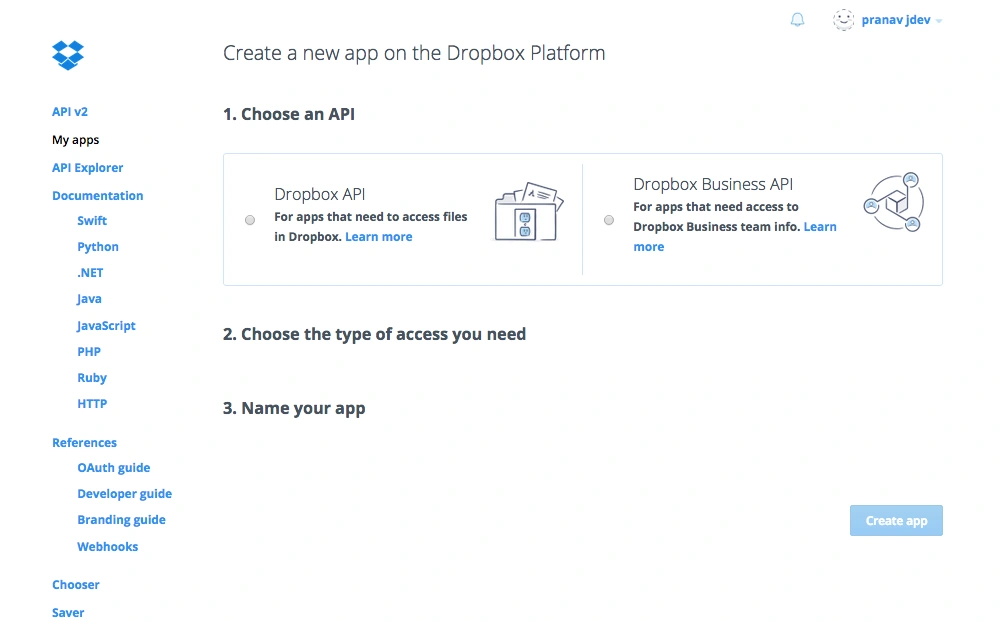
- Provide the API, type of access and Application name,
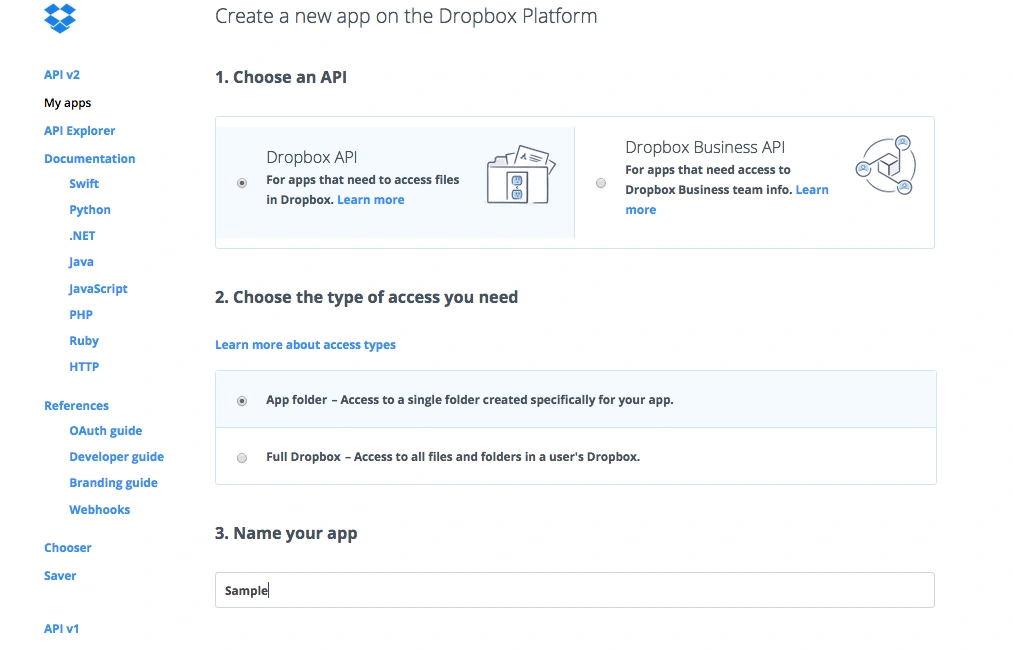
- After clicking on the create app button it will show you a page like the following.
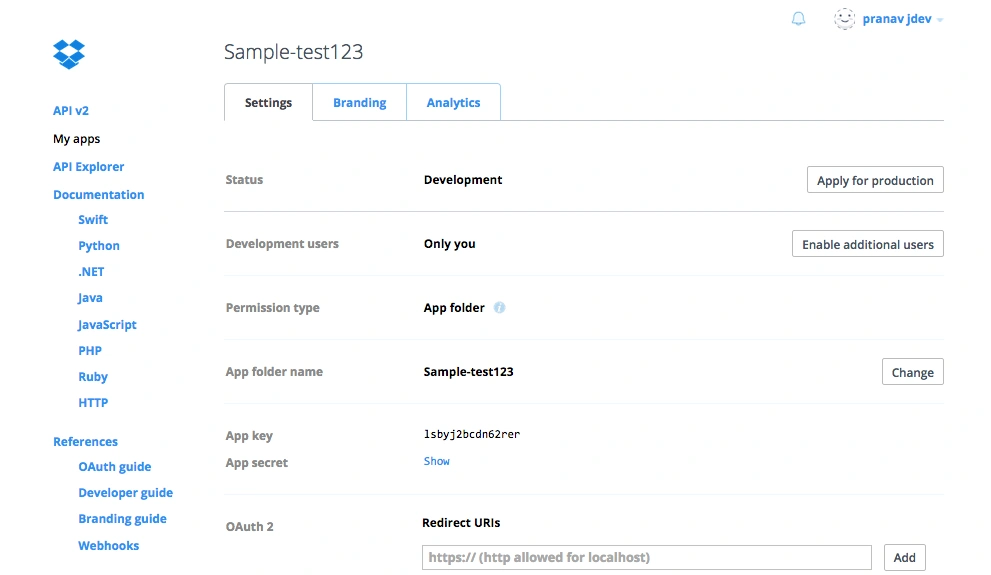
- You can change any of the application settings on this page. Please note down the App key; this will be needed in the Android code.
- The Android Chooser SDK zip file contains a DropboxChooserSDK this is a library project.
Adding the chooser SDK into Android Studio
You'll need to add the DropboxChooserSDK to Android Studio and then add it as a dependency in your project.
Creating the new module
- Open Android Studio, go to File, New Module, then click Import Existing Project (Eclipse ADT or Gradle Project) and press Next
- Press the "..." button next to the Source Directory field and select the DropboxChooserSDK folder you just unzipped. Press Next.
- Go through the rest of the module creation flow. Click Next again, and then click Finish.
- You should now have a DropboxChooserSDK module in your project.
Adding the dependency
- Within Android Studio, switch to the "Project view"
- Right-click on the app module and click Open Module Settings.
- Select the Dependencies tab.
- In the lower-left corner, click the "+" (Add) button, select Module dependency and select the dropboxChooserSDKmodule.
- Click OK, and then click OK again. You may have to wait for Gradle to sync.
You'll need to add the DropboxChooserSDK to Eclipse and then reference it in your project.
Creating the new project
- Open Eclipse, go to File, New, Other, Android, then click Android Project from existing code and press Next
- Press Browse next to the Root Directory field and select the DropboxChooserSDK folder you just unzipped. Press Finish.
- You should now have a DropboxChooserSDK project.
Referencing the project
- In Eclipse, right-click on your existing project and click Properties.
- In the menu on the left-hand side, select Android.
- In the lower Library section, click Add and select the DropboxChooserSDK project.
Example Application
The Android Chooser SDK zip also contains a ChooserExample Android app project that implements an expanded version of the code below. Open it and follow along with the rest of this guide.
- static final int DBX_CHOOSER_REQUEST = 0;
- private Button mChooserButton;
- private DbxChooser mChooser;
- @Override
- protected void onCreate(Bundle savedInstanceState)
- {
- super.onCreate(savedInstanceState);
- setContentView(R.layout.activity_main);
- mChooser = new DbxChooser(APP_KEY);
- mChooserButton = (Button) findViewById(R.id.chooser_button);
- mChooserButton.setOnClickListener(new OnClickListener()
- {
- @Override
- public void onClick(View v)
- {
- mChooser.forResultType(DbxChooser.ResultType.PREVIEW_LINK).launch(MainActivity.this, DBX_CHOOSER_REQUEST);
- }
- });
- }
The Chooser coordinates with the Dropbox app to allow the user to select files without having to worry about the usual authorization flow. In order to handle the response when the user returns to your app, you'll need to add a hook to onActivityResult():,
- @Override
- public void onActivityResult(int requestCode, int resultCode, Intent data)
- {
- if (requestCode == DBX_CHOOSER_REQUEST)
- {
- if (resultCode == Activity.RESULT_OK)
- {
- DbxChooser.Result result = new DbxChooser.Result(data);
- Log.d("main", "Link to selected file: " + result.getLink()); // Handle the result
- } else
- {
- // Failed or was cancelled by the user.
- }
- } else
- {
- super.onActivityResult(requestCode, resultCode, data);
- }
- }
Read more articles on Android
Ankit JainPosted Apr 16, 2018, 2:24 AM
But this code want me to install DropBox App. But my requirement is to pick document from DropBox without installing App.
Rahul Kumar SaxenaPosted Apr 4, 2016, 7:45 AM
Good Show
Saillesh PawarPosted Mar 29, 2016, 2:19 PM
Nice share
Kashif SohailPosted Mar 29, 2016, 1:59 PM
Very Nice article, can we use it in C# applications?
kalu singh raoPosted Mar 29, 2016, 12:10 PM
Nice...
Mohammed IbrahimPosted Mar 29, 2016, 11:07 AM
nice