

Introduction
In today’s data-driven world, businesses strive to harness artificial intelligence (AI) and machine learning (ML) to extract actionable insights. Microsoft’s Azure Machine Learning (Azure ML) and Power BI provide a seamless way to implement predictive analytics and data visualization. By integrating these powerful tools, organizations can make data-driven decisions with AI-enhanced business intelligence.
This article explores how to integrate Azure ML with Power BI, the benefits, use cases, and a step-by-step guide to implementing ML models within Power BI.
Why Integrate Azure ML with Power BI?
Azure ML is a cloud-based service for building, training, and deploying ML models, while Power BI enables interactive data visualization and reporting. Combining these tools enables businesses to:
- Leverage Predictive Analytics: Move beyond descriptive analytics by integrating ML models into reports.
- Enhance Decision-Making: Use AI to uncover hidden trends, forecast future trends, and optimize operations.
- Automate Data Insights: Deploy machine learning workflows that continuously refine predictions based on updated data.
- Scalability & Accessibility: Azure ML’s cloud-based nature ensures scalability, while Power BI makes insights accessible to stakeholders.
Use Cases of Azure ML and Power BI Integration
- Customer Churn Prediction: Businesses can use ML models to predict customer churn and visualize insights in Power BI to take proactive measures.
- Sales Forecasting: ML models can predict future sales based on historical data and trends, improving inventory and marketing strategies.
- Fraud Detection: Financial institutions can integrate anomaly detection models in Power BI dashboards to flag suspicious transactions.
- Healthcare Analytics: Hospitals can leverage ML to predict patient admission rates and visualize patterns for better resource allocation.
How to Integrate Azure ML with Power BI
Step 1. Develop a Machine Learning Model in Azure ML.
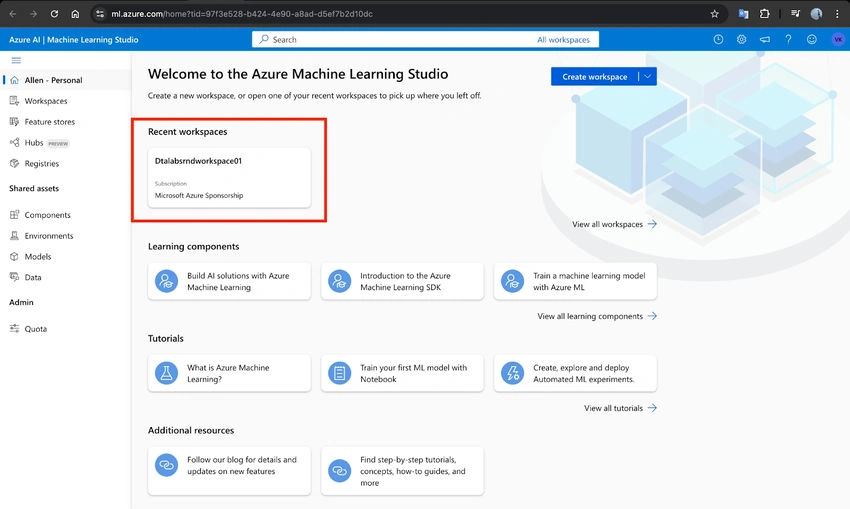
- Access Azure ML Studio: Sign in to Azure ML Studio and create a new workspace.
- Prepare Data: Upload and preprocess your dataset.
- Train the Model: Use Azure AutoML or create a custom ML pipeline with Python or R.
- Deploy the Model as a Web Service: Once the model is trained and evaluated, deploy it as a REST API endpoint.
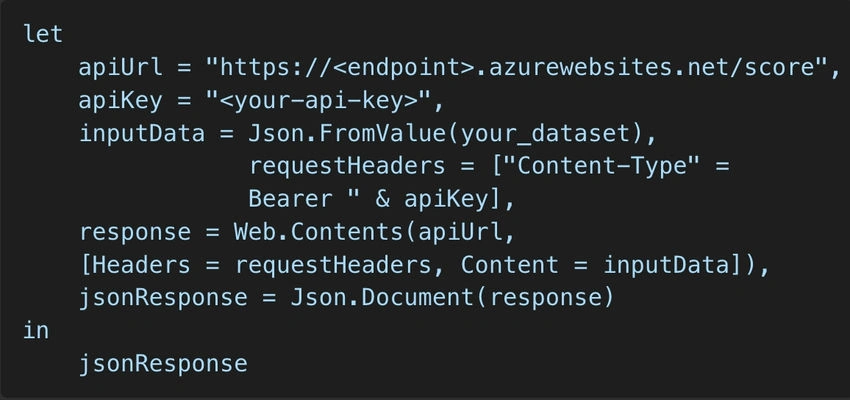
Step 2. Configure Azure ML Web Service.

Join the conversation! Your thoughts help the community grow.