Hello Geeks!
Introduction
As we all know, social media plays a vital role in taking any firm/organization from foot to neck. This simple principle is universal and applicable to each and every type of organization. But when it comes to eCommerce then.
I don't think even I need to explain this in terms as this simple graph says it all. So before going further have a look at this graph.
Getting Started
Since you understand what a social network can do for you, in return it takes nothing from you, yeah I said "nothing".
Just follow these simple steps to get started.
- First of all visit this official link of the Facebook AppGuide:
https://developers.facebook.com/docs/app-events/best-practices
- Look for the My Apps Option in the header, as shown below:
- Click on the My Apps Options and then on "Add a New App" My Apps -> Add a New App.
- After clicking on "Add a New App", you will get something like the following:
Actually, this is an option window that contains 4 options. Just choose anyone and proceed further quickly.
(In my case I am going with the "Website" option.)
- Select any and move quickly
- As you click on any of those four available options you will ext get this window, requiring some details about your website, such as:
SiteURL
Mobile URL
And then, click on "Next"
- As you click on "Next" you will get a similar window, shown below. This screen will share the First Step, "Setup SDK" with you and share others.
So, in the beginning, you are here:
Then you will get a code snippet, just paste that snippet into your website wherever you want to integrate that Facebook content.
Here's a snippet.
- <script>
- window.fbAsyncInit = function() {
- FB.init({
- appId : '564784100291609',
- xfbml : true,
- version : 'v2.3'
- });
- };
-
- (function(d, s, id){
- var js, fjs = d.getElementsByTagName(s)[0];
- if (d.getElementById(id)) {return;}
- js = d.createElement(s); js.id = id;
- js.src = "//connect.facebook.net/en_US/sdk.js";
- fjs.parentNode.insertBefore(js, fjs);
- }(document, 'script', 'facebook-jssdk'));
- </script>
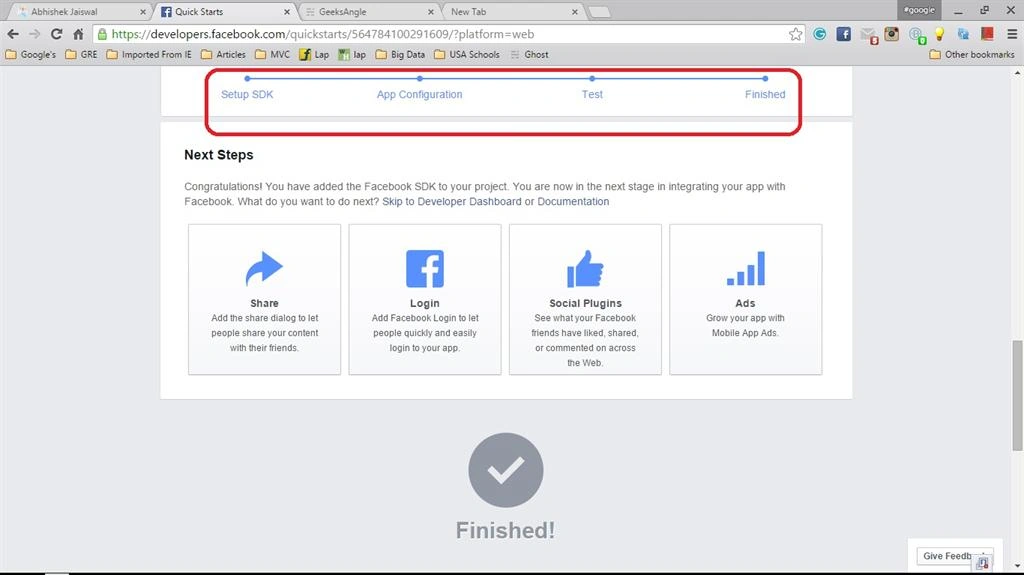
- The very second step is App Configuration. (You don't need to do anything in that step, just move forward for the next.)
- Then here comes the next step, "Test". In this step you too check whether all that is working or not. They call it "Test Your Facebook Integration".
For that just follow the words written below
That's all guys, it's over.
I hope you guys will love that.
Stay tuned for Twitter and some other social networking integrations. Until then keep sharing and happy learning.




Shujaat AliPosted Sep 19, 2020, 7:56 AM
Hello Abhishek, I am working on my project and tryig to post (images and text) on my Facebook, but I am unable to do so. Can you help me in? [email protected]
Abhishek JaiswalPosted Apr 12, 2015, 5:09 AM
Thanks Sibeesh & Sanjay! :)
Sanjay SinghPosted Apr 12, 2015, 12:21 AM
nice one sir !!!
Sibeesh VenuPosted Apr 10, 2015, 1:36 AM
Good one.
Abhishek JaiswalPosted Apr 10, 2015, 1:34 AM
Thank you! :)
Khargesh RajputPosted Apr 10, 2015, 1:32 AM
nice article and congrates to reach 1m readers
Abhishek JaiswalPosted Apr 10, 2015, 12:38 AM
Thanks you! :)
Abhishek JaiswalPosted Apr 10, 2015, 12:38 AM
Thank you! :)
Santhakumar MunuswamyPosted Apr 9, 2015, 11:31 PM
Good Work
Santhakumar MunuswamyPosted Apr 9, 2015, 11:31 PM
Congrats you reached 1M readers...!
Mahesh ChandPosted Apr 9, 2015, 11:30 PM
Nice. 1M Readers!