

Background
Due to changing business needs and the quick growth of technology, in today's web applications users want many options and capabilities in their applications. So let us learn in this article how to integrate the Google auto-complete search for places in maps.
Google provides many facilities to their users and other developers working on various technologies to integrate their product into applications.
Google Place Autocomplete Map Search
This feature is provided by Google and is in their Google Maps JavaScript API. With it people can enter any place around the world and then the search box will return a list of places in the world depending on that input.
To use the Google Maps Place Autocomplete search of the JavaScript API, use the following methods:
- LatLngBounds
- fitBounds
- getBounds
- setBounds
- getPlaces
Using the preceding JavaScript methods you can integrate Google Maps Search Places into your application. The following are some of the features of a Google Maps Place Autocomplete search.
Key points for integrating Google Maps:
- Google provides the free JavaScript API to integrate Google Maps into our applications.
- You can customize Google Maps depending on your requirements.
- its provides the suggestion while typing.
Let us see the preceding points with an example by creating a web application using the following:
- "Start" - "All Programs" - "Microsoft Visual Studio 2010".
- "File" - "New WebSite" - "C#" - "ASP.NET Empty Web Application" (to avoid adding a master page).
- Provide the web site a name such as "GoogleLocationSearch" or another as you wish and specify the location.
- Then right-click on Solution Explorer - "Add New Item" then Default.aspx page.
Now the Default.aspx source code will look as in the following:
- <%@ Page Language="C#" AutoEventWireup="true" CodeFile="Default.aspx.cs" Inherits="_Default" %>
- <%@ Register Assembly="System.Web.DataVisualization, Version=4.0.0.0, Culture=neutral, PublicKeyToken=31bf3856ad364e35"
- Namespace="System.Web.UI.DataVisualization.Charting" TagPrefix="asp" %>
- <!DOCTYPE html PUBLIC "-//W3C//DTD XHTML 1.0 Transitional//EN" "http://www.w3.org/TR/xhtml1/DTD/xhtml1-transitional.dtd">
- <html>
- <head>
- <meta name="viewport" content="initial-scale=1.0, user-scalable=no">
- <meta charset="utf-8">
- <title>Article by Vithal Wadje</title>
- </head>
- <body bgcolor="Blue">
- <h5 style="color:White;">
- Article for C# corner</h5>
- </body>
- </html>
Now add one HTML input TextBox control and div tag on the default.aspx page and specify the ID as follows:
- <input id="txtsearch" class="apply" type="text" placeholder="Enter Search Place e.g C# Corner Noida">
- <div id="divloadMap"></div>
Now let us add a stylesheet CCS file by right-clicking on the solution and create the following CSS classes:
- html, body,#divloadMap {
- height: 100%;
- margin: 0px;
- padding: 0px;
- margin-top:15px
- }
- .apply {
- margin-top: 16px;
- border: 1px solid transparent;
- border-radius: 2px 0 0 2px;
- box-sizing: border-box;
- -moz-box-sizing: border-box;
- height: 32px;
- outline: none;
- box-shadow: 0 2px 6px rgba(0, 0, 0, 0.3);
- }
- #txtsearch {
- background-color: #fff;
- padding: 0 11px 0 13px;
- width: 400px;
- font-family: Roboto;
- font-size: 15px;
- font-weight: 300;
- text-overflow: ellipsis;
- }
- #txtsearch:focus {
- border-color: #4d90fe;
- margin-left: -1px;
- padding-left: 14px;
- width: 401px;
- }
- .pac-container {
- font-family: Roboto;
- }
- #type-selector {
- color: #fff;
- background-color: #4d90fe;
- padding: 5px 11px 0px 11px;
- }
- #type-selector label {
- font-family: Roboto;
- font-size: 13px;
- font-weight: 300;
- }
Now add the JavaScript file to Solution Explorer to call the Google Maps JavaScript API as in the following:
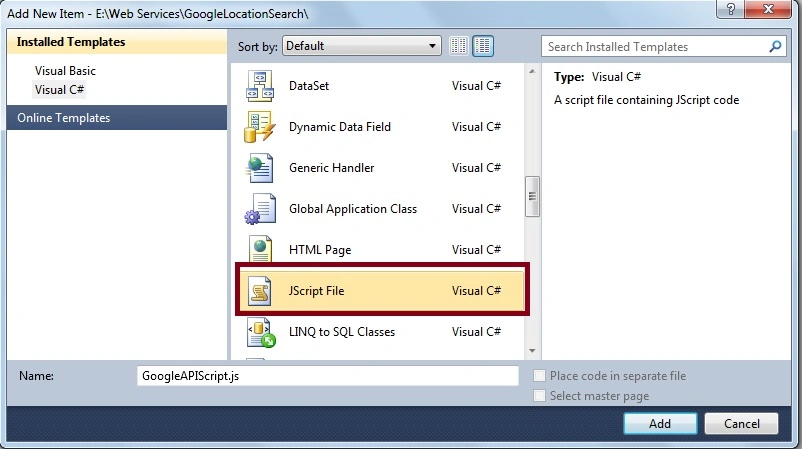
Now create the following functions to call the Google Maps API:
- //creating function to load initial MAP when page loading
- function LoadGoogleMAP() {
- var markers = [];
- var map = new google.maps.Map(document.getElementById('divloadMap'), {
- mapTypeId: google.maps.MapTypeId.ROADMAP
- });
- var defaultBounds = new google.maps.LatLngBounds(
- new google.maps.LatLng(-33.8902, 151.1759),
- new google.maps.LatLng(-33.8474, 151.2631));
- map.fitBounds(defaultBounds);
- // Create the search box and link it to the UI element.
- var input =(document.getElementById('txtsearch'));
- map.controls[google.maps.ControlPosition.TOP_LEFT].push(input);
- var searchBox = new google.maps.places.SearchBox((input));
- // Listen for the event fired when the user selects an item from the
- // pick list. Retrieve the matching places for that item.
- google.maps.event.addListener(searchBox, 'places_changed', function () {
- var places = searchBox.getPlaces();
- if (places.length == 0) {
- return;
- }
- for (var i = 0, marker; marker = markers[i]; i++) {
- marker.setMap(null);
- }
- // For each place, get the icon, place name, and location.
- markers = [];
- var bounds = new google.maps.LatLngBounds();
- for (var i = 0, place; place = places[i]; i++) {
- var image = {
- url: place.icon,
- size: new google.maps.Size(71, 71),
- origin: new google.maps.Point(0, 0),
- anchor: new google.maps.Point(17, 34),
- scaledSize: new google.maps.Size(25, 25)
- };
- // Create a marker for each place.
- var marker = new google.maps.Marker({
- map: map,
- icon: image,
- title: place.name,
- position: place.geometry.location
- });
- markers.push(marker);
- bounds.extend(place.geometry.location);
- }
- map.fitBounds(bounds);
- });
- // current map's viewport.
- google.maps.event.addListener(map, 'bounds_changed', function () {
- var bounds = map.getBounds();
- searchBox.setBounds(bounds);
- });
- }
- google.maps.event.addDomListener(window, 'load', LoadGoogleMAP);
- <%@ Page Language="C#" AutoEventWireup="true" CodeFile="Default.aspx.cs" Inherits="_Default" %>
- <%@ Register Assembly="System.Web.DataVisualization, Version=4.0.0.0, Culture=neutral, PublicKeyToken=31bf3856ad364e35"
- Namespace="System.Web.UI.DataVisualization.Charting" TagPrefix="asp" %>
- <!DOCTYPE html PUBLIC "-//W3C//DTD XHTML 1.0 Transitional//EN" "http://www.w3.org/TR/xhtml1/DTD/xhtml1-transitional.dtd">
- <html>
- <head>
- <meta name="viewport" content="initial-scale=1.0, user-scalable=no">
- <meta charset="utf-8">
- <title>Article by Vithal Wadje</title>
- <script type="text/javascript" src="https://maps.googleapis.com/maps/api/js?v=3.exp&libraries=places"></script>
- <script src="GoogleAPIScript.js" type="text/javascript"></script>
- <link href="MapStyleSheet.css" rel="stylesheet" type="text/css" />
- </head>
- <body bgcolor="Blue">
- <h5 style="color:White;">
- Article for C# corner</h5>
- <input id="txtsearch" class="apply" type="text" placeholder="Enter Search Place e.g C# Corner Noida">
- <div id="divloadMap"></div>
- </body>
- </html>
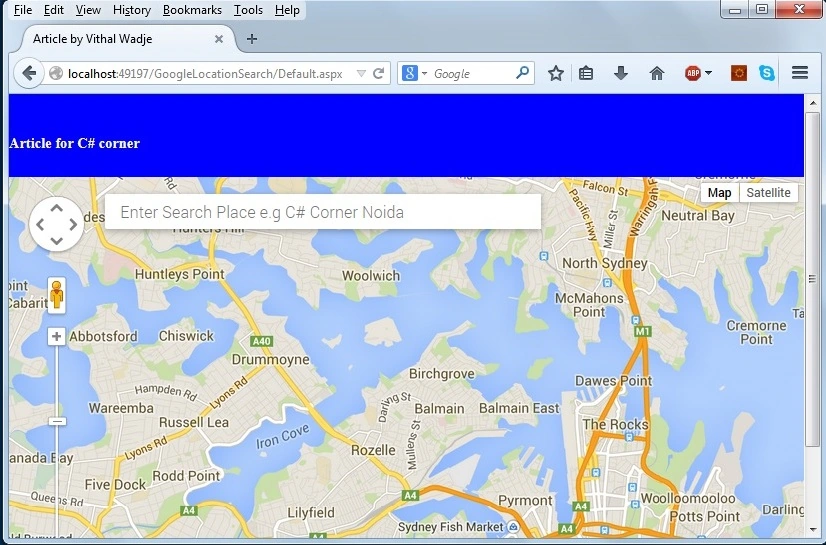
Now enter a place into the preceding search text box. Let us assume I am searching for MCN solutions, then it gives the following auto-complete search places suggestions:
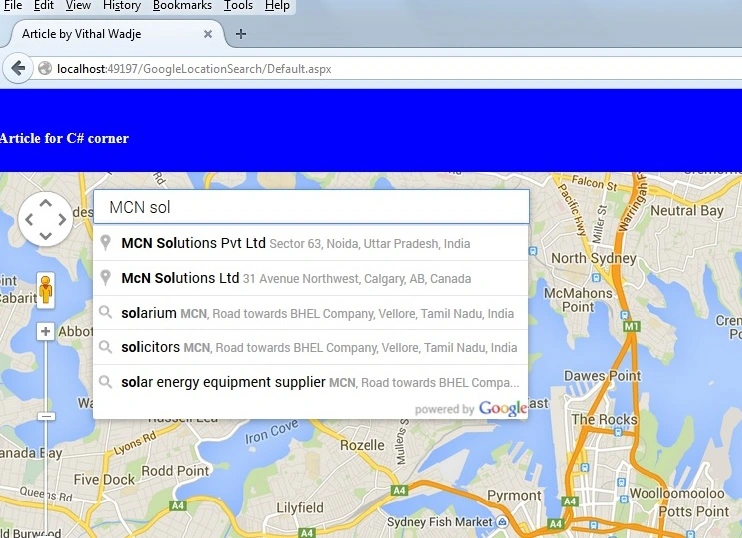
In the preceding example, you see that it gives the auto-complete text box while I am searching the places in Google Maps. Now let us enter a city name now; it shows the following suggestions:
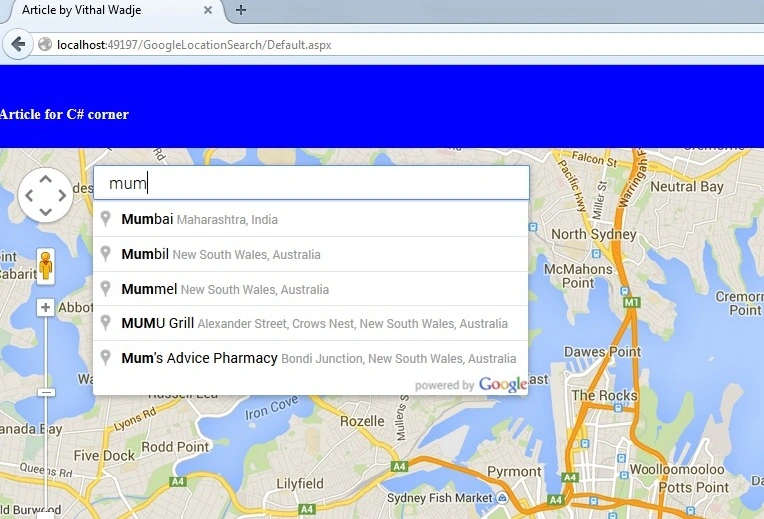
Now let us consider I am searching for Noida and after clicking on the suggested text, its shows the location as follows:
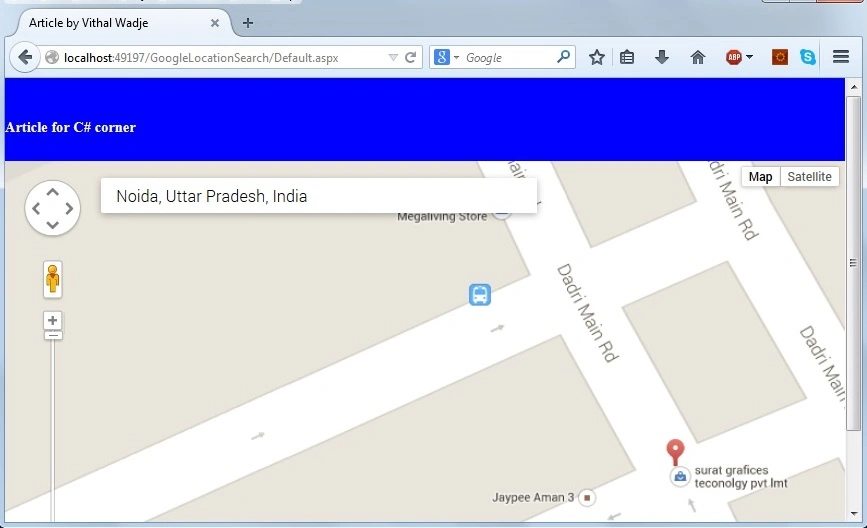
From all the preceding examples, we have learned how to integrate Google Maps Auto Location search into an ASP.Net web application.
Notes
- Download the source code of the application for a detailed understanding.
- You need an active internet connection to view Google Maps.
Summary
I hope this article is useful for all readers. If you have any suggestions then please contact me including beginners also.
Saravanakumar SekaranPosted Aug 11, 2021, 9:28 AM
Awesome article. let me know google map is free ?
sachin bhaleraoPosted Oct 3, 2019, 12:17 AM
Dear Vithal , after executing it is showing error "This page can't load Google Maps correctly." Please suggest me some solution
Prasanna LaadPosted Apr 5, 2019, 4:34 AM
Sir, the search bar is not working, means the suggestions are not displayed. can you guide me please?
Rajeev KumarPosted Dec 13, 2018, 8:13 AM
Hi, Can you please guide me .net code for trip planner. Like gets possible routes on the base of Source Location and Destination. Thanks
Manjunath BiradarPosted Oct 12, 2016, 7:07 AM
Thanks,How to add marks from database in this map
Vithal WadjePosted Dec 19, 2015, 8:50 AM
Thanks Anu Vivin
Anu VPosted Dec 19, 2015, 3:41 AM
good one..
Raju SanPosted Sep 7, 2015, 2:11 AM
Hello sir downlaod link giving some error plz help
Vithal WadjePosted Jun 9, 2015, 12:37 PM
Rahul Sharma sir refer this LatLngBounds fitBounds getBounds setBounds getPlaces in article
Vithal WadjePosted Jun 9, 2015, 12:36 PM
Thanks Gilbert Santos
Rahul SharmaPosted Jun 9, 2015, 4:15 AM
How to dynamically add LatLng to google map api, i means to say i want to save latlong values in ms sql server and and want to show map depending on the page(insert values dynamivally)
Gilbert SantosPosted Jun 8, 2015, 10:56 PM
Thanks for the sample.. I've been looking a bit long now for this kind of GOOGLE MAP usage...Great job... Looking forward to see more of your work sooner...Tnx man...
Vithal WadjePosted Feb 24, 2015, 9:23 AM
Thanks Rahul Saxena sir
Vithal WadjePosted Feb 24, 2015, 9:23 AM
thanks a lot Dinesh Beniwal sir
Rahul Kumar SaxenaPosted Feb 24, 2015, 12:28 AM
Congrts Vithal Wadje...
Dinesh BeniwalPosted Feb 23, 2015, 10:34 PM
Congrats Vithal Wadje Article of the day on ASP.NET
Vithal WadjePosted Jan 6, 2015, 5:51 AM
google searcher map textbox means you wants only location details instead of showing on MAP ? rigth
Muhammad SaroshPosted Jan 6, 2015, 2:11 AM
this is very intresting but i dont wanna required map but only google searcher map textbox please help me shall be very thankful to you please consult on me [email protected]
Vithal WadjePosted Dec 14, 2014, 10:07 PM
thanks to moderators and judges for making this article feature
Vithal WadjePosted Dec 14, 2014, 1:24 PM
Thanks Michal Habalcik sir for your great words
Vithal WadjePosted Dec 14, 2014, 1:23 PM
thanks once again Jitendra Kumar sir
Vithal WadjePosted Dec 14, 2014, 1:21 PM
thanks Manish Kumar Choudhary sir
Michal HabalcikPosted Dec 14, 2014, 9:27 AM
excellent tutorial, thanks
Jitendra KumarPosted Dec 14, 2014, 8:22 AM
Good...
Manish Kumar ChoudharyPosted Dec 14, 2014, 6:53 AM
nice one....