

Google News
In this article I would like to explain how you can integrate this service in your asp.net web application. For this we require reference to a dll called(GoogleSearchApI.dll).
You can download this dll from the following link given below.
For using this functionality in your website first create a new project and add a new web form into this.
Download the dll and extract this from the folder.
Right Click and Add new Referance.Browse and add the reference.
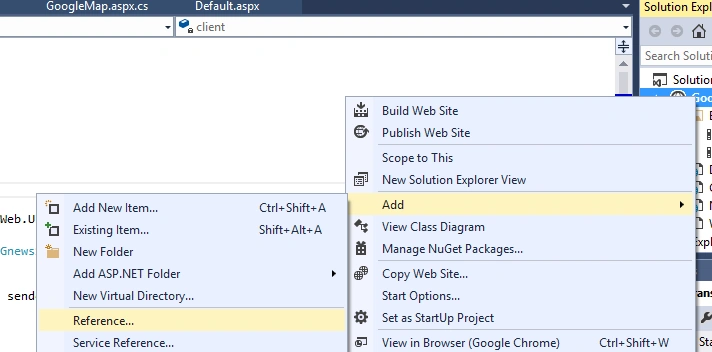
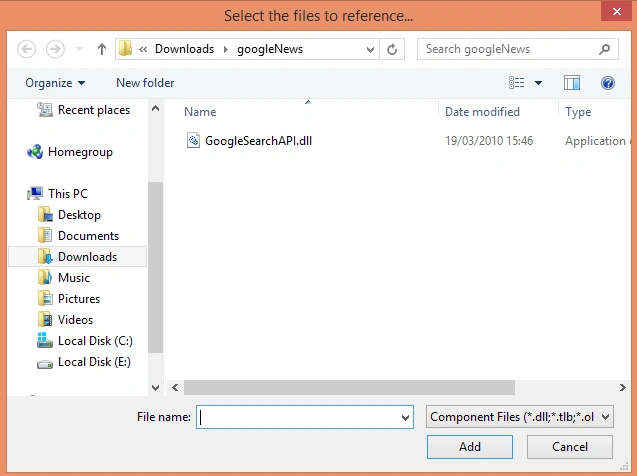
After adding it will appear within your project like this.
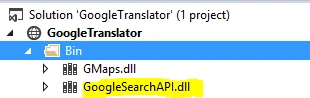
Now every thing is set; now you need to call the api and show the new one from your page.
Now design your page like this.

Here I have attached the html code for this.
- <%@ Page Language="C#" AutoEventWireup="true" CodeFile="News.aspx.cs" Inherits="News" %>
- <!DOCTYPE html>
- <html xmlns="http://www.w3.org/1999/xhtml">
- <head runat="server">
- <title></title>
- </head>
- <body>
- <form id="form1" runat="server">
- <asp:TextBox ID="txt_search" runat="server" Width="500px" Height="30px" ></asp:TextBox>
- <asp:Button runat="server" Text="SEARCH" ID="btn_btn" Height="40px" OnClick="btn_btn_Click" CommandName="Search" />
- <br />
- <asp:DataList ID="DataList1" runat="server" BackColor="#CCCCCC" BorderColor="#999999" BorderStyle="Solid" BorderWidth="3px" CellPadding="4" GridLines="Both" CellSpacing="2" ForeColor="Black" OnItemDataBound="DataList1_ItemDataBound">
- <FooterStyle BackColor="#CCCCCC" />
- <HeaderStyle BackColor="Black" Font-Bold="True" ForeColor="White" />
- <ItemStyle BackColor="White" />
- <SelectedItemStyle BackColor="#000099" Font-Bold="True" ForeColor="White" />
- <HeaderTemplate>
- <div>
- Today News
- </div>
- </HeaderTemplate>
- <ItemTemplate>
- <div>
- <asp:Image ID="imgEmp" runat="server" Width="100px" Height="120px" ImageUrl='<%# Bind("Image") %>' style="padding-left:40px"/><br />
- </div>
- <div>
- <asp:Label runat="server" ID="lbl_content" Text='<%#Eval("Content") %>' Font-Bold="true">
Now the design part is over. Now we have to start coading for getting the news. Before writting any code regarding this you should use the following Namespace.
- using Google.API.Search;
Here is the code that will give all news deatils.
- GnewsSearchClient client = new GnewsSearchClient("myclient");
- IList<INewsResult> results=client.Search("Any Topics News", 10);
- protected void Page_Load(object sender, EventArgs e)
- {
- if(!IsPostBack)
- {
- GnewsSearchClient client = new GnewsSearchClient("myclient");
- IList<INewsResult> results;
- results = client.Search("India News", 10);
- DataSet ds = new DataSet();
- DataTable dt = new DataTable();
- dt.Columns.Add(new DataColumn("Content", typeof(string)));
- dt.Columns.Add(new DataColumn("Url", typeof(string)));
- dt.Columns.Add(new DataColumn("Image", typeof(string)));
- dt.Columns.Add(new DataColumn("Link", typeof(string)));
- dt.Columns.Add(new DataColumn("Publisher", typeof(string)));
- dt.Columns.Add(new DataColumn("Date", typeof(string)));
- foreach (var news in results)
- {
- DataRow dr = dt.NewRow();
- dr["Content"] = news.Content;
- dr["Image"] = news.Image;
- dr["Link"] = news.Url;
- dt.Rows.Add(dr);
- DataList1.DataSource = dt;
- DataList1.DataBind();
- }
- }
- }
So here when the page loads for first time it will show Indi's news as follows.

Now here is the complete code to search any type of news.
- using Google.API.Search;
- using System;
- using System.Collections.Generic;
- using System.Linq;
- using System.Web;
- using System.Web.UI;
- using System.Web.UI.WebControls;
- using System.Data;
- public partial class News : System.Web.UI.Page
- {
- protected void Page_Load(object sender, EventArgs e)
- {
- GnewsSearchClient client = new GnewsSearchClient("myclient");
- IList<INewsResult> results;
- if(!IsPostBack)
- {
- results = client.Search("India News", 10);
- DataSet ds = new DataSet();
- DataTable dt = new DataTable();
- dt.Columns.Add(new DataColumn("Content", typeof(string)));
- dt.Columns.Add(new DataColumn("Url", typeof(string)));
- dt.Columns.Add(new DataColumn("Image", typeof(string)));
- dt.Columns.Add(new DataColumn("Link", typeof(string)));
- dt.Columns.Add(new DataColumn("Publisher", typeof(string)));
- dt.Columns.Add(new DataColumn("Date", typeof(string)));
- foreach (var news in results)
- {
- DataRow dr = dt.NewRow();
- dr["Content"] = news.Content;
- dr["Image"] = news.Image;
- dr["Link"] = news.Url;
- dt.Rows.Add(dr);
- DataList1.DataSource = dt;
- DataList1.DataBind();
- }
- }
- }
- public void searchNews(string prefix)
- {
- results = client.Search(prefix, 10);
- DataSet ds = new DataSet();
- DataTable dt = new DataTable();
- dt.Columns.Add(new DataColumn("Content", typeof(string)));
- dt.Columns.Add(new DataColumn("Url", typeof(string)));
- dt.Columns.Add(new DataColumn("Image", typeof(string)));
- dt.Columns.Add(new DataColumn("Link", typeof(string)));
- foreach (var news in results)
- {
- DataRow dr = dt.NewRow();
- dr["Content"] = news.Content;
- dr["Image"] = news.Image;
- dr["Link"] = news.Url;
- dt.Rows.Add(dr);
- DataList1.DataSource = dt;
- DataList1.DataBind();
- }
- }
- protected void btn_btn_Click(object sender, EventArgs e)
- {
- searchNews(txt_search.Text);
- }
- }
Now we can run this application and search any kind of news inside our website as follows.

Thus in this way we can inplement google news search functionality in our website.
Humayun Kabir MamunPosted Mar 5, 2016, 11:03 PM
Nice...
Sonu ChaudharyPosted Mar 5, 2016, 12:15 PM
Nice share
Amit Kumar SinghPosted Mar 5, 2016, 7:24 AM
Nice one
Sibeesh VenuPosted Mar 4, 2016, 6:42 AM
Nice Share
Gowtham RajamanickamPosted Mar 4, 2016, 1:37 AM
Good one..
Ammar ShaukatPosted Mar 3, 2016, 3:54 PM
Good
Asfend YarPosted Mar 3, 2016, 1:18 PM
if some one want to use it in windows phone then what's the procedure of consuming just google services??
Asfend YarPosted Mar 3, 2016, 1:12 PM
o man you rocking
Mohammed IbrahimPosted Mar 3, 2016, 10:37 AM
nice