

Web Services
Web Services means structuring operations and data according to SOAP specification in an XML document. SOAP (Simple Object Access Protocol) is a way for a program running in one kind of operating system or language (e.g. Windows or .Net) to communicate with a program in the same or another kind of an operating system or language (e.g. Linux or Java) by using the HTTP and XML as the mechanisms for information exchange. Since Web protocols are installed and available for use by all major operating system platforms, HTTP and XML provide an already at-hand solution to the problem of how programs running under different operating systems in a network can communicate with each other. SOAP specifies exactly how to encode an HTTP header and an XML file so that a program in one computer can call a program in another computer and pass it information. It also specifies how the called program can return a response. Once a Web Service is implemented, a client sends a message to the component as an XML document and the component sends an XML document back to the client as the response.
Interoperability
The goal of this article is to show to integrate Microsoft's .NET Platform Web service with other platform like Java and ASP. The samples demonstrate basic techniques and principles that are used to cross-platform interoperability via Web services. You start off by writing code for your Web service. After you compile, the Web services framework uses your code to dynamically generate a WSDL file. When clients request your Web service definition, they retrieve the generated WSDL and then create the client proxy based on that definition.
The example here contains a web services in .Net C#, which returns the data from Customer table of Northwind database SQL Server in XML format. Data is retrieved through Dataset and then converted to XML. To display the data in the client side browser it is accessed by .Net, Java and classic ASP.
Through .Net there are two ways to display data in browser from web service. First it can be convert back to Dataset using XMLDataDocument and Schema. And Second one by using XMLDocument and style sheet.
In Java client Apache client proxy is used to get the data from .Net web services and then XML Document Builder and XML Document is used to display the data in browser with the help of XSL Transformer.
Classic ASP use Microsoft SOAP Toolkit 3.0 to get data from web services and MSXML 4.0 to load and display the data in browser.
.Net C# Web service
Visual Studio automatically creates the necessary files and includes the needed references to support an XML Web service, to create a web services in C# in Visual Studio.NET.
1. On the File menu. File->New->Project.
2. In the New Project dialog box, select either the visual C# Projects folder. Select the ASP.NET
Web Service icon.
3. Enter the address of the Web server on which you will develop the XML Web service and specify TestWebService as the directory name, such as "http://localhost/TestWebService". Click OK to create the project.
4. When you create an XML Web service, Service1.asmx will be created automatically. Change the name of Service1.asmx to ThakurService.asmx.
5. Specify the properties to WebService attribute. The namespace property you specify is used within the WSDL document of the Web service to uniquely identify the callable entry points of the service. Name is service name to display in help page. Description property of this attribute is included in the Service help page to describe the services usage. As shown in example here:
[WebService (Namespace = "http://ThakurService", Name = "ThakurService", Description = "Test Service By Anand Thakur")]
//CODE ThakurService.asmx
public class ThakurService : System.Web.Services.WebService
{
public ThakurService()
{
InitializeComponent();
}
[WebMethod(MessageName = "GetCustomerData",Description = "Return DataSet XML of Contact Name and Company Name from Northwind.Customers table" )]
public String GetCustomerData()
{
///data source string
string source = "Data Source=ATHAKUR;Initial Catalog=Northwind;user=sa;password=cincom" ;
// And this is the SQL statement that will be issued
string select = "SELECT Top 20 ContactName,CompanyName FROM Customers";
SqlConnection conn=new SqlConnection(source);
// Open the database connection
conn.Open () ;
/// Create the SQL command...
SqlCommand cmd = new SqlCommand ( select , conn ) ;
conn.Close ( ) ;
SqlDataAdapter myDataAdapter = new SqlDataAdapter(cmd);
///declare myDataSet as DataSet
DataSet myDataSet= new DataSet("AnandThakur");
///fill the dataset with returned records
myDataAdapter.Fill(myDataSet, "Products");
///finally return dataset
return myDataSet.GetXml();
}
}
6. Add one public method GetCustomerData with return type string. Add WebMethod attribute to this method. The WebMethod attribute instructs .NET to add the code necessary to marshal calls using XML and SOAP. The MessageName property of the WebMethod attribute enables the XML Web service to uniquely identify overloaded methods using an alias. Unless otherwise specified, the default value is the method name. The Description property of the WebMethod attribute supplies a description for an XML Web service method that will appear on the Service help page
7. Add the necessary code to retrieve the data from Northwind.Customers table. From dataset return XML using GetXML method as shown in code.
8. Run the web service. You will see the following output shown in figure. You can see the service as well as web method name and description in output and link to service WSDL. You can further explore the web method to see method SOAP and output.
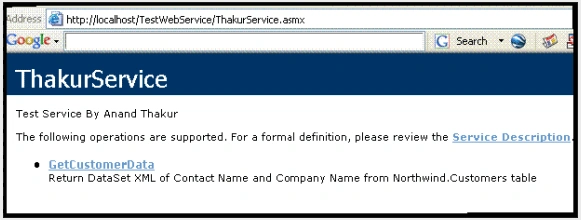
9. Now our web service is complete and ready to serve clients. We will consume the service from Java, .net and classic ASP client.
Note: if you want to browse web service directly through browser without VS.net. Then add following entries in web.config within <system.web>.
<webServices>
<protocols>
<add name="HttpSoap"/>
<add name="HttpPost"/>
<add name="HttpGet"/>
</protocols>
</webServices>
.Net Client
To test the above web services with .net client.
1. Open VS.net. On the File menu, click New->Project.
2. The New Project dialog box appears.
3. In the Project Type pane, click Visual C# Projects, and select ASP.NET Web Application.
4. Name your application by changing the default name in the Location box (such as http://localhost/times as in example) Click OK.
5. WebForm1.aspx and WebForm1.aspx.cs will be created automatically.WebForm1.aspx - Contains the visual representation of the Web Form and WebForm1.aspx.cs - The code-behind file that contains the code for event handling.
6. In the solution explorer, right click on project and select Add Web Reference from context menu. Add Web Reference window will be opened to enter the web service URL. Enter the URL to web service (http://localhost/TestWebService/ThakurService.asmx). Enter the web reference as localhost and click on Add Reference button. Now web references added to the project tree in solution explorer. You can see WSDL, DISCO and .cs proxy class for web services.
7. Now we ready to consume the service. Here we are consuming our service by two ways. One through dataset and another one using XMLDocument.
8. To consume the service through dataset. Add dataset schema to client web application. Right click project in solution explorer and select Add->Add New Item->XML Schema. Enter the file name as Products.xsd. And paste the code below in the file.
//CODE Products.xsd
<xs:element name="AnandThakur" msdata:IsDataSet="true">
<xs:complexType>
<xs:choice maxOccurs="unbounded">
<xs:element name="Products">
<xs:complexType>
<xs:sequence>
<xs:element name="ContactName" type="xs:string" minOccurs="0" />
<xs:element name="CompanyName" type="xs:string" minOccurs="0" />
</xs:sequence>
</xs:complexType>
</xs:element>
</xs:choice>
</xs:complexType>
</xs:element>
</xs:schema>
9. Now open the WebForm1.aspx.cs file and add following code in Page Load Event.
//Code WebForm1.aspx.cs
{
//web service proxy object
times.localhost.ThakurService ts1 = new times.localhost.ThakurService();
//Call web method
string strHelloThakur = ts1.GetCustomerData();
XmlDataDocument xm= new XmlDataDocument();
StreamReader myStreamReader = null;
myStreamReader = new treamReader(Server.MapPath("Products.xsd"));
xm.DataSet.ReadXmlSchema(myStreamReader);
//Laod XML return from web method
xm.LoadXml(strHelloThakur);
Response.Write("<Table bgcolor='ffffff' cellpadding='1' width='640' border='1'>");
Response.Write("<TR>");
Response.Write("<TD><B>Contact Name</B></TD>");
Response.Write("<TD><B>Company Name</B></TD>");
Response.Write("</TR>");
//get the data into dataset and dispay in asp.net page
DataSet ds = xm.DataSet;
for(int i=0;i<ds.Tables["Products"].Rows.Count;i++)
{
Response.Write("<TR>");
Response.Write("<TD> "+ ds.Tables[0].Rows[i][0].ToString()+ "</TD>");
Response.Write("<TD> "+ ds.Tables[0].Rows[i][1].ToString()+ "</TD>");
Response.Write("</TR>");
}
Response.Write("</Table>");
}
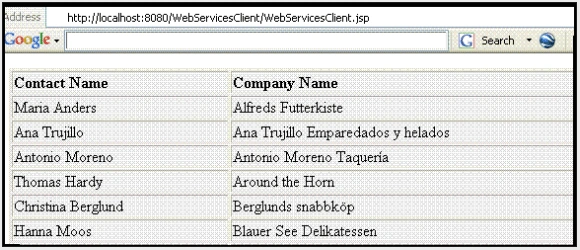
10. Now right click on WebForm1.aspx and select Set as Start Page. And run the application. If everything works fine, you will see the following output in browser.
11. To get same output through XMLDocument. Add one more Web Form (WebForm2.aspx)
12. Right click project in solution explorer and select Add->Add New Item->XSLT file. Name the file as Products.xsl. And paste the following code in .xsl file.
Vicente Tarin FontPosted Oct 29, 2010, 6:47 AM
I have to call with java to a .net web service that returns a DataTable object serialized in binary format . Is there any way to access to this object with a java client or am i forced to implement the client in .net?
aravindPosted Jun 11, 2010, 12:20 PM
I am having an asp application that calls Vb dll. I have an choice to either call a webservice from the asp page and pass the return values to vb dll or call from vb dll directly. the return of the web service is a dataset with 500 rows. Which way would be more efficient? thanks! aravind [email protected]
gowrisanker PPosted Feb 20, 2009, 1:36 AM
Hi Anand, I have .net webservice with below namespace and message name Name space and Message Name for .net webservice [WebService(Namespace = "http://Service/",Name="Service",Description="test")] [WebMethod(MessageName = "HelloWorld",Description="test method")] when i was tried to access from jsp/java client(your code with 2 url modification) that was deployed in tomcat, im getting the below error soap:ClientServer did not recognize the value of HTTP Header SOAPAction=http://Service/HelloWorld please help me
Jyotsna YendapallyPosted Feb 28, 2008, 2:43 PM
Hi Anand, The above article is very helpful. Before I start using it, I just want to confirm that I need not worry about the technology used to build the webservice, for me to access it from CLASSIC ASP as long as I am using Microsoft SOAP toolkit 3.0 and MSXML 4.0. Please reply at your earliest convenience. I really appreciate your help in this. Thanks, Jyotsna
RishuPosted Oct 30, 2007, 3:02 AM
How to Pass a String Parameter e.g. ("D:\image.jpg") to Java SOAP Client for .Net Web Service