

Introduction
In the enterprise landscape, Artificial Intelligence is no longer a standalone experiment; it is a critical business function that interacts with sensitive data, proprietary knowledge bases, and expensive computational resources. As organizations deploy Multi-Agent Retrieval-Augmented Generation (RAG) systems, the question of "who can access what" becomes paramount. Traditional API keys are insufficient for complex user hierarchies, audit requirements, and dynamic permission sets. This is where OAuth 2.0 emerges as the gold standard for authorization. This article explores how to integrate OAuth 2.0 into a FastAPI-based AI architecture. We will build a Proof-of-Concept (PoC) for an "Enterprise HR Policy Assistant," a multi-agent system that helps employees navigate complex internal policies. By leveraging OAuth 2.0, we ensure that only authenticated users can access the system, and their specific roles (e.g., Manager vs. Intern) dictate which documents they can retrieve via RAG. We will cover the end-to-end implementation, from the Identity Provider (IdP) configuration to the LangGraph state management and the React frontend integration.
Why OAuth 2.0 for AI APIs?
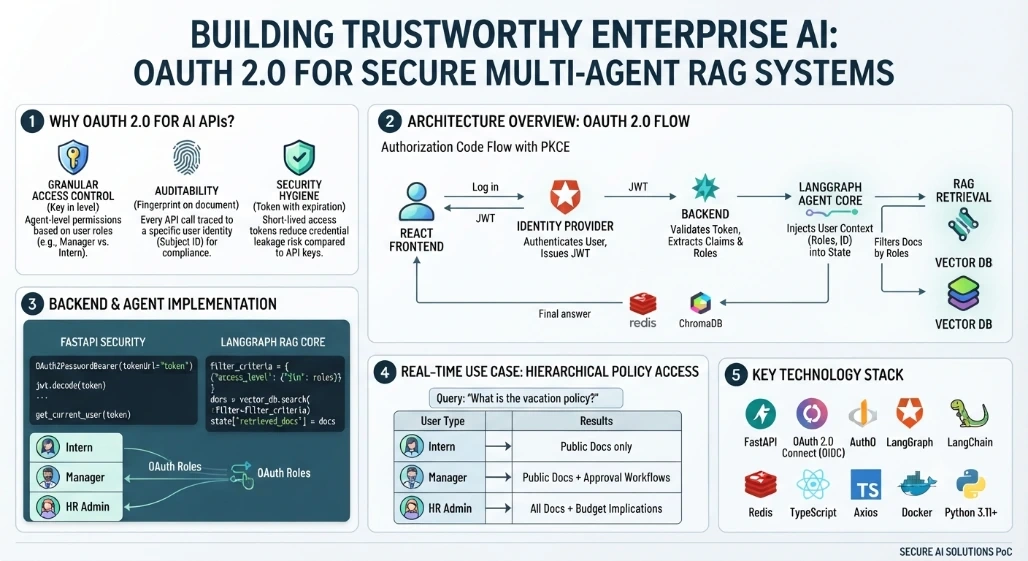
OAuth 2.0 provides a framework for access delegation. In an AI context, this is crucial for three reasons:
Granular Access Control: Different agents may need different permissions. A "Finance Agent" should not access "HR Confidential" documents unless the user’s token explicitly allows it.
Auditability: Every API call is tied to a specific user identity (Subject ID), enabling precise tracking of who asked what.
Security Hygiene: Tokens expire, reducing the risk of long-term credential leakage compared to static API keys.
Architecture Overview
Our system follows a standard Authorization Code Flow with PKCE (Proof Key for Code Exchange):
User logs in via the React Frontend using an Identity Provider (IdP).
IdP issues a JWT (JSON Web Token) containing user claims (roles, email).
Frontend sends this JWT in the
Authorization: Bearerheader to the FastAPI Backend.FastAPI validates the token signature and extracts user roles.
LangGraph uses these roles to filter the RAG retrieval step, ensuring only authorized documents are injected into the LLM context.
Backend Implementation: FastAPI Security Dependencies
We use fastapi-auth0 or standard python-jose to validate tokens. The key is creating a dependency that extracts user info and injects it into the agent state.
from fastapi import Depends, HTTPException, status
from fastapi.security import OAuth2PasswordBearer
from jose import jwt, JWTError

oauth2_scheme = OAuth2PasswordBearer(tokenUrl="token")

def get_current_user(token: str = Depends(oauth2_scheme)) -> dict:
    try:
        payload = jwt.decode(token, SECRET_KEY, algorithms=[ALGORITHM])
        return {
            "sub": payload.get("sub"),
            "roles": payload.get("permissions", []),
            "email": payload.get("email")
        }
    except JWTError:
        raise HTTPException(status_code=401, detail="Invalid token")

@app.post("/api/ask")
async def ask_agent(query: QueryRequest, user: dict = Depends(get_current_user)):
    # Inject user context into the agent graph
    initial_state = {
        "messages": [{"role": "user", "content": query.question}],
        "user_roles": user["roles"],
        "user_id": user["sub"]
    }
    result = await agent_graph.ainvoke(initial_state)
    return {"answer": result['final_response']}
Multi-Agent RAG Core: LangGraph with Role-Based Context
The magic happens in the RetrieveNode. Instead of fetching all documents, it filters based on the user's roles extracted from the OAuth token.
class AgentState(TypedDict):
    messages: list
    user_roles: list
    retrieved_docs: list
    final_response: str

def retrieve_node(state: AgentState):
    query = state['messages'][-1]['content']
    roles = state['user_roles']

    # Filter metadata in ChromaDB based on roles
    # Example: Only 'manager' role can see 'salary_policy' docs
    filter_criteria = {"access_level": {"$in": roles}} if roles else {}

    docs = vector_db.search(query, filter=filter_criteria)
    state['retrieved_docs'] = docs
    return state

def generate_node(state: AgentState):
    context = "\n".join([doc.page_content for doc in state['retrieved_docs']])
    prompt = f"Answer based on: {context}"
    response = llm.invoke(prompt)
    state['final_response'] = response.content
    return state

workflow = StateGraph(AgentState)
workflow.add_node("retrieve", retrieve_node)
workflow.add_node("generate", generate_node)
workflow.set_entry_point("retrieve")
workflow.add_edge("retrieve", "generate")
workflow.add_edge("generate", END)
agent_graph = workflow.compile()
Memory and State: Persisting User-Specific Sessions
We use Redis to store conversation history, keyed by the user’s OAuth sub (subject ID). This ensures that even if the user logs out and back in, their session continuity is maintained securely.
import redis
redis_client = redis.Redis(host='localhost', port=6379, db=0)

def save_memory(user_id: str, session_id: str, message: dict):
    key = f"memory:{user_id}:{session_id}"
    redis_client.lpush(key, json.dumps(message))
    redis_client.expire(key, 3600) # 1 hour TTL
Frontend Implementation: React with OIDC Client
The frontend uses react-oidc-context to handle the login flow and token management automatically.
import { useAuth } from 'react-oidc-context';

const ChatInterface = () => {
  const auth = useAuth();

  const sendMessage = async (text: string) => {
    if (!auth.isAuthenticated) return;

    const response = await fetch('/api/ask', {
      method: 'POST',
      headers: {
        'Content-Type': 'application/json',
        'Authorization': `Bearer ${auth.user?.access_token}`
      },
      body: JSON.stringify({ question: text })
    });

    const data = await response.json();
    setMessages(prev => [...prev, { role: 'ai', content: data.answer }]);
  };

  if (auth.isLoading) return <div>Loading...</div>;
  if (!auth.isAuthenticated) return <button onClick={auth.signinRedirect}>Login</button>;

  return (
    <div>
      {/* Chat UI */}
      <button onClick={() => sendMessage("What is the travel policy?")}>Ask</button>
    </div>
  );
};
Real-Time Use Case: Hierarchical Policy Access
Consider an HR scenario:
Intern asks: "What is the vacation policy?" -> The RAG system retrieves only public-facing policy docs.
Manager asks: "What is the vacation policy?" -> The RAG system retrieves public docs PLUS internal guidelines on approval workflows.
HR Admin asks: "What is the vacation policy?" -> The system retrieves all docs, including budget implications.
This differentiation is handled seamlessly by the OAuth scopes/roles passed in the token, without changing the code logic for each user type.
Conclusion
Integrating OAuth 2.0 into your AI API architecture is not just about security; it’s about enabling intelligent, context-aware interactions. By tying user identity to agent behavior, you create a system that is not only secure but also personalized and compliant. As enterprises scale their AI initiatives, this foundation of trusted identity and granular access control will be the cornerstone of successful deployment.
Join the conversation! Your thoughts help the community grow.