


1. Introduction
Ollama lets you run large language models locally with a simple API. LangChain is a framework for building LLM-powered applications using prompts, chains, memory, tools, and agents.
When combined, they let you build:
Private AI assistants
Local RAG (Retrieval-Augmented Generation) systems
Offline chatbots
Developer tools powered by LLMs
No cloud API. No token costs. Full data privacy.
2. Architecture Overview
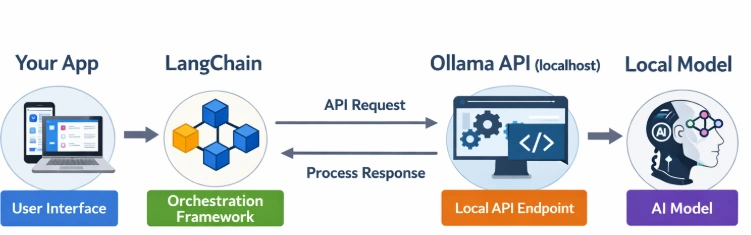
LangChain handles logic, prompts, memory, and orchestration
Ollama serves the model via a local REST API
Model runs fully on your machine
Default Ollama API endpoint:
http://localhost:11434
Output: Ollama is running
3. Installing Ollama
a. Install Ollama
Download ollama from ollama site (https://ollama.com)
b. Pull a Model
ollama pull gemma3:1bOther popular models:
| Model | Use Case |
|---|---|
llama3 | General purpose |
mistral | Fast + lightweight |
gemma:2b | Small systems |
phi3 | Efficient reasoning |
codellama | Code generation |
c. Test Locally
ollama run gemma3:1bIf this works, Ollama server is running automatically in the background.
4. Install Python Dependencies
pip install langchain langchain-core langchain-ollama5. Ollama + Langchain Integration Examples
a. Basic LLM Example (Text Generation)
from langchain_ollama import OllamaLLM

# Connect to Ollama running locally
llm = OllamaLLM(model="gemma3:1b", base_url="http://localhost:11434")

# Ask a question directly
response = llm.invoke("Explain quantum computing in simple terms.")

print(response)
Key Parameters
| Parameter | Meaning |
|---|---|
model | Name of the Ollama model |
base_url (Optional) | API endpoint (default: localhost:11434) |
temperature (Optional) | Creativity of output |
b. Chat Models with Ollama
Ollama supports chat-style interactions. Use ChatOllama.
from langchain_ollama import ChatOllama
from langchain_core.messages import HumanMessage, SystemMessage

chat = ChatOllama(model="gemma3:1b", base_url="http://localhost:11434")

messages = [
    SystemMessage(content="You are a helpful teacher."),
    HumanMessage(content="Explain quantum computing simply.")
]

print(chat.invoke(messages).content)
c. Streaming Responses
Streaming is useful for real-time UI updates.
from langchain_community.chat_models import ChatOllama
from langchain.callbacks.streaming_stdout import StreamingStdOutCallbackHandler

chat = ChatOllama(
    model="gemma3:1b",
    streaming=True,
    callbacks=[StreamingStdOutCallbackHandler()]
)

chat.invoke("Tell me a story about a robot.")
d. Prompt Templates + Ollama
LangChain lets you structure prompts cleanly.
from langchain_core.prompts import PromptTemplate
from langchain.chains import LLMChain
from langchain_ollama import OllamaLLM

# Initialize local Ollama model
llm = OllamaLLM(model="gemma3:1b", base_url="http://localhost:11434")

# Create a reusable prompt template
prompt = PromptTemplate(
    input_variables=["topic", "level"],
    template="Explain {topic} in simple terms for a {level} student."
)

# Build the chain
chain = LLMChain(llm=llm, prompt=prompt)

# Run it
response = chain.invoke({
    "topic": "quantum computing",
    "level": "10th grade"
})

print(response["text"])
e. Local Embedding
from langchain_ollama import OllamaEmbeddings

embeddings = OllamaEmbeddings(model="nomic-embed-text", base_url="http://localhost:11434")
vector = embeddings.embed_query("What is LangChain?")
print(len(vector))
f. Using Ollama with Agents
Agents allow LLMs to use tools.
from langchain.agents import initialize_agent, Tool
from langchain_community.llms import Ollama

def calculator_tool(query: str) -> str:
    return str(eval(query))

tools = [
    Tool(
        name="Calculator",
        func=calculator_tool,
        description="Useful for math calculations"
    )
]
llm = Ollama(model="gemma3:1b")
agent = initialize_agent(tools, llm, agent="zero-shot-react-description", verbose=True)
agent.run("What is 25 * 18?")
6. Model Customization with Ollama (Modelfile)
You can create your own model variant.
Modelfile example:
FROM llama3
PARAMETER temperature 0.2 SYSTEM "You are a strict technical assistant."
Build it:
ollama create tech-llama -f ModelfileUse in LangChain:
llm = Ollama(model="tech-llama")7. Performance Considerations
| Factor | Impact |
|---|---|
| RAM | Large models need 8–32 GB |
| GPU | Speeds up inference significantly |
| Quantization | Smaller size, faster, slightly lower quality |
| Model Size | 7B = fast, 13B+ = smarter but slower |
8. Ollama vs Cloud LLM APIs
| Feature | Ollama | Cloud APIs |
|---|---|---|
| Internet Needed | No | Yes |
| Data Privacy | High | Depends on provider |
| Cost | Free (local compute) | Pay per token |
| Setup | Moderate | Easy |
| Scalability | Limited to hardware | Highly scalable |
9. Best Use Cases
Internal company assistants
Document Q&A systems
Secure research tools
Developer copilots
Offline AI app
Join the conversation! Your thoughts help the community grow.