


Introduction
In today's e-commerce landscape, seamless and secure payment processing is crucial. PayU offers a robust payment gateway solution for businesses to accept online payments. This guide will equip you with the knowledge to integrate PayU with your .NET Core API, enabling you to securely accept payments from your customers.
Prerequisites
Before proceeding, make sure you have a basic understanding of .NET Core and Web API development. Additionally, ensure that you have installed the necessary software, including Visual Studio 2022 or later
Creating a New Project in Visual Studio 2022
Creating a New Project in Visual Studio 2022 Start the Visual Studio software and select "Create a new project."
Backend Configure .NET Core API Configuration Step by Steps.
Step 1. Create a new .NET Core Web API project.
dotnet new webapi -n PayUPaymentIntegration
cd PayUPaymentIntegration
Step 2. Add necessary packages.
dotnet add package Newtonsoft.Json
dotnet add package RestSharp
Step 3. Configure PayU settings.
Create a configuration class for PayU settings in Models/PayUSettings.cs.
 public class PayUSettings
{
    public string Key { get; set; }
    public string Salt { get; set; }
    public string BaseUrl { get; set; }
    public string SuccessUrl { get; set; }
    public string FailureUrl { get; set; }
}
Step 4. Add settings to appsettings.json.
"PayUSettings": {
    "Key": "your_key_here",
    "Salt": "your_salt_here",
    "BaseUrl": "https://test.payu.in/_payment",
    "SuccessUrl": "http://localhost:5000/api/payment/success",
    "FailureUrl": "http://localhost:5000/api/payment/failure"
}
Step 5. Create a service for PayU integration.
Create a new service in Services/IPayUService.cs. And PayUService.
Interface
public interface IPayUService
{
    Task<string> InitiatePayment(PaymentRequest paymentRequest);
}
interface IPayUService: This declares the name of the interface as IPayUService. Interfaces define functionalities that a class implementing the interface must provide.
Class
public class PayUService
{
    private readonly PayUSettings _settings;
    public PayUService(IOptions<PayUSettings> settings)
    {
        _settings = settings.Value;
    }
    public async Task<string> InitiatePayment(PaymentRequest paymentRequest)
    {
        var hashString = $"{_settings.Key}|{paymentRequest.txnId}|{paymentRequest.amount}|{paymentRequest.productInfo}|{paymentRequest.firstName}|{paymentRequest.email}|||||||||||{_settings.Salt}";
        var hash = GenerateHash(hashString);
        var client = new RestClient(_settings.BaseUrl);
        var request = new RestRequest("", Method.Post);
        request.AddParameter("key", _settings.Key);
        request.AddParameter("txnid", paymentRequest.txnId);
        request.AddParameter("amount", paymentRequest.amount);
        request.AddParameter("productinfo", paymentRequest.productInfo);
        request.AddParameter("firstname", paymentRequest.firstName);
        request.AddParameter("email", paymentRequest.email);
        request.AddParameter("phone", paymentRequest.Phonenumber); // Replace with actual phone number
        request.AddParameter("surl", _settings.SuccessUrl);
        request.AddParameter("furl", _settings.FailureUrl);
        request.AddParameter("hash", hash);
        // request.AddParameter("service_provider", "payu_paisa");
        request.AddHeader("Content-Type", "application/x-www-form-urlencoded");
        var response = await client.ExecuteAsync(request);
        if (response.IsSuccessStatusCode)
        {
            return response.ResponseUri.AbsoluteUri;
        }
        else
        {
            return response.ResponseUri.AbsoluteUri;
        }
    }
}
InitiatePayment Method
- public async Task<string> InitiatePayment(PaymentRequest paymentRequest): This method implements the InitiatePayment method from the IPayUService interface. It's marked as public, asynchronous (async), and returns a Task<string>.
- PaymentRequest paymentRequest: This is the argument containing details about the payment to be initiated.
Hash Generation
The code constructs a string using the following information from paymentRequest and _settings.
- Merchant Key (_settings. Key)
- Transaction ID (paymentRequest.txnId)
- Amount (paymentRequest.amount)
- Product Information (paymentRequest.productInfo)
- Customer Name (paymentRequest.firstName)
- Customer Email (paymentRequest.email)
- Additional fields (empty in this example)
- Salt (_settings. Salt)
This string is then used to generate a hash using a function called GenerateHash (implementation not shown, likely uses a hashing algorithm like SHA).
Sending the Request and Handling Response
The ExecuteAsync method is called on the client object with the prepared request. This sends the request to PayU's API asynchronously.
The response from PayU is stored in a response variable.
An if statement checks the IsSuccessStatusCode property of the response.
- If successful (IsSuccessStatusCode is true), the absolute URI of the response (the redirection URL) is returned.
- If unsuccessful, the code currently returns the same redirection URL (likely for debugging purposes, you should implement proper error handling here)
Step 6. Add service and settings to the Program. cs.
builder.Services.Configure<PayUSettings>(builder.Configuration.GetSection("PayUSettings"));
builder.Services.AddTransient<IPayUService, PayUService>();
builder.Services.Configure<PayUSettings>(builder.Configuration.GetSection("PayUSettings"));
This line configures the dependency injection system in your application.
Let's break it down.
- builder.Services: This refers to the IServiceCollection object exposed by the WebApplicationBuilder class (likely named builder in your startup code). This object is used to register services that can be injected into other parts of your application.
- .Configure<TSettings>(...): This is an extension method used to configure a specific type of service. In this case, <TSettings> is replaced with PayUSettings, indicating we're configuring the PayUSettings class.
- builder.Configuration.GetSection("PayUSettings"): This part retrieves a configuration section named "PayUSettings" from the application configuration. This section likely contains settings for the PayU service, such as Merchant Key, Salt, Base URL, success/failure URLs, etc
builder.Services.AddTransient<IPayUService, PayUService>(); - builder.Services.AddTransient<TService, TImplementation>(): This extension method registers a service with a specific lifetime and implementation.
- <TService>: This is replaced with the interface type, IPayUService in this case. By registering with the interface, you promote loose coupling and testability. Any class implementing IPayUService can be used as long as it fulfills the contract. This separates the interface type from the implementation type.
- <TImplementation>: This is replaced with the concrete class that implements the interface, which is PayUService here.
Read PayU settings (Merchant Key, Salt, URLs, etc.) from the PayUSettings section in the application configuration.
Register the PayUService class as a transient service. This means a new instance of PayUService will be created each time it's requested through dependency injection.
Step 7. Create API Controller.
Create a new controller in Controllers/PaymentController.cs.
   public class PAYUController : ControllerBase
{
    private readonly IPayUService _payUService;
    public PAYUController(IPayUService payUService)
    {
        _payUService = payUService;
    }
    [HttpPost("Payment")]
    public async Task<IActionResult> InitiatePayment(PaymentRequest paymentRequest)
    {
        var txnId = Guid.NewGuid().ToString();
        paymentRequest.txnId = txnId;
        var response = await _payUService.InitiatePayment(paymentRequest);
        return Ok(response);
    }
}
Class Definition and Dependency Injection
- public class PAYUController: ControllerBase: This declares a public class named PAYUController that inherits from the ControllerBase class in ASP.NET Core MVC.
- private readonly IPayUService _payUService: This line defines a private read-only field named _payUService of type IPayUService. This field will be used to interact with the PayU payment gateway service.
- public PAYUController(IPayUService payUService): This is the constructor of the controller. It takes a single argument of type IPayUService. This leverages dependency injection to get an instance of the PayUService class from the application's service container.
InitiatePayment Method
- [HttpPost("Payment")]: This line decorates the InitiatePayment method with the HttpPost attribute. This specifies that this method handles HTTP POST requests sent to the "/Payment" URL of the controller.
- public async Task<IActionResult> InitiatePayment(PaymentRequest payment request): This method definition specifies that it.
- is asynchronous (async).
- returns an IActionResult (represents the HTTP response).
- takes a PaymentRequest object as an argument (presumably containing payment details).
Inside the method.
- A new transaction ID is generated using Guid.NewGuid().ToString().
- The generated transaction ID is assigned to the txnId property of the paymentRequest object.
- The InitiatePayment method from the injected _payUService is called asynchronously with the paymentRequest object. This triggers the PayU payment initiation process.
- The response received from _payUService (likely a redirection URL) is returned using the OK method of ControllerBase.
Step 8. API Testing for Payment Integration and PayU.
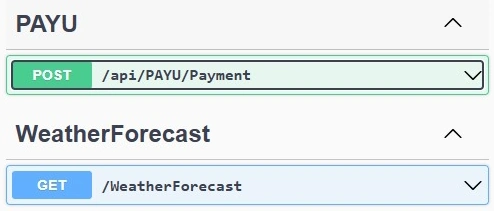
Test Payload.
{
  "amount": "100",
  "productInfo": "Dell",
  "firstName": "C#Corner",
  "email": "C#@gmail.com",
  "phonenumber": "0976452865"
}
API Hit Return Url Send Back.
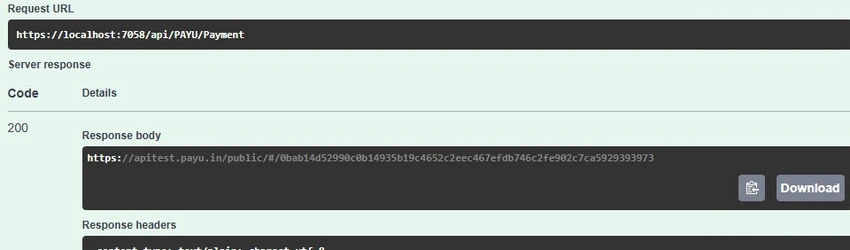
https://apitest.payu.in/public/#/0bab14d52990c0b14935b19c4652c2eec467efdb746c2fe902c7ca5929393973
This Url Directly Redirect to the PayU Service Page.
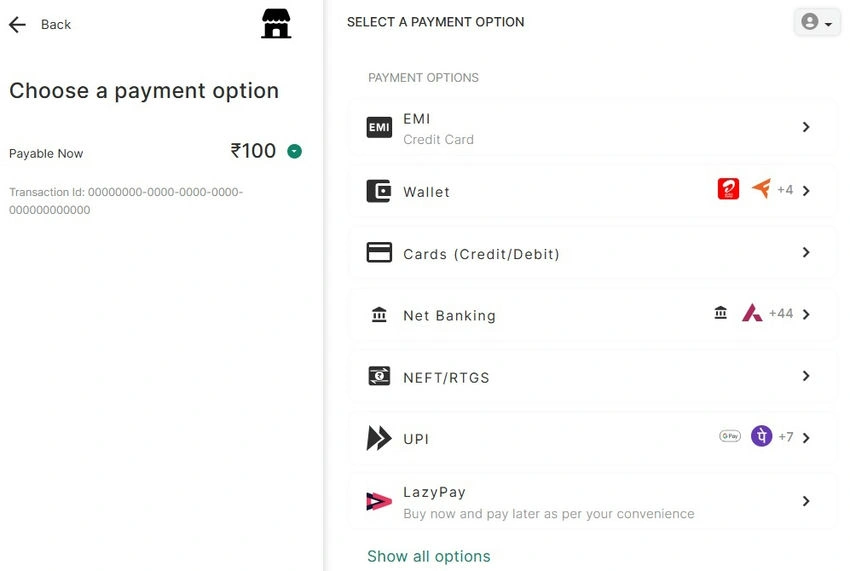
Testing Some Credentials.
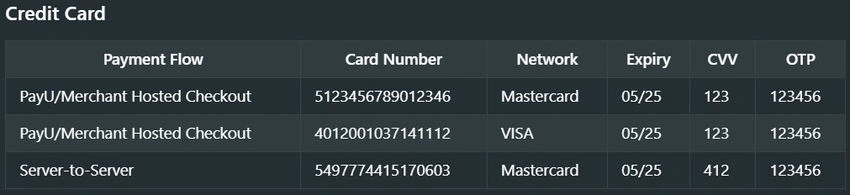
Once Enter the Test card credentials.
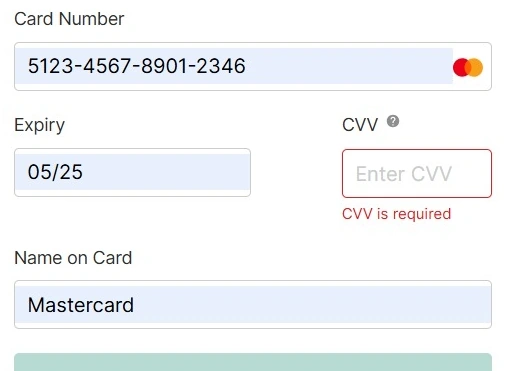
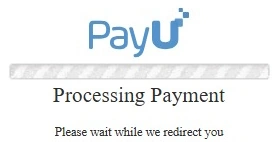
Step 9. Once Payment Is SuccessFully Completed in PayU return Sucess Respone in Payu Service Side.
test-payment-middleware.payu.in/simulatorResponse
{
  "mihpayid": "403993715531897316",
  "mode": "CC",
  "status": "success",
  "unmappedstatus": "captured",
  "key": "1y4IBs",
  "txnid": "00000000-0000-0000-0000-000000000000",
  "amount": "100.00",
  "cardCategory": "domestic",
  "discount": "0.00",
  "net_amount_debit": "100",
  "addedon": "2024-07-09 21:13:09",
  "productinfo": "Dell",
  "firstname": "C#Corner",
  "lastname": "",
  "address1": "",
  "address2": "",
  "city": "",
  "state": "",
  "country": "",
  "zipcode": "",
  "email": "[email protected]",
  "phone": "097645286",
  "udf1": "",
  "udf2": "",
  "udf3": "",
  "udf4": "",
  "udf5": "",
  "udf6": "",
  "udf7": "",
  "udf8": "",
  "udf9": "",
  "udf10": "",
  "hash": "bf8884483f4d55d226538f7f6c1b9429968116d65a3de6f7cf9acf22cad391199afe4fdb3a772d6ad9994ea752008fcfee31330ff0c020e25bca8c1414f131a0",
  "field1": "961618592448180100",
  "field2": "355997",
  "field3": "100.00",
  "field4": "",
  "field5": "00",
  "field6": "02",
  "field7": "AUTHPOSITIVE",
  "field8": "AUTHORIZED",
  "field9": "Transaction is Successful",
  "payment_source": "payu",
  "meCode": "{\"MID\":\"PAYUPAYMENTCYBS\",\"TKey\":\"XkxU7gtGQxXVJbT9csM6tACIwtKvg2rZcQ95S0PR+cp+5Hw9fYvUzZr\\/wIAkldIU3wlM3NSYKQFxBFfSKYl4QrRobSPu1IVR37PqnJ9BQgJG7tCh3w9vEhasJxn85jdTvD4DPpci9qJZw797cPFXSnU9mmq4Yxnm0pVSOH3Sz\\/NIWVy2pGaRrq9XdISlEmd7MSv1X4wDFck0\\/Pl51mBLVMWvZYfXsCRJdITUy7aHDO5gb6FRBwDjdG9Fdwv7n5sLaFdiVGfhBMWNNWzWSIzovVdCnfln4sFv1zl70j2tP4+wwBLf\\/znoEtFq3YpCe0fE\\/BbNNwdNwNkzxcghUyhkBg==\"}",
  "PG_TYPE": "CC-PG",
  "bank_ref_num": "961618592448180100",
  "bankcode": "CC",
  "error": "E000",
  "error_Message": "No Error",
  "cardnum": "XXXXXXXXXXXX2346",
  "cardhash": "This field is no longer supported in postback params."
}
Conclusion
By following these steps and leveraging PayU's API, you can empower your .NET Core application to accept payments efficiently. Remember to prioritize security and testing throughout the integration process. With a successful PayU integration, you'll be well on your way to offering a smooth and secure payment experience for your users.
Join the conversation! Your thoughts help the community grow.