Introduction
This article explains how to connect to or integrate with Salesforce with C#. The Force.com platform tightly integrates with the Microsoft .NET technologies via the Force.com SOAP API that lets you access and manipulate your data and functionality in the Force.com cloud.
Force.com
Force.com is a cloud computing platform as a service system from Salesforce.com that developers use to build multitenant applications hosted on their servers as a service.
Integrating Salesforce with C#
It is easy to connect to or integrate with the Salesforce API with any platform. In this article, we will learn how to invoke the Salesforce API with two types of WSDL. We need to connect to a custom method for developing in developer org.
- Enterprise WSDL: This API is for users developing client applications for their organization.
- Partner WSDL: This API is for salesforce.com partners who are developing client applications for multiple organizations.
Here is the procedure to connect Salesforce with C#.
Step 1: We need to create a developer account to access any API, custom objects or methods from the org. You can create a developer account from the following link.
Step 2: Connect with the org using your credentials. Once you connected with the org, next we will create a method to get the details of the lead object.
To create a method in the class go to Setup (under the user name drop down or beside the help menu top right corner) -> Develop -> Apex Classes -> New.
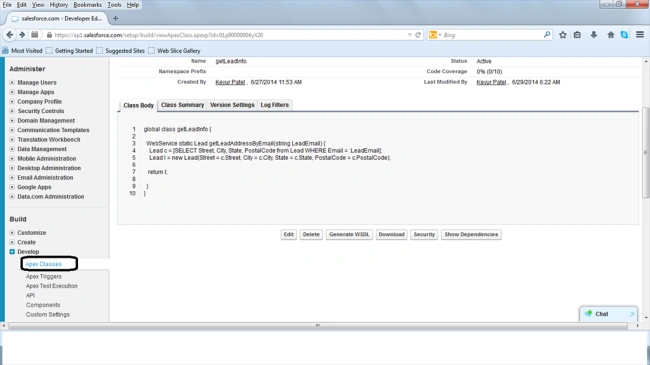
We need to get the lead details based on email. Hence, create a method as shown in the following screen shot in the apex class. To access other platforms we need to use the global keyword to declare the class and use the webservice keyword for the method.
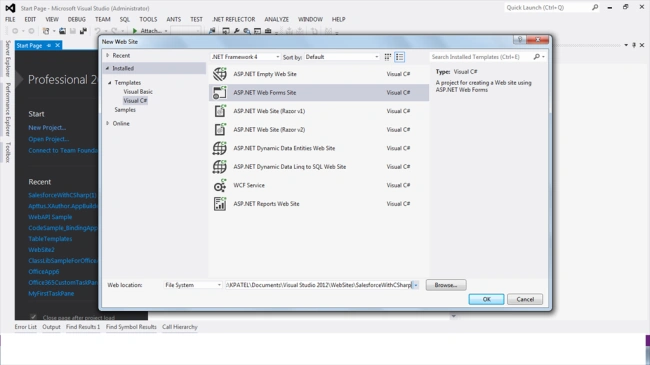
Step 3: Once a method is created in Salesforce, create a new website or project in Visual Studio 2010/2012/2013. Add a web form to display the lead object details.
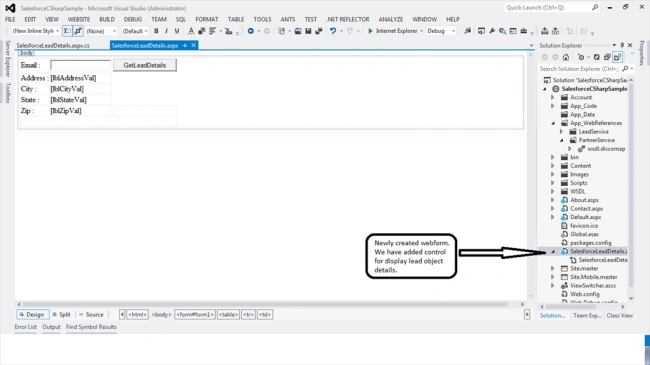
Step 4: Add control in the newly created webform. The user can enter an email id in the TextBox based on email and other relevant lead details displayed in a different label as shown in the following screenshot.
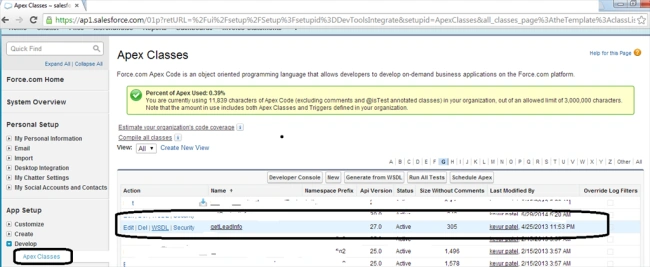
Step 5 : Next you need to get the URL to the WSDL file, that we'll add to our project in Visual Studio to generate the web service proxy. To get this, expand the Develop section on the left hand side in your salesforce org. Then click on Apex Classes. You can see our created custom method (getLeadInfo). Click on the WSDL link and copy it (it'll be something like https://naXX.salesforce.com/soap/wsdl.jsp?type=*).
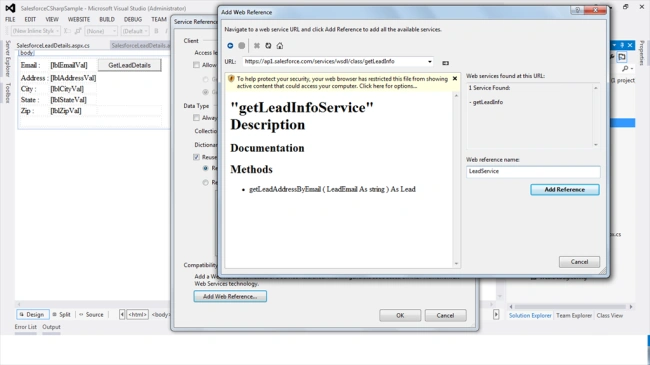
Step 6 : After the getting WSDL link, first we'll need to add a reference to our WSDL from Salesforce to generate the webservice proxy. Right-click on References in the Solution Explorer and select Add Service Reference. Click Advanced (bottom left on dialog box). Then Add Web Reference. Paste the URL from Step 5 above into the URL box and click the green arrow. You'll probably be prompted to login to Salesforce. Once that's done, you should see the WSDL or service method summaries in the window. On the right hand side, under “Web Reference Name”, type LeadService and click Add Reference.
Step 7 : After adding Leadservice to your project, you need to do same steps to add a partner WSDL to your project. The Partners WSDL, who wish to get an OAuth consumer Id for authentication, can contact salesforce.com. The Partner WSDL can send requests to the enterprise endpoint. Assign the session Id to the SOAP header for subsequent calls.
You need to get the partner URL. To get this, expand the Develop section on the left hand side in your Salesforce org. Then click on API.You can see list if WSDL. Find the Partner WSDL. Click on the Generate Partner WSDL link and copy it (it'll be something like https://naXX.salesforce.com/soap/wsdl.jsp?type=*). You can see same as shown in following screenshot.
Step 8:After adding the webreference of the enterprise and partner WSDL, we will go through the code snippet to authenticate with Salesforce.
Authenticating and Creating a Session
1. Capture a user name and password: These values can be hardcoded as part of your application's .config files, stored in a database for retrieval, or passed to the API via values collected from the application user. In this example, the username and password are simply hard-coded as string variables within the application. You need to append the password with your security token.
A security token is an automatically generated key that you must add to the end of your password to log into Salesforce from an untrusted network. For example, if your password is mypassword and your security token is XXXXXXXXXX, then you must enter mypasswordXXXXXXXXXX to log in. Security tokens are required whether you log in via the API or a desktop client such as Connect for Outlook, Connect Offline, Connect for Office, Connect for Lotus Notes, or the Data Loader.
For more details refer to the following link:
https://help.salesforce.com/HTViewHelpDoc?id=user_security_token.htm&language=en_US
-
- private string userID = "[email protected]";
-
- private string password = "somecomplexpassword";
2. Once the username and password values are established, they are passed to the API to determine if they are valid. As part of this validation, a binding to the API is established by instantiating a SforceService object. Once the binding is established, the result of the login attempt is returned in the form of a LoginResult object. Best practices also dictate this login attempt be wrapped in a try/catch block to allow for graceful handling of any exceptions that may be thrown as part of the login process
-
-
-
- private void getSessionInfo()
- {
-
- PartnerService.SforceService partnerService = new PartnerService.SforceService();
- PartnerService.LoginResult lr = new PartnerService.LoginResult();
-
-
- lr = partnerService.login(userID, password);
- _sessionId = lr.sessionId;
- Session["_sessionId"] = lr.sessionId;
- Session["_serverUrl"] = lr.serverUrl;
- Session["_nextLoginTime"] = DateTime.Now;
- }
You can avoid calling the partner WSDL every time if the user is already connected with that session. For this you can make a method that checks whether or not a connection exists.
-
-
-
-
- public bool IsConnected()
- {
- bool blnResult = false;
- if (!string.IsNullOrEmpty(_sessionId) & _sessionId != null)
- {
- if (DateTime.Now > _nextLoginTime)
- blnResult = false;
- else
- blnResult = true;
- }
- else
- blnResult = false;
-
- return blnResult;
- }
Step 9: Once you get a session id, now you can call your actual method that we created in Step 2. Create an object of the enterprise service proxy class and pass a session id that we have stored in a session object. We wrote this code on a button click event for the lead details based on email id. You can see the code snippet as follows.
-
-
-
-
-
- protected void btnGet_Click(object sender, EventArgs e)
- {
-
- if (!IsConnected())
- getSessionInfo();
-
- LeadService.getLeadInfoService leadService = new LeadService.getLeadInfoService();
-
-
- leadService.SessionHeaderValue = new LeadService.SessionHeader();
- leadService.SessionHeaderValue.sessionId = _sessionId;
-
- LeadService.Lead getLeadInfoResponse = new LeadService.Lead();
- getLeadInfoResponse = leadService.getLeadAddressByEmail(Convert.ToString(txtEmailVal.Text));
- this.lblAddressVal.Text = getLeadInfoResponse.Street.ToString();
- this.lblCityVal.Text = getLeadInfoResponse.City.ToString();
- this.lblStateVal.Text = getLeadInfoResponse.State.ToString();
- this.lblZipVal.Text = getLeadInfoResponse.PostalCode.ToString();
- }
Step 10: Now to build the project. Press F5 to run your project. Enter an email id in the TextBox to get the lead details. You can see the lead details shown in the label in the following screenshot.
Output
Summary
This article explains how to integrate Salesforce with C#. We learned about partner and enterprise WSDLs. I hope this helps the developers who want to Integration with Salesforce using C#.
Reference link



Fateh hesabPosted Dec 29, 2022, 2:02 AM
Hi, am getting script error when clicking to Go "The underlying connection was closed..." and am unable to add the reference at all. Using Developer edition and VS 2013.
Rajesh KumarPosted May 17, 2019, 2:34 AM
If anyone have the problem in Salesforce integration. tell me i can help you.
Rajesh KumarPosted May 17, 2019, 2:31 AM
ServicePointManager.SecurityProtocol = SecurityProtocolType.Tls12 | SecurityProtocolType.Tls11; after add this line my issue is resoleve.
Rajesh KumarPosted May 17, 2019, 2:30 AM
ServicePointManager.SecurityProtocol = SecurityProtocolType.Tls12 | SecurityProtocolType.Tls11;
Rajesh KumarPosted Feb 26, 2019, 12:52 AM
When I am try to get data from salesforce then error The request was aborted: Could not create SSL/TLS secure channel but salesforce service reffrence add successfully in my visual studio solution..
Arun RajaduraiPosted Sep 28, 2017, 2:11 AM
The code does not work at all! using LeadService; shows an error.Error 34 The type or namespace name 'LeadService' could not be found (are you missing a using directive or an assembly reference?) Can you please tell me how to get solution
Bernie HollPosted Feb 27, 2017, 3:27 PM
I know this is from awhile ago but in the IsConnected code will DateTime.Now > _NextLoginTime ever be false?
Programming ShamsiPosted Nov 18, 2016, 6:18 AM
How to integrate salesforce with C# to push records or even schedule a job that could push records into salesforce
Keyur PatelPosted Jul 19, 2016, 2:27 AM
I would happy to help you any of your query on Salesforce platform with c#.Net.
Rodolpho ACPosted Dec 23, 2015, 4:00 PM
The code does not work at all! using LeadService; shows an error. The person upon me, asked somthing. There was no answer!! Can someone really explain this??
Rupayan PoddarPosted Oct 24, 2015, 2:05 PM
Thanks for this article ... !!!! But I am having the following error in for both the Lead Service and the Partner Service "The type or namespace could not be found" . I have added both the wsdl s as web references .... But still getting this error.
SwapnaPosted Mar 16, 2015, 1:23 AM
Thank you so much for such a wonderful article!! Is that possible to share some more sample projects to read other information from salesforce API. Very less information is available on Saleforce. Your article is a great help.
Keyur PatelPosted Jan 16, 2015, 6:23 AM
Thanks farrukh iftikhar. I will do sure.
farrukh iftikharPosted Jan 16, 2015, 5:49 AM
It's a very good effort to share this article. Can you also please share the sample project using salesforce metadata API with C#.net for getting objects (tables) and custom objects (custom view list)
Mahesh ChandPosted Jul 1, 2014, 8:25 PM
This is great Keyur. You're correct. There are no articles on Salesforce integration and this kind of articles are very useful.
Prerana TiwariPosted Jul 1, 2014, 1:39 AM
Nice article.............
Lakshmanan Sethu SankaranarayanPosted Jun 30, 2014, 11:16 PM
Good article