

Introduction
Themes are very useful and save a lot of our time while designing and making the site responsive. Here, we will learn to implement them in an Angular 7 app.
First of all, download the latest version of AdminLTE theme or whatever theme you prefer. For AdminLTE, you can get the latest version from here.
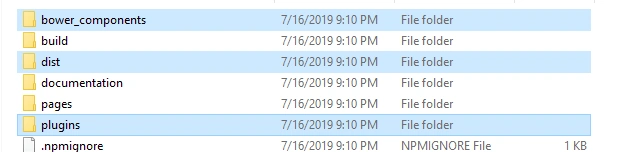
 Open the zip file from the download location and copy
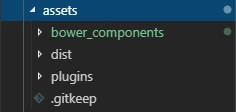
the following files in the assets folder for your Angular application.
Open the zip file from the download location and copy
the following files in the assets folder for your Angular application.
 Open the theme-menu.component.html file and add the following code in it.
Open the theme-footer.component.html file and add the following code in it.
Open the theme-setting.component.html file and add the following code in it.
Open the app.component.html file and add the following code in it.
Open the dashboard.component.html file and add the following code in it.
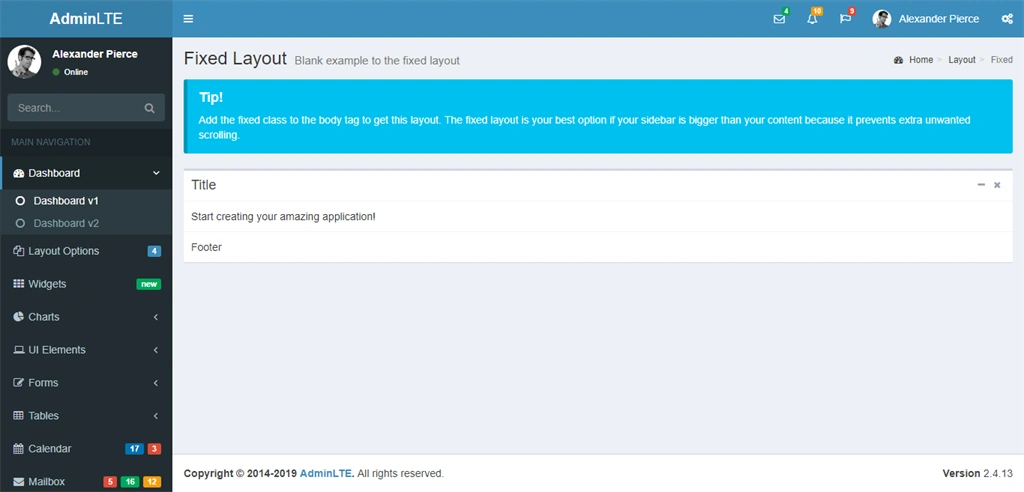
That’s it. Run the application by typing the ng serve command.
Open the theme-menu.component.html file and add the following code in it.
Open the theme-footer.component.html file and add the following code in it.
Open the theme-setting.component.html file and add the following code in it.
Open the app.component.html file and add the following code in it.
Open the dashboard.component.html file and add the following code in it.
That’s it. Run the application by typing the ng serve command.
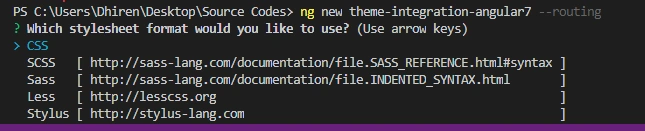
Create a new project in Angular 7 by typing the following command.
Once the project is created, open it and create various components
like sidebar, menubar, etc. by typing the following commands.
- ng g c theme-header
- ng g c theme-menu
- ng g c theme-footer
- ng g c theme-setting
- ng g c dashboard
It should be present here.
Open the index.html file and add the following code in it. We have to
add the CSS and JS files for all the pages here which we are going to
use.
- <!doctype html>
- <html lang="en">
- <head>
- <meta charset="utf-8">
- <title>ThemeIntegrationAngular7</title>
- <base href="/">
- <meta name="viewport" content="width=device-width, initial-scale=1">
- <link rel="icon" type="image/x-icon" href="favicon.ico">
- <link rel="stylesheet" href="assets/bower_components/bootstrap/dist/css/bootstrap.min.css">
- <link rel="stylesheet" href="assets/bower_components/font-awesome/css/font-awesome.min.css">
- <link rel="stylesheet" href="assets/bower_components/Ionicons/css/ionicons.min.css">
- <link rel="stylesheet" href="assets/dist/css/AdminLTE.min.css">
- <link rel="stylesheet" href="assets/dist/css/skins/_all-skins.min.css">
- </head>
- <body class="hold-transition skin-blue fixed sidebar-mini">
- <app-root>
- <div class="wrapper"></div>
- </app-root>
- <script src="assets/bower_components/jquery/dist/jquery.min.js"></script>
- <script src="assets/bower_components/bootstrap/dist/js/bootstrap.min.js"></script>
- <script src="assets/bower_components/jquery-slimscroll/jquery.slimscroll.min.js"></script>
- <script src="assets/bower_components/fastclick/lib/fastclick.js"></script>
- <script src="assets/dist/js/adminlte.min.js"></script>
- <script src="assets/dist/js/demo.js"></script>
- </body>
- </html>
Open the theme-header.component.html file and add the following code in it.
- <header class="main-header">
- <!-- Logo -->
- <a href="index2.html" class="logo">
- <!-- mini logo for sidebar mini 50x50 pixels -->
- <span class="logo-mini"><b>A</b>LT</span>
- <!-- logo for regular state and mobile devices -->
- <span class="logo-lg"><b>Admin</b>LTE</span>
- </a>
- <!-- Header Navbar: style can be found in header.less -->
- <nav class="navbar navbar-static-top">
- <!-- Sidebar toggle button-->
- <a href="#" class="sidebar-toggle" data-toggle="push-menu" role="button">
- <span class="sr-only">Toggle navigation</span>
- </a>
- <div class="navbar-custom-menu">
- <ul class="nav navbar-nav">
- <!-- Messages: style can be found in dropdown.less-->
- <li class="dropdown messages-menu">
- <a href="#" class="dropdown-toggle" data-toggle="dropdown">
- <i class="fa fa-envelope-o"></i>
- <span class="label label-success">4</span>
- </a>
- <ul class="dropdown-menu">
- <li class="header">You have 4 messages</li>
- <li>
- <!-- inner menu: contains the actual data -->
- <ul class="menu">
- <li><!-- start message -->
- <a href="#">
- <div class="pull-left">
- <img src="../../assets/dist/img/user2-160x160.jpg" class="img-circle" alt="User Image">
- </div>
- <h4>
- Support Team
- <small><i class="fa fa-clock-o"></i> 5 mins</small>
- </h4>
- <p>Why not buy a new awesome theme?</p>
- </a>
- </li>
- <!-- end message -->
- <li>
- <a href="#">
- <div class="pull-left">
- <img src="../../assets/dist/img/user3-128x128.jpg" class="img-circle" alt="User Image">
- </div>
- <h4>
- AdminLTE Design Team
- <small><i class="fa fa-clock-o"></i> 2 hours</small>
- </h4>
- <p>Why not buy a new awesome theme?</p>
- </a>
- </li>
- <li>
- <a href="#">
- <div class="pull-left">
- <img src="../../assets/dist/img/user4-128x128.jpg" class="img-circle" alt="User Image">
- </div>
- <h4>
- Developers
- <small><i class="fa fa-clock-o"></i> Today</small>
- </h4>
- <p>Why not buy a new awesome theme?</p>
- </a>
- </li>
- <li>
- <a href="#">
- <div class="pull-left">
- <img src="../../assets/dist/img/user3-128x128.jpg" class="img-circle" alt="User Image">
- </div>
- <h4>
- Sales Department
- <small><i class="fa fa-clock-o"></i> Yesterday</small>
- </h4>
- <p>Why not buy a new awesome theme?</p>
- </a>
- </li>
- <li>
- <a href="#">
- <div class="pull-left">
- <img src="../../assets/dist/img/user4-128x128.jpg" class="img-circle" alt="User Image">
- </div>
- <h4>
- Reviewers
- <small><i class="fa fa-clock-o"></i> 2 days</small>
- </h4>
- <p>Why not buy a new awesome theme?</p>
- </a>
- </li>
- </ul>
- </li>
- <li class="footer"><a href="#">See All Messages</a></li>
- </ul>
- </li>
- <!-- Notifications: style can be found in dropdown.less -->
- <li class="dropdown notifications-menu">
- <a href="#" class="dropdown-toggle" data-toggle="dropdown">
- <i class="fa fa-bell-o"></i>
- <span class="label label-warning">10</span>
- </a>
- <ul class="dropdown-menu">
- <li class="header">You have 10 notifications</li>
- <li>
- <!-- inner menu: contains the actual data -->
- <ul class="menu">
- <li>
- <a href="#">
- <i class="fa fa-users text-aqua"></i> 5 new members joined today
- </a>
- </li>
- <li>
- <a href="#">
- <i class="fa fa-warning text-yellow"></i> Very long description here that may not fit into the
- page and may cause design problems
- </a>
- </li>
- <li>
- <a href="#">
- <i class="fa fa-users text-red"></i> 5 new members joined
- </a>
- </li>
- <li>
- <a href="#">
- <i class="fa fa-shopping-cart text-green"></i> 25 sales made
- </a>
- </li>
- <li>
- <a href="#">
- <i class="fa fa-user text-red"></i> You changed your username
- </a>
- </li>
- </ul>
- </li>
- <li class="footer"><a href="#">View all</a></li>
- </ul>
- </li>
- <!-- Tasks: style can be found in dropdown.less -->
- <li class="dropdown tasks-menu">
- <a href="#" class="dropdown-toggle" data-toggle="dropdown">
- <i class="fa fa-flag-o"></i>
- <span class="label label-danger">9</span>
- </a>
- <ul class="dropdown-menu">
- <li class="header">You have 9 tasks</li>
- <li>
- <!-- inner menu: contains the actual data -->
- <ul class="menu">
- <li><!-- Task item -->
- <a href="#">
- <h3>
- Design some buttons
- <small class="pull-right">20%</small>
- </h3>
- <div class="progress xs">
- <div class="progress-bar progress-bar-aqua" style="width: 20%" role="progressbar"
- aria-valuenow="20" aria-valuemin="0" aria-valuemax="100">
- <span class="sr-only">20% Complete</span>
- </div>
- </div>
- </a>
- </li>
- <!-- end task item -->
- <li><!-- Task item -->
- <a href="#">
- <h3>
- Create a nice theme
- <small class="pull-right">40%</small>
- </h3>
- <div class="progress xs">
- <div class="progress-bar progress-bar-green" style="width: 40%" role="progressbar"
- aria-valuenow="20" aria-valuemin="0" aria-valuemax="100">
- <span class="sr-only">40% Complete</span>
- </div>
- </div>
- </a>
- </li>
- <!-- end task item -->
- <li><!-- Task item -->
- <a href="#">
- <h3>
- Some task I need to do
- <small class="pull-right">60%</small>
- </h3>
- <div class="progress xs">
- <div class="progress-bar progress-bar-red" style="width: 60%" role="progressbar"
- aria-valuenow="20" aria-valuemin="0" aria-valuemax="100">
- <span class="sr-only">60% Complete</span>
- </div>
- </div>
- </a>
- </li>
- <!-- end task item -->
- <li><!-- Task item -->
- <a href="#">
- <h3>
- Make beautiful transitions
- <small class="pull-right">80%</small>
- </h3>
- <div class="progress xs">
- <div class="progress-bar progress-bar-yellow" style="width: 80%" role="progressbar"
- aria-valuenow="20" aria-valuemin="0" aria-valuemax="100">
- <span class="sr-only">80% Complete</span>
- </div>
- </div>
- </a>
- </li>
- <!-- end task item -->
- </ul>
- </li>
- <li class="footer">
- <a href="#">View all tasks</a>
- </li>
- </ul>
- </li>
- <!-- User Account: style can be found in dropdown.less -->
- <li class="dropdown user user-menu">
- <a href="#" class="dropdown-toggle" data-toggle="dropdown">
- <img src="../../assets/dist/img/user2-160x160.jpg" class="user-image" alt="User Image">
- <span class="hidden-xs">Alexander Pierce</span>
- </a>
- <ul class="dropdown-menu">
- <!-- User image -->
- <li class="user-header">
- <img src="../../assets/dist/img/user2-160x160.jpg" class="img-circle" alt="User Image">
- <p>
- Alexander Pierce - Web Developer
- <small>Member since Nov. 2012</small>
- </p>
- </li>
- <!-- Menu Body -->
- <li class="user-body">
- <div class="row">
- <div class="col-xs-4 text-center">
- <a href="#">Followers</a>
- </div>
- <div class="col-xs-4 text-center">
- <a href="#">Sales</a>
- </div>
- <div class="col-xs-4 text-center">
- <a href="#">Friends</a>
- </div>
- </div>
- <!-- /.row -->
- </li>
- <!-- Menu Footer-->
- <li class="user-footer">
- <div class="pull-left">
- <a href="#" class="btn btn-default btn-flat">Profile</a>
- </div>
- <div class="pull-right">
- <a href="#" class="btn btn-default btn-flat">Sign out</a>
- </div>
- </li>
- </ul>
- </li>
- <!-- Control Sidebar Toggle Button -->
- <li>
- <a href="#" data-toggle="control-sidebar"><i class="fa fa-gears"></i></a>
- </li>
- </ul>
- </div>
- </nav>
- </header>
- <aside class="main-sidebar">
- <!-- sidebar: style can be found in sidebar.less -->
- <section class="sidebar">
- <!-- Sidebar user panel -->
- <div class="user-panel">
- <div class="pull-left image">
- <img src="../../assets/dist/img/user2-160x160.jpg" class="img-circle" alt="User Image">
- </div>
- <div class="pull-left info">
- <p>Alexander Pierce</p>
- <a href="#"><i class="fa fa-circle text-success"></i> Online</a>
- </div>
- </div>
- <!-- search form -->
- <form action="#" method="get" class="sidebar-form">
- <div class="input-group">
- <input type="text" name="q" class="form-control" placeholder="Search...">
- <span class="input-group-btn">
- <button type="submit" name="search" id="search-btn" class="btn btn-flat"><i class="fa fa-search"></i>
- </button>
- </span>
- </div>
- </form>
- <!-- /.search form -->
- <!-- sidebar menu: : style can be found in sidebar.less -->
- <ul class="sidebar-menu" data-widget="tree">
- <li class="header">MAIN NAVIGATION</li>
- <li class="active treeview">
- <a href="#">
- <i class="fa fa-dashboard"></i> <span>Dashboard</span>
- <span class="pull-right-container">
- <i class="fa fa-angle-left pull-right"></i>
- </span>
- </a>
- <ul class="treeview-menu">
- <li class="active"><a href="index.html"><i class="fa fa-circle-o"></i> Dashboard v1</a></li>
- <li><a href="index2.html"><i class="fa fa-circle-o"></i> Dashboard v2</a></li>
- </ul>
- </li>
- <li class="treeview">
- <a href="#">
- <i class="fa fa-files-o"></i>
- <span>Layout Options</span>
- <span class="pull-right-container">
- <span class="label label-primary pull-right">4</span>
- </span>
- </a>
- <ul class="treeview-menu">
- <li><a href="pages/layout/top-nav.html"><i class="fa fa-circle-o"></i> Top Navigation</a></li>
- <li><a href="pages/layout/boxed.html"><i class="fa fa-circle-o"></i> Boxed</a></li>
- <li><a href="pages/layout/fixed.html"><i class="fa fa-circle-o"></i> Fixed</a></li>
- <li><a href="pages/layout/collapsed-sidebar.html"><i class="fa fa-circle-o"></i> Collapsed Sidebar</a></li>
- </ul>
- </li>
- <li>
- <a href="pages/widgets.html">
- <i class="fa fa-th"></i> <span>Widgets</span>
- <span class="pull-right-container">
- <small class="label pull-right bg-green">new</small>
- </span>
- </a>
- </li>
- <li class="treeview">
- <a href="#">
- <i class="fa fa-pie-chart"></i>
- <span>Charts</span>
- <span class="pull-right-container">
- <i class="fa fa-angle-left pull-right"></i>
- </span>
- </a>
- <ul class="treeview-menu">
- <li><a href="pages/charts/chartjs.html"><i class="fa fa-circle-o"></i> ChartJS</a></li>
- <li><a href="pages/charts/morris.html"><i class="fa fa-circle-o"></i> Morris</a></li>
- <li><a href="pages/charts/flot.html"><i class="fa fa-circle-o"></i> Flot</a></li>
- <li><a href="pages/charts/inline.html"><i class="fa fa-circle-o"></i> Inline charts</a></li>
- </ul>
- </li>
- <li class="treeview">
- <a href="#">
- <i class="fa fa-laptop"></i>
- <span>UI Elements</span>
- <span class="pull-right-container">
- <i class="fa fa-angle-left pull-right"></i>
- </span>
- </a>
- <ul class="treeview-menu">
- <li><a href="pages/UI/general.html"><i class="fa fa-circle-o"></i> General</a></li>
- <li><a href="pages/UI/icons.html"><i class="fa fa-circle-o"></i> Icons</a></li>
- <li><a href="pages/UI/buttons.html"><i class="fa fa-circle-o"></i> Buttons</a></li>
- <li><a href="pages/UI/sliders.html"><i class="fa fa-circle-o"></i> Sliders</a></li>
- <li><a href="pages/UI/timeline.html"><i class="fa fa-circle-o"></i> Timeline</a></li>
- <li><a href="pages/UI/modals.html"><i class="fa fa-circle-o"></i> Modals</a></li>
- </ul>
- </li>
- <li class="treeview">
- <a href="#">
- <i class="fa fa-edit"></i> <span>Forms</span>
- <span class="pull-right-container">
- <i class="fa fa-angle-left pull-right"></i>
- </span>
- </a>
- <ul class="treeview-menu">
- <li><a href="pages/forms/general.html"><i class="fa fa-circle-o"></i> General Elements</a></li>
- <li><a href="pages/forms/advanced.html"><i class="fa fa-circle-o"></i> Advanced Elements</a></li>
- <li><a href="pages/forms/editors.html"><i class="fa fa-circle-o"></i> Editors</a></li>
- </ul>
- </li>
- <li class="treeview">
- <a href="#">
- <i class="fa fa-table"></i> <span>Tables</span>
- <span class="pull-right-container">
- <i class="fa fa-angle-left pull-right"></i>
- </span>
- </a>
- <ul class="treeview-menu">
- <li><a href="pages/tables/simple.html"><i class="fa fa-circle-o"></i> Simple tables</a></li>
- <li><a href="pages/tables/data.html"><i class="fa fa-circle-o"></i> Data tables</a></li>
- </ul>
- </li>
- <li>
- <a href="pages/calendar.html">
- <i class="fa fa-calendar"></i> <span>Calendar</span>
- <span class="pull-right-container">
- <small class="label pull-right bg-red">3</small>
- <small class="label pull-right bg-blue">17</small>
- </span>
- </a>
- </li>
- <li>
- <a href="pages/mailbox/mailbox.html">
- <i class="fa fa-envelope"></i> <span>Mailbox</span>
- <span class="pull-right-container">
- <small class="label pull-right bg-yellow">12</small>
- <small class="label pull-right bg-green">16</small>
- <small class="label pull-right bg-red">5</small>
- </span>
- </a>
- </li>
- <li class="treeview">
- <a href="#">
- <i class="fa fa-folder"></i> <span>Examples</span>
- <span class="pull-right-container">
- <i class="fa fa-angle-left pull-right"></i>
- </span>
- </a>
- <ul class="treeview-menu">
- <li><a href="pages/examples/invoice.html"><i class="fa fa-circle-o"></i> Invoice</a></li>
- <li><a href="pages/examples/profile.html"><i class="fa fa-circle-o"></i> Profile</a></li>
- <li><a href="pages/examples/login.html"><i class="fa fa-circle-o"></i> Login</a></li>
- <li><a href="pages/examples/register.html"><i class="fa fa-circle-o"></i> Register</a></li>
- <li><a href="pages/examples/lockscreen.html"><i class="fa fa-circle-o"></i> Lockscreen</a></li>
- <li><a href="pages/examples/404.html"><i class="fa fa-circle-o"></i> 404 Error</a></li>
- <li><a href="pages/examples/500.html"><i class="fa fa-circle-o"></i> 500 Error</a></li>
- <li><a href="pages/examples/blank.html"><i class="fa fa-circle-o"></i> Blank Page</a></li>
- <li><a href="pages/examples/pace.html"><i class="fa fa-circle-o"></i> Pace Page</a></li>
- </ul>
- </li>
- <li class="treeview">
- <a href="#">
- <i class="fa fa-share"></i> <span>Multilevel</span>
- <span class="pull-right-container">
- <i class="fa fa-angle-left pull-right"></i>
- </span>
- </a>
- <ul class="treeview-menu">
- <li><a href="#"><i class="fa fa-circle-o"></i> Level One</a></li>
- <li class="treeview">
- <a href="#"><i class="fa fa-circle-o"></i> Level One
- <span class="pull-right-container">
- <i class="fa fa-angle-left pull-right"></i>
- </span>
- </a>
- <ul class="treeview-menu">
- <li><a href="#"><i class="fa fa-circle-o"></i> Level Two</a></li>
- <li class="treeview">
- <a href="#"><i class="fa fa-circle-o"></i> Level Two
- <span class="pull-right-container">
- <i class="fa fa-angle-left pull-right"></i>
- </span>
- </a>
- <ul class="treeview-menu">
- <li><a href="#"><i class="fa fa-circle-o"></i> Level Three</a></li>
- <li><a href="#"><i class="fa fa-circle-o"></i> Level Three</a></li>
- </ul>
- </li>
- </ul>
- </li>
- <li><a href="#"><i class="fa fa-circle-o"></i> Level One</a></li>
- </ul>
- </li>
- <li><a href="https://adminlte.io/docs"><i class="fa fa-book"></i> <span>Documentation</span></a></li>
- <li class="header">LABELS</li>
- <li><a href="#"><i class="fa fa-circle-o text-red"></i> <span>Important</span></a></li>
- <li><a href="#"><i class="fa fa-circle-o text-yellow"></i> <span>Warning</span></a></li>
- <li><a href="#"><i class="fa fa-circle-o text-aqua"></i> <span>Information</span></a></li>
- </ul>
- </section>
- <!-- /.sidebar -->
- </aside>
- <footer class="main-footer">
- <div class="pull-right hidden-xs">
- <b>Version</b> 2.4.13
- </div>
- <strong>Copyright © 2014-2019 <a href="https://adminlte.io">AdminLTE</a>.</strong> All rights
- reserved.
- </footer>
- <aside class="control-sidebar control-sidebar-dark" style="display: none;">
- <!-- Create the tabs -->
- <ul class="nav nav-tabs nav-justified control-sidebar-tabs">
- <li><a href="#control-sidebar-home-tab" data-toggle="tab"><i class="fa fa-home"></i></a></li>
- <li><a href="#control-sidebar-settings-tab" data-toggle="tab"><i class="fa fa-gears"></i></a></li>
- </ul>
- <!-- Tab panes -->
- <div class="tab-content">
- <!-- Home tab content -->
- <div class="tab-pane" id="control-sidebar-home-tab">
- <h3 class="control-sidebar-heading">Recent Activity</h3>
- <ul class="control-sidebar-menu">
- <li>
- <a href="javascript:void(0)">
- <i class="menu-icon fa fa-birthday-cake bg-red"></i>
- <div class="menu-info">
- <h4 class="control-sidebar-subheading">Langdon's Birthday</h4>
- <p>Will be 23 on April 24th</p>
- </div>
- </a>
- </li>
- <li>
- <a href="javascript:void(0)">
- <i class="menu-icon fa fa-user bg-yellow"></i>
- <div class="menu-info">
- <h4 class="control-sidebar-subheading">Frodo Updated His Profile</h4>
- <p>New phone +1(800)555-1234</p>
- </div>
- </a>
- </li>
- <li>
- <a href="javascript:void(0)">
- <i class="menu-icon fa fa-envelope-o bg-light-blue"></i>
- <div class="menu-info">
- <h4 class="control-sidebar-subheading">Nora Joined Mailing List</h4>
- <p>[email protected]</p>
- </div>
- </a>
- </li>
- <li>
- <a href="javascript:void(0)">
- <i class="menu-icon fa fa-file-code-o bg-green"></i>
- <div class="menu-info">
- <h4 class="control-sidebar-subheading">Cron Job 254 Executed</h4>
- <p>Execution time 5 seconds</p>
- </div>
- </a>
- </li>
- </ul>
- <!-- /.control-sidebar-menu -->
- <h3 class="control-sidebar-heading">Tasks Progress</h3>
- <ul class="control-sidebar-menu">
- <li>
- <a href="javascript:void(0)">
- <h4 class="control-sidebar-subheading">
- Custom Template Design
- <span class="label label-danger pull-right">70%</span>
- </h4>
- <div class="progress progress-xxs">
- <div class="progress-bar progress-bar-danger" style="width: 70%"></div>
- </div>
- </a>
- </li>
- <li>
- <a href="javascript:void(0)">
- <h4 class="control-sidebar-subheading">
- Update Resume
- <span class="label label-success pull-right">95%</span>
- </h4>
- <div class="progress progress-xxs">
- <div class="progress-bar progress-bar-success" style="width: 95%"></div>
- </div>
- </a>
- </li>
- <li>
- <a href="javascript:void(0)">
- <h4 class="control-sidebar-subheading">
- Laravel Integration
- <span class="label label-warning pull-right">50%</span>
- </h4>
- <div class="progress progress-xxs">
- <div class="progress-bar progress-bar-warning" style="width: 50%"></div>
- </div>
- </a>
- </li>
- <li>
- <a href="javascript:void(0)">
- <h4 class="control-sidebar-subheading">
- Back End Framework
- <span class="label label-primary pull-right">68%</span>
- </h4>
- <div class="progress progress-xxs">
- <div class="progress-bar progress-bar-primary" style="width: 68%"></div>
- </div>
- </a>
- </li>
- </ul>
- <!-- /.control-sidebar-menu -->
- </div>
- <!-- /.tab-pane -->
- <!-- Stats tab content -->
- <div class="tab-pane" id="control-sidebar-stats-tab">Stats Tab Content</div>
- <!-- /.tab-pane -->
- <!-- Settings tab content -->
- <div class="tab-pane" id="control-sidebar-settings-tab">
- <form method="post">
- <h3 class="control-sidebar-heading">General Settings</h3>
- <div class="form-group">
- <label class="control-sidebar-subheading">
- Report panel usage
- <input type="checkbox" class="pull-right" checked>
- </label>
- <p>
- Some information about this general settings option
- </p>
- </div>
- <!-- /.form-group -->
- <div class="form-group">
- <label class="control-sidebar-subheading">
- Allow mail redirect
- <input type="checkbox" class="pull-right" checked>
- </label>
- <p>
- Other sets of options are available
- </p>
- </div>
- <!-- /.form-group -->
- <div class="form-group">
- <label class="control-sidebar-subheading">
- Expose author name in posts
- <input type="checkbox" class="pull-right" checked>
- </label>
- <p>
- Allow the user to show his name in blog posts
- </p>
- </div>
- <!-- /.form-group -->
- <h3 class="control-sidebar-heading">Chat Settings</h3>
- <div class="form-group">
- <label class="control-sidebar-subheading">
- Show me as online
- <input type="checkbox" class="pull-right" checked>
- </label>
- </div>
- <!-- /.form-group -->
- <div class="form-group">
- <label class="control-sidebar-subheading">
- Turn off notifications
- <input type="checkbox" class="pull-right">
- </label>
- </div>
- <!-- /.form-group -->
- <div class="form-group">
- <label class="control-sidebar-subheading">
- Delete chat history
- <a href="javascript:void(0)" class="text-red pull-right"><i class="fa fa-trash-o"></i></a>
- </label>
- </div>
- <!-- /.form-group -->
- </form>
- </div>
- <!-- /.tab-pane -->
- </div>
- </aside>
- <div class="control-sidebar-bg"></div>
- <app-theme-header></app-theme-header>
- <app-theme-menu></app-theme-menu>
- <app-dashboard></app-dashboard>
- <router-outlet></router-outlet>
- <app-theme-footer></app-theme-footer>
- <app-theme-setting></app-theme-setting>
- <div class="content-wrapper">
- <!-- Content Header (Page header) -->
- <section class="content-header">
- <h1>
- Fixed Layout
- <small>Blank example to the fixed layout</small>
- </h1>
- <ol class="breadcrumb">
- <li><a href="#"><i class="fa fa-dashboard"></i> Home</a></li>
- <li><a href="#">Layout</a></li>
- <li class="active">Fixed</li>
- </ol>
- </section>
- <!-- Main content -->
- <section class="content">
- <div class="callout callout-info">
- <h4>Tip!</h4>
- <p>Add the fixed class to the body tag to get this layout. The fixed layout is your best option if your sidebar
- is bigger than your content because it prevents extra unwanted scrolling.</p>
- </div>
- <!-- Default box -->
- <div class="box">
- <div class="box-header with-border">
- <h3 class="box-title">Title</h3>
- <div class="box-tools pull-right">
- <button type="button" class="btn btn-box-tool" data-widget="collapse" data-toggle="tooltip" title="Collapse">
- <i class="fa fa-minus"></i></button>
- <button type="button" class="btn btn-box-tool" data-widget="remove" data-toggle="tooltip" title="Remove">
- <i class="fa fa-times"></i></button>
- </div>
- </div>
- <div class="box-body">
- Start creating your amazing application!
- </div>
- <!-- /.box-body -->
- <div class="box-footer">
- Footer
- </div>
- <!-- /.box-footer-->
- </div>
- <!-- /.box -->
- </section>
- <!-- /.content -->
- </div>
- <router-outlet></router-outlet>
Please give your valuable feedback/comments/questions about this article. Please let me know how you like and understand this article and
how I could improve it.
Arvind GuptaPosted Jun 3, 2020, 8:24 AM
Bower_components folder is not available in zip file and i am not getting it on by searching on google. Can you help?
jitendra sawantPosted Feb 15, 2020, 4:33 AM
Hi.. I want to install this theme for a section of my site like.. mysite/admin and not for whole site
Anees KhalidPosted Aug 27, 2019, 1:59 AM
Well Done Faisal bro
Akshay KumarPosted Aug 14, 2019, 4:13 AM
Must read article
Amit MohantyPosted Aug 6, 2019, 11:21 PM
Useful article. Thanks for sharing.
Bidyasagar MishraPosted Aug 6, 2019, 8:57 AM
Awesome article boss