

Introduction
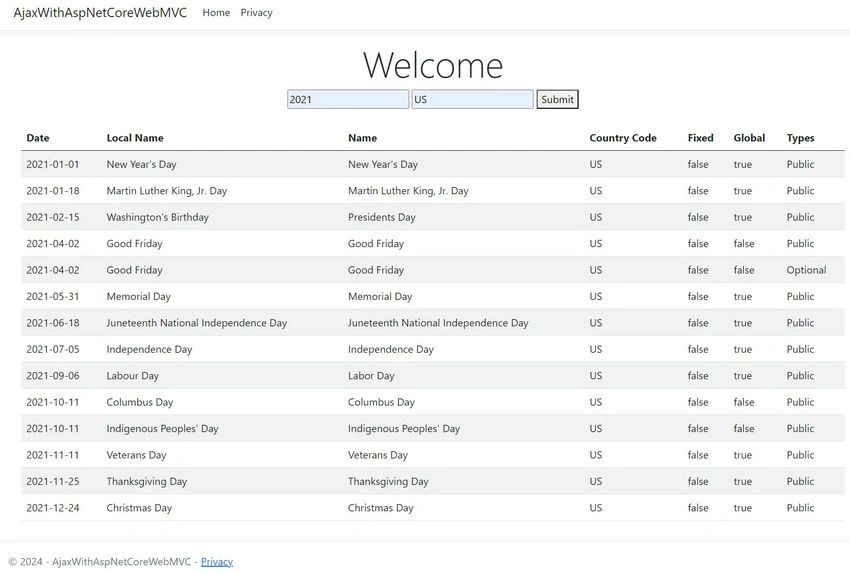
Integrating third-party APIs into your web application can greatly enhance its functionality by allowing it to access and use external data and services. In this article, we will explore how to integrate a third-party API using AJAX in an ASP.NET Core Razor Pages application. We will demonstrate this process with an example where we fetch public holidays from an API and display them in a Bootstrap table.
Prerequisites
Before we begin, ensure you have the following.
- A basic understanding of ASP.NET Core and Razor Pages.
- Basic knowledge of jQuery and AJAX.
- Visual Studio or another code editor.
Step 1. Setting up the ASP.NET Core Razor Pages project
First, create a new ASP.NET Core Razor Pages project in Visual Studio:
- Open Visual Studio and create a new project.
- Select ASP.NET Core Web Application and click Next.
- Name your project and click Create.
- Choose NET Core" and ASP.NET Core 5.0 or later.
- Select Web Application (Model-View-Controller) and click Create.
Step 2. Creating the Razor Page
Next, add a new Razor Page to your project:
- Right-click on the Pages folder and select Add > New Item
- Choose Razor Page and name it Index.
Step 3. Designing the Razor Page
Edit the Index.cshtml file to include a form for user input and a Bootstrap table to display the fetched data.
@page
@model IndexModel
@{
    ViewData["Title"] = "Home page";
}
<div class="text-center">
    <h1 class="display-4">Welcome</h1>
    <form id="inputForm">
        <input type="text" id="yearValue" name="yearValue" placeholder="Enter Year value">
        <input type="text" id="countryCode" name="countryCode" placeholder="Enter countryCode value">
        <button type="submit">Submit</button>
    </form>
</div>
<div class="container mt-4">
    <div class="row">
        <div class="col-md-12">
            <table id="holidayTable" class="table table-striped">
                <thead>
                    <tr>
                        <th>Date</th>
                        <th>Local Name</th>
                        <th>Name</th>
                        <th>Country Code</th>
                        <th>Fixed</th>
                        <th>Global</th>
                        <th>Types</th>
                    </tr>
                </thead>
                <tbody id="tableBody"></tbody>
            </table>
        </div>
    </div>
</div>
<script src="https://code.jquery.com/jquery-3.6.0.min.js"></script>
<script type="text/javascript">
    $(document).ready(function () {
        $("#inputForm").submit(function (e) {
            debugger;
            e.preventDefault();
            var yearValue = $("#yearValue").val();
            var countryCode = $("#countryCode").val();

            $.ajax({
                type: "GET",
                url: "https://date.nager.at/api/v3/publicholidays/" + yearValue + "/" + countryCode,
                success: function (data) {
                    console.log(data);
                    populateTable(data);
                },
                error: function (error) {
                    console.log(error);
                }
            });
        });
    });
    function populateTable(data) {
        debugger;
        var tableBody = $("#tableBody");
        tableBody.empty();

        data.forEach(function (holiday) {
            var row = $("<tr>");
            row.append($("<td>").text(holiday.date));
            row.append($("<td>").text(holiday.localName));
            row.append($("<td>").text(holiday.name));
            row.append($("<td>").text(holiday.countryCode));
            row.append($("<td>").text(holiday.fixed));
            row.append($("<td>").text(holiday.global));
            row.append($("<td>").text(holiday.types.join(', ')));
            tableBody.append(row);
        });
    }
</script>
Join the conversation! Your thoughts help the community grow.