

Introduction
We'll simply discuss how to integrate JSON APIs in our UWP applications. JSON stands for JavaScript Object Notation, and is famous light-weight format of data interchange. It is being highly used in applications now-a-days.
JSON stores data in a Key-Value format. For example,
- var Person = {"name": "Hussain", "age": 22};
Before moving on, I'll assume that you've installed latest version of Visual Studio and have the basic knowledge of UWP Application Development.
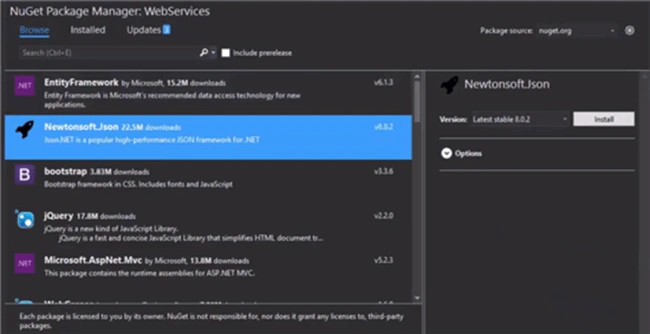
Install Newtonsoft.Json
After creating a new project, first thing you need to do is install "Newtonsoft.Json" package from your NuGet Package Manager.
Creating JSON Classes
I'm using here a free weather API offered by openweathermap.org. When I open my API in a browser, I get to see this stuff which is in JSON format.

Now, follow these steps carefully.
- Copy your JSON data from browser.
- Go to your Visual Studio project and create a new class "weatherData".
- Remove existing class from your weatherData.cs file.
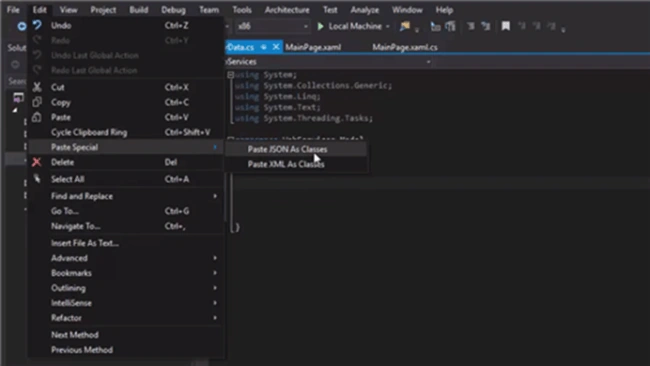
- Click on Edit > Paste Special > Paste JSON As Classes. This will convert and paste your JSON data as C# classes.
Lastly, change the weather array to a list in your RootObject class (newly pasted JSON class).
- public Weather[] weather {get; set;} //old
- public List<Weather> weather {get; set;} //new
Here, we'll use the NuGet package that we installed in our first step. But before moving onto that, let's make a simple textblock with which we'll bind some data to display our weather. Put the following code in your MainPage.xaml file.
- <TextBlock FontSize="50" Margin="20", x:Name="temperature"/>
- async void getTemperature() {
- string url = "http://api.openweathermap.org/data/2.5/weather/?q=Islamabad ,pk&APPID=853dbcea2a5b4eb495d21a3cef29d1af";
- HttpClient client = new HttpClient();
- string response = await client.GetStringAsync(url);
- var data = JsonConvert.DeserializeObject < RootObject > (response);
- temperature.Text = data.main.temp.ToString() + " 'F";
- }
Conclusion
We've created a very simple weather app by consuming a JSON API. This is very easy approach. You can try this out with many other freely available APIs.
Have any confusion or suggestion? Please let me know in comments.
Shamim UddinPosted Sep 7, 2016, 10:19 PM
Good one.. well Explained
Prasanna MuraliPosted Sep 6, 2016, 9:21 PM
Nice post...