
InfoPath?
InfoPath is based on industry-standard Extensible Markup Language (XML). Extensible Markup Language (XML) is a condensed form of Standard Generalized Markup Language (SGML) that enables developers to create customized tags that offer flexibility in organizing and presenting information. When you design a form, InfoPath creates a form template (.xsn) file, with an .xsn extension. When someone fills out a form in InfoPath, the data in that form is saved in XML format. This makes it easy for organizations to reuse the data elsewhere, perhaps in an existing process that relies on XML, such as an expense reporting process.
However, you don't need to understand XML in order to design or fill out an InfoPath form. The important point is that the form's XML format makes it easy to repurpose and share the data you collect.
In InfoPath, you can do two things:
- Design forms You can design and publish interactive, user-friendly forms in design mode. In addition to inserting standard controls into a form, InfoPath lets you insert controls that offer users the flexibility to add, remove, or hide sections of a form. The forms you design can range from simple forms for collecting data to complex forms that are part of a larger business process. You don't need programming or scripting expertise to design an effective form. However, if you know how to write script, you can use Microsoft JScript or Microsoft Visual Basic Scripting Edition (VBScript) in your forms by accessing the Microsoft Script Editor (MSE) from within design mode.
- Fill out forms Users who have InfoPath installed on their computer can fill out forms using familiar, document-like features, such as the spelling checker and rich text formatting. Depending on the form's design, users may also be able to merge data from multiple forms into a single form, or export data to other programs. Users can also save forms to their computer, work on them offline, and then submit them to the corporate network when they are reconnected. This is especially useful for people who have intermittent or limited access to network resources, such as employees who travel frequently.
Why to Use InfoPath?
InfoPath forms can be straightforward, simple forms that are used by a few people in a small workgroup For example, a 10-person sales team can use InfoPath to fill out and share information in sales call forms. These forms can be published to and accessed from a common location on the company network, such as a form library located on a Microsoft Windows SharePointServices site. Alternatively, the sales call form can be designed so that data is submitted directly to an existing database of customer information.
InfoPath forms can also be more sophisticated forms that are integrated into the existing business processes of a large organization. For example, if a company uses Microsoft BizTalk Server to manage the process of expense claim reporting, developers in the company's IT department might design an InfoPath expense claim form that submits data to BizTalk, which then routes that data to the appropriate department for approval or processing.
The following lists are some of the most important benefits of using InfoPath:
Reusable data: The data stored in an InfoPath form doesn't have to remain locked in the form forever; it can be easily separated from the form and reformatted or reused in a variety of ways. This enables form designers to integrate form data into existing business processes.
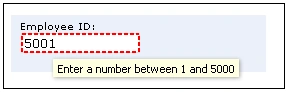
Accurate data: As a user fills out an InfoPath form, the data they enter can be checked for data validation errors. If your form is connected to a database or Web service, users won't be able to submit data until they fix these errors. This helps you ensure that the data you collect is accurate and error-free, and that it conforms to whatever standards you specify.
Offline support: Unlike Web-based forms, InfoPath forms don't have to be filled out while a user is connected to a network. Users can fill out forms offline, and then submit them later, when they are reconnected.
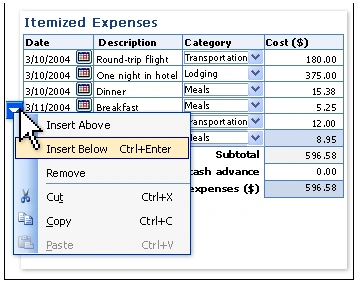
Flexible controls: In addition to standard controls, such as text boxes and list boxes, InfoPath also includes a number of new controls, such as repeating tables and optional sections these types of controls let you create a flexible form that is designed to accommodate your users. For example, in an expense report form, you can use a repeating table to allow users to enter only as many expense items as necessary.
Tablet PC support: InfoPath allows you to design forms for Tablet PC users. In particular, you can include special controls, called ink picture controls, in your form. Tablet PC users can then add handwritten words or drawings inside these controls.
SharePoint?
Microsoft Office SharePoint Portal Server 2003 connects people, teams, and knowledge across business processes. It unifies disparate information, facilitates easy collaboration on documents, projects, and other efforts, and presents specific applications and customized content based on a user's functional group and organizational role. SharePoint Portal Server works with Microsoft Windows Explorer, Microsoft Office applications, and Web browsers to help you create, manage and share content throughout your organization.
Why to Use SharePoint?
SharePoint Portal Server offers solutions in the following areas:
- Enterprise integration:
- Scales and manages portal sites for the largest organizations
- Integrates different systems into one solution
- Creates indexes for and searches multiple sources, providing access to the most relevant information
- Content management, organization, and publication:
- Provides multiple ways to organize content in meaningful ways, such as by area or topic, so that it's easier for users to find and easier to manage
- Affords greater control over content publishing; for example, you can target content to a specific audience
- Connected collaboration:
- Allows you to find and work with people, teams and sites
- Provides interactive Web-based team sites
- Provides document collaboration for the whole organization
- Personal context for users:
- Delivers one place that remembers who you are and what you do
- Empowers information workers with portal personalization
- Provides site managers with a flexible policy for personalization
Integration
Form Library
The InfoPath form library is the primary integration point between Windows SharePoint Services and InfoPath. An InfoPath form library is a special type of document library that can contain and promote any information from any XML file. All documents stored within it are based on a specified InfoPath form template.
The form library is the main distribution point for a specified InfoPath form template; it allows the form to be maintained, deployed, and shared for use by the members of an organization. The form library can display columns of information extracted from the forms. With these columns, the user can create custom views to organize the forms and their content, called property promotion.
The form library also makes the extracted information available for searching as part of the SharePoint site. A form designer can use InfoPath to publish a form template directly to the form library and to define custom views for the forms.
Scenario
You can use SharePoint Products and Technologies in combination with InfoPath to improve status reporting with a project team.
Members of a project team compose and submit project status reports on a weekly basis. The status report covers topics such as tasks, progress, issues, hours logged, and budget expended. The project manager reviews the status report submission for each team member and consolidates relevant information from all team members into a single report, which is then specified to the project sponsor.
Existing Process
Project teams use a generic status report document and store all status reports on a file share. The status report process typically operates as follows:
- Team member creates a status report The team member opens a local, possibly outdated, copy of the generic status report document. The team member types new information for the current reporting period.
- Team member submits a status report The team member posts the completed status report to a file share and sends an e-mail message to the project manager; alternately, the team member mails the status report to the project manager.
- Project manager collects individual status reports The project manager checks both the file share and e-mail periodically, looking for new status reports.
- Project manager browses status reports The project manager must open a specific report to examine its contents, even if the project manager wants only a quick summary of the status report.
- Project manager searches status reports The file share is not included in an index by a search engine, so searches against the contents of the status reports are not possible.
- Project manager creates the consolidated status report Once all reports are submitted, the project manager goes through a time-consuming, manual process to generate the consolidated status report for the project sponsor.
- Project manager submits the consolidated status report The project manager posts the completed status report to a file share and sends an e-mail message to the project sponsor; alternately, the project manager mails the status report to the project sponsor.
Improved Process
Project teams use a status report form, which is implemented using InfoPath. The form uses custom Web services to obtain information about the user and pre-populates the form. A form library on a SharePoint site hosts the form and stores all subsequent status reports. The form promotes its fields as columns to the form library, thus allowing the associated content to be summarized and searched. The improved status report process operates as follows.
- Team member creates a status report The team member visits the form library and clicks Fill Out This Form, which launches the most current release of the status report form. As the form loads, it calls Web services to obtain information related to the team member. It uses this information to pre-populate various form fields, thus allowing the team member to focus on adding new information for the current reporting period. In addition, it could be used to display only those fields that are relevant to the user. If it is necessary to carry forward information from a previous status report, the team member can use InfoPath to import the contents of that status report. To do so, users click Merge on the File menu and then navigate to the form library where they can select other reports to merge into the current report.
- Team member submits a status report The team member clicks Submit on the status report form to post the completed status report to the form library. The code behind the action ensures that the status report is posted to the correct location.
- Project manager collects status reports The project manager views the form library and clicks Alert Me to configure an alert that generates an e-mail whenever team members submit a status report to the form library.
- Project manager browses status reports The project manager views the form library and clicks select a View to choose among a number of custom views designed to present specified fields of the status report forms in custom formats. Custom views reduce the need to open a specific report to examine its contents.
- Project manager searches status reports The project manager visits the form library and searches against the specified fields of the status report forms.
- Project manager creates a consolidated status report After all reports are submitted, the project manager visits the form library and clicks Merge View to generate the consolidated status report for the project sponsor.
- Project manager submits the consolidated status report The project manager clicks Submit on the status report form to post the completed status report to the form library.
- Project sponsor collects status report The project sponsor views the form library and clicks Alert Me to configure an alert which generates an e-mail whenever the project manager submits a status report for the project to the form library.
kalu singh raoPosted Jul 6, 2016, 1:49 AM
Nice...
James SwanstonPosted Jan 5, 2010, 7:18 PM
Hi, I found the following articles relating to developing InfoPath forms and integrating SharePoint Lists, Libraries and Workflow. They have been very useful to me when developing InfoPath forms for SharePoint. SharePoint InfoPath Development Update existing SharePoint List item from an InfoPath from using a CAML query and secondary submit data connections. InfoPath CAML Date/Time format when submitting to SharePoint. This article details the requirements for Date/Time fields/data types when submitting to SharePoint using a CAML query. Submit InfoPath form to SharePoint List or Library using Content Type. This article demonstrates how to integrate an InfoPath form with a SharePoint form library, using a centralised template stored in a SharePoint document library and linked to a site Content Type. The form is set up to submit to a SharePoint form library. Using Secondary InfoPath Data Connections to retrieve data from a SharePoint List or Library. This article demonstrates how to use InfoPath data connections to connect to and retrieve SharePoint list contents (item metadata) for use in the form. This can be useful when InfoPath forms are used as a workflow component or interface, or if the form is being submitted to a library on a SharePoint site. Thanks James
raja gopalPosted Aug 28, 2008, 5:57 AM
i need to start a workflow instance only when the submit button in my infopath form is clicked. The workflow is created using sharepoint designer. thanks for your answers.
raja gopalPosted Aug 28, 2008, 5:56 AM
i need to start a workflow instance only when the submit button in my infopath form is clicked. The workflow is created using sharepoint designer. thanks for your answers.
raja gopalPosted Aug 28, 2008, 5:56 AM
i need to start a workflow instance only when the submit button in my infopath form is clicked. The workflow is created using sharepoint designer. thanks for your answers.
Uri NissaniPosted Oct 21, 2007, 1:43 PM
a nice solution to present InfoPath forms inside sharepoint sites http://www.kwizcom.com/ProductPage.asp?ProductID=541&ProductSubNodeID=542
SheetalSPosted Sep 6, 2007, 3:09 AM
Hi, I need practical steps to create status report form using InfoPath and MOSS 2007 .And also want to know how to make that form Browser Enabled so that it can be filled in and submitted even if InfoPath is not installed in the client machine. Regards, Sheetal
Rachel SteynPosted Feb 21, 2007, 2:47 AM
Hi, We want to extrat out of the Infopath form the unique identifiers of each cell on the form. The unique identifiers and the descriptions of the row and column . This we want to store on SQL tables to be used later in the BI tools. We don't want to recapture the descriptions when used in Reporting Services and Analysis services. Regards, Rachel Steyn (RSA)