

Actually I needed to implement it in my project and I encountered many difficulties in getting this feature because I hardly found any help for it and if I found something then it was just halfway useful.
I recommend you to visit this before proceeding with this article.
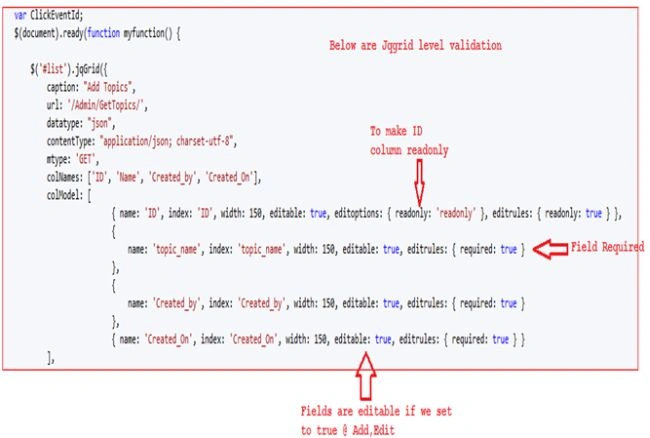
This is a second part of Integration of jqGrid with MVC4 application. This part is more about enabling add, edit, delete and refresh as well as a little validation using builtin validation keywords.
- Enabling jqGrid add, edit, delete and refresh
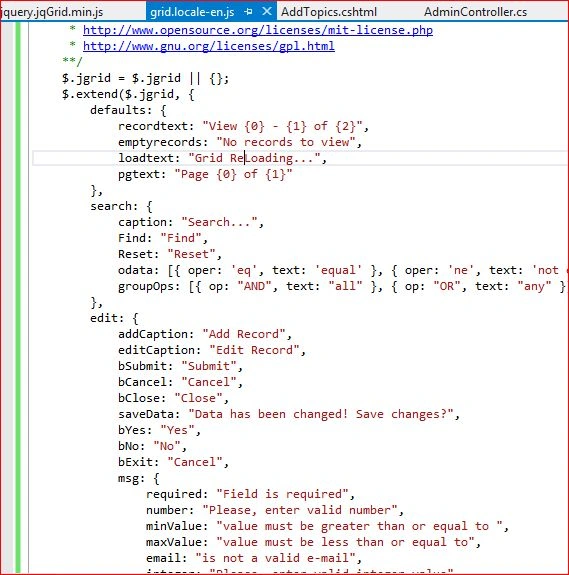
- Validation keywords
To learn more about MVC kindly go to C# Corner MVC Section or My Blog.
I've developed this sample application using Visual Studio 2012 and used Entity Framework to retrieve information from the database.
Step 1 : Enabling jqGrid add, edit, delete and refresh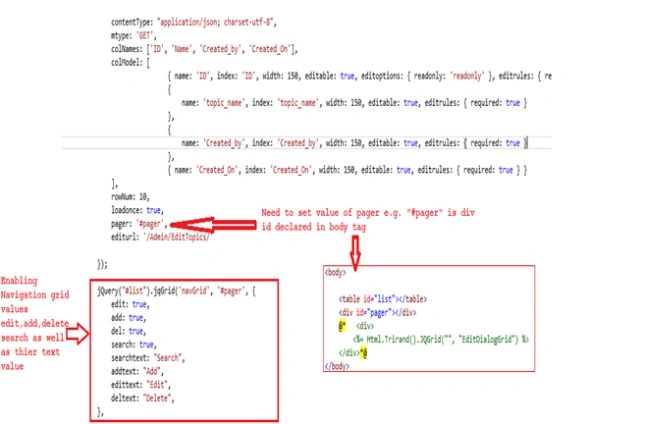
After enabling values we should run the application and press F5. Kindly see the following image.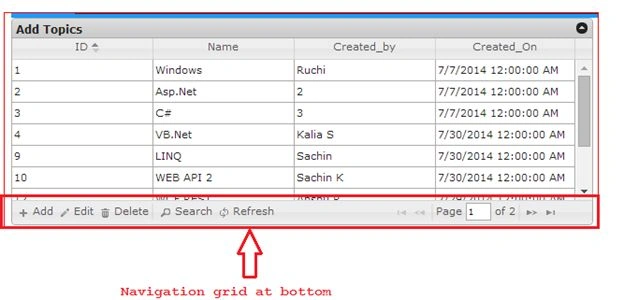

I have pasted this URL into a browser http://localhost:26158/Admin to get the above result.
Here is the complete code of AddTopic.cshtml, though I will share the AdminController class file and AddTopic.cshtml file with you as a sample so that you could add it into your solution.
Note: the code segment of jqGrid in the AddTopic.cshtml view is as shown below:
- @{
- ViewBag.Title = "ADDTOPICS";
- Layout = "~/Views/Shared/_Layout.cshtml";
- }
- <!DOCTYPE html>
- <html>
- <head>
- <meta name="viewport" content="width=device-width" />
- <title>AddTopics</title>
- <script src="~/Scripts/jquery.jqGrid.js"></script>
- <script src="~/Scripts/jquery.jqGrid.min.js"></script>
- <script src="~/Scripts/i18n/grid.locale-en.js"></script>
- <link href="~/Content/jquery.jqGrid/ui.jqgrid.css" rel="stylesheet" />
- <link href="~/Content/themes/base/jquery-ui.css" rel="stylesheet" />
- <!-- The jqGrid client-side javascript -->
- @* <script type="text/javascript" src="http://www.trirand.net/aspnetmvc/Scripts/trirand/jquery.jqGrid.min.js"></script>*@
- <script type="text/javascript">
- var ClickEventId;
- $(document).ready(function myfunction() {
- $('#list').jqGrid({
- caption: "Add Topics",
- url: '/Admin/GetTopics/',
- datatype: "json",
- contentType: "application/json; charset-utf-8",
- mtype: 'GET',
- colNames: ['ID', 'Name', 'Created_by', 'Created_On'],
- colModel: [
- { name: 'ID', index: 'ID', width: 150, editable: true, editoptions: { readonly: 'readonly' }, editrules: { readonly: true } },
- {
- name: 'topic_name', index: 'topic_name', width: 150, editable: true, editrules: { required: true }
- },
- {
- name: 'Created_by', index: 'Created_by', width: 150, editable: true, editrules: { required: true }
- },
- { name: 'Created_On', index: 'Created_On', width: 150, editable: true, editrules: { required: true } }
- ],
- rowNum: 10,
- loadonce: true,
- pager: '#pager',
- editurl: '/Admin/EditTopics/'
- });
- jQuery("#list").jqGrid('navGrid', '#pager', {
- edit: true,
- add: true,
- del: true,
- search: true,
- refresh: true,
- searchtext: "Search",
- addtext: "Add",
- edittext: "Edit",
- deltext: "Delete",
- refreshtext:"Refresh"
- }
- );
- $('.ui-pg-button').on('click', function (ev) {
- ClickEventId = this.id;
- });
- });
- </script>
- </head>
- <body>
- <table id="list"></table>
- <div id="pager"></div>
- @*<div>
- <%= Html.Trirand().JQGrid("", "EditDialogGrid") %>
- </div>*@
- </body>
- </html>
Join the conversation! Your thoughts help the community grow.