

Here we deploy 2 asp.net core web api applications, named serviceone & servicetwo, inside 2 different local docker containers. Then serviceone will call sericetwo to get it's data.
Tools and Environments Needed
- Visual Studio 2019
- Local Docker
Please ref. this article, asp.net core web api in docker , to know how to create asp.net core web api applications running in docker locally. Here we create 2 asp.net core webapi services i.e. serviceone & servicetwo. You make sure that your local docker service is running.
Configure Target Service (servicetwo)
Service with a name servicetwo is providing data. So we can call it a target service.Below code showing the exposed API(Weather) of servicetwo, which is returning an Array of type WeatherForecast. Please refer the uploaded project to see this code.
- [ApiController]
- [Route("api/[controller]/[action]")]
- public class WeatherForecastController : ControllerBase
- {
- private static readonly string[] Summaries = new[]
- {
- "Freezing", "Bracing", "Chilly", "Cool", "Mild", "Warm", "Balmy", "Hot", "Sweltering", "Scorching"
- };
- private readonly ILogger<WeatherForecastController> _logger;
- public WeatherForecastController(ILogger<WeatherForecastController> logger)
- {
- _logger = logger;
- }
- [HttpGet]
- public IEnumerable<WeatherForecast> Weather()
- {
- var rng = new Random();
- return Enumerable.Range(1, 5).Select(index => new WeatherForecast
- {
- Date = DateTime.Now.AddDays(index),
- TemperatureC = rng.Next(-20, 55),
- Summary = Summaries[rng.Next(Summaries.Length)]
- })
- .ToArray();
- }
- }
Now run this servicetwo selecting docker as host locally.Please confirm the output like below. Please understand that this web page has been launched from a docker container and so this local service (servicetwo) with its' API has been hosted in a local docker container. You need to find that container IP for any communication with this specific API. You can't use the browser address displaying here for internal service communication, if using containers.
Now servicetwo is running and you need to find the IP address of the container under which servicetwo is running. You can't use the URL displayed in above browser for internal service communication, if using containers. Run below docker commands to get the container IP.
- Run "docker ps" to see all local docker containers running and from there identify "servicetwo" container to get it's container id. You might noticed that, "8991ea0996fd" is the container id of servicetwo.
- Run "docker inspect -f "{{range .NetworkSettings.Networks}}{{.IPAddress}}{{end}}" 8991ea0996fd" to see the IP of the servicetwo container. Usually "docker inspect" command will return load of information, but we are interested only in IP. That filter has been mentioned with a paramter "-f"

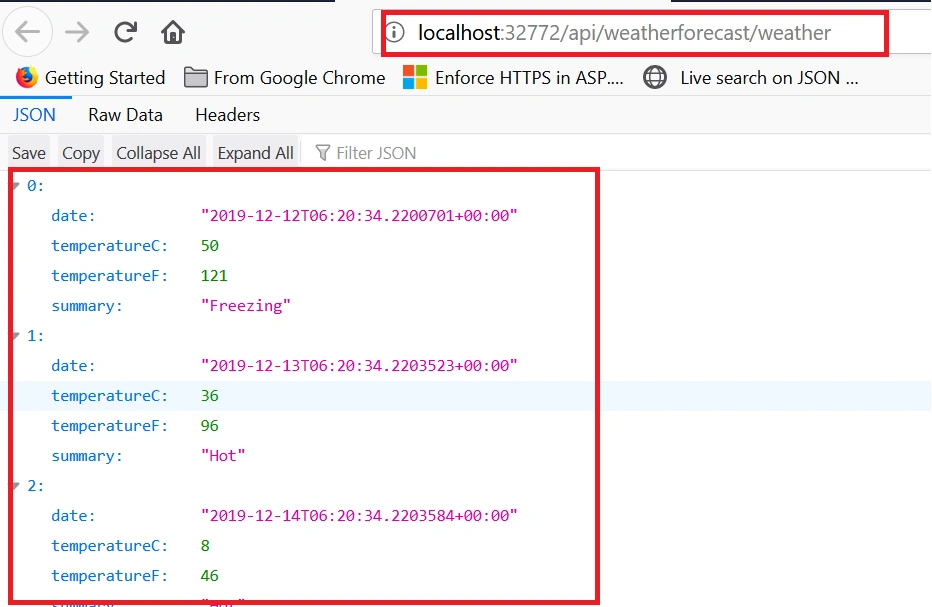

Now our target service, servicetwo, is running and we know it's container IP as well. Time to write code for source service i.e. serviceone, to communicate and pull data from servicetwo
Configure SourceService (serviceone)
Service with a name serviceone is pulling data from servicetwo.Below code showing the API is calliing a method CallServiceTwo(), which internally calling target service i.e. servicetwo. The line "BaseAddress = new Uri("http://172.17.0.3/api/")" is the key, where we used the container IP of the servicetwo for the communication. Remaining code sections all as like a normal HttpClient call. Please refer the uploaded project to see this code.
- [ApiController]
- [Route("[controller]")]
- public class WeatherForecastController : ControllerBase
- {
- private readonly ILogger<WeatherForecastController> _logger;
- public WeatherForecastController(ILogger<WeatherForecastController> logger)
- {
- _logger = logger;
- }
- [HttpGet]
- public IEnumerable<WeatherForecast> Get()
- {
- return CallServiceTwo().ToArray();
- }
- private static IEnumerable<WeatherForecast> CallServiceTwo()
- {
- IEnumerable<WeatherForecast> weatherData = new List<WeatherForecast>();
- try
- {
- using var client = new HttpClient
- {
- BaseAddress = new Uri("http://172.17.0.3/api/")
- };
- client.DefaultRequestHeaders.Accept.Clear();
- client.DefaultRequestHeaders.Accept.Add(new MediaTypeWithQualityHeaderValue("application/json"));
- var response = client.GetAsync("weatherforecast/weather").Result;
- if (response.IsSuccessStatusCode)
- {
- var jsonTask = response.Content.ReadAsAsync<IEnumerable<WeatherForecast>>();
- jsonTask.Wait();
- weatherData = jsonTask.Result; ;
- }
- }
- catch (Exception ex)
- {
- Console.WriteLine(ex.Message);
- }
- return weatherData;
- }
- }
Now you run serviceone and see below debug point to understand the runtime execution and values returning from servicetwo.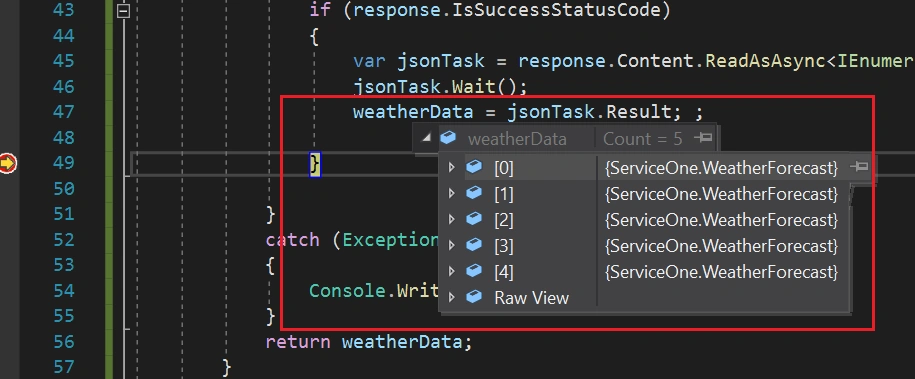 Last, confirm serviceone UI also as like below.
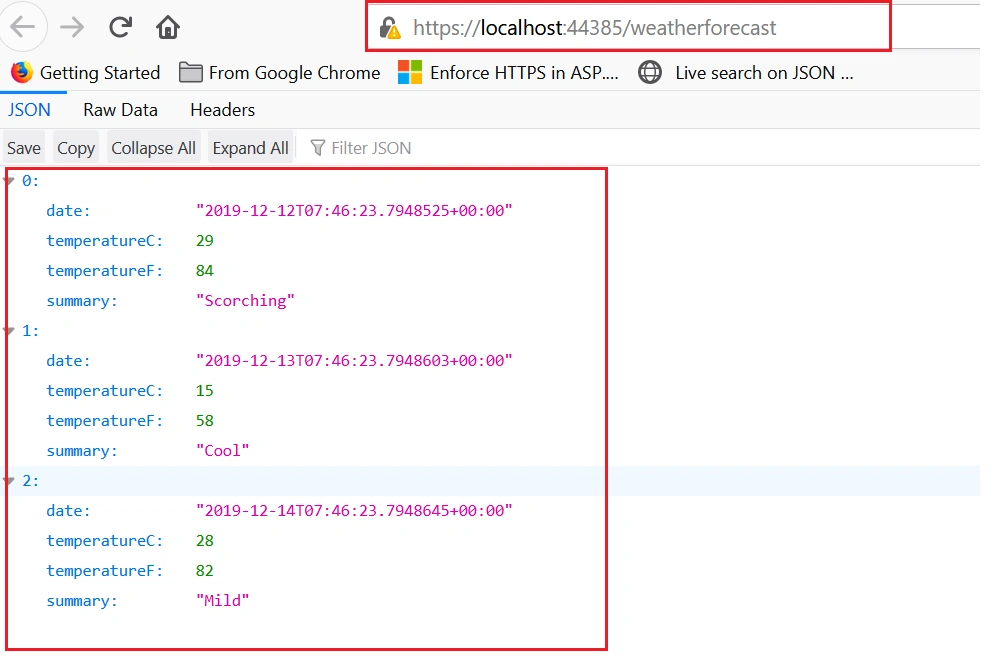 Here overall idea is to understand the basic container level communication using IP, if you deploy services across different containers. This is a practical scenario if you are deploying Microservices in an Azure Kubernetes Service host. In real world, using IP to communicate across containers may not be a proper choice and we need specific DNS to identify them. I will explain that approach in another article.
ManikanthPosted Jul 16, 2020, 2:57 AM
Thanks for the Article Jaish ji, comprehensive and pretty much useful.
Sourav Kumar DasPosted Dec 15, 2019, 11:01 PM
Nice and useful article Sir.
Ashutosh GuptaPosted Dec 12, 2019, 12:39 PM
WeatherForecastController is default controller when you create new web API in .net core, be careful doing this, this could be a case of paradigm from Microsoft copy right. you could update your article with new controller doing anything other than weather so that it does violate rule of copy right. thank you..
Gaurav GahlotPosted Dec 12, 2019, 4:19 AM
I really appreciate your efforts in writing about Docker. And, I'm not trying to be a Docker expert here. However, it's really difficult for me to visualize a scenario where your approach will fit in. You have hard-coded the container IP in your code. Not good. Also, since you are not spinning up containers in a specific network, both of them are launched in the bridge network. Therefore, you can simply create a "link" in the consumer container to the one providing data. As a result, you don't need to worry if the IP for your container changes as it restarts.
Chittaranjan SwainPosted Dec 11, 2019, 10:54 PM
Nice article.
Rushi MehtaPosted Dec 11, 2019, 3:55 AM
Good articles to learn docker