

MongoDB is a popular NoSQL database that makes it a great backend for Web APIs that lend themselves towards a document store rather than a relational store. In this article we show how to use MongoDB with the ASP.NET Web API to build an ApiController with support for HTTP GET, PUT, POST and DELETE.
This sample project gives an idea of how to access MongoDB using .Net WebAPI.
First of all setup the environment in your local machine:
First create a Web API using Visual Studio.
Add one Class Library project to implement the MongoDB interaction.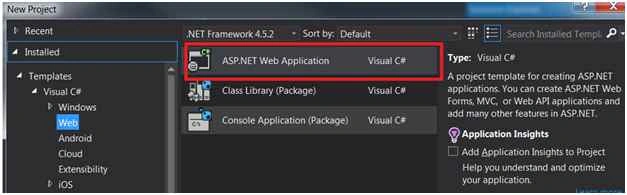
Add MongoDB driver packages using Nuget Packages.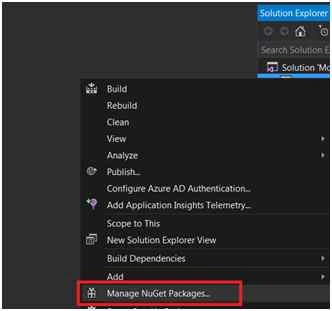
Now you are able to see the reference DLL related to MongoDB.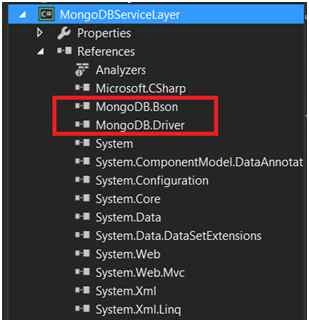
- Create one class MongoHelper.
This class has a connection created to MongoDB.- public class MongoHelper<T> where T : class
- {
- public MongoCollection<T> Collection { get; private set; }
- public MongoHelper()
- {
- var con = new MongoConnectionStringBuilder("server=127.0.0.1;database=galary");
- var server = MongoServer.Create(con);
- var db = server.GetDatabase(con.DatabaseName);
- Collection = db.GetCollection<T>(typeof(T).Name.ToLower());
- }
- }
- Create one class MobileService.
This class has the actual CRUD logic implementation to interact with MongoDB.
- public class MobileService
- {
- private readonly MongoHelper<Mobile> _mob;
- public MobileService()
- {
- _mob = new MongoHelper<Mobile>();
- }
- public void Create(Mobile mob)
- {
- _mob.Collection.Save(mob);
- }
- public void Edit(Mobile mob)
- {
- _mob.Collection.Update(
- Query.EQ("_id", mob.MobileID),
- Update.Set("Name", mob.Name)
- .Set("Details", mob.Details));
- }
- public void Delete(ObjectId postId)
- {
- _mob.Collection.Remove(Query.EQ("_id", postId));
- }
- public IList<Mobile> GetMobiles()
- {
- return _mob.Collection.FindAll().ToList();
- }
- public Mobile GetMobile(ObjectId id)
- {
- var mob = _mob.Collection.Find(Query.EQ("_id", id)).Single();
- return mob;
- }
- }
- The class Mobile is the model for the data interaction.
- public class Mobile
- {
- [BsonId]
- public Guid ID { get; set; }
- public int MobileID { get; set; }
- public string Name { get; set; }
- public string Details{ get; set; }
- }
- Using the following code you can add a new item.
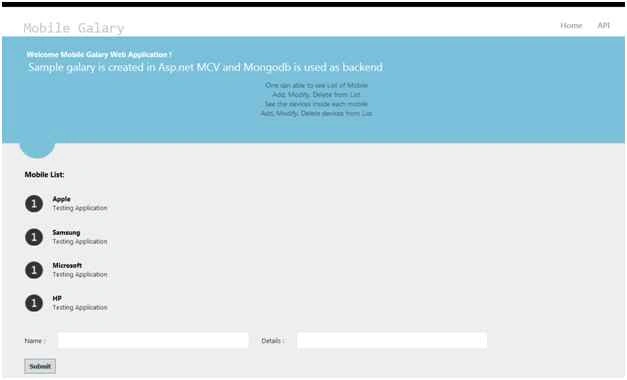
- serv.Create(new Mobile { ID= Guid.NewGuid(), MobileID = 1, Name = "Apple", Details = "Testing Application" });
- Using this code you can retrieve all the data records from MongoDB.
- var datalst = serv.GetMobiles();
For testing the application first start the MongoDB service on your local system.
Please use the following procedure to start MongoDB.
Go to the command prompt:
C:\MongoDB\bin>mongod and press Enter.
Then MongoDB service is started.
Please find the following screenshot.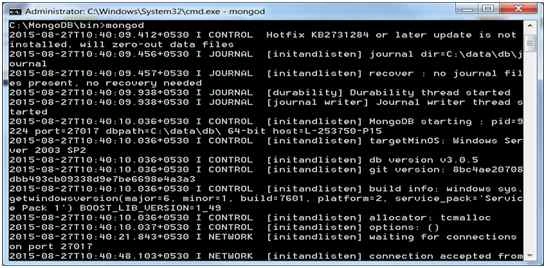
Now call the MongoDB code from the Controller as in the following:
- public ActionResult Index()
- {
- MobileService serv = new MobileService();
- var datalst = serv.GetMobiles();
- TempData["recordcount"] = datalst.Count;
- return View(datalst);
- }
MN AmbaliyaPosted Jul 12, 2018, 12:23 AM
How can I create complex schema in MongoDB using nested class in .NET
Martin Eduardo Martinez DimasPosted Aug 11, 2016, 12:45 PM
How can I valdiate user. Is there something like Identity for mongo and Web api2?
Sonali MisraPosted May 26, 2016, 4:05 AM
I didn't get where to write the code for adding an item and retrieve the items from mongodb.
Amit PrabhuPosted Sep 1, 2015, 5:20 AM
Thanks
Ratnesh SinghPosted Aug 31, 2015, 9:01 AM
nice
Sibeesh VenuPosted Aug 30, 2015, 1:14 AM
Nice Share
Santhakumar MunuswamyPosted Aug 29, 2015, 4:36 AM
Good article. Thanks for sharing
Mohammed IbrahimPosted Aug 29, 2015, 1:49 AM
nice information
Ratnesh SinghPosted Aug 28, 2015, 11:48 PM
Nice...
Gopi ChandPosted Aug 28, 2015, 11:39 PM
Nice one.....good start up..welcome Mr.Amit :)
Karthikeyan KPosted Aug 28, 2015, 9:09 PM
Good one sir..Thanks for sharing
Gowtham KPosted Aug 28, 2015, 8:59 PM
Good one, Thanks for sharing
Pankaj Kumar ChoudharyPosted Aug 28, 2015, 8:14 PM
nice explain sir................