
The Web has had worldwide reach since its inception. Users have different cultural expectations and speak different languages. In this Quickstart you will learn how powerful new ASP.NET v2.0 features make it easier to adapt your Web application to different countries, regions, and markets.
In this article, we will discuss the internationalization of web application using ASP.NET 2.0
Culture-sensitive Formatting
Setting a Preferred Language in Internet Explorer
HTTP allows browsers to send a list of preferred languages to the Web server using the Accept-Language HTTP request header field. In Internet Explorer the list can be configured like this:
- Select the "Tools | Internet Options" command.
- Select the "Languages" button.
- In the dialog that is shown, click on the "Add" button to add a new language and select a new culture. Click "OK".
- Ensure your preferred language is at the top of the list. Select that language and click "Move Up". Click "OK" to exit the dialog.
- Refresh the page using F5.
Initially the list is preconfigured to the language of the Internet Explorer user interface, which makes sense as typically users want to see Web content in the language of the computer they are working on. Other browsers have similar features to configure this header field.
Auto-detecting the browser language for culture-sensitive formatting:
The language list can be used to determine which culture the user most likely prefers for formatting of numbers, dates and times. ASP.NET v2.0 now provides functionality to easily detect the first language in the list and use this for formatting:
<%@ Page Culture = "auto:en-US" %>
If the first language in the list matches the name of a specific culture supported by the .NET Framework, ASP.NET will set the CurrentCulture of the running thread to this culture. This happens early in the page life cycle so that all subsequent culture-sensitive formatting will be done with this culture.
If the first language in the list matches the name of a neutral culture supported by the .NET Framework, ASP.NET will try to use the function CultureInfo.CreateSpecificCulture() to create a specific culture for the purpose of formatting. For example, this would map fr into the culture for French (France). However, this determination could be inappropriate for somebody in the French-speaking part of Canada, which is why an application should provide the means to configure both culture and language
If the first language in the list isn't a culture supported by the .NET Framework, ASP.NET will fall back to the culture specified after the colon in the Culture declaration. This would be en-US - English (United States) in the example above.
This auto-detection functionality can be used in all places where Culture can be specified declaratively, such as in the globalization section of web.config. The auto-detection works the same for UICulture, which is used for localization and is explained later.
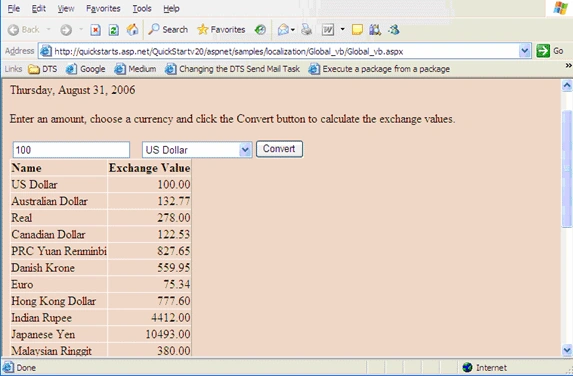
The following sample demonstrates a Currency Exchange Calculator that reacts to different language settings in the browser (see above for information how to change this). It will display the date in the format appropriate for the first language in the list and also uses the correct decimal separator for the exchange values. Furthermore, this decimal separator can be used for the entry of the value to be converted.
CODE:
XML:
<?xml version="1.0" encoding="UTF-8"?>
<ExchangeRates>
<Currency Region="US" Rate="1"/>
<Currency Region="AU" Rate="1.32766861391397"/>
<Currency Region="BR" Rate="2.78"/>
<Currency Region="CA" Rate="1.2253"/>
<Currency Region="CN" Rate="8.2765"/>
<Currency Region="DK" Rate="5.5995"/>
<Currency Region="DE" Rate="0.753352418261263"/>
<Currency Region="HK" Rate="7.776"/>
<Currency Region="IN" Rate="44.12"/>
<Currency Region="JP" Rate="104.93"/>
<Currency Region="MY" Rate="3.8"/>
<Currency Region="MX" Rate="11.29"/>
<Currency Region="NZ" Rate="1.41242937853107"/>
<Currency Region="NO" Rate="6.2225"/>
<Currency Region="SG" Rate="1.6495"/>
<Currency Region="ZA" Rate="5.82"/>
<Currency Region="KR" Rate="1055"/>
<Currency Region="SE" Rate="6.7723"/>
<Currency Region="CH" Rate="1.1545"/>
<Currency Region="TW" Rate="32.16"/>
<Currency Region="TH" Rate="39.67"/>
<Currency Region="GB" Rate="0.521240552514986"/>
<Currency Region="VE" Rate="1915.2"/>
</ExchangeRates>
Global_Vb.aspx:
<%@ Page Language="VB" AutoEventWireup="true" Culture="auto:en-US" %>
<%@ Import Namespace="System.Globalization" %>
<%@ Import Namespace="System.Xml" %>
<%@ Import Namespace="System.Data" %>
<!DOCTYPE html PUBLIC "-//W3C//DTD XHTML 1.0 Transitional//EN" "http://www.w3.org/TR/xhtml1/DTD/xhtml1-transitional.dtd">
<html xmlns="http://www.w3.org/1999/xhtml" >
<head runat="server">
<title>Currency Exchange Calculator</title>
</head>
<script runat="server">
Private Sub Page_Load(ByVal sender As Object, ByVal e As EventArgs)
If (Not IsPostBack Or CStr(Session("CultureName")) <> CultureInfo.CurrentCulture.Name) Then
DateTimePlaceholder.Text = DateTime.Now.ToLongDateString()
' Populate the drop-down with currency names
' If possible set the default selected currency to the currency of the CurrentCulture
Dim UserRegion As New RegionInfo(CultureInfo.CurrentCulture.Name)
Dim TargetRegion As RegionInfo
Dim dir As String = Server.MapPath("")
Dim ExchangeRateTextReader As New XmlTextReader(Server.MapPath("~/ExchangeRates.xml"))
Join the conversation! Your thoughts help the community grow.