

Introduction to Interceptors
Interceptors are an experimental feature in preview mode with C# 12. An interceptor is a method that allows you to substitute a call to an interceptable method, with a call to itself at compile time. In this article, I present how to create and use an interceptor.
Setting up Interceptors in .NET 8
For demonstration purposes, I created a console application with .NET 8 and opened it using the Visual Studio 2022 Preview version. To use this feature, you also need to add the following configuration in the PropertyGroup in your csproj (and replace the DotNet8Examples with your application’s namespace).
<InterceptorsPreviewNamespaces>$(InterceptorsPreviewNamespaces);DotNet8Examples</InterceptorsPreviewNamespaces>
Creating InterceptsLocation attribute
Then it would help if you created the InterceptsLocation attribute. This can be done in a separate file, or in the same file where you have the code that you want to intercept. Note that if you add in a separate file, the namespace must be System.Runtime.CompilerServices, and not the namespace of your application. Create the attribute like this:
namespace System.Runtime.CompilerServices
{
    [AttributeUsage(AttributeTargets.Method, AllowMultiple = true)]
    public sealed class InterceptsLocationAttribute : Attribute
    {
        public InterceptsLocationAttribute(string filePath, int line, int character)
        {
            // Constructor logic here
        }
    }
}
This attribute contains three parameters. I will explain how to use them a bit later in this article, but let me explain what are they.
- The filePath is the path of the file you want to intercept.
- The line is the code line you want to intercept.
- The character is the character of your code that you want to intercept.
Creating the Intercept Class
I also created a class with three methods that print a value in the console, to use as an example.
public class InterceptableExample
{
    // This method will not be intercepted;
    public void PrintValue1()
    {
        Console.WriteLine("Test 1");
    }
    // This method will be intercepted;
    public void PrintValue2()
    {
        Console.WriteLine("Test 2");
    }
    // This method will not be intercepted;
    public void PrintValue3()
    {
        Console.WriteLine("Test 3");
    }
}
On the Program.cs file, I create an instance of this class, and I create a call to each of these three methods. The output can be seen below.
var interceptableExample = new InterceptableExample();
interceptableExample.PrintValue1();
interceptableExample.PrintValue2();
interceptableExample.PrintValue3();
// Output:
Test 1
Test 2
Test 3
Now, let’s create the intercept class. This class must follow these rules.
- Must be a static class.
- Must contain an extension method of the class that we want to intercept.
- Must have the InterceptsLocation attribute, with the values for the file path we want to intercept as well as the line number and the character number.
For demonstration purposes, I created a class that contains a method that will print the message Interceptor is here.
public static class Interceptors
{
    [InterceptsLocation(
        filePath: @"C:\Users\Henrique.Domareski\projects\github\DotNet8Examples\DotNet8Examples\Program.cs",
        line: 117,
        character: 22)]
    public static void InterceptMethodPrintValue2(this InterceptableExample example)
    {
        Console.WriteLine("Interceptor is here!");
    }
}
- On line 1, there is the class declaration.
- On lines 3 up to 6, there is the InterceptsLocation attribute.
- On lines 7 up to 10, there is the extension method for the class we want to intercept.
In this example, the method PrintValue2 from the InterceptableExample class is going to be intercepted, and instead of executing the method PrintValue2, the InterceptMethodPrintValue2 method will be executed.
For that, the filePath must be the full path of the Program.cs file (which is the file on which this method is being called). You can get this information by right-clicking into the class you want to intercept and selecting the “Copy Full Path” option:
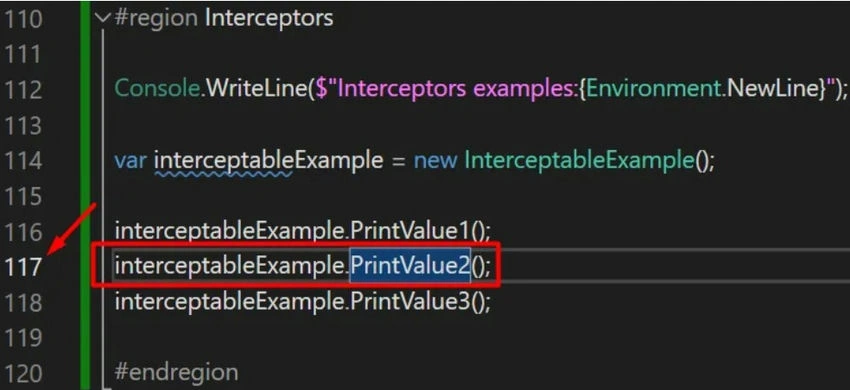
For the line parameter value, you need to inform the code line of the method you want to intercept. In this example, the method PrintValue2 will be intercepted, and the call to this method it’s on line 117.
Join the conversation! Your thoughts help the community grow.