

Introduction to JSON
- Introduction to JSON
- JSON syntax
- Parsing and Generating JSON files
- JSON data storage application
So let us start with the introduction part.
JSON (Javascript Object Notation) is a lightweight data-interchange format.
Why use it
What is JSON?
- Same syntax as JavaScript objects.
- Easy for humans to read and write.
- Language independent.
- It can be used to store application data.
How can we create /read JSON file?
- JavaScriptSerializer (inbuilt in dotnet framework).
- JSON.NET third party tool (download from Nuget Package Manager).
So let us look at JSON:
{ } culry braces represent object
key – value pair
JSON Syntax
So what exactly makes up a JSON file:
- Values
- Objects
- Arrays
- Putting it all together
JSON Values can be
- Strings ( in double quotes)
- Numbers (integer or floating point)
- Boolean ( true or false )
- Objects ( in curly brackets)
- Array( in square brackets)
- Null
JSON Object
- Name/value pairs using colons
- Enclose by curly braces
- Pairs separated by commas
Example
- {
- name: values,
- name2: values2
- }
So here is a very simple example curly braces representing json object, name values pair separated by comma:
- {
- "Name" :"Ravi",
- "City": "Varanasi",
- }
More complex example
- {
- "countryId": 1,
- "countryName" : "India",
- "state" : ["uttar pradesh","Mumbai","Bangalore"]
- }
JSON Arrays
- Values enclosed by brackets
- Separated by commas [item,item,item,item]
Example
["uttar pradesh","Mumbai","Bangalore"]
Indicated by bracket we have JSON arrays and in this example its an array of three string and each string separated by commas:
[1,2,3,4] its array of number
Complex array
- [
- {
- "AlbumId": 3,
- "GenreId": 1,
- "ArtistId": 4,
- },
- {
- "AlbumId": 5,
- "GenreId": 1,
- "ArtistId": 77,
- }]
- JSON values can also be objects or arrays
- JSON objects and arrays can be nested
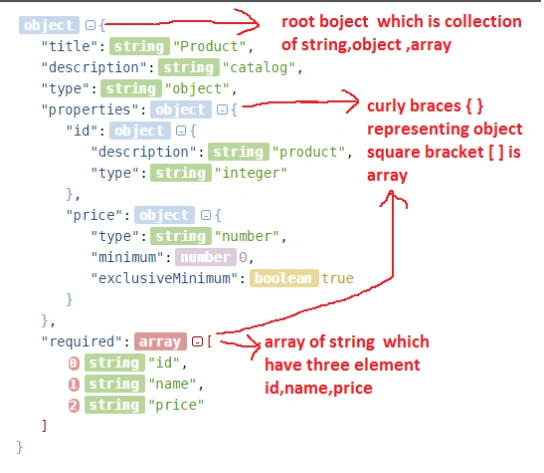
Points of Interest
- In this article, I have touched the very basics of JSON.
- JSON is very useful in client-server communication where network bandwidth is very limited.
Rashmita ShresthaPosted Apr 11, 2017, 2:45 AM
Very informative...
Asfend YarPosted Mar 6, 2016, 2:06 PM
nice
Ravi PatelPosted Dec 11, 2015, 1:16 AM
Thanks Neelam
Neelam PrajapatiPosted Dec 11, 2015, 1:01 AM
good one
Ravi PatelPosted Oct 25, 2015, 11:38 AM
thanks!
Santhakumar MunuswamyPosted Oct 25, 2015, 11:11 AM
Good one
Ravi PatelPosted Oct 25, 2015, 8:08 AM
thanks!
Gowtham KPosted Oct 25, 2015, 3:08 AM
Good One
NitinPosted Oct 25, 2015, 2:14 AM
Nice
Rupesh KahanePosted Oct 24, 2015, 2:28 PM
Great ...
Ravi PatelPosted Oct 24, 2015, 1:40 PM
thanks Mukesh for appreciation
Mukesh KumarPosted Oct 24, 2015, 1:00 PM
Good Job
Ravi PatelPosted Oct 24, 2015, 12:58 PM
thanks Nilesh
Nilesh JadavPosted Oct 24, 2015, 12:44 PM
Good Share sir !