

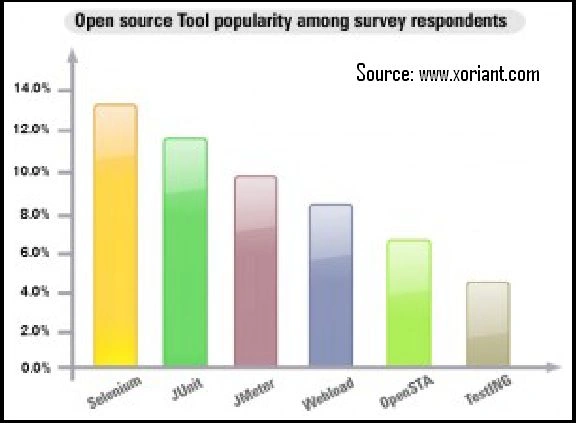
Selenium is the best option for automated testing of Websites these days. This tool is very popular and it is the first choice of organizations for automating the testing of Web-based applications for the GUI as well as the functionality. The Selenium popularity is displayed in the following graph:
To install the IDE
For the Selenium tool using Firefox first download the IDE from the SeleniumHQ download page.
While installing, the Firefox browser will protect you from installing add-ons from unwanted locations by showing you a message in a yellow bar across the top of the web page; click the "Allow" button so that the Selenium tool can be easily installed.

When we install the Selenium tool into Firefox a popup window will display to install the Selenium IDE.

Click on the Install Now button; Firefox will display a progress bar and when the Firefox finishes the download it displays as in the following image:

After installing the Selenium IDE restart the browser. Click on the "Tools" link in the header of the browser and check for the Selenium IDE as shown in the following image:


Join the conversation! Your thoughts help the community grow.