

Introduction
This article explains the self-hosting of ASP.NET SignalR. Generally, an ASP.NET SignalR application is hosted in the IIS, but you can also self-host your application using the self-host library. OWIN is the base of the SignalR library. You also know that OWIN is used to do a decoupled architecture between the web server and web application, from this great feature OWIN is the ideal feature to self-host a SignalR application.
The following are reasons to not host in IIS.
- The availability of IIS. You can also use an existing server.
- The IIS performance.
- The functionality of SignalR is to be added to an existing application that runs on a Windows Service or any other process.
Let's proceed with the following sections.
- Self Hosting Application
- Accessing Hosting Application
Self Hosting Application
In this section, we will create a console application for self-hosting. Use the following procedure.
Step 1. Open Visual Studio and create a console application.
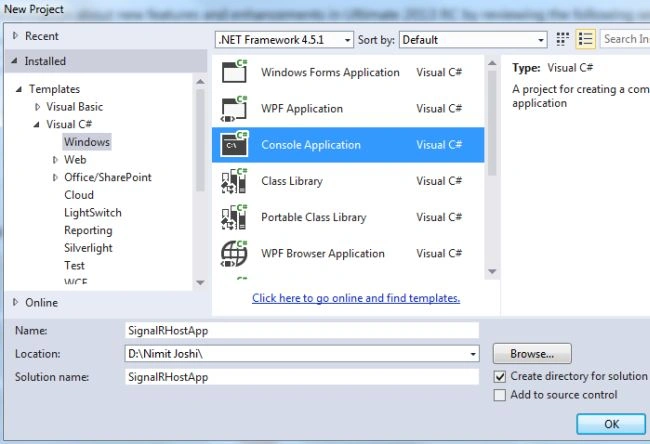
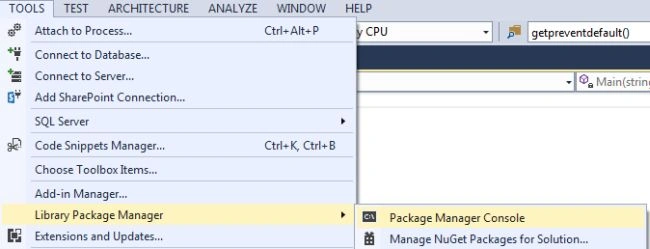
Step 2. Open the Package Manager Console from the Tools/Library Package Manager.
Step 3. Write the following command.
install-package Microsoft.AspNet.SignalR.SelfHost -pre.
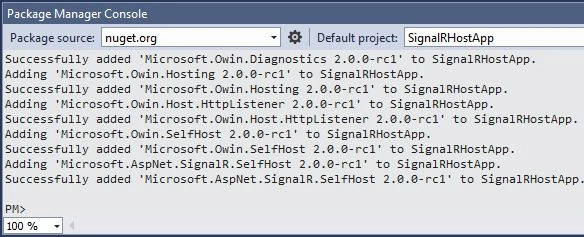
Step 4. Now paste the following code into the Program.cs file.
using System;
using Microsoft.AspNet.SignalR;
using Microsoft.Owin.Hosting;
using Owin;

namespace SignalRHostApp
{
    class Program
    {
        static void Main(string[] args)
        {
            string url = "http://localhost:6118";
            using (WebApp.Start<Startup>(url))
            {
                Console.WriteLine("The Server URL is: {0}", url);
                Console.ReadLine();
            }
        }
    }

    class Startup
    {
        public void Configuration(IAppBuilder MyApp)
        {
            MyApp.MapSignalR();
        }
    }

    public class ChatHub : Hub
    {
        public void LetsChat(string Cl_Name, string Cl_Message)
        {
            Clients.All.NewMessage(Cl_Name, Cl_Message);
        }
    }
}
Step 5. Run your application.

Step 6. Suppose you get an exception named System.Reflection.TargetInvocationException that was unhandled then it might be possible that you did not open Visual Studio as an Administrator.
Step 7. Stop the execution.
Join the conversation! Your thoughts help the community grow.