

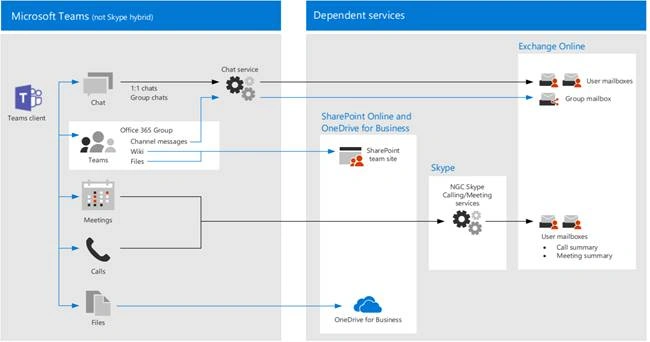
Microsoft has introduced “Teams” as a Service in Office 365 suite. It is mixed with multiple tools to give complete integration tools for employees. Teams uses Office 365 group, Microsoft Graph, and Azure AD. Using teams, you can create a new team for internal as well as external users. When a new team is created in Teams, you will get the following.
- Office365 group
- SharePoint Online site with document library to store publicly access files
- Exchange Online shared mailbox & Calendar
- A OneNote notebook
Teams has a platform in the workspace for chat, meetings, notes, attachments. Currently the biggest competitor for teams is Slack, HeySpace, Wire, Winio, and ZohoConnect. A few of them are free for use and a few of them are paid versions. The most popular is Slack due to its simple to use nature.
Microsoft has tried to simplify the communication between employees and external users by using its own product of office suite tools and opened external connectors for all kinds of organizations who are using existing tools.
Difference between Microsoft Skype & Teams
Using teams along with Skype needs user-readiness, as it is disruptive for users.
Below are a few differences or limitations:
|
Skype
|
Teams
|
|
It is used as a chat application
|
It is used as a chat application
|
|
It is used for calling & meeting purposes
|
It is used for calling & meeting purposes
|
|
It shows a user presence indicator
|
It shows a user presence indicator
|
|
It uses Skype for business clients
|
It uses Teams client
|
|
File transfer in private chats, or file attachment in group chats, from Teams to Skype for Business is not supported
|
File transfer in private chats, or file attachment in group chats, from Skype to Teams is not supported.
|
|
Screen Sharing with Teams is not supported
|
Screen sharing with Skype for business not supported.
|
|
Group chats are only supported for Skype users.
|
Group chat is only supported in Teams users.
|
Sundaram SubramanianPosted Oct 3, 2019, 5:23 PM
Much Informative.
Abhishek MishraPosted Sep 2, 2019, 12:05 PM
Awesome. Good one.
Anuranjan SrivastavPosted Jul 15, 2019, 9:41 AM
Very informative.Thanks for sharing..
Sagar PardeshiPosted Jul 14, 2019, 8:31 AM
Good one explore in detail keep it up