Introduction
Microsoft has launched Visual Studio 2013 Preview. It includes a new way to create ASP.NET Web Projects in which the following characteristics exist:
- Prerequisites
- Overview
- Web Application Projects
- Projects Templates
- Authentication Modes
- Support for Additional Framework
Prerequisites
There is a new tool named Web Tools provided by Visual Studio 2013. To create ASP.NET Web Projects you need to install it. This is supported for only the English version of Visual Studio 2013 Preview.
Overview
To create ASP.NET Web Projects, the following procedure is to be used:
- Click "New Project" in the Start Page and select ASP.NET Web Application in the Web option.
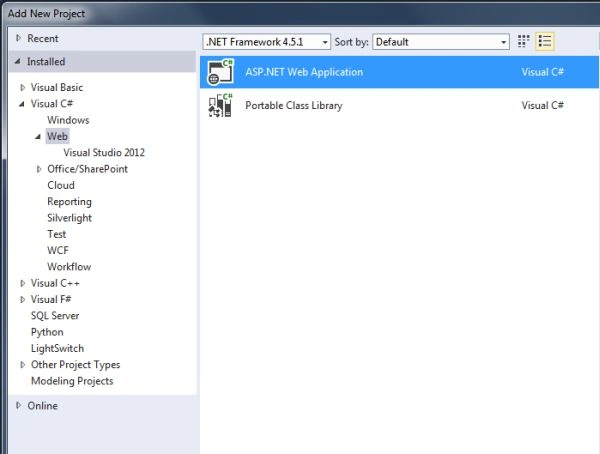
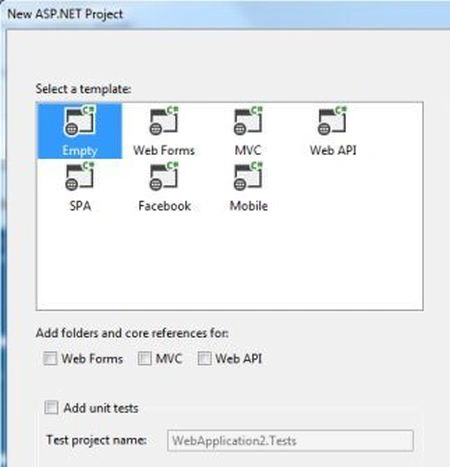
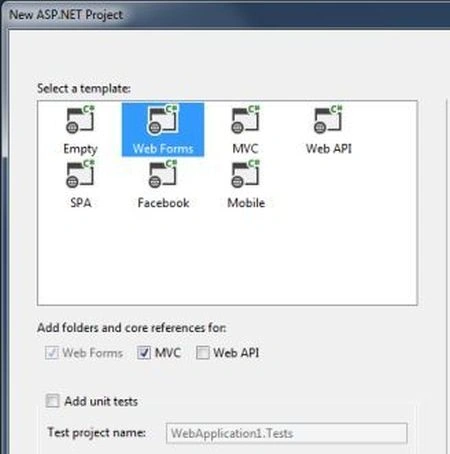
- The New ASP.Net Project Window appears; select the template for creating the project.
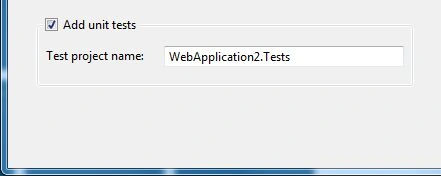
- You can also select "Add Unit Test" to create a Test Project.
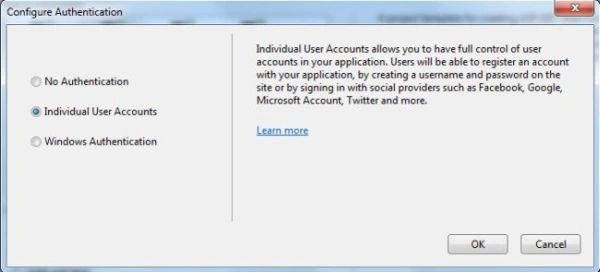
- You can also use Configure Authentication to create various templates.
Web Application Projects
In Visual Studio.NET there are two types of categories for creating web projects for ASP.NET. These are web application projects and web site projects. Microsoft recommends web application projects for creating a new ASP.NET Web Project. This new ASP.NET Web Proejct is only applicable for Web Application Projects.
Projects Templates
There are various types of Projects Templates described in Visual Studio 2013. These are given below:
- Empty Template: In an Empty Template a minimum of 3 files and folders exist, like web.config, References and Properties. Further you can add Web Forms and classes (depends upon the developer).
- Web Forms Template: This template provides the following features:
- A creative designer in Visual Studio.
- Server Controls that are rendered to HTML
- New controls for data accessing
- Automatic preservation of the state
- MVC Template: This template is designed to elaborate pattern-based developments. Pattern-based developments are useful for seprating the business logic layer from your presentation layer. This development is very easy to understand the entire application. This reduces the complexity of your application. In this template you can work directly with HTML and HTTP whereas you cannot in web forms.
- Web API Template: The Web API template creates a web service based Web API. There is no authentication required for this template in Visual Studio Preview.
- Facebook Template: The Facebook Template creates an application that runs a Facebook Website. The Facebook Template runs using ASP.NET MVC that uses the Web API for the functionality.
Authentication Modes
There are various types of Authentication Modes available in creating ASP.NET Web Projects. These are given below:
- No Authentication: For creating an Empty Template there is no authentication required.
- Individual User Accounts: You must have the membership of ASP.NET for using Individual User Account.
- Organizational Accounts: If you work on this account then the application based in this account is basically configured to use Windows Identify Foundation (WIF).
- Windows Authentication: If you choose Windows Authentication then the application work in an intranet site and configured to use IIS authentication.
Support for Additional Framework
In Visual Studio 2013, additional frameworks are now provided for creating a template. If you select Web Forms Template then the web forms option is selected automatically and you cannot change it and further you can select the MVC folder option for reference. This type of functionality is added for additional support.


Join the conversation! Your thoughts help the community grow.