Want to control your GUI dynamically with the present data? If yes, then Data Binding is the answer to your question.
Data binding is the process that establishes a connection between the UI layer with our Data Layer. So when you change your Data your GUI is updated and vice versa.
Let’s start with an example.
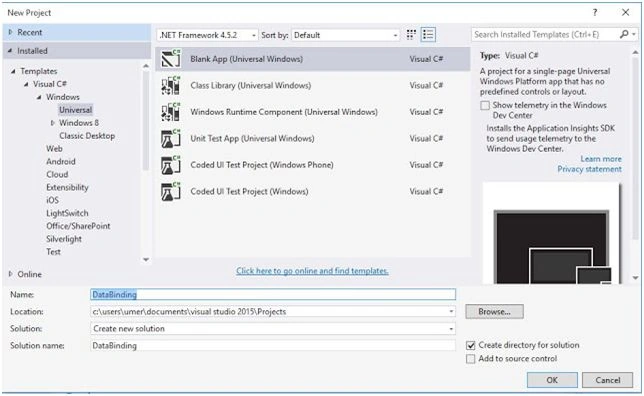
Firstly, create a new project,
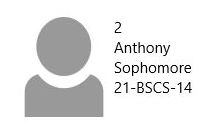
Design a UI template in MainPage.Xaml to make our layout like this,
- <ListView Name="list_students">
- <!--Name the listView to refer-->
- <ListView.ItemTemplate>
- <DataTemplate>
- <StackPanel Orientation="Horizontal" Margin="10,20,0,0">
- <Image Stretch="Fill" Width="100" Height="100"></Image>
- <StackPanel Orientation="Vertical">
- <TextBlock></TextBlock>
- <TextBlock></TextBlock>
- <TextBlock TextBlock>
- <TextBlock TextBlock>
- </StackPanel>
- </StackPanel>
- </DataTemplate>
- </ListView.ItemTemplate>
- </ListView>
Name your ListView so you can refer it later.
Now add a new class in the project called student.cs. Make the class Public, so that it is accessible. This will be your model class containing the properties of the data being used.
- namespace Databinding
- {
- public class Student
- {
- public int id
- {
- get;
- set;
- }
- public string Name
- {
- get;
- set;
- }
- public string Class
- {
- get;
- set;
- }
- public string RollNo
- {
- get;
- set;
- }
- public string ImagePath
- {
- get;
- set;
- }
- }
- }
Now the data with the respective properties in our
MainPage.xaml. Be careful as it is case sensitive.
- <StackPanel Orientation="Horizontal" Margin="10,20,0,0">
- <Image Source="{Binding ImagePath}" Stretch="Fill" Width="100" Height="100"></Image>
- <StackPanel Orientation="Vertical">
- <TextBlock Text="{Binding id}"></TextBlock>
- <TextBlock Text="{Binding Name}"></TextBlock>
- <TextBlock Text="{Binding Class}"></TextBlock>
- <TextBlock Text="{Binding RollNo}"></TextBlock>
- </StackPanel>
- </StackPanel>
We have bind the source of image with our ImagePath property, text properties with their respective values. These all will be filled dynamically.
Now we need to populate our data, for that open MainPage.xaml.cs and write a function to fill the list.
Include the header,
using System.Collections.ObjectModel; And then make an observable collection of the type of the student class.
- public ObservableCollection < Student > stdlist = new ObservableCollection < Student > ();
- public void PopulateData()
- {
- stdlist.Add(new Student
- {
- id = 1, Name = "Ahmed", RollNo = "100-BSCS-15", Class = "FreshMan", ImagePath = "Assets\\Image DB.png"
- });
- stdlist.Add(new Student
- {
- id = 2, Name = "Anthony", RollNo = "21-BSCS-14", Class = "Sophomore", ImagePath = "Assets\\Image DB.png"
- });
- stdlist.Add(new Student
- {
- id = 3, Name = "David", RollNo = "72-PHY-13", Class = "Junior", ImagePath = "Assets\\Image DB.png"
- });
- stdlist.Add(new Student
- {
- id = 4, Name = "Umer", RollNo = "125-BSEE-12", Class = "Senior", ImagePath = "Assets\\Image DB.png"
- });
- list_students.ItemsSource = stdlist;
- }
I am using the same image for every entry, you can use different. Right path should be given and Image should be added into your project first.
Then populate the data in that list and call the function in the constructor so it should run as the program loads.
- public MainPage()
- {
- this.InitializeComponent();
- PopulateData();
- }
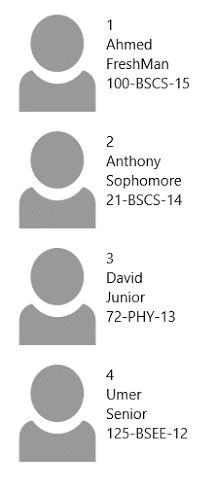
Now run you project and it will be like this. Getting all the data dynamically and using the layout multiple times by itself. Increase or decrease the record and will also add or remove them from the following GUI,


MuhammadZawawi ManjaPosted Sep 9, 2019, 12:05 AM
Code in listview need to be fix. Not //<TextBlock TextBlock><TextBlock TextBlock>
Santhakumar MunuswamyPosted Dec 1, 2015, 1:34 AM
Nice share
Humayun Kabir MamunPosted Dec 1, 2015, 1:10 AM
Nice...
Raja TPosted Nov 30, 2015, 11:39 PM
Nice,Thanks for sharing
Mohammed IbrahimPosted Nov 30, 2015, 1:35 PM
nice
Banketeshvar NarayanPosted Nov 30, 2015, 1:25 PM
Nice Share