Enterprise Library
Microsoft Enterprise Library is a collection of reusable software components designed to assist developers with common enterprise development challenges, it contains standalone application blocks that can be combined to work together to solve various cross-cutting concerns such as DI, logging, error handling, data access, validating input, etcetera. The new version of Enterprise Library has been released, Enterprise Library 6.0. Enterprise Library 6.0 has enhancements for more recent technologies and integrates with ASP.NET MVC and ASP.NET Web API.
In Enterprise Library 6.0, the following application blocks are available,
- Data Access Application Block
- Exception Handling Application Block
- Logging Application Block
- Policy Injection Application Block
- Semantic Logging Application Block
- Transient Fault Handling Application Block
- Unity Application Block
- Validation Application Block
What's New in Enterprise Library 6.0?
- Now all Enterprise Library 6.0 blocks have been updated to .NET 4.5 Framework, this is the global change in this version.
- Working with Group Policy for configuration support has been removed from this version.
- Block instrumentation is no longer available in this release.
- In this version, only the Policy Injection Application Block can take a dependency on the exceptions.
Newly implemented Blocks
- Semantic Logging Application Block
- Transient Fault Handling Application Block
Rejected Blocks that have been removed
- Caching Application Block
- Cryptography Application Block
- Security Application Block
Other but Important changes
- Now if you are working with SQL Server scripts, they can support SQL Server 2005 or later. As previously not supported.
- There is no more need to use a DI container while working with an Exception Handling Application Block, object creation is much easier, and you can directly create an object from configuration.
- The Rolling Behavior of a Logging Application Block has changed, now the trace listener rolls the log every day at midnight, not depending on the last message written as previously done.
- JSON format has been included in the Logging Application Block.
- Now you can write messages asynchronously by using AsynchronousTraceListenerWrapper with your existing listeners.
- Complete support for Windows Azure caching, storage, transient fault, etcetera by changing the Transient Fault Handling Application Block and making it an Integration Pack of the Enterprise Library for Windows Azure.
- Several bugs, error checking, and internal implementation have been changed, added, and removed in many blocks, listeners, and features. Like, Email Event Listener, MSMQ Event Listener, Rolling Flat File Event Listener, Policy Injection Application Block, Semantic Logging Application Block, Validation Application Block, etcetera.
Unity
Unity is also an application block of Enterprise Library that provides a lightweight, extensible dependency injection container with support for constructor, property, and method call injection. It facilitates building loosely coupled applications. And the way we envision Unity 3.0 is that they will be targeted for Windows 8. Microsoft Patterns & practices list the new features of Unity 3.0
What's New in Unity 3.0?
- The Unity assembly is now Security Transparent.
- Unity now supports NetCore (Windows Store apps).
- The bug that caused a first-chance exception when registering a singleton is fixed.
- The bug that resulted in static properties not being filtered out when doing property injection is fixed.
- Internally, the WinRT namespaces that support Unity in Windows Store apps have been renamed to NetCore.
- Unity now supports resolving objects of type Lazy<T>
- Unity now supports registration by convention through the new RegisterTypes method.
- Unity now includes support for ASP.NET MVC and ASP.NET Web API.
As the Semantic Logging Application Block and Transient Fault Handling Application Block are the newly implemented blocks, let's learn something more about the Semantic Logging Application Block.
Semantic Logging Application Block
Semantic Logging Application Block provides a set of destinations (sinks) to persist application events published using a subclass of the EventSource class from the "System.Diagnostics.Tracing" namespace. It enables developers to have a structured way to log events so that later analysis of the logged information can produce valuable inputs to the business. You can do many of the same things with the Semantic Logging Application Block; you can write log messages to multiple destinations, you can control the format of your log messages, and you can filter what gets written to the log.
To store some errors using semantic logging application block we use,
MyEventSource.Log.UIError(ex.Message);
When you write log messages, what exactly does semantic logging mean? Semantic logging means that before writing a message you need to define what log messages you will write. Now how do you define and write messages? The answer is the EventSource class. The "System.Diagnostics.Tracing" namespace of the .NET 4.5 Framework provides the EventSource class. See the syntax.
public class MyEventEventSource : EventSource
{
    public class Points
    {
        // code
    }

    public class Tasks
    {
        // code
    }

    [Event(definition...)]
    internal void Task(string message)
    {
        // code
    }

    public static readonly MyEventEventSource Log = new MyEventEventSource();
}
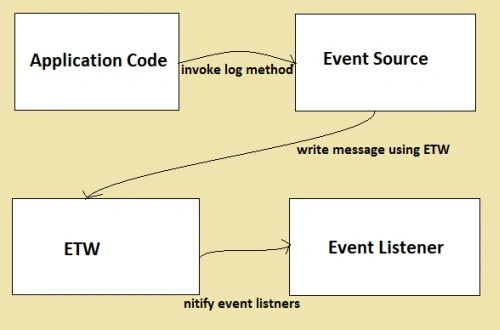
The class, MyEventEventSourcethat extends the EventSource class, contains definitions for all of the events that you want to be able to log in using Event Tracing for Windows (ETW).
Application using the Semantic Logging Application Block


Join the conversation! Your thoughts help the community grow.