

In previous article, we discussed about DOM manipulation functions. In this article, we will cover AJAX capabilities of JQuery. We can load data from the server without page refresh using AJAX functions. The major functions under this category are: $.get(), $.post() and $.ajax(). I will cover get() and getJSON() methods in this article. In next article, we will discuss about post() and ajax() along with its supporting functions. $.get() loads data from the server using HTTP GET request.
Its syntax:
$.get( url, [ data ], [ callback(data, textStatus, XMLHttpRequest) ], [ dataType ] )
Here,
- 1st parameter: URL to which request need to be sent.
- 2nd parameter: data that need to be sent to server along with request.
- 3rd parameter: function that need to be called if request succeeds.
- 4th parameter: Type of data returned from the server like xml, html...
Let's see an example using ASP.NET MVC 2. Create a new MVC 2 web application and name it as JQueryGetSample. ASP.NET MVC supports JQuery within it. So, no need to add script files. Visual Studio 2008 provides intellisense for JQuery using vsdoc file present under scripts folder as shown below:
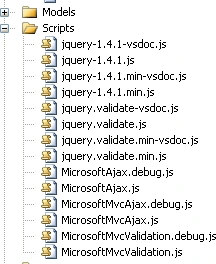
Now, add below code to site.master under head section:
<script type="text/javascript">
$(function() { $.get('account/getdata', { firstName: "AAA", lastName: "BBB" }, function(data)
{ alert("From Server: "+ data); })
});
</script>
Here, we are calling getdata method present in AccountController and showing the result returned as an alert. Data is passed to method in JSON format. MVC routing engine will take care of redirecting the request to AccountController. We add below method to AccountController.cs, which can be called over HTTP GET:
[HttpGet]
public string GetData(string firstName,string
lastName)
{
return "Hello "+firstName+", "+lastName;
}
Join the conversation! Your thoughts help the community grow.