

Introduction
Java Server Faces (JSF), is a web-based framework that makes the UI development in web-based applications easy. JSF provides various ways to connect UI components with data sources and server-side event handlers. It helps in making data transfer between UI components easy.
A JSF application is similar to any Java-based web application. It runs in a Java Servlet container and follows the MVC (Model, View and Controller) architecture.
The diagram below shows the architecture of a JSF application:
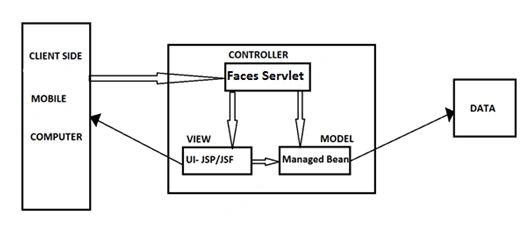 JSF applications run inside a servlet container. All of the processing related to JSF, is done inside the container. The procedure below, explains how a JSF application works, in a scenario where a user clicks button or performs any other event, to get the desired output.
Architecture of JSF
How a JSF works
- When a user fires an event, it goes to a FacesServlet class, that is an engine of a JSF application. A servlet-mapping element is used in a deployment descriptor (web.xml), to map a specific pattern, to invoke the FacesServlet class. The following code is a part of the web.xml used to run a JSF application.
- < Servlet >
- <
- servlet - name > Faces Servlet < /servlet-name> <
- servlet - class > javax.faces.webapp.FacesServlet < /servlet-class> <
- load - on - startup > 1 < /load-on-startup> <
- /servlet> <
- Servlet - mapping >
- <
- servlet - name > Faces Servlet < /servlet-name> <
- url - pattern > /faces/ * < /url-pattern> <
- /servlet-mapping>
- All of the processing is done inside the FacesServlet class. Each JSF application, inside the same web container, has its own FacesServlet class.
- Each FacesServlet class has a FacesContext class object, that has all of the necessary information, of the current request.
- Now, the request goes to the called ManagedBean and it returns the output to the called UI page.
- There are two ways by which you can map your JSF/JSP page with the required managedbean class.
- Using Faces-Config.xml file: Faces-Config XML file has all the information of mapping between JSP/JSF pages and managedbean class. An example of a Faces-Config XML file is shown below:
- < faces - config >
- <
- managed - bean >
- <
- managed - bean - name > someName < /managed-bean-name> <
- managed - bean - class >
- somePackage.SomeClass <
- /managed-bean-class> <
- /managed-bean> <
- /faces-config>
- Using Annotations: Another way to map your JSP/JSF file, with the managedbean class, is to use Annotations in the managedbean. An example of annotation is shown below:In future articles, I will be describing more about the JSF framework. I hope this article was useful to you and thank you for reading it.
- Import javax.faces.bean.ManagedBean;
- @ManagedBean(name = "JSFTut", eager = true)
- public class JSFTutorials {
- public String callMe() {
- return "Hello JSF ";
- }
- }
- Using Faces-Config.xml file: Faces-Config XML file has all the information of mapping between JSP/JSF pages and managedbean class. An example of a Faces-Config XML file is shown below:
Akash MalikPosted Feb 18, 2015, 10:33 AM
Thank you Fina
fina diarraPosted Feb 18, 2015, 9:10 AM
Good introduction