

Introduction to MCP
As AI systems evolve from simple chatbots to autonomous agents, they must interact with real-world systems—databases, APIs, enterprise workflows, DevOps pipelines, financial systems, and more. Large Language Models (LLMs) excel at reasoning and text generation, but they cannot execute external actions on their own.
The Model Context Protocol (MCP) provides a standardized way for LLM-based agents to discover and execute tools safely and scalarly.
In simple terms:
MCP is a protocol that connects reasoning (LLM) with execution (tools).
The Core Problem MCP Solves
LLMs can:
Understand instructions
Perform reasoning
Generate structured outputs
LLMs cannot:
Query databases
Trigger APIs
Modify infrastructure
Execute business logic
Access secure systems directly
Without a structured tool integration layer, systems become:
Tightly coupled
Hard to scale
Hard to secure
Difficult to govern
Model-dependent
MCP solves this by standardizing tool exposure and execution.
What Is MCP?
Model Context Protocol (MCP) is a structured interface between:
An LLM (reasoning engine)
A tool execution environment
It defines how:
Tools are described (metadata/schema)
Tools are discovered
Tools are invoked
Results are returned
Key Components:
| Component | Responsibility |
|---|---|
| LLM | Decides which tool to call |
| MCP Client | Communicates tool metadata & calls |
| MCP Server | Hosts and executes tools |
| Tools | Perform actual business logic |
This separation is fundamental.
MCP Execution Flow
Let’s walk through a real flow.
1. Tool Discovery Phase (Before User Input)
Before any user input is processed, the MCP client queries the MCP server to discover available tools. This ensures the LLM knows what capabilities exist.
When the Agent starts:
MCP Client connects to MCP Server.
MCP Server sends tool definitions.
MCP Client passes tool metadata to LLM.
Now LLM knows:
What tools exist
What parameters they accept
What they do
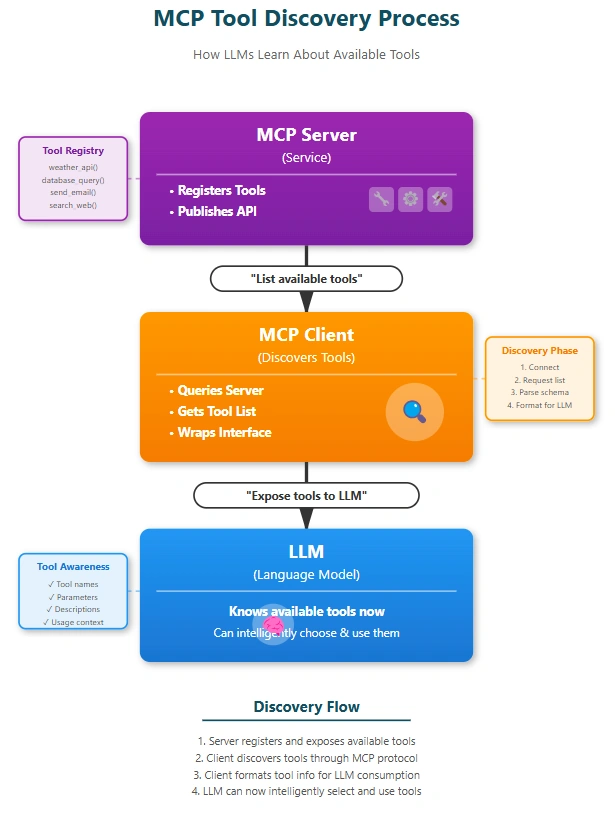
Key Point: This discovery happens before user input, so the LLM already knows what tools it can call.
2. Execution Phase (After User Input)
Once the user provides input, the LLM decides which tool to call. The MCP client simply routes the request to the server, which executes the tool and returns results.
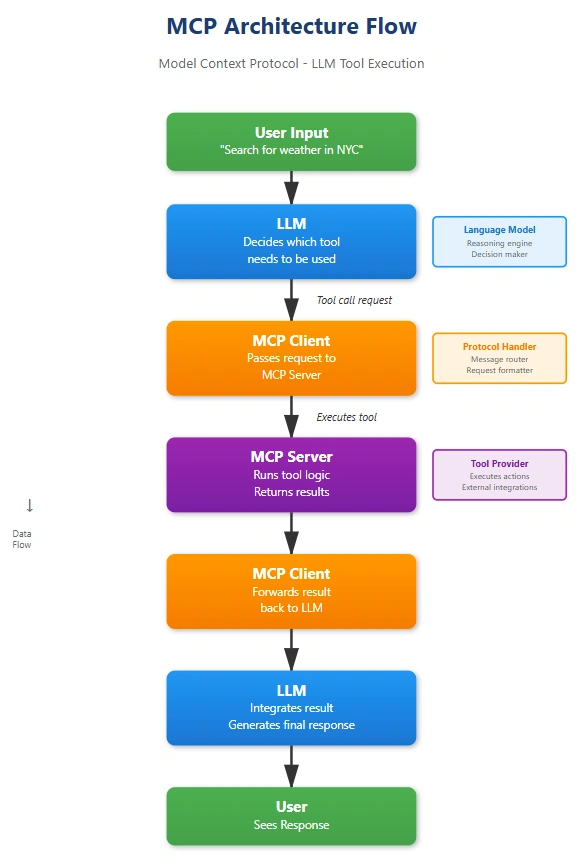
3. Agent Loop (Iterative Execution)
In agent-based systems, the LLM may not be satisfied after one tool call. It evaluates the result, decides if more information is needed, and repeats the process until it can confidently answer.
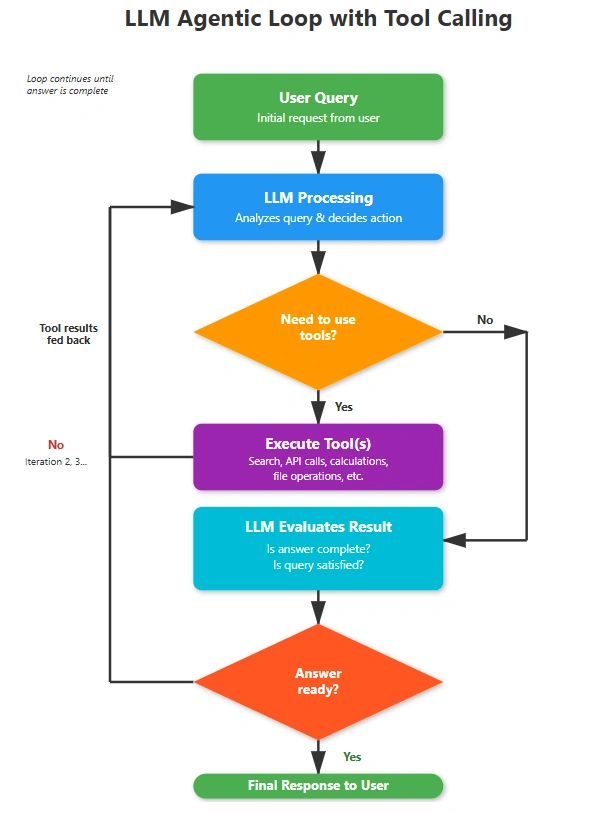
Key Point:
The LLM controls the loop.
The MCP client is a router.
The MCP server executes tools.
This repeats until the LLM is satisfied.
Example
let’s walk through Discovery, Execution, and Looping with a realistic example:
Plan a 5-day trip to Goa with a budget of ₹10,000.
Step 1 — Discovery Phase: What Tools Are Available?
Before planning anything, the LLM has to know what tools it can use.
Let’s say the available tools are:
| Tool Name | Purpose |
|---|---|
search_flights | Finds affordable flights |
search_hotels | Finds budget hotels |
get_weather | Gets weather forecast |
get_local_transport_info | Info on local travel in Goa |
estimate_trip_cost | Estimates total trip cost |
The LLM now "discovers" these tools and what parameters they need.
Step 2 — Execution Phase: Start Planning
User Query
“Plan a 5-day trip to Goa with a budget of ₹10,000.”
The LLM needs information that it can’t just generate — it needs tool calls.
Looping Begins: Iteration 1
LLM Decision
To plan a trip, first I need to know the flight cost to Goa.
Tool Call
LLM generates
{"tool": "search_flights","arguments": {
    "from": "Bangalore",
    "to": "Goa",
    "sort_by": "price"}}
MCP Client sends this to MCP Server.
MCP Server returns flight options.
Example Response from Server:
{"cheapest_flight": {
    "airline": "IndiGo",
    "price": 3500,
    "departure": "Bangalore → Goa"}}
Looping Iteration 1 - Evaluate Answer
LLM evaluates
Flight cost found: ₹3,500
Still missing hotel cost, transport cost, total trip cost
So, we need another tool call.
Looping Iteration 2
LLM Decision
Next, we need hotel costs for 5 days.
Tool Call
{"tool": "search_hotels","arguments": {
    "city": "Goa",
    "nights": 5,
    "budget_per_night": 1000}}
Server returns:
{"hotel_option": {
    "name": "Budget Inn",
    "total_price": 3500}}
Looping Iteration 2 - Evaluate Answer
LLM now has:
Flight cost: ₹3,500
Hotel cost: ₹3,500
Still missing local transport, food cost
Budget left: ₹10,000 – ₹7,000 = ₹3,000
So, we keep going.
Looping Iteration 3
LLM Decision
We should find local transport and food estimates.
Tool Call
{"tool": "get_local_transport_info","arguments": {
    "city": "Goa",
    "days": 5}}
Server returns:
{"transport_cost_estimate": 1200,"food_cost_estimate": 1500}Looping Iteration 3 - Evaluate Answer
Now the LLM has:
Flights → ₹3,500
Hotels → ₹3,500
Transport → ₹1,200
Food → ₹1,500
Total = ₹3,500 + ₹3,500 + ₹1,200 + ₹1,500 = ₹9,700
Budget: ₹10,000
Everything accounted for & within budget!
So LLM decides: Answer is ready.
Final Response to User
LLM formats everything into a natural answer:
Here’s your 5-day Goa trip within ₹10,000:
Flight: IndiGo from Bangalore to Goa – ₹3,500
Hotel: Budget Inn – ₹3,500 for 5 nights
Transport: Estimated ₹1,200
Food: ₹1,500
Total Estimated Cost: ₹9,700
You’re within budget with ₹300 to spare!
Summary: How Discovery → Execution → Looping Worked
| Phase | What Happened |
|---|---|
| Discovery | LLM learned what tools exist (flights, hotels, transport) |
| Execution | LLM called tools one by one |
| Looping | LLM checked after each call whether the plan was complete |
| Output | Final trip plan sent only when all components were covered |
Core Principles to Remember
MCP Server executes tools
The server is the execution environment.
Tools (e.g., database queries, API calls, workflows) run only on the server side.
This ensures isolation, security, and governance.
LLM decides which tool to execute
The LLM is the reasoning engine.
It analyzes user intent, decomposes tasks, and selects the appropriate tool(s).
It does not run the tool itself — it only issues the decision.
LLM cannot execute tools directly
By design, LLMs are stateless reasoning models.
They cannot query databases, trigger APIs, or modify infrastructure on their own.
This prevents unsafe or uncontrolled execution.
Tools are running on the MCP Server
The MCP Server hosts the actual business logic.
It provides a registry of tools and executes them when requested by the MCP Client.
Results are returned back to the LLM through the client.
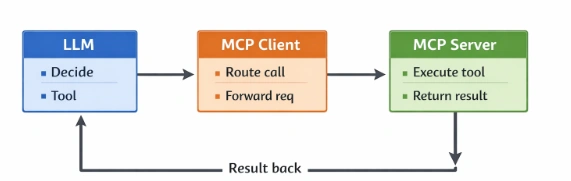
Responsibility Separation
Why This Separation Matters
Security: LLMs never directly touch sensitive systems.
Governance: MCP Server logs and controls tool execution.
Scalability: Tools can be updated independently of the LLM.
Reliability: Failures are contained at the server level, not the reasoning engine.
Conclusion
The MCP architecture cleanly separates responsibilities:
Server = tool provider (service layer)
Client = router and interface layer
LLM = decision-maker and reasoning engine
In simple queries, this runs once. In agent setups, it loops until the LLM is satisfied. This design ensures flexibility, modularity, and scalability in AI tool usage.
Join the conversation! Your thoughts help the community grow.