

Welcome to this lesson about OCI Networking. In this lesson, we will learn about an important part of Oracle Cloud called the Virtual Cloud Network (VCN).
What Is a Virtual Cloud Network (VCN)?
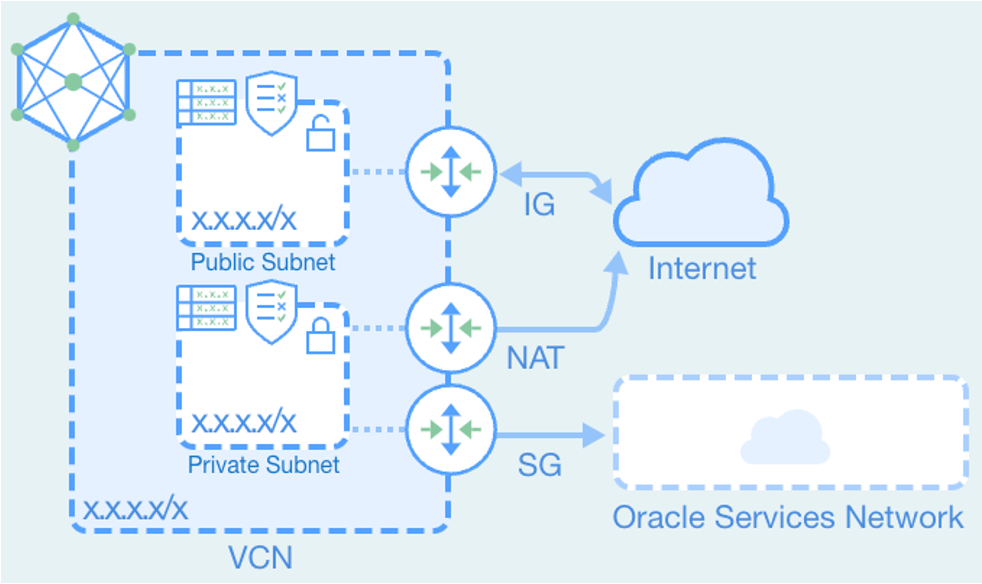
A Virtual Cloud Network (VCN) is a private network that you create in Oracle Cloud.
It allows your cloud resources, such as virtual machines (instances), to communicate safely with each other.
You can think of a VCN like your company’s network, but it is in the cloud instead of a physical building.
When Do You Use a VCN?
You use a VCN when:
Your instances need to talk to each other
Your instances need internet access
Your cloud needs to connect to your office (on-premises network)
Your cloud needs to connect to another cloud network
Every OCI setup needs a VCN. It is the base of networking in Oracle Cloud.
Main Features of a VCN
It works across the whole OCI region
It is secure
It is scalable (can grow easily)
Oracle manages it for you
You do not need to manage hardware. Oracle handles it in the background.
Basic Parts of a VCN
1. IP Address Range (CIDR Block)
Every VCN has an IP address range. This range is written in CIDR format.
Example:
10.0.0.0/16This means your VCN can use many IP addresses inside this range.
2. Subnets
A subnet is a smaller network inside the VCN.
You create your instances inside subnets.
For example:
Public Subnet: 10.0.1.0/24
Private Subnet: 10.0.2.0/24
A public subnet can connect to the internet.
A private subnet cannot receive traffic directly from the internet.
When you create an instance, it gets:
A private IP address (always)
A public IP address (optional)
How Instances Communicate
To allow communication, OCI uses gateways.
Gateways control how traffic moves in and out of the VCN.
Types of Gateways
1. Internet Gateway
The Internet Gateway allows two-way communication with the internet.
Use it when:
You want users to access your website
Your server needs to send and receive internet traffic
2. NAT Gateway
The NAT Gateway allows private instances to access the internet.
But the internet cannot start a connection to them.
This is safer.
Use it when:
Your server needs updates
Your server needs to download software
3. Service Gateway
The Service Gateway allows private access to Oracle Cloud services like Object Storage.
The traffic does not go through the public internet.
It stays inside Oracle’s network.
This is more secure.
4. Dynamic Routing Gateway (DRG)
The Dynamic Routing Gateway connects your VCN to:
Your office network (on-premises)
Other VCNs
Other regions
It is used in hybrid cloud setups.
Summary
A VCN is a private network in Oracle Cloud.
It has an IP address range (CIDR block).
It is divided into subnets.
Instances run inside subnets.
Gateways control communication.
Gateway Types
Internet Gateway → Two-way internet access
NAT Gateway → Outbound-only internet access
Service Gateway → Private access to OCI services
Dynamic Routing Gateway → Connect to other networks
Conclusion
The Virtual Cloud Network (VCN) is the main network in Oracle Cloud. It helps you create a private and secure network for your cloud resources. Inside the VCN, you can create subnets, add virtual machines, and control how they connect to each other, to the internet, to Oracle services, and to your office network. By using different gateways, you can manage internet access and private connections safely. In simple words, a VCN lets you build and control your own secure network in the cloud.
Join the conversation! Your thoughts help the community grow.