

Introduction
In the past couple of years, Big Data has been in the limelight and BI is a big part of it. Don't forget to check out Top 5 Developer Technology Trends for 2014 to learn more.
And because of Big Data trends, I became interested in learning Power BI and found that what Microsoft is trying to do with Office 365, SharePoint 2013, and Excel 2013 very interesting. Recently, I met a client with a need to build charts, analytics, and reports based on a huge consumer data. If it was just reporting then I usually recommend the Report Viewer or Reporting Services, or Crystal Reports. But this client needs analytics, charts, filters, and much more. So that's my story of getting interested in Power BI.
Data vs Information
One can't understand business intelligence without understanding the difference between data and information. I remember my college days and the difference between data and information.
Data is the raw form of facts that does not make any sense unless processed. For example, data stored about C# Corner authors views, downloads, and such.
Information is processed and structured data that is meaningful when read by humans. For example, charts displaying the number of views, downloads, and such per month.
Business Intelligence
From Wikipedia:
“Business intelligence (BI) is a set of theories, methodologies, architectures, and technologies that transform raw data into meaningful and useful information for business purposes. BI can handle enormous amounts of unstructured data to help identity, develop and otherwise create new opportunities. BI, in simple words, makes interpreting voluminous data-friendly. Making use of new opportunities and implementing an effective strategy can provide a competitive market advantage and long-term stability.”
Power BI
Power BI is a business intelligence solution developed by Microsoft to convert data into information. Power BI is a self-service tool delivered using Microsoft Excel and Office 365. Using Power BI, users can generate charts and reports for data analysis and data visualization purposes.
Find more details on Power BI: www.powerbi.com
Microsoft Power BI not only works with Office 365 and Excel but also integrates with SharePoint 2013, SQL Server, Access, and other data sources.
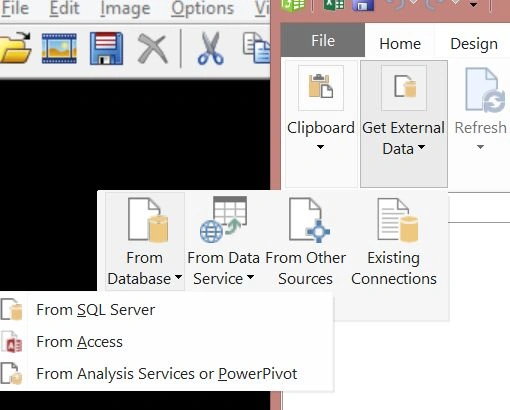
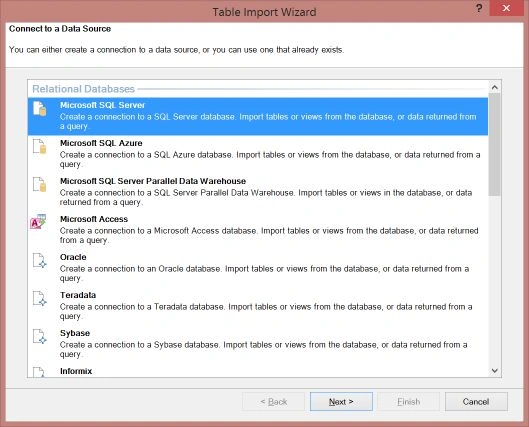
As you can see from the Table Import Wizard, data in Excel can be imported from SQL Server, Azure, Access, Oracle, Terada, Sybase, and several other data sources.
Recently, the Power BI team announced the public preview of Power BI connectivity to SAP BusinessObjects BI. Using this connector, developers and users can now connect with SAP and use data in Power BI. Power BI (www.powerbi.com) allows users to visualize the data using Power View and Power Maps.
Some of the capabilities include seamless access to trusted enterprise data from the SAP world, data access, and visibility in Excel, discover and merge data with public and corporate data sources such as Windows Azure HDInsight, analytics, and much more.
Power BI Components
Power BI has four components, Power Query, Power Pivot, Power View, and Power Map.
Power Query
Microsoft Power Query for Excel is a query language used to access and filter data from the various data sources listed below.
-
Power Query functionality:
-
Find and connect data across a wide variety of sources.
-
Merge and shape data sources to match your data analysis requirements or prepare it for further analysis and modeling by tools such as Power Pivot and Power View.
-
Create custom views over data.
Power Query Data Sources can be nearly any kind of data, including Excel, CSV, XML, Text, SQL Server, Access, Oracle, MySQL, Azure Database, DB2, PostgreSQL, Sybase, Teradata, SharePoint List, OData feed, Windows Azure Marketplace, Hadoop File (HDFS), Windows Azure HDInsight, Active Directory, Microsoft Exchange, Facebook, and SAP.
Learn more about Power Query:
Power Pivot
An add-in that enables you to perform powerful data analysis in Excel 2013.
Learn more about Power Pivot:
Power View
An interactive data exploration, visualization, and presentation experience that encourages intuitive ad-hoc reporting.
Learn more about Power View:
Power Map
A three-dimensional (3D) data visualization tool for Excel 2013 that provides a powerful method for geospatial analysis.
Learn more about Power Map:
Conclusion
This article was an introduction to Microsoft Power BI.
Join the conversation! Your thoughts help the community grow.