

Introduction
Protractor is an E2E UI automation testing tool for Angular or Angular JS and it is very similar to Selenium Webdriver. Angular has some extra web elements, like ng-model and ng-if so we can’t test Angular applications without protractor. Protractor is built on the top of WebDriverJS that uses native events and browser-specific drivers to interact with web application.
Before jumping into Protractor, we should have a little background knowledge. As all of us know, AngularJS is developed using JavaScript. In simple words, we need to know JavaScript for AngularJS application development. Angular is an advanced version of AngularJS. For the development of any application in Angular, we use TypeScript. So, if we need to write a test case in Protractor, we can use JavaScript or TypeScript.
Environment Setup
One more bit of information before we start the setup. We need to know about npm or Node Platform Manager which is a very important platform on which we can install Protractor. NPM is the platform that is mandatory to exist on your machine to get Protractor to work on your machine. The simplest way to know whether the node or npm is available or not is to go to the command prompt or terminal and type command
If node or npm is not available, then please visit node.org and download the latest version and install.
After installation of npm or node, you can install Protractor.
Command to install Protractor from command line or terminal:
npm install -g protractor
Command to add/update webdriver
webdriver-manager update
Now, start up a server with:
webdriver-manager start
Application setup and development environment
There is N number of IDE’s available like Sublime text, Visual Studio code, Eclipse, or Netbeans etc. These all are open source tools. Also, there are some paid IDE's too.
There are two programming language options that we can use for development.
- JavaScript
- TypeScript
In this document, all samples are developed using TypeScript because TypeScript is easier.
If anyone is not aware of TypeScript, then please visit https://www.typescriptlang.org/
TypeScript is very similar to JavaScript.
Use the following command for installing Angular CLI.
Try ng --help to get help
Follow the steps to create a new application.
- Open terminal or command prompt.
- Write the command -
ng new simple-test-app
- If you see the folder structure, it looks like below.
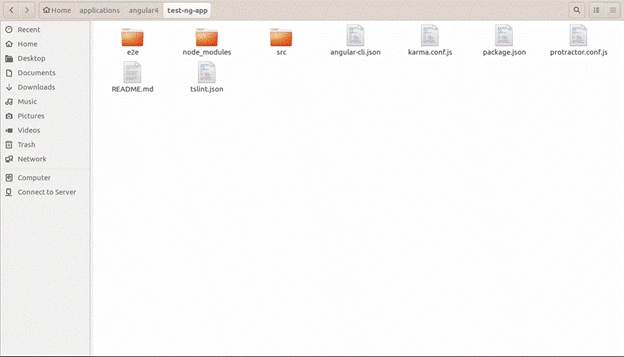
Now, we can go with the required files and folders one by one.
- package.json
- protractor.config.js
- e2e folder
These three files are very important for automation. The rest of the files and folders are used for developing the Angular application. In node_module, all the dependencies are stored.
Package.json
- {
- "name": "test-ng-app",
- "version": "0.0.0",
- "license": "MIT",
- "angular-cli": {},
- "scripts": {
- "ng": "ng",
- "start": "ng serve",
- "test": "ng test",
- "pree2e": "webdriver-manager update --standalone false --gecko false",
- "e2e": "protractor"
- },
- "private": true,
- "dependencies": {
- "@angular/common": "^2.3.1",
- "@angular/compiler": "^2.3.1",
- "@angular/core": "^2.3.1",
- "@angular/forms": "^2.3.1",
- "@angular/http": "^2.3.1",
- "@angular/platform-browser": "^2.3.1",
- "@angular/platform-browser-dynamic": "^2.3.1",
- "@angular/router": "^3.3.1",
- "core-js": "^2.4.1",
- "rxjs": "^5.0.1",
- "ts-helpers": "^1.1.1",
- "zone.js": "^0.7.2"
- },
- "devDependencies": {
- "@angular/compiler-cli": "^2.3.1",
- "@types/jasmine": "2.5.38",
- "@types/node": "^6.0.42",
- "angular-cli": "1.0.0-beta.28.3",
- "codelyzer": "~2.0.0-beta.1",
- "jasmine-core": "2.5.2",
- "jasmine-spec-reporter": "2.5.0",
- "karma": "1.2.0",
- "karma-chrome-launcher": "^2.0.0",
- "karma-cli": "^1.0.1",
- "karma-jasmine": "^1.0.2",
- "karma-remap-istanbul": "^0.2.1",
- "protractor": "~4.0.13",
- "ts-node": "1.2.1",
- "tslint": "^4.3.0",
- "typescript": "~2.0.3"
- }
- }
Anh NguyenPosted Mar 11, 2019, 7:17 PM
Testsample.zip project has nothing to do with C#
Hadshana KamalanathanPosted Jul 22, 2018, 4:45 AM
Thanks for sharing...
Sandeep BhujabalPosted Sep 8, 2017, 10:05 PM
Nice Article. well explained