

Sweet Alert is a library that acts as a replacement for the JavaScript’s alert() function. This shows very pretty model windows. It’s a library that has no dependencies, and is made from a JavaScript file plus a CSS file. This library comes in three different flavors -
the third is a fork that you can use in your Android projects.
How to get Sweet Alert JavaScript File
To use Sweet Alert in your projects, you have to download it and include it in the pages where you intend to use this library. Also, I have added Sweet Alert related CSS and JavaScript file.
- sweetalert.css
- sweetalert.js
- sweetalert.min.js
- title (mandatory): A string representing the title of the alert shown.
- message (optional): An optional string representing the message shown beneath the title.
- type(optional): An optional string representing the type of message you want to show. Its value may be one of "success", "error", "warning", and "info".
- sweetAlert("File Shouldn't Be Empty!!", "Please select file", "error");
The first option I want to cover allows you to change the text of the buttons shown. For example, if you want to change the text of the button for the success message from “OK” to “Yeah!”, you can set the value for an option called confirmButtonText. If you want to change the text of the button for the Cancel button, you have to set the value of cancelButtonText. At this point, the most observant of you should raise up the hand and say “I haven’t seen any cancel button so far, what are you talking about?” If you did, excellent!
The truth is that Sweet Alert allows you to show a Cancel message but you have to explicitly specify that you want it. You can do that by setting the option showCancelButton to true.
- swal({
- title: 'Confirm',
- text: 'Are you sure to delete this message?',
- type: 'warning',
- showCancelButton: true,
- confirmButtonText: 'Yes, sir',
- cancelButtonText: 'Not at all'
- });
Another interesting option is that you can set that a message is displayed for a fixed amount of time and then is auto-closed. You can achieve this task by passing a number, representing the number of milliseconds after which the message is closed to an option called timer. The following code uses these other two options.
- swal({
- title: 'Confirm',
- text: 'Are you sure to delete this message?',
- type: 'warning',
- showCancelButton: true,
- confirmButtonColor: '#987463',
- timer: 1500
- });
Steps to be followed
Step 1
Create an MVC application named "ExceluploadDB".
Create a Controller class file named "ExcelUploadController.cs".
- using System;
- using System.Collections.Generic;
- using System.Linq;
- using System.Web;
- using System.Web.Mvc;
- namespace ExceluploadDB.Controllers
- {
- public class ExcelUploadController : Controller
- {
- public ActionResult ExcelUpload()
- {
- return View();
- }
- }
- }
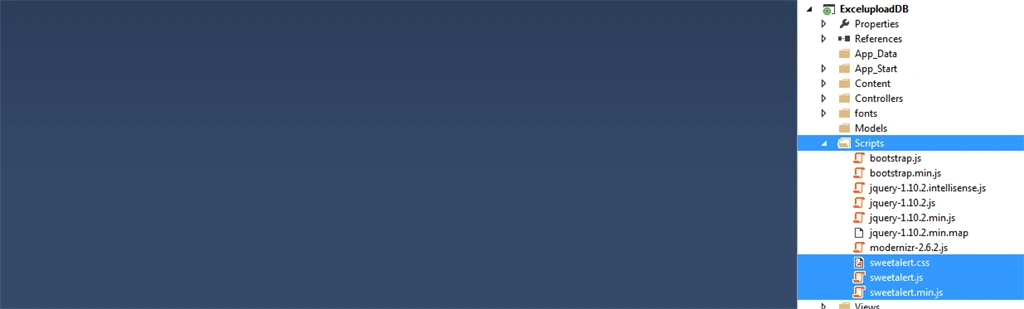
Add 3 Sweet Alert related CSS and JavaScript files in the Scripts folder.
- sweetalert.css
- sweetalert.js
- sweetalert.min.js
Create a View file named "ExcelUpload.cshtml".
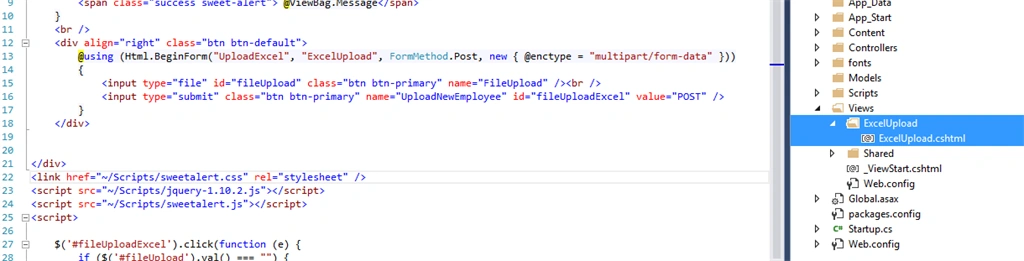
- @{
- ViewBag.Title = "Satyaprakash Sweetalert Javascript File";
- }
- <br />
- <div align="center">
- @if (ViewBag.Message != null)
- {
- <span class="success sweet-alert"> @ViewBag.Message</span>
- }
- <br />
- <div align="right" class="btn btn-default">
- @using (Html.BeginForm("UploadExcel", "ExcelUpload", FormMethod.Post, new { @enctype = "multipart/form-data" }))
- {
- <input type="file" id="fileUpload" class="btn btn-primary" name="FileUpload" /><br />
- <input type="submit" class="btn btn-primary" name="UploadNewEmployee" id="fileUploadExcel" value="POST" />
- }
- </div>
- </div>
- <link href="~/Scripts/sweetalert.css" rel="stylesheet" />
- <script src="~/Scripts/jquery-1.10.2.js"></script>
- <script src="~/Scripts/sweetalert.js"></script>
- <script>
- $('#fileUploadExcel').click(function (e) {
- if ($('#fileUpload').val() === "") {
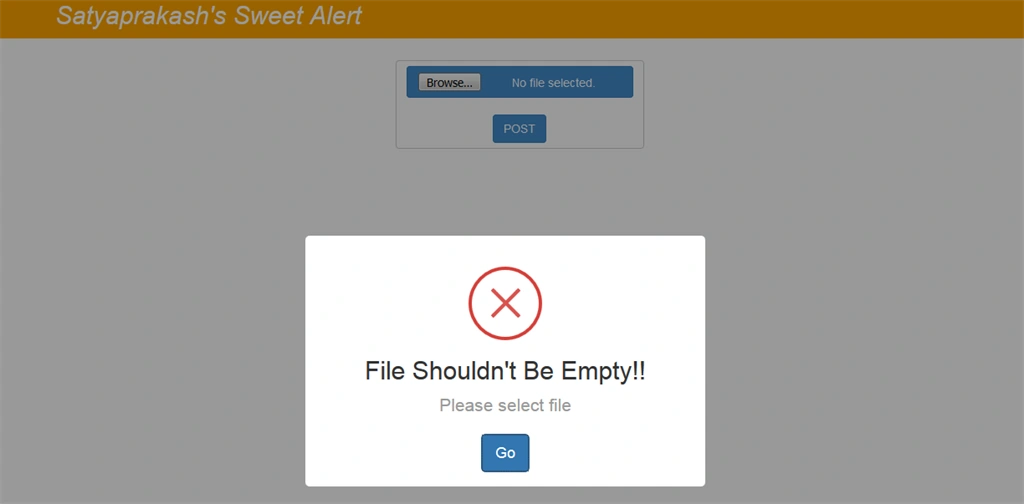
- sweetAlert("File Shouldn't Be Empty!!", "Please select file", "error");
- //alert("File Shouldn't Be Empty!!");
- return false;
- }
- if ($('#fileUpload').val() !== "") {
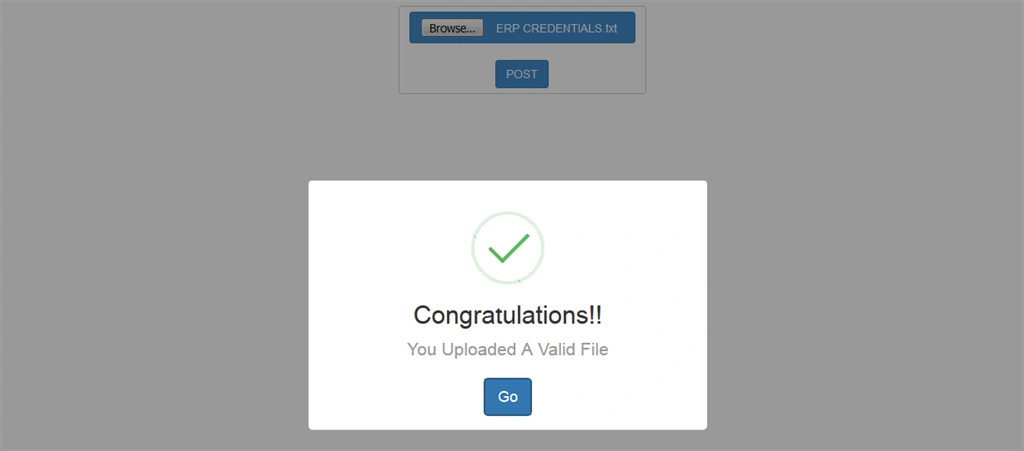
- sweetAlert("Congratulations!!", "You Uploaded A Valid File", "success");
- return false;
- }
- });
- </script>
Here, I have added a title of the browser.
- @{
- ViewBag.Title = "Satyaprakash Sweetalert Javascript File";
- }
- @if (ViewBag.Message != null)
- {
- <span class="success sweet-alert"> @ViewBag.Message</span>
- }
BeginForm
When the user submits the form, the request will be processed by an action method.
- @using (Html.BeginForm("UploadExcel", "ExcelUpload", FormMethod.Post, new { @enctype = "multipart/form-data" }))
- {
- <input type="file" id="fileUpload" class="btn btn-primary" name="FileUpload" /><br />
- <input type="submit" class="btn btn-primary" name="UploadNewEmployee" id="fileUploadExcel" value="POST" />
- }
- <link href="~/Scripts/sweetalert.css" rel="stylesheet" />
- <script src="~/Scripts/jquery-1.10.2.js"></script>
- <script src="~/Scripts/sweetalert.js"></script>
- $('#fileUploadExcel').click(function (e) {
- if ($('#fileUpload').val() === "") {
- sweetAlert("File Shouldn't Be Empty!!", "Please select file", "error");
- //alert("File Shouldn't Be Empty!!");
- return false;
- }
- if ($('#fileUpload').val() !== "") {
- sweetAlert("Congratulations!!", "You Uploaded A Valid File", "success");
- return false;
- }
- });
- $('#fileUploadExcel').click(function (e) {
- if ($('#fileUpload').val() === "") {
- alert("File Shouldn't Be Empty!!");
- return false;
- }
- $('#fileUploadExcel').click(function (e) {
- if ($('#fileUpload').val() === "") {
- sweetAlert("File Shouldn't Be Empty!!", "Please select file", "error");
- return false;
- }
Then, customize the layout file named "~/Views/Shared/_Layout.cshtml".
Code Ref
- <!DOCTYPE html>
- <html>
- <head>
- <meta charset="utf-8" />
- <meta name="viewport" content="width=device-width, initial-scale=1.0">
- <title>@ViewBag.Title</title>
- @Styles.Render("~/Content/css")
- @Scripts.Render("~/bundles/modernizr")
- </head>
- <body>
- <div class="navbar navbar-inverse navbar-fixed-top">
- <div class="container">
- <div class="navbar-header">
- <button type="button" class="navbar-toggle" data-toggle="collapse" data-target=".navbar-collapse">
- <span class="icon-bar"></span>
- <span class="icon-bar"></span>
- <span class="icon-bar"></span>
- </button>
- @*@Html.ActionLink("Application name", "Index", "Home", null, new { @class = "navbar-brand" })*@
- </div>
- <div class="navbar-collapse collapse">
- <ul class="nav navbar-nav">
- @*<li>@Html.ActionLink("Satyaprakash Samantaray", "ExcelUpload", "ExcelUpload")</li>*@
- <h2 style="color: white;text-align: center; font-style: oblique">Satyaprakash's Sweet Alert</h2>
- @*<li>@Html.ActionLink("About", "About", "Home")</li>
- <li>@Html.ActionLink("Contact", "Contact", "Home")</li>*@
- </ul>
- @*@Html.Partial("_LoginPartial")*@
- </div>
- </div>
- </div>
- <div class="container body-content">
- @RenderBody()
- @*<hr />*@
- <footer>
- @*<p>© @DateTime.Now.Hour - Satyaprakash Samantaray</p>*@
- </footer>
- </div>
- @Scripts.Render("~/bundles/jquery")
- @Scripts.Render("~/bundles/bootstrap")
- @RenderSection("scripts", required: false)
- </body>
- </html>

DESKTOP VIEW (If file is empty)
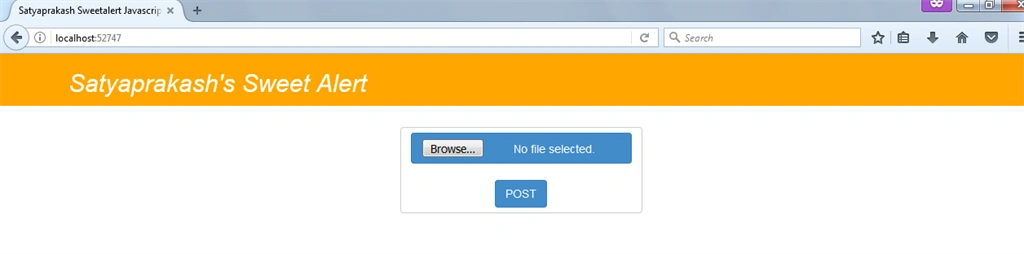
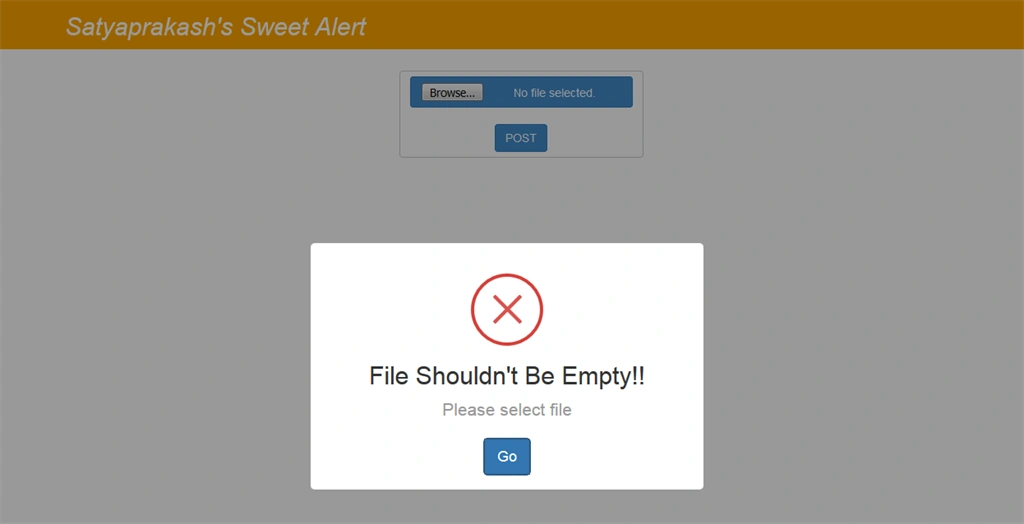
DESKTOP VIEW (If file is not empty).
MOBILE VIEW

Difference between normal alert and Sweet Alert JavaScript library.
For Normal Alert

For Sweet Alert
Summary
- What is Sweet Alert?
- Difference between Normal alert and Sweet Alert.
- Sweet Alert supports multi-platform enviornment.
- Resources required to implement Sweet Alert.
Anu MentaPosted May 18, 2020, 2:13 AM
Styles are changed in my app after adding this can you help me
borahan arslanPosted Jun 19, 2019, 6:43 AM
Hello, how do we send the form yes - no button ?
Oink QuackPosted Jul 12, 2018, 1:04 PM
It's OK. Got it working.
Oink QuackPosted Jul 12, 2018, 12:53 PM
I have followed your instructions closely. I am running VS 2017; has something changed because I get your navbar, but the normal default index page content, no file input.
Sumeet IlluminatePosted Apr 16, 2018, 11:31 PM
Sir can you do the same thing for sweet alert confirm button please
AJAY CHOUHANPosted Jan 31, 2018, 10:00 AM
Good boss..........................
Mohsin AzamPosted Aug 9, 2017, 3:25 AM
Toastr.js is also nice library,but will check both which is better,, :) any ways great article to know about new library ,thanks
Pandurang PailvanPosted Aug 9, 2017, 1:19 AM
Hi Satyaprakash,Very good article and well explained.