

In this article, we will look into visual studio add-ins and benefits of using it. Visual Studio provides add-ins to extend the functionality to its IDE. By using add-ins, we can automate our repetitive tasks in VS IDE. Visual Studio provides two project templates for creating add-ins:
- Visual Studio add-ins: This add-in works with only Visual Studio and its Macros.
- Visual Studio Shared add-ins: This add-in works with both Visual Studio and Microsoft Office products like MS Word, MS Excel etc.
An add-in is a compiled component that runs inside Visual Studio IDE. VS provides a wizard to simplify the task of creating add-ins. Since, add-in is in compiled format, we can distribute those without exposing code and improving performance. Add-in wizard creates minimum settings for writing our own add-in.
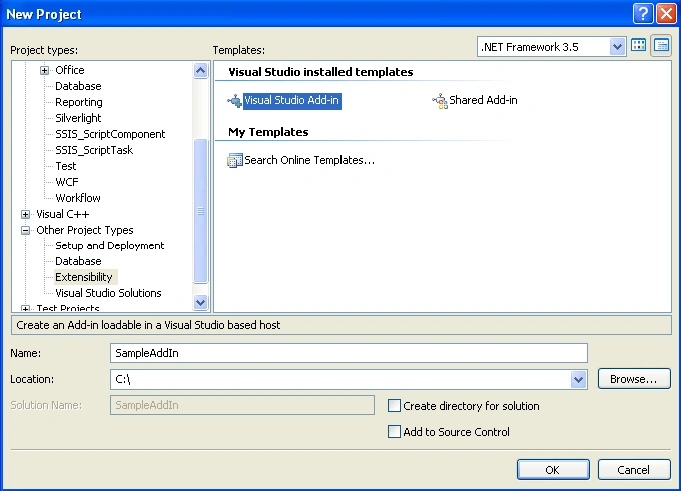
Let's create a sample add-in. Open your VS 2008, go to New Project  Other Project Types Extensibility Select Visual Studio Add-in Name as SampleAddIn as shown below:
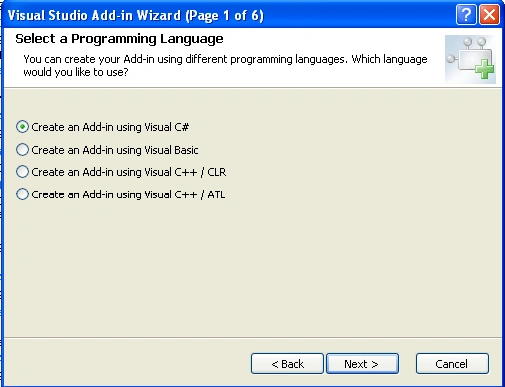
It will show up a wizard to create the basic configuration/code to create the add-in. Select language as C# as shown below:
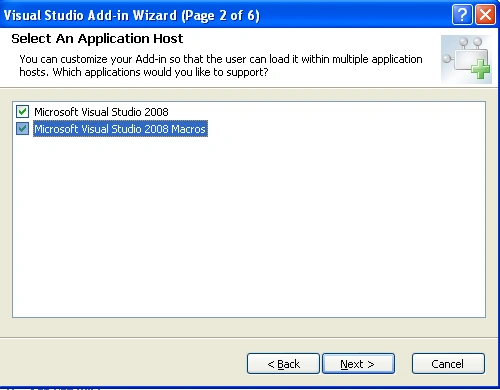
Then, click on Next and select Application Host as VS 2008 and VS 2008 Macros as shown below:
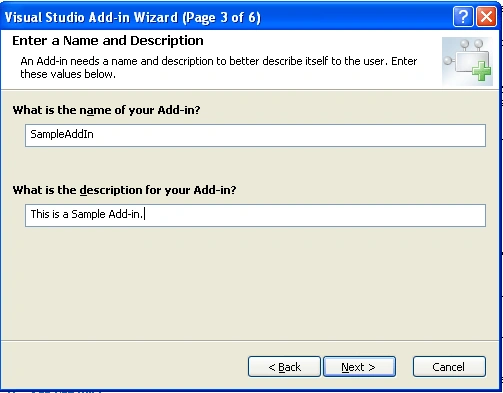
Then, click on Next and give Name & Description as shown below:
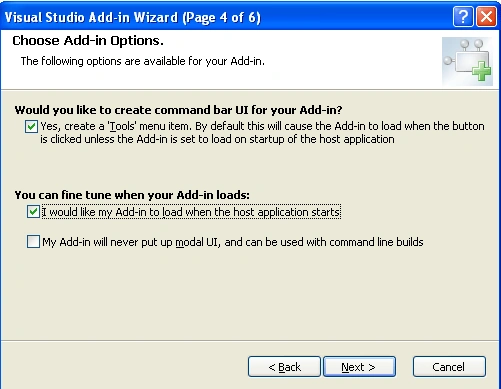
Then, click on Next and check the first checkbox for making our add-in gets displayed in Tools Menu of VS IDE and check second checkbox to load our add-in on start of host application (Visual Studio) a shown below:
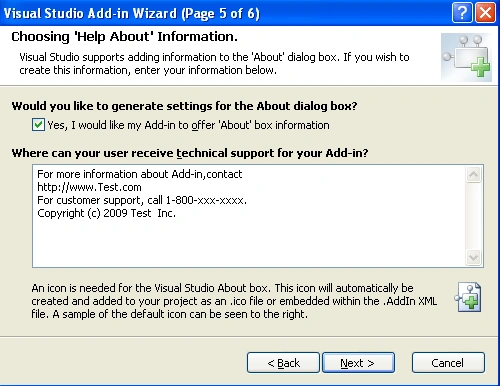
Then, click on Next and check the first checkbox, if you want to provide any About dialog box to your add-in as shown below:
Then click on Finish, so we are done with basic settings. Now, we will make our add-in to log all the build events of a solution in a text file. Go to Exec method of Connect class and add below code to it:
public void Exec(string commandName, vsCommandExecOption executeOption, ref object varIn, ref object varOut, ref bool handled)
{
handled = false;
if(executeOption == vsCommandExecOption.vsCommandExecOptionDoDefault)
{
if(commandName == "SampleAddIn.Connect.SampleAddIn")
{
handled = true;
_applicationObject.Events.BuildEvents.OnBuildBegin += new _dispBuildEvents_OnBuildBeginEventHandler(BuildEvents_OnBuildBegin);
_applicationObject.Events.BuildEvents.OnBuildDone += new _dispBuildEvents_OnBuildDoneEventHandler(BuildEvents_OnBuildDone);
return;
}
}
}
Gowtham RajamanickamPosted Apr 19, 2016, 6:42 AM
very good article
Peter PhelpseditedPosted Mar 28, 2009, 10:37 AMEdited Mar 28, 2009, 1:58 PM
Thanks for the article. It was very interesting. I have a few comments to hopefully make it easier for others, and one question. First, the code is missing a using System.IO; statement at the top. This allows access to the Path and StreamWriter classes, etc. Next, and more importantly, the code does not check to see if these events were already added. So if the user can't remember if he already started this add-in, starting it again causes the event to be triggered an additional time for each build, which muddies up your logfile. To resolve this, I tried to "walk" the event list while in the Exec() method, but couldn't figure out how to do so. Ultimately I decided on a simple bool to determine if the code has already done its job. To make the changes, do the following: At the top of the class declare a bool: public class Connect : IDTExtensibility2, IDTCommandTarget { bool EventsAdded = false; ... Then wrap the event modification code found in Exec() in a simple if statement and tweak your bool when it executes: if(commandName == "SampleAddIn.Connect.SampleAddIn") { handled = true; if(!EventsAdded) { _applicationObject.Events.BuildEvents.OnBuildBegin += new _dispBuildEvents_OnBuildBeginEventHandler(BuildEvents_OnBuildBegin); _applicationObject.Events.BuildEvents.OnBuildDone += new _dispBuildEvents_OnBuildDoneEventHandler(BuildEvents_OnBuildDone); EventsAdded = true; } return; } This code only works because it holds the state of the bool in the class, so I consider it a bit of a hack. I think it would be a lot better if the code somehow determined if the event had already been set by walking an event list, but I have no idea how to do that programmatically. If anyone wants to explain that one to me, I'll put you in my will! A final thing worth mentioning is how Add-ins are stored by the IDE. The location of your compiled Add-ins are in the folder you specified at Tools/Options/Projects & Solutions/General --> Visual Studio projects location. To remove an Add-in: Shut down the IDE, and then either delete or move a given add-in. It will not be available at IDE restart. If you just want to not use an add-in, then go to Tools/Add-in Manager... and uncheck the Startup Box. The source folder for the Add-in is just like any other source folder, and can just be deleted. Hope this helps! --Pete
James GregorPosted Mar 16, 2009, 8:42 AM
If you're as careful as me, you will be logged into your Windows system as a limited user. In this case, you will not have access to the root directory C:\ and you will not be able to create the output file "sampleprojectname.txt". A better soultion would be to change control.cs so that it creates the file in C:\TEMP. Of course there are other good dirctory choices, but this one is easy.
Eric SanderseditedPosted Mar 4, 2009, 4:13 PMEdited Mar 4, 2009, 4:51 PM
Thanks for the tutorial! I am in the process of porting my old C++ VS6.0 addin over to VS2005 in C#. All is going well except for one snag. I have added te proper code to add the commands to the Tools menu, the QueryStatus function, as well as the Exec function, and removed references to the default wizard generated command. When I run in debug mode, I see my five command icons in the tools menu. If I select the AddIn Manager option to load on startup, I only see the original default command created by the wizard, even though I removed it from the connect.cs file. Any ideas where I am faltering? Thanks, Eric Update.....found a crude solution... On instinct, I changed the line: if(connectMode == ext_ConnectMode.ext_cm_UISetup) to if(true)//connectMode == ext_ConnectMode.ext_cm_UISetup) to force it to go into the code section where my commands are added to the Tools menu. Low and behold, that worked. I changed it back and all is well. I'm sure that this little hack isn't the preferred way to do this however. Eric