

But when I tried to open and run my already-created ASP.NET application, I ended up with another issue. Visual Studio 2015 was not able to launch IIS Express. This was not the end.
I noticed another strange thing. Although my installation was successful, Extension's dialog was still showing that Update 1 is available. Now I was left with only one option – uninstall and reinstall Visual Studio 2015.
So, I went tothe control panel and selected Visual Studio Enterprise. As soon as I clicked on that, a notification popped up:

I clicked on Update and noticed that check box provided for VS 2015 Update 1 was still unchecked in the newly opened window as shown below:
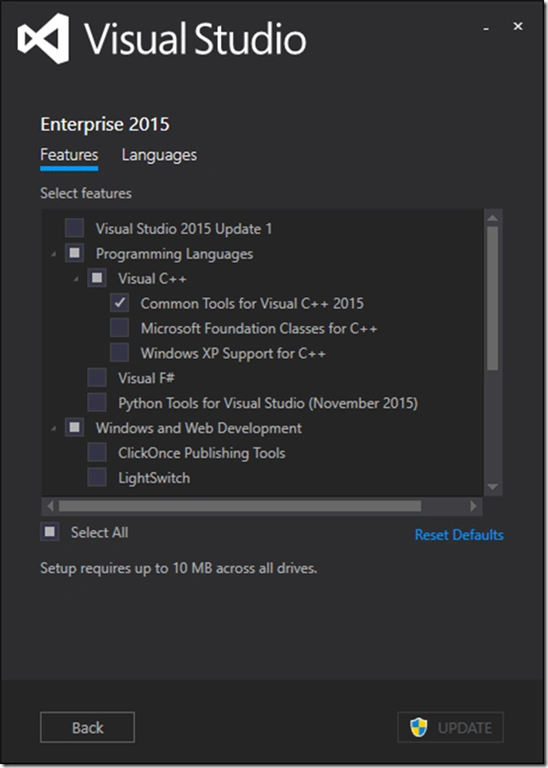
Oncethe update is completed, all my things are in place.
If you don’t want to suffer like me then my recommendation is to do the update directly from the Control Panel, rather than doing it using VS2015.1.exe. Hope you enjoyed troubleshooting.
Manoj KallaPosted Jan 30, 2016, 11:42 AM
Thanks for sharing , very informative
Santhakumar MunuswamyPosted Jan 23, 2016, 2:19 AM
Thanks for nice share
Jaco ZwartsPosted Jan 22, 2016, 11:17 AM
Thank you!
Nigel FernandesPosted Jan 21, 2016, 4:50 AM
Thanks
Joe WilsonPosted Jan 21, 2016, 12:22 AM
Thank you very much.
Vipul MalhotraPosted Jan 20, 2016, 6:13 AM
Thanks for the information.