

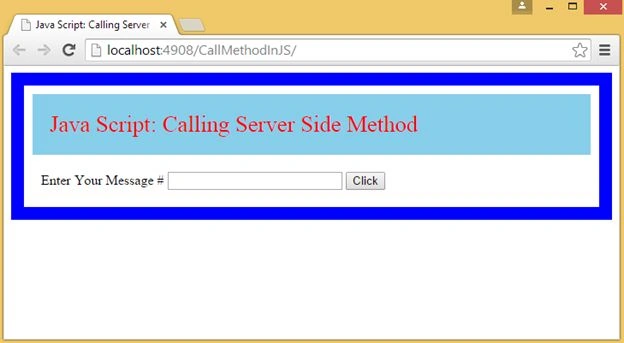
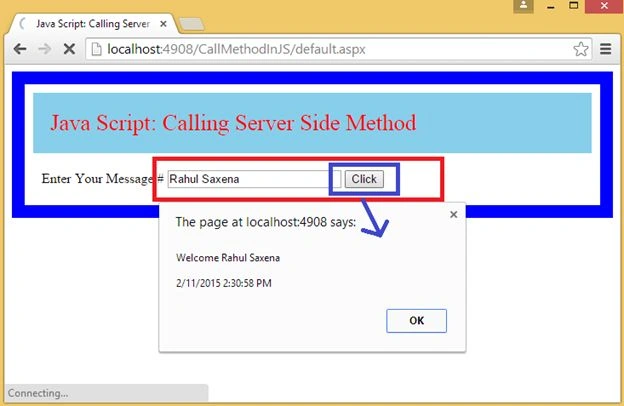
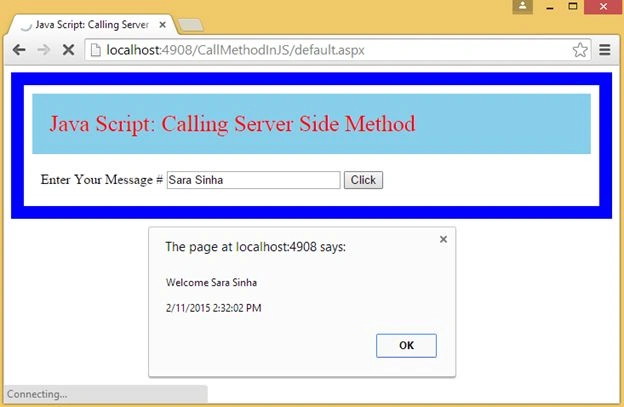
This article explains how to call a Server Side method from JavaScript in ASP.NET C#.
The following is my aspx code.
- <%@ Page Language="C#" AutoEventWireup="true" CodeFile="Default.aspx.cs" Inherits="_Default" %>
- <!DOCTYPE html PUBLIC "-//W3C//DTD XHTML 1.0 Transitional//EN" "http://www.w3.org/TR/xhtml1/DTD/xhtml1-transitional.dtd">
- <html xmlns="http://www.w3.org/1999/xhtml">
- <head runat="server">
- <title>Java Script: Calling Server Side Method</title>
- <script type="text/javascript" language="javascript">
- function jsCallServerSideMethod() {
- var _msg = $get("txtMessage").value;
- PageMethods.GetUserMessage(_msg, OnSuccess, OnFailure);
- }
- function OnSuccess(result) {
- if (result) {
- alert(result);
- }
- }
- function OnFailure(error) {
- }
- </script>
- </head>
- <body>
- <form id="form1" runat="server">
- <div>
- <asp:ScriptManager ID="ScriptManager1" runat="server" EnablePageMethods="True">
- </asp:ScriptManager>
- <table style="border: solid 15px blue; width: 100%; vertical-align: central;" cellpadding="10"
- cellspacing="10">
- <tr>
- <td style="padding-left: 20px; padding-top: 20px; padding-bottom: 20px; background-color: skyblue;
- font-family: 'Times New Roman'; font-size: 20pt; color: red;">
- Java Script: Calling Server Side Method
- </td>
- </tr>
- <tr>
- <td style="text-align: left; font-family: Times New Roman; font-size: 12pt;">
- Enter Your Message #
- <asp:TextBox ID="txtMessage" runat="server" Width="200px"></asp:TextBox>
- <asp:Button ID="btnClick" runat="server" Text="Click" OnClientClick="jsCallServerSideMethod()" />
- </td>
- </tr>
- </table>
- </div>
- </form>
- </body>
- </html>
syed ibrahimPosted Sep 18, 2018, 3:16 AM
Mehod itself not hitting while put break point , it is going to Mccaffeevar browserHandler; if (element.addEventListener) { browserHandler = function(e) { return handler.call(element, new Sys.UI.DomEvent(e)); } element.addEventListener(eventName, browserHandler, false); } Browserlink at end const mcafee_wa_annotationoptions={Unknown:-1,None:1,OnlySecureSearch:2,All:4};mcafee_wa_bkconstants={uninstallUrl:"https://home.mcafee.com/root/landingpage.aspx?lpname=get-it-now",siteAdvisorUrl:"http://www.siteadvisor.com/",siteAdvisorUrlSecure:"https://www.siteadvisor.com/",siteReportUrl:"https://www.siteadvisor.com/sitereport.html?url=",blockPageUrl:"https://www.siteadvisor.com/restricted.html",phishingPageUrl:"https://www.siteadvisor.com/phishing.html",maxCacheRecords:1e3,browsertype:"browsertype",useragent:"useragent",whitelistUrl:"about:blank?command=whitelist&token=1",domain:"domain",redirectURL:"redirectURL",originalURL:"originalURL",chromeExtensionVersion:"chromeExtVer",disabled:"disabled",viewport:"viewport",annonlyonssearch:"*OnlyShowAnnotationsOnSecureSearch",showicons:"*Icons",pnaclenabled:"Pnaclenabled",phishingcategory:169,SystemGEO:"SystemGEO",BingCountrySet:"BingCountrySet",ProviderForced:"ProviderForced",BingQString:"PC=MC",BingProvider:23,cookie:"Cookie",maxreservedcallbackid:5,WBUpsellDisabled:"WBUpsellDisabled",autoplaynotificationrequired:"AutoPlayNotificationRequired"};var mcafee_wa_browsertypes={Unknown:-1,Firefox:1,Chrome:2,IronSource:3,Edge:4};function mcafee_wa_clientfunctions(){this._client=null}mcafee_wa_clientfunctions.prototype.init=function(e){this._client=e},mcafee_wa_clientfunctions.prototype.call=function(e){this._client.processpagemsg(e)};const mcafee_wa_color={SA_Green:0,SA_Yellow:1,SA_Red:2,SA_Unknown:3,SA_HackerSafe:4,SA_Cashback:5,SA_Disabled:6};var mcafee_wa_commands={gtirequest:"gtirequest",reportstat:"reportstat",executecommand:"executecommand",ondoccomplete:"ondoccomplete",onnavigateiframe:"onnavigateiframe",onredirectiframe:"onredirectiframe",onnavigate:"onnavigate",onoptionreceived:"onoptionreceived",setoption:"setoption",getsupportedfeatures:"getsupportedfeatures",isframeblocked:"isframeblocked",whitelistediframe:"whitelistediframe",ispageblocked:"ispageblocked",logmsg:"logmsg",getxyviewport:"getxyviewport",getres:"getres",showoptions:"showoptions",addpagescanstat:"addpagescanstat",getbingsecuresearchenabled:"getbingsecuresearchenabled",whitelist:"whitelist",getbkoptions:"getbkoptions",setViewport:"setViewport",installExtension:"installExtension",getExtensionStatus:"getExtensionStatus",updateTopFrame:"updateTopFrame",autorunvideosite:"autorunvideosite",saveclickeventtime:"saveclickeventtime",getclickeventtime:"getclickeventtime",getValues:"getValues"};const mcafee_wa_disabledflags={disabledChrome:1,disabledSafeBrowser:2,disabledFirefox:4,disabledEdge:8,disabledOpera:16},mcafee_wa_executecommands={showsettingsdialog:1,raisenewtabevent:3,showwelcomemessage:4},mcafee_wa_externalextns={WebBoost:"klekeajafkkpokaofllcadenjdckhinm"},mcafee_wa_loggertype={defaultLogger:0,nativeLogger:1};class mcafee_wa_mutationobject{init(){this._engine=mcafee_wa_searchengine.getEngineForUrl(document.location.href,mcafee_wa_globals.browserType)}requireAnnotation(e){if("a"==e.nodeName.toLowerCase()&&mcafee_wa_linkharvester.shouldHarvestElement(e,this._engine.selectors))return!0;if("function"==typeof e.getElementsByTagName){const a=e.getElementsByTagName("a");for(let e=0;e<a.length;++e)if(mcafee_wa_linkharvester.shouldHarvestElement(a[e],this._engine.selectors))return!0}return!1}nodeAdded(e){return mcafee_wa_globals.isSearchPage?this.requireAnnotation(e)?(mcafee_wa_coreengine.annotate(document),mcafee_wa_mutationresponse.Skip):mcafee_wa_mutationresponse.Continue:mcafee_wa_mutationresponse.NoMoreRequired}}const mcafee_wa_scorevals={ScoreMinimal:15,ScoreUnknown:30,ScoreMedium:50},mcafee_wa_searchoption={securesearch:1,anysearch:2,nosearch:0},mcafee_wa_supportedfeatures={none:0,annotations:1,blockpages:2,iframeblocking:4},mcafee_wa_telemetrycounters={incrstatsrchitunk:"INCREMENTSTAT_SearchHit_Unknown_",incrstat:"INCREMENTSTAT_",browsererr:"BrowserError"};var mcafee_wa_uriparser={getURI:function(e){let a=e.split("?");return a.length>1?a[0]:(a=e.split("#")).length>1?a[0]:e},getCleanURI:function(e){let a=e;return a.endsWith("/")&&(a=a.slice(0,-1)),a.startsWith("http://")?a=a.slice(7):a.startsWith("https://")&&(a=a.slice(8)),mcafee_wa_uriparser.getURI(a)},getParam:function(e,a){const t=e.indexOf("?");if(-1==t)return null;const n=e.substring(t+1).split("&");for(let e=0;e<n.length;++e){const t=n[e].indexOf("=");if(-1!=t&&n[e].substring(0,t)==a)return n[e].substring(t+1)}return null}},mcafee_wa_settings={loggertype:mcafee_wa_loggertype.defaultLogger,logtype:mcafee_wa_logtypes.None,debugmode:!1,browsertype:mcafee_wa_browsertypes.Chrome,extnversion:"6.0.0.13089"},mcafee_wa_browser={browser:mcafee_wa_settings.browsertype==mcafee_wa_browsertypes.Edge?browser:chrome},mcafee_wa_bkcommon={browserTypeToString:function(e){switch(e){case 1:return"FF";case 2:return"CH";case 3:return"ISB";case 4:return"ED"}return"UN"},isHackerSafe:function(e){return 1&e},colorToImagePaths:function(e){let a="white";switch(e){case mcafee_wa_color.SA_Green:a="green";break;case mcafee_wa_color.SA_Yellow:a="yellow";break;case mcafee_wa_color.SA_Red:a="red";break;case mcafee_wa_color.SA_Unknown:a="white";break;case mcafee_wa_color.SA_HackerSafe:a="hackersafe";break;case mcafee_wa_color.SA_Disabled:a="disabled"}return mcafee_wa_msgdispatchhelper.toImagePaths(a)},toColor:function(e){let a=mcafee_wa_color.SA_Unknown;return a=e<mcafee_wa_scorevals.ScoreMinimal?mcafee_wa_color.SA_Green:e<mcafee_wa_scorevals.ScoreUnknown?mcafee_wa_color.SA_Unknown:e<mcafee_wa_scorevals.ScoreMedium?mcafee_wa_color.SA_Yellow:mcafee_wa_color.SA_Red},isDisabled:function(e,a){const t=[{browser:mcafee_wa_browsertypes.Chrome,flag:mcafee_wa_disabledflags.disabledChrome},{browser:mcafee_wa_browsertypes.McAfeeSecureBrowser,flag:mcafee_wa_disabledflags.disabledSafeBrowser},{browser:mcafee_wa_browsertypes.Firefox,flag:mcafee_wa_disabledflags.disabledFirefox},{browser:mcafee_wa_browsertypes.Edge,flag:mcafee_wa_disabledflags.disabledEdge},{browser:mcafee_wa_browsertypes.Opera,flag:mcafee_wa_disabledflags.disabledOpera}];for(let n=0;n<t.length;++n)if(t[n].browser==a)return 0!=(t[n].flag&e);return!1},isSiteAdvisorURL:function(e){return!(!e.startsWith(mcafee_wa_bkconstants.siteAdvisorUrl)&&!e.startsWith(mcafee_wa_bkconstants.siteAdvisorUrlSecure))},isProperWebURL:function(e){return!!(e.startsWith("http://")||e.startsWith("https://")||e.startsWith("ftp://"))}},mcafee_wa_backgroundipc={makeGTIRequest:function(e,a,t,n,o){return mcafee_wa_browser.browser.runtime.sendMessage({command:mcafee_wa_commands.gtirequest,searchEngineType:a,Url:e,isSecureSearch:t,requestData:n},o),!0},reportStat:function(e,a){mcafee_wa_browser.browser.runtime.sendMessage({command:mcafee_wa_commands.reportstat,Name:e,Value:a})},onNavigate:function(e,a){mcafee_wa_browser.browser.runtime.sendMessage({command:mcafee_wa_commands.onnavigate,Url:e,FrameId:a})},executeCommand:function(e,a){mcafee_wa_browser.browser.runtime.sendMessage({command:mcafee_wa_commands.executecommand,commandId:e,params:a})},getSupportedFeatures:function(e){mcafee_wa_browser.browser.runtime.sendMessage({command:mcafee_wa_commands.getsupportedfeatures},e)},isFrameBlocked:function(e,a){mcafee_wa_browser.browser.runtime.sendMessage({command:mcafee_wa_commands.isframeblocked,Url:e},a)},logMsg:function(e,a,t){mcafee_wa_browser.browser.runtime.sendMessage({command:mcafee_wa_commands.logmsg,logflags:e,message:a,extnprocess:t})},isPageBlocked:function(e,a){mcafee_wa_browser.browser.runtime.sendMessage({command:mcafee_wa_commands.ispageblocked,Url:e},a)},addPageScanStat:function(){mcafee_wa_browser.browser.runtime.sendMessage({command:mcafee_wa_commands.addpagescanstat})},getBingSecureSearchEnabled:function(e){mcafee_wa_browser.browser.runtime.sendMessage({command:mcafee_wa_commands.getbingsecuresearchenabled},e)},whitelist:function(e,a,t){mcafee_wa_browser.browser.runtime.sendMessage({command:mcafee_wa_commands.whitelist,url:e,redirect_token:a,frame_id:t})},domContentLoaded:function(){mcafee_wa_browser.browser.runtime.sendMessage({command:mcafee_wa_commands.ondoccomplete})},getBkOptions:function(e){mcafee_wa_browser.browser.runtime.sendMessage({command:mcafee_wa_commands.getbkoptions},e)},autoRunVideo:function(e){mcafee_wa_browser.browser.runtime.sendMessage({command:mcafee_wa_commands.autorunvideosite,Url:e})},saveLastClickedTime:function(){mcafee_wa_browser.browser.runtime.sendMessage({action:mcafee_wa_commands.saveclickeventtime,last_event:Date.now()})},getLastClickedTime:function(e){mcafee_wa_browser.browser.runtime.sendMessage({action:mcafee_wa_commands.getclickeventtime},e)}};function mcafee_wa_contentnativelogger(e,a){this._logTypes=e,this._browserType=a}function stat(e,a,t,n,o){this._regex=e,this._searchStatName=a,this._secureSearchStatName=t,this._engineAddendum=n,this._type=o}mcafee_wa_contentnativelogger.prototype.log=function(e){mcafee_wa_logtypes.Info&this._logTypes&&mcafee_wa_backgroundipc.logMsg(0|this._browserType<<16|mcafee_wa_logtypes.Info,e,1)},mcafee_wa_contentnativelogger.prototype.error=function(e){mcafee_wa_logtypes.Err&this._logTypes&&mcafee_wa_backgroundipc.logMsg(0|this._browserType<<16|mcafee_wa_logtypes.Err,e,1)};const telemetryOrigin={typosquatting:"TypoSquatting",blockpage:"BlockPage",unknown:"Unknown",defaultsearch:"DefaultSearch",toolbar:"Toolbar",blank:""},mcafee_wa_telemetry=function(){const e=[new stat(/^http(s)?:\/\/(us\.|ar\.|au\.|br\.|ca\.|fr\.|de\.|hk\.|in\.|it\.|kr\.|mx\.|es\.|tw\.|uk\.|cf\.|cl\.|co\.|id\.|nz\.|pe\.|ph\.|sg\.|th\.|espanol\.|ve\.|vn\.|malaysia\.)?search\.yahoo\.(com|co\.jp)\/yhs\/search.*(\?|&)hspart=mcafee/,"srch_t","SecureSearchHit_","_YahooYHS",telemetryOrigin.unknown),new stat(/^http(s)?:\/\/(us\.|ar\.|au\.|br\.|ca\.|fr\.|de\.|hk\.|in\.|it\.|kr\.|mx\.|es\.|tw\.|uk\.|cf\.|cl\.|co\.|id\.|nz\.|pe\.|ph\.|sg\.|th\.|espanol\.|ve\.|vn\.|malaysia\.)?search\.yahoo\.(com|co\.jp)\/search.*(\?|&)fr=mcafee/,"srch_h","SecureSearchHit_","_Yahoo",telemetryOrigin.defaultsearch),new stat(/^http(s)?:\/\/(us\.|ar\.|au\.|br\.|ca\.|fr\.|de\.|hk\.|in\.|it\.|kr\.|mx\.|es\.|tw\.|uk\.|cf\.|cl\.|co\.|id\.|nz\.|pe\.|ph\.|sg\.|th\.|espanol\.|ve\.|vn\.|malaysia\.)?search\.yahoo\.(com|co\.jp)\/search.*(\?|&)fr=(mcasa|mcsaoff|mcsaoffblock|slv8-mcafee|slv8-mc)/,"srch_p","SecureSearchHit_","_Yahoo",telemetryOrigin.toolbar),new stat(/^http(s)?:\/\/(www\.)?yandex\.(com|ru)\/yandsearch.*(\?|&)clid=1963438/,"srch_h","SecureSearchHit_","_Yandex",telemetryOrigin.defaultsearch)],a={OK:"GR",CERTIFIED:"GR",INFO:"YW",WARN:"RD",HACKERSAFE:"HS",CASHBACK:"CB",UNKNOWN:"UN"};let t=null,n=null,o=mcafee_wa_browsertypes.Unknown,r={};const s=function(){switch(o){case mcafee_wa_browsertypes.Firefox:return"FF";case mcafee_wa_browsertypes.Chrome:return"CH";case mcafee_wa_browsertypes.Edge:return"ED";case mcafee_wa_browsertypes.IronSource:return"ISB"}return"Unknown"};return{init:function(e){o=e},onBeginAnnotation:function(a,o,c){if(mcafee_wa_backgroundipc.addPageScanStat(),null!==c&&void 0!==c&&(null==t||t!=c||null==n||n!=o)){mcafee_wa_backgroundipc.reportStat(mcafee_wa_telemetrycounters.incrstatsrchitunk+s()+"_"+o,c),t=c,n=o;let r=telemetryOrigin.blank;a.match(/^http(s)?:\/\/.*&type=\w\d3/)?r=telemetryOrigin.typosquatting:a.match(/^http(s)?:\/\/.*&type=\w\d4/)&&(r=telemetryOrigin.blockpage);for(let t=0;t<e.length;++t){const n=e[t];if(a.match(n._regex)){const e=r==telemetryOrigin.blank?n._type:r;mcafee_wa_backgroundipc.reportStat(mcafee_wa_telemetrycounters.incrstat+n._searchStatName,1),mcafee_wa_backgroundipc.reportStat(mcafee_wa_telemetrycounters.incrstat+n._secureSearchStatName+e+"_"+s()+n._engineAddendum,1)}}}r={}},onShowBalloon:function(e,t,n){const o="SERP_CL_"+a[e.score];mcafee_wa_backgroundipc.reportStat(mcafee_wa_telemetrycounters.incrstat+o,1)},onCompleteAnnotation:function(e){for(const e in r)mcafee_wa_backgroundipc.reportStat(mcafee_wa_telemetrycounters.incrstat+e,r[e]);r={}},onAnnotatingLink:function(e,t){const n="SERP_VW_"+a[e.score];void 0===r[n]?r[n]=1:r[n]++}}}();function mcafee_wa_warnbanner(){this._document=null,this._frameUrls=new Map,this._totalWhitelisted=0,this._bannerDiv=null,this.WARNING_BANNER="warning_banner",this.WARNING_TEXT="warning_text",this.SHOW_ALL_CONTENT="show_all_content",this.CLOSE_BTN_X="close_btn_x"}function mcafee_wa_gtiproxy(){}function mcafee_wa_annotatehandler(){}mcafee_wa_warnbanner.prototype.hideWarning=function(){this._bannerDiv.style.display="none"},mcafee_wa_warnbanner.prototype.showAllContent=function(){this._document.getElementById(this.SHOW_ALL_CONTENT).disabled=!0,this._frameUrls.forEach((e,a,t)=>{mcafee_wa_backgroundipc.whitelist(a,e,-1)})},mcafee_wa_warnbanner.prototype.isBannerCreated=function(){return null!=this._document.getElementById(this.WARNING_BANNER)},mcafee_wa_warnbanner.prototype.setWarningImage=function(e){const a=e.getAttribute("src");mcafee_wa_resourcemanager.getImage(a,a=>{e.setAttribute("src",a)})},mcafee_wa_warnbanner.prototype.addFrameURI=function(e,a){this._frameUrls.set(e,a)},mcafee_wa_warnbanner.prototype.showWarningBanner=function(e){this._document=e;try{if(this.isBannerCreated())return!0;mcafee_wa_resourcemanager.getHtml(mcafee_wa_constants.warningHtmlName,e=>{if(this.isBannerCreated())return!0;if(null==e||""==e)return!1;this._bannerDiv=this._document.createElement("div"),this._bannerDiv.setAttribute("id","BannerLayer"+mcafee_wa_globals.uid),this._bannerDiv.style.cssText="height: 47px; display: block;",this._bannerDiv.innerHTML=e,this._document.body.insertBefore(this._bannerDiv,this._document.body.childNodes[0]);const a=this._document.getElementById(this.WARNING_BANNER);if(void 0!==a&&null!==a){const e=a.getElementsByTagName("img");for(let a=0;a<e.length;++a)this.setWarningImage(e[a])}const t=this._document.getElementById(this.WARNING_TEXT);void 0!==t&&null!==t&&mcafee_wa_resourcemanager.getResString("res_20041",e=>{t.innerHTML=e});const n=this._document.getElementById(this.SHOW_ALL_CONTENT);null!=n&&(mcafee_wa_resourcemanager.getResString("res_20042",e=>{n.value=e}),n.addEventListener("click",e=>{mcafee_wa_globals.clientFunctions.call({id:mcafee_wa_scriptmessages.msgShowIFrame})}));const o=this._document.getElementById(this.CLOSE_BTN_X);null!=o&&o.addEventListener("click",e=>{mcafee_wa_globals.clientFunctions.call({id:mcafee_wa_scriptmessages.msgHideWarning})})})}catch(e){return mcafee_wa_globals.logger.error("showWarningBanner: "+e.message),!1}return!0},mcafee_wa_gtiproxy.prototype.post=function(e,a,t,n,o){let r=t;try{if(r){const a=decodeURIComponent(e),t=mcafee_wa_uriparser.getParam(a,"fr");r="mcafee"==t}if(a==mcafee_wa_senginetypes.SearchEngine_BING&&null!=document.cookie){document.cookie.split(";").forEach(e=>{-1!=e.indexOf(mcafee_wa_bkconstants.BingQString)&&(r=!0)})}mcafee_wa_backgroundipc.makeGTIRequest(e,a,r,n,o)}catch(e){mcafee_wa_globals.logger.error(e)}},mcafee_wa_annotatehandler.prototype.process=function(e){mcafee_wa_globals.cacheStats.localCacheHits=0,mcafee_wa_globals.cacheStats.localCacheMiss=0,mcafee_wa_backgroundipc.isPageBlocked(e.location.href,(e,a)=>{e&&(mcafee_wa_globals.logger.log("Top page is blocked so redirecting to blockpage"),window.location.replace(a))}),mcafee_wa_globals.isSearchPage=mcafee_wa_coreengine.annotate(e)},mcafee_wa_annotatehandler.prototype.processpagemsg=function(e){switch(e.id){case mcafee_wa_scriptmessages.msgShowBalloon:mcafee_wa_globals.eventHandler.showBalloon(e);break;case mcafee_wa_scriptmessages.msgHideBalloon:mcafee_wa_globals.eventHandler.hideBalloon(e);break;case mcafee_wa_scriptmessages.msgShowIFrame:this._warningBanner.showAllContent();break;case mcafee_wa_scriptmessages.msgHideWarning:this._warningBanner.hideWarning()}},mcafee_wa_annotatehandler.prototype.processmsg=function(e,a){switch(e.command){case mcafee_wa_commands.updateTopFrame:case mcafee_wa_commands.onredirectiframe:{null==this._warningBanner&&(this._warningBanner=new mcafee_wa_warnbanner);const a=mcafee_wa_uriparser.getParam(e.uri,"domain"),t=mcafee_wa_uriparser.getParam(e.uri,"originalURL");this._warningBanner.addFrameURI(a,t),this._warningBanner.showWarningBanner(document);break}case mcafee_wa_commands.whitelistediframe:++this._warningBanner._totalWhitelisted==this._warningBanner._frameUrls.size&&window.location.reload()}};const blockpageconstants={acceptrisk:"acceptrisk",fnacceptrisk:"acceptrisk()"},mcafee_wa_blockpagehandler=function(){};function mcafee_wa_standaloneclient(){this._handler=null,this._messages=[],this._mutationobserver=new mcafee_wa_mutationobserver}mcafee_wa_blockpagehandler.prototype._insertScript=function(e){const a=e.createElement("script");a.text="function "+blockpageconstants.fnacceptrisk+" { window.postMessage({ type: '"+blockpageconstants.acceptrisk+"'}, '*'); }";const t=document.getElementsByTagName("head");null!==t&&void 0!==t&&t[0].appendChild(a)},mcafee_wa_blockpagehandler.prototype.processpagemsg=function(e){},mcafee_wa_blockpagehandler.prototype.process=function(e){let a=mcafee_wa_uriparser.getParam(e.location.href,mcafee_wa_bkconstants.domain);a=null==a?"":a;const t=mcafee_wa_uriparser.getParam(e.location.href,mcafee_wa_bkconstants.originalURL);if(null!=t){this._insertScript(e),window.addEventListener("message",e=>{e.data.type&&e.data.type===blockpageconstants.acceptrisk&&mcafee_wa_backgroundipc.whitelist(a,t,0)},!1);const n=e.getElementById("DontWarn");null!=n&&(n.href="javascript:"+blockpageconstants.fnacceptrisk)}},mcafee_wa_blockpagehandler.prototype.procesmsg=function(e,a){},mcafee_wa_standaloneclient.prototype.processXYViewPortRequest=function(){if(null==window)return;let e=(window.mozInnerScreenX-window.screenX)*window.devicePixelRatio;e=Math.round(e);let a=(window.mozInnerScreenY-window.screenY)*window.devicePixelRatio;a=Math.round(a),mcafee_wa_browser.browser.runtime.sendMessage({command:mcafee_wa_commands.setViewport,X:e,Y:a})},mcafee_wa_standaloneclient.prototype.processpagemsg=function(e){null!=this._handler&&this._handler.processpagemsg(e)},mcafee_wa_standaloneclient.prototype.initMsgHandler=function(){mcafee_wa_browsertypes.Firefox===mcafee_wa_settings.browsertype&&(document.onreadystatechange=(()=>{"complete"===document.readyState&&this.processXYViewPortRequest()})),mcafee_wa_browser.browser.runtime.onMessage.addListener((e,a,t)=>{try{if(null===this._handler){mcafee_wa_globals.logger.log("Message received however handler not initialized so msg is cached");const n={request:e,sender:a,fncallback:t};return void this._messages.push(n)}mcafee_wa_globals.logger.log(e.command+" received in frame with uri: "+document.location.href),this._handler.processmsg(e,t)}catch(e){mcafee_wa_globals.logger.error(e)}return!1})},mcafee_wa_standaloneclient.prototype.createHandler=function(e){return mcafee_wa_bkcommon.isSiteAdvisorURL(e.location.href)?new mcafee_wa_blockpagehandler:new mcafee_wa_annotatehandler},mcafee_wa_standaloneclient.prototype.process=function(e){try{if(this._handler=this.createHandler(e),null!=this._handler){this._handler.process(e),this._mutationobserver.observe(e,mcafee_wa_globals.bkOptions.autoPlayNotificationRequired);for(let e=0;e<this._messages.length;++e)this._handler.processmsg(this._messages[e].request,this._messages[e].fncallback);this._messages=[]}}catch(e){mcafee_wa_globals.logger.error(e)}},mcafee_wa_standaloneclient.prototype.executeCommand=function(e,a){mcafee_wa_backgroundipc.executeCommand(e,a)};const mcafee_wa_main={main:function(){const e=new mcafee_wa_standaloneclient;e.initMsgHandler();const a=new mcafee_wa_clientfunctions;a.init(e),mcafee_wa_backgroundipc.getBkOptions(t=>{if(null!=t){mcafee_wa_globals.bkOptions=t;try{const t=mcafee_wa_settings.browsertype,n=new mcafee_wa_coreproperties;mcafee_wa_settings.loggertype==mcafee_wa_loggertype.nativeLogger?n.logger=new mcafee_wa_contentnativelogger(mcafee_wa_settings.logtype,t):n.logType=mcafee_wa_settings.logtype,mcafee_wa_globals.bkOptions.autoRunNotificationRequired&&window.addEventListener("click",()=>{mcafee_wa_backgroundipc.saveLastClickedTime()},!0),n.gtiRequestor=new mcafee_wa_gtiproxy,n.events.onShowBalloon=mcafee_wa_telemetry.onShowBalloon,n.events.onBeginAnnotation=mcafee_wa_telemetry.onBeginAnnotation,n.events.onAnnotatingLink=mcafee_wa_telemetry.onAnnotatingLink,n.events.onCompleteAnnotation=mcafee_wa_telemetry.onCompleteAnnotation,n.clientFunctions=a,n.debugMode=mcafee_wa_settings.debugmode,n.browserType=t,n.debugTitle="(Main)",mcafee_wa_telemetry.init(t),mcafee_wa_coreengine.init(n,()=>{e.process(document)})}catch(e){mcafee_wa_globals.logger.log(e)}}}),window.addEventListener("load",e=>{mcafee_wa_backgroundipc.domContentLoaded()})}};mcafee_wa_main.main();
Rahul Kumar SaxenaPosted Mar 11, 2015, 2:03 PM
Thank u Gowtham Rajamanickam
Gowtham RajamanickamPosted Mar 11, 2015, 9:50 AM
good one....
pranay sagarPosted Feb 18, 2015, 1:13 PM
is it necessary to use script manager . i mean their is also a other to do the same does it improve performance
Khargesh RajputPosted Feb 18, 2015, 2:02 AM
nice sir
Prasham SabadraPosted Feb 18, 2015, 12:28 AM
Useful information. Thanks for sharing!