

Abstract
This is tutorial text on “function closures” in JavaScript. Some theory is explained, and several JavaScript examples are shown.
1. Introduction
“Function closures” are tricky and sometimes difficult to understand. They are possible and present in JavaScript language. Every ambitious JavaScript developer should be familiar with function closures, either to use them or to competently read/debug other people's code. They offer fancy encapsulation in the form of a “captured variable” that is not so easy to comprehend. This tutorial tries to explain it and provide a sufficient number of examples. The intended audience is Intermediate JavaScript developers and above.
2. Theoretical background
Before some practical examples, some theoretical background is needed. In this article, we will not go for the full rigor in definitions, like one that can be found in a very good article [1]. We are more focused on explaining and comprehending the basic concepts, leaving a more formal approach to further reading of materials like references enclosed.
2.1. Simplified definitions
Here are some plain-language explanations.
What are closures?
Closures are created when you inside a function/method in JavaScript reference a variable from the “above scope” and then you pass that function as a function object/function expression around. That variable from the “above scope” is passed around with that function object.
How is the closure implemented?
When the compiler notices that you are inside a function accessing the variable from the “above scope”, it creates a record in which it stores 1) the function in question; 2) the variable from the “above scope” (popularly called “captured variable”) and passes them around together.
2.2. More formal definitions
Here are more formal definitions, still not as formal as [1]. You can skip this in the first reading.
A programming language with first-class functions. A programming language is said to have “First-class functions” if it treats functions as first-class citizens, meaning that functions can be assigned to variables, passed as arguments to another function, etc. JavaScript is such a language since functions are JavaScript objects and can be passed around. Basically, it says that if you can somehow obtain a “pointer to a function” ( in C/C++ terminology) and pass it around, that is a special feature of that language, which we call “first-class function language”. In such languages typically “function closure” concepts have sense and are possible. So, the concept of “function closure” has no sense in every programming language, just in some languages, and JavaScript is one of them.
Free variable. That is a variable that is used locally but defined in the enclosing scope. That is what we sometimes call “variable from the above scope”.
Lexical scope (aka Static scope). That is the definition area of an expression. For the variable, that is an area in which the variable is defined/created. It is often called “static scope” since it can be deduced from static program text.
JavaScript, C, C#, and Java all use Lexical scope. That means that functions use the variable scope where they were defined, not where they were executed.
Dynamic scope. That is the execution area of an expression. For the variable (see [10],[11]), using this scoping rule, we first look for a local definition of a variable. If it isn’t found, we look up the calling stack for a definition. The word “dynamic” refers to change, that is the call stack can be different every time a given function is called. JavaScript does not use Dynamic scope, the languages that use it are the original version of Lisp and Bash.
What are closures?
The “function closure” is the concept of implementing lexically scoped variable binding in a language with first-class functions. Practically, that means that “function closure” is storing a record (structure) of a function together with references/values of any free variables it has.
How is the closure implemented?
Closures are typically implemented as a special data structure that contains 1) a pointer to the function code; 2) a representation of any “free variable” at the time of closure creation. The second part is sometimes referred to as the “function lexical environment”.
2.3. Some discussions on closures
First thing to clarify, we need to say that the term “closure” has been used in different texts with different meanings. Here are 2 definitions for the purpose of this text.
- Closure-in-computer-science: When talking of closure, in many texts the meaning of closure is the implementation of lexical scoping in which closure is a combination of function object and reference to the scope in which the function appears.
- Closure-as-special-function: When talking of closure, in many texts the meaning of closure is that special situation when the function has a free variable from the “above scope” that exists in the definition environment of the function, but now in the execution environment of the function that scope no longer exists. That is, the function is invoked from a different scope/environment than the one where it was defined.
Here are some frequent discussions on “what exactly closure is and is not” and here is my opinion. Some clarifications might seem trivial or obvious, but I saw a number of articles with confusing interpretations.
- Not every function with a free variable is a closure: (Here is the context Closure-as-special-function). So, in simple words, the fact that the function accesses variables from the “above/parent/enclosing scope” does not make it automatically a closure. It becomes closure only when it is used out of that “above/parent/enclosing scope” where free variables are defined, because only then do interesting things happen, that is the free variable is then bound. If that free variable in question is still available in enclosing/parent scope, that is still a normal case., and no variable is being bound in the sense of closure definition. So, if the definition environment of a function is the same as the execution environment, nothing interesting is happening. Only when the definition environment of a function is different than the execution environment, and the function has a free variable from “above scope” that no longer exists, we have the situation Closure-as-special-function.
- JavaScript function referring to the global variable is not a closure: (Here is the context Closure-as-special-function). One can find articles claiming that “every JavaScript function accessing the global variable” is a closure. I do not agree, because that represents the case discussed above, since global variables are always available and in scope (since global scope is parent/enclosing scope for all functions). So, nothing interesting is happening there, no variable is being bound and that is not a closure. Simple to say, the execution environment (global scope) is trivially the same as the execution environment, so that is not the closure.
- Enclosing scope for closure does not need to be function scope, it can be block scope: (Here the context is both Closure-as-special-function and Closure-in-computer-science). A typical example you will find is that the inner function is defined inside the outer (enclosing) function. Since the introduction of “let” in Java Script and the existence of the block scope, a regular case for closure is also when the outer scope is a block scope. (**). Typically, in literature [5] one can find that closures are a concept from languages where functions are “first-class objects” (as in JavaScript where functions can be assigned to variables) in which functions can be returned as a result from “higher-order functions” (as in JavaScript function producing function as a result). In those articles (see [4]), they do not typically discuss the situation of the outer scope being a block scope but typically focus on the outer scope being a function scope. What really matters is a function's “definition environment”, not how technically a scope is formed.
- The function does not need to be returned as a result of another function to be called closure: (Here the context is both Closure-as-special-function). Typical examples of closures usually show the “inner function” returned from the “outer function” as a result (see [4]). But even the article [8] example shows that construct does not need to be strictly adhered to, and there are variations to that formulation, for example, a variable can be used to pass a function/closure out of “outer scope”. (***). What really matters is a function's “definition environment”, and the fact that is different from a function’s “execution environment’, and it doesn’t matter how technically we got to that situation.
- Every function in JavaScript is a closure. (Here is the context Closure-in-computer-science): You can find in reputable books like [4] statements that “Technically, all JavaScript functions are closures….”. So, what the author wants to say is that every function in JavaScript keeps a reference to the scope/environment in which it was defined. And that is true for JavaScript language. We get the interesting situation Closure-as-special-function only when the function is invoked from a different scope/environment than the one in which was defined in. So, all functions in JavaScript are “Closure-in-computer-science”, but just sometimes we get an interesting case of “Closure-as-special-function”.
For the purpose of this article, when talking about closure, we mean “Closure-as-special-function”.
3. Example01 – Nested function syntax
Here is a practical example of JavaScript “function closure” created, using nested function syntax.
<!DOCTYPE html>
<html>
<head>
    <title>JavaScript Closure Example</title>
    <style>
        #ResultBox {
            border: 1px solid;
            min-height: 20px;
        }
    </style>
</head>
<body>
    <h3>Example 01</h3>
    <p>JavaScript closure using Nested functions</p>
    <button onclick="main()">Execute Example</button>
    <hr />
    <h3>Result</h3>
    <div id="ResultBox"></div>
    <script>
        function ResultBoxClear() {
            document.getElementById("ResultBox").innerHTML = "";
        }

        function ResultBoxAddLine(textLine) {
            document.getElementById("ResultBox").innerHTML += textLine + "<br/>";
        }
        function CreateClosureFunction() {
            let i_capturedVariable = 0;

            function ff() {
                ++i_capturedVariable;
                ResultBoxAddLine("i_capturedVariable:" + i_capturedVariable);
            }

            return ff;
        }
        window.onerror = function (message, url, line, col, error) {
            ResultBoxAddLine(`Error: ${message} at ${line}:${col} of ${url}`);
        };
        function main() {
            ResultBoxClear();
            let ClosureFunction1 = CreateClosureFunction();

            ResultBoxAddLine("ClosureFunction1 invocation:");
            ClosureFunction1();
            ClosureFunction1();
            ClosureFunction1();
        }
    </script>
</body>
</html>
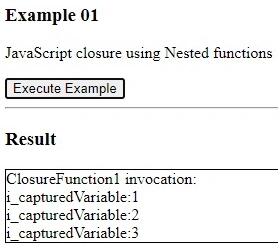
The above code is an example of a “function closure” in JavaScript.
- Please look at variable i_capturedVariable: It is defined in “above scope” to the function scope where it is used. In the above terminology, that is a “free variable” and it will be bound to the function during assignment to the variable ClosureFunction1. In the above terminology, it will become a “captured variable”. That variable is not in the function scope but is used inside the function, so when the function is passed around, it needs to be encapsulated with the function. The existence of such a variable is the main and only reason why “function closure” needs to be created. The main trick here is that at the moment in which the function is invoked/executed, the scope in which the variable i_capturedVariable is defined will no longer exist, so to make the function work, the compiler needs to encapsulate that variable with the function itself.
- Please look at variable ClosureFunction1: Function closures in JavaScript are created only when the function is passed around as an assignment of a function object, which is analogous to the C/C++ “pointer to a function”.
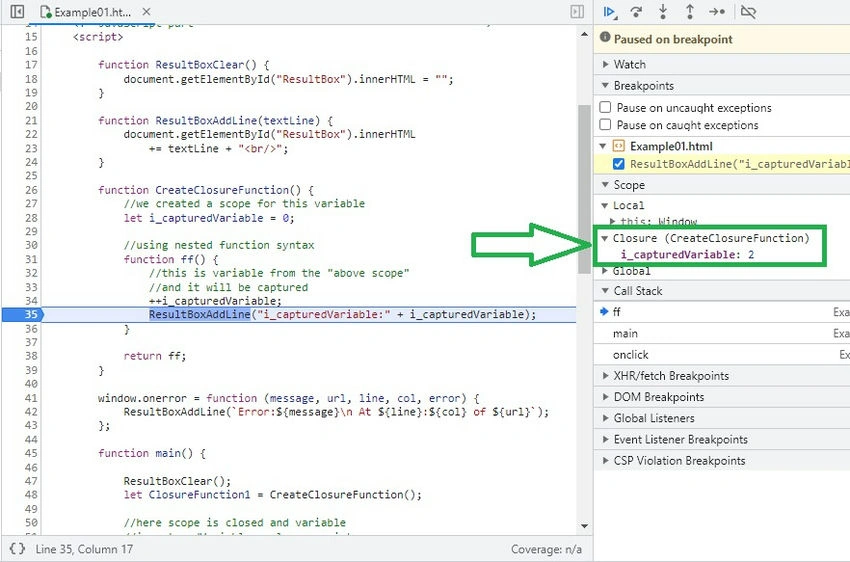
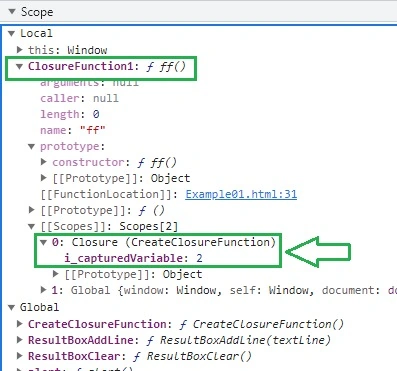
- Please a look at the assignment to the delegate ClosureFunction1: It looks like an ordinary assignment to the variable, nothing in the code visibly indicates that the “function closure” is being created and assigned. All work is done by the compiler in the background. That is why is sometimes not easy to recognize that “function closure” is being created. Only by looking with a debugger like Chrome-DevTools, one can see that the variable i_capturedVariable is being encapsulated and passed together with the function.
- Please look at the execution result: What we see, is not only that “function closure” has access to the variable i_capturedVariable from the above scope, although that scope no longer exists, but also that it can use that variable to remember the state between invocations. That is why we say that the variable i_capturedVariable from the “above scope” is a “captured variable”.
- Please look at the invocation/execution result again: The fact that now “function closure” represented by function object ClosureFunction1 carries its own state encapsulated within itself, is a feature that is often a motivation for the creation and usage of “function closures”. That is a fancy way to encapsulate state with the function and is liked by many programmers.
It is interesting to see how Chrome DevTools during the debugging session nicely presents the existence of the closure and the captured variable.
4. Example02 – Function expression syntax
Here is a practical example of JavaScript “function closure” created, using function expression syntax.
<!DOCTYPE html>
<html>
<head>
    <title>Example 02</title>
</head>
<body>
    <!-- Html part -->
    <h3>Example 02</h3>
    <p>JavaScript closure using Function Expression</p>
    <button onclick="main()">Execute Example</button>
    <hr />
    <h3>Result</h3>
    <div id="ResultBox" style="border: 1px solid; min-height:20px"></div>
    <!-- JavaScript part -->
    <script>
        function ResultBoxClear() {
            document.getElementById("ResultBox").innerHTML = "";
        }

        function ResultBoxAddLine(textLine) {
            document.getElementById("ResultBox").innerHTML += textLine + "<br/>";
        }
        window.onerror = function (message, url, line, col, error) {
            ResultBoxAddLine(`Error:${message}\n At ${line}:${col} of ${url}`);
        };
        function main() {
            ResultBoxClear();
            let ClosureFunction1;

            {
                // we created a scope for this variable
                let i_capturedVariable = 0;

                // using function expression syntax
                ClosureFunction1 = function () {
                    // this is variable from the "above scope"
                    // and it will be captured
                    ++i_capturedVariable;
                    ResultBoxAddLine("i_capturedVariable:" + i_capturedVariable);
                };
            }
            // here scope is closed and variable
            // i_capturedVariable no longer exists
            // this line (*) will throw error, and that shows
            // i_capturedVariable is no longer in scope
            // ResultBoxAddLine("Main: i_capturedVariable:" + i_capturedVariable); //(*)
            ResultBoxAddLine("ClosureFunction1 invocation:");
            ClosureFunction1();
            ClosureFunction1();
            ClosureFunction1();
        }
    </script>
</body>
<!--
Result
ClosureFunction1 invocation:
i_capturedVariable:1
i_capturedVariable:2
i_capturedVariable:3
-->
</html>
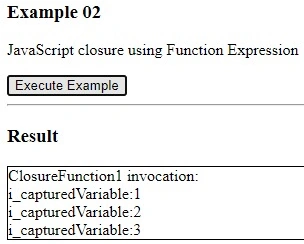
The above code is an example of a “function closure” in JavaScript. Even though we this time used “function expression syntax”, all the comments made in Example01 (paragraph 3) still apply and stay the same.
If you look into code marked (*), and if you uncomment it, you will get an error. That shows that the variable i_capturedVariable is no longer in scope.
It is interesting to see how Chrome DevTools will represent this situation.
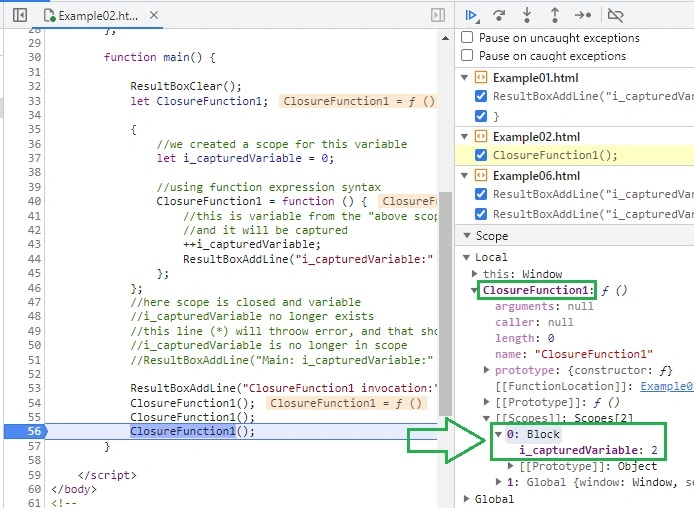
As you can see on the screenshot from a debugging session, the ClosureFunction1 function/object keeps a reference to the “Block” scope, where is our captured variable i_capturedVariable. I guess that would be the block where the function is defined.
It is a bit confusing why in the previous example Example01 Chrome DevTools used the name “Closure”, here just name “Block”. But this is a valid example of the “Function Capture”. Similar examples can be found in [8], [9] and they are called closures in those articles.
I do not know the definitive answer to what situations Chrome DevTools call closure and what not, but I think it might be that they do not agree with definitions (**) and (***) from paragraph 2.3 of what closure is and have some more narrow definition of closure in their mind. But, as you can see in debugger screenshots, still variables are captured and are still available to the function during execution, and a formal name for that in a debugger is maybe less important.
5. Example03 – Arrow function syntax
Here is a practical example of JavaScript “function closure” created, using arrow function syntax.
<!DOCTYPE html>
<html>
<head>
    <title>Example 03</title>
    <style>
        #ResultBox {
            border: 1px solid;
            min-height: 20px;
        }
    </style>
</head>
<body>
    <!-- Html part ---------------------------------------->
    <h3>Example 03</h3>
    <p>JavaScript closure using Arrow Function</p>
    <button onclick="main()">Execute Example</button>
    <hr />

    <h3>Result</h3>
    <div id="ResultBox"></div>

    <!-- JavaScript part ---------------------------------------->
    <script>
        function ResultBoxClear() {
            document.getElementById("ResultBox").innerHTML = "";
        }

        function ResultBoxAddLine(textLine) {
            document.getElementById("ResultBox").innerHTML += textLine + "<br/>";
        }
        window.onerror = function (message, url, line, col, error) {
            ResultBoxAddLine(`Error: ${message}\n At ${line}:${col} of ${url}`);
        };
        function main() {
            ResultBoxClear();
            let ClosureFunction1;

            {
                // We created a scope for this variable
                let i_capturedVariable = 0;

                // Using Arrow Function syntax
                ClosureFunction1 = () => {
                    // This is variable from the "above scope"
                    // and it will be captured
                    ++i_capturedVariable;
                    ResultBoxAddLine("i_capturedVariable: " + i_capturedVariable);
                };
            };
            // Here scope is closed and variable
            // i_capturedVariable no longer exists
            // This line (*) will throw an error, and that shows
            // i_capturedVariable is no longer in scope
            // ResultBoxAddLine("Main: i_capturedVariable: " + i_capturedVariable); //(*)
            ResultBoxAddLine("ClosureFunction1 invocation:");
            ClosureFunction1();
            ClosureFunction1();
            ClosureFunction1();
        }
    </script>
</body>
<!--
Result:
ClosureFunction1 invocation:
i_capturedVariable: 1
i_capturedVariable: 2
i_capturedVariable: 3
-->
</html>
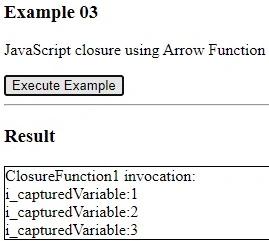
The above code is an example of a “function closure” in JavaScript. Even though we this time used “arrow function syntax”, all the comments made in Example01 and Example02 still apply and stay the same.
It is interesting to see how Chrome DevTools will represent this situation.
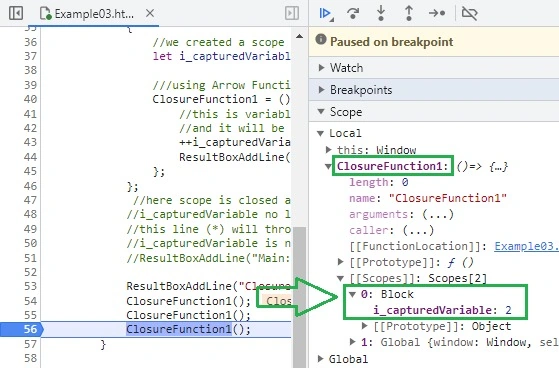
6. Example04 – Same captured variable, but not shared
The question that is arising is: If we have 2 instances of the same “function closure”, do they reference the same “captured variable” or each has its own instance? Here is the answer
<!DOCTYPE html>
<html>
<head>
    <title>Example 04 - JavaScript Closure</title>
    <style>
        #ResultBox {
            border: 1px solid;
            min-height: 20px;
        }
    </style>
</head>
<body>
    <!-- HTML part -->
    <h3>Example 04</h3>
    <p>JavaScript closure, Same captured variable but not shared</p>
    <button onclick="main()">Execute Example</button>
    <hr />
    <!-- Result -->
    <h3>Result</h3>
    <div id="ResultBox"></div>
    <!-- JavaScript part -->
    <script>
        function ResultBoxClear() {
            document.getElementById("ResultBox").innerHTML = "";
        }
        function ResultBoxAddLine(textLine) {
            document.getElementById("ResultBox").innerHTML += textLine + "<br/>";
        }
        function CreateClosureFunction() {
            let i_capturedVariable = 0;

            function ff() {
                ++i_capturedVariable;
                ResultBoxAddLine("i_capturedVariable: " + i_capturedVariable);
            }
            return ff;
        }
        window.onerror = function (message, url, line, col, error) {
            ResultBoxAddLine(`Error: ${message}\n At ${line}:${col} of ${url}`);
        };
        function main() {
            ResultBoxClear();
            let ClosureFunction1 = CreateClosureFunction();
            let ClosureFunction2 = CreateClosureFunction();
            ResultBoxAddLine("ClosureFunction1 invocation:");
            ClosureFunction1();
            ClosureFunction1();
            ClosureFunction1();
            ResultBoxAddLine("ClosureFunction2 invocation:");
            ClosureFunction2();
            ClosureFunction2();
            ClosureFunction2();
        }
    </script>
</body>
</html>
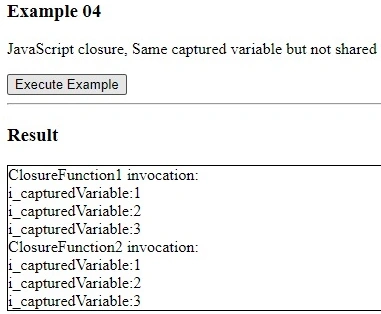
So, from the result of the execution, we see that each instance of the “function closure” has its own instance of the “captured variable”. Precisely speaking, that is true for this example, it is not necessary to always be like that. The key thing to notice is that every time CreateClosureFunction() is executed, a new instance of i_capturedVariable is created and that is the reason why each function closure has its own instance of the captured variable.
7. Example05 –Not shared captured variable
Here is another example.
<!DOCTYPE html>
<html>
<head>
    <title>Example 05: JavaScript closure using Function Expression</title>
</head>
<body>
    <!-- Html part -->
    <h3>Example 05</h3>
    <p>JavaScript closure using Function Expression</p>
    <button onclick="main()">Execute Example</button>
    <hr />
    <h3>Result</h3>
    <div id="ResultBox" style="border: 1px solid; min-height: 20px;"></div>
    <!-- JavaScript part -->
    <script>
        function ResultBoxClear() {
            document.getElementById("ResultBox").innerHTML = "";
        }

        function ResultBoxAddLine(textLine) {
            document.getElementById("ResultBox").innerHTML += textLine + "<br/>";
        }
        window.onerror = function(message, url, line, col, error) {
            ResultBoxAddLine(`Error: ${message}\n At ${line}:${col} of ${url}`);
        };
        function main() {
            ResultBoxClear();
            let ClosureFunction1;
            let ClosureFunction2;

            {
                // We created a scope for this variable
                let i_capturedVariable = 0;

                // Using function expression syntax
                ClosureFunction1 = function() {
                    // This is variable from the "above scope"
                    // and it will be captured
                    ++i_capturedVariable;
                    ResultBoxAddLine("i_capturedVariable: " + i_capturedVariable);
                };
            };

            {
                // We created a scope for this variable
                let i_capturedVariable = 0;

                // Using function expression syntax
                ClosureFunction2 = function() {
                    // This is variable from the "above scope"
                    // and it will be captured
                    ++i_capturedVariable;
                    ResultBoxAddLine("i_capturedVariable: " + i_capturedVariable);
                };
            };
            // Here scope is closed and variable
            // i_capturedVariable no longer exists
            ResultBoxAddLine("ClosureFunction1 invocation:");
            ClosureFunction1();
            ClosureFunction1();
            ClosureFunction1();
            ResultBoxAddLine("ClosureFunction2 invocation:");
            ClosureFunction2();
            ClosureFunction2();
            ClosureFunction2();
        }
    </script>
</body>
<!--
Result:
ClosureFunction1 invocation:
i_capturedVariable: 1
i_capturedVariable: 2
i_capturedVariable: 3
ClosureFunction2 invocation:
i_capturedVariable: 1
i_capturedVariable: 2
i_capturedVariable: 3
-->
</html>
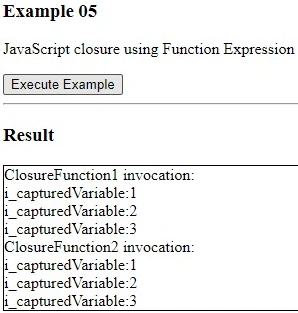
So, from the result of the execution, we see that each instance of the “function closure” has its own instance of the “captured variable”. Now the code from Example04 is better understood.
I made this modification and this example to emphasize what is happening in Example04, that you need to use different variables. Actually, Example05 in concept is no different from Example04, which is why Example04 works the way it works. In that example each time you use a different variable, only the machine sees it, but humans do not so easily. If you look into Example04 and Example05 for a while, you will see they are doing the same thing, just Example05 is easier to read.
8. Example06 – Same captured variable, shared
Let us look again at the case when we have 2 instances of the same “function closure”, and they reference the same “captured variable”.
<!DOCTYPE html>
<html>
<head>
    <title>Example 06 - JavaScript Closure using Function Expression</title>
    <style>
        #ResultBox {
            border: 1px solid;
            min-height: 20px;
        }
    </style>
</head>
<body>
    <!-- Html part -->
    <h3>Example 06</h3>
    <p>JavaScript closure using Function Expression</p>
    <button onclick="main()">Execute Example</button>
    <hr />
    <!-- Result display -->
    <h3>Result</h3>
    <div id="ResultBox"></div>
    <!-- JavaScript part -->
    <script>
        function ResultBoxClear() {
            document.getElementById("ResultBox").innerHTML = "";
        }

        function ResultBoxAddLine(textLine) {
            document.getElementById("ResultBox").innerHTML += textLine + "<br/>";
        }
        window.onerror = function (message, url, line, col, error) {
            ResultBoxAddLine(`Error: ${message}\n At ${line}:${col} of ${url}`);
        };
        function main() {
            ResultBoxClear();
            let ClosureFunction1;
            let ClosureFunction2;

            {
                // Scope for the captured variable
                let i_capturedVariable = 0;

                // Function expression syntax for ClosureFunction1
                ClosureFunction1 = function () {
                    ++i_capturedVariable;
                    ResultBoxAddLine("i_capturedVariable: " + i_capturedVariable);
                };
                // Function expression syntax for ClosureFunction2
                ClosureFunction2 = function () {
                    ++i_capturedVariable;
                    ResultBoxAddLine("i_capturedVariable: " + i_capturedVariable);
                };
            }
            // The scope is closed here, and i_capturedVariable no longer exists
            ResultBoxAddLine("ClosureFunction1 invocation:");
            ClosureFunction1();
            ClosureFunction1();
            ClosureFunction1();
            ResultBoxAddLine("ClosureFunction2 invocation:");
            ClosureFunction2();
            ClosureFunction2();
            ClosureFunction2();
        }
    </script>
</body>
<!--
Result:
ClosureFunction1 invocation:
i_capturedVariable: 1
i_capturedVariable: 2
i_capturedVariable: 3
ClosureFunction2 invocation:
i_capturedVariable: 4
i_capturedVariable: 5
i_capturedVariable: 6
-->
</html>
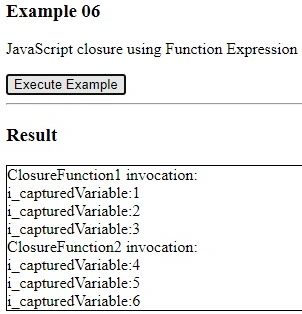
From the execution result, we can see that they reference the same “captured variable”. If you look carefully into the code, you will see that it is one instance of i_capturedVariable that is being referenced by both function closures. After looking into it for a while, it will make sense.
9. Example07 – Using function object properties for encapsulation
Here we will show one example, which is in many articles advertised as an alternative to the usage of “function closures” to achieve encapsulation. So, this is not “function closure”, but usage of using “function object properties”.
<!DOCTYPE html>
<html>
<head>
    <title>Example 07</title>
    <style>
        #ResultBox {
            border: 1px solid;
            min-height: 20px;
        }
    </style>
</head>
<body>
    <!-- Html part -->
    <h3>Example 07</h3>
    <p>JavaScript example using function object properties (NOT a closure)</p>
    <button onclick="main()">Execute Example</button>
    <hr />
    <!-- Result display -->
    <h3>Result</h3>
    <div id="ResultBox"></div>
    <!-- JavaScript part -->
    <script>
        function ResultBoxClear() {
            document.getElementById("ResultBox").innerHTML = "";
        }

        function ResultBoxAddLine(textLine) {
            document.getElementById("ResultBox").innerHTML += textLine + "<br/>";
        }
        function CreateCounterFunction() {
            // using nested function syntax
            function ff() {
                ++ff.i_counter;
                ResultBoxAddLine("i_counter:" + ff.i_counter);
            }
            // this is NOT a captured variable
            // this is function (as an object) property variable
            // with PUBLIC access
            // so enclosure is broken
            ff.i_counter = 0;
            return ff;
        }
        // Error handling
        window.onerror = function (message, url, line, col, error) {
            ResultBoxAddLine(`Error: ${message} at ${line}:${col} of ${url}`);
        };
        function main() {
            ResultBoxClear();
            let CounterFunction1 = CreateCounterFunction();
            ResultBoxAddLine("CounterFunction1 invocation:");
            CounterFunction1();
            CounterFunction1();
            CounterFunction1();
            // here we see that encapsulation is broken
            // we have public access to this
            // function property
            CounterFunction1.i_counter = 555;
            CounterFunction1();
            CounterFunction1();
            CounterFunction1();
        }
    </script>
</body>
<!--
Result:
CounterFunction1 invocation:
i_counter:1
i_counter:2
i_counter:3
i_counter:556
i_counter:557
i_counter:558
-->
</html>
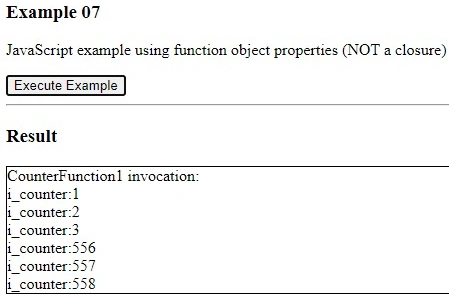
As can be seen from the example code, the problem is that the access level of “function object property” ff.i_counter is public, so encapsulation can be easily broken. So, that is not a good way to achieve encapsulation.
10. Example08 – Encapsulation using a class with private properties
Here is one more example showing how encapsulation can be achieved using a class with private properties. This example shows an alternative to the usage of “function closures” to achieve encapsulation. While opinions might differ, I personally find this approach easier to read than “function closures”.
<!DOCTYPE html>
<html>
<head>
    <title>Example 08</title>
</head>
<body>
    <!-- Html part -->
    <h3>Example 08</h3>
    <p>JavaScript example encapsulation using class with private members</p>
    <button onclick="main()">Execute Example</button>
    <hr />
    <h3>Result</h3>
    <div id="ResultBox" style="border: 1px solid; min-height: 20px;"></div>
    <!-- JavaScript part -->
    <script>
        function ResultBoxClear() {
            document.getElementById("ResultBox").innerHTML = "";
        }
        function ResultBoxAddLine(textLine) {
            document.getElementById("ResultBox").innerHTML += textLine + "<br/>";
        }
        class CounterClass {
            // this hash symbol (#) makes this
            // variable private to the class
            // so we have encapsulation
            static #i_counter = 0;

            static CounterFunction() {
                ++CounterClass.#i_counter;
                ResultBoxAddLine("CounterClass.#i_counter:" + CounterClass.#i_counter);
            }
        }
        window.onerror = function (message, url, line, col, error) {
            ResultBoxAddLine(`Error:${message}\n At ${line}:${col} of ${url}`);
        };
        function main() {
            ResultBoxClear();
            let CounterFunction1 = CounterClass.CounterFunction;

            ResultBoxAddLine("CounterFunction1 invocation:");
            CounterFunction1();
            CounterFunction1();
            CounterFunction1();
            // This line below (**) will cause
            // syntax error, since we try to
            // access private variable
            // CounterClass.#i_counter = 333; // (**)
            CounterFunction1();
            CounterFunction1();
            CounterFunction1();
        }
    </script>
</body>
<!--
Result
CounterFunction1 invocation:
CounterClass.#i_counter:1
CounterClass.#i_counter:2
CounterClass.#i_counter:3
CounterClass.#i_counter:4
CounterClass.#i_counter:5
CounterClass.#i_counter:6
-->
</html>
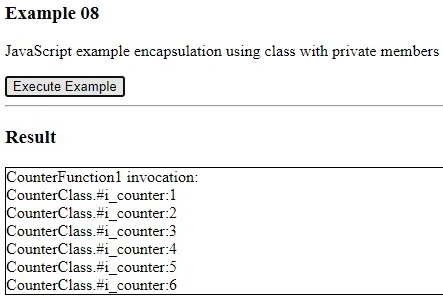
The offending line of code (**) is commented out since it will create the error. The usage of a hash symbol (#) made our variable #i_counter private to the class. It can not be accessed from the code out of the class. If you uncomment the line (**), you will get an error. The funny thing is only, it throws a “Syntax error” during the loading/parsing of the file, I would expect something like an “access level error” during the execution. But that is how they made it.
11. Conclusion
Function closure is an interesting concept and technique and needs to be in the repertoire of every serious JavaScript programmer. It is widely accepted and present in JavaScript code and one needs to understand it regardless of his/her personal preferences of using it, in order to be able to competently read/debug other people’s code.
12. References
- https://en.wikipedia.org/wiki/Closure_(computer_programming)
- https://www.w3schools.com/js/default.asp
- https://javascript.info/
- David Flanagan, JavaScript: The Definitive Guide, Seventh Edition, O’Reilly 2020
- https://en.wikipedia.org/wiki/Closure_(computer_programming)#Anonymous_functions
- [https://stackoverflow.com/questions/35130415/is-every-function-a-closure/35131645#35131645
- https://stackoverflow.com/questions/35378699/chrome-devtools-console-does-not-display-closure
- https://en.wikipedia.org/wiki/Closure_(computer_programming)#Lexical_environment
- https://en.wikipedia.org/wiki/Closure_(computer_programming)#Delegates_(C#,_VB.NET,_D)
- https://courses.cs.washington.edu/courses/cse341/03wi/imperative/scoping.html
- https://stackoverflow.com/questions/1047454/what-is-lexical-scope
- https://prl.khoury.northeastern.edu/blog/2019/09/05/lexical-and-dynamic-scope/
Join the conversation! Your thoughts help the community grow.