

Introduction
Many times, while developing an application, we require the date or time values in a proper format. So, later on, valuable insights can be extracted based on the date & time data. During the earlier times of web programming, in date & time fields, whether used in date of birth field, joining date, hiring date, or any sort of date or time input field, a plain text input was used where the user was guided to input the date in a specific format. This was the time when date or time picker were not used. Even at the start of date or time picker usage, many applications required the user to input correct date or time format.
The simple reason for that is that there was no such library available that can automatically adjust the format of date or time as input is being received from the user. Mostly formatting adjustment of date or time is handled at the server side. Then comes Moment.JS client-side date & time manipulating or formatting library.
Following are some prerequisites before you proceed further in this tutorial,
- Knowledge of HTML.
- Knowledge of JavaScript.
- Knowledge of Bootstrap.
You can download the complete source code for this tutorial or you can follow the step by step discussion below. The sample code is developed in plain HTML.
Let's begin now.
Step 1
Create a plain "datetime-format.html" HTML file and replace the following code in it i.e.
- <!DOCTYPE html>
- <html>
- <head>
- <meta charset="utf-8" />
- <meta name="viewport" content="width=device-width, initial-scale=1.0">
- <title>Moment.JS - Date Time Format</title>
- <link rel="stylesheet" href="Style/bootstrap.css" />
- <link rel="stylesheet" href="Style/Site.css" />
- <script type="text/javascript" src="Scripts/modernizr-2.6.2.js"></script>
- <!-- Font Awesome -->
- <link rel="stylesheet" href="https://maxcdn.bootstrapcdn.com/font-awesome/4.4.0/css/font-awesome.min.css" />
- </head>
- <body>
- <div class="navbar navbar-inverse navbar-fixed-top">
- <div class="container">
- <div class="navbar-header">
- <button type="button" class="navbar-toggle" data-toggle="collapse" data-target=".navbar-collapse">
- <span class="icon-bar"></span>
- <span class="icon-bar"></span>
- <span class="icon-bar"></span>
- </button>
- </div>
- </div>
- </div>
- <div class="container body-content">
- <div class="row">
- <div class="panel-heading">
- <div class="col-md-8 custom-heading3">
- <h3>
- <i class="fa fa-calendar"></i>
- <span>Moment.JS - Date Time Format</span>
- </h3>
- </div>
- </div>
- </div>
- <div class="row">
- <section class="col-md-12 col-md-push-0">
- <div class="row">
- <div class="col-xs-12 col-xs-push-2">
- <!-- Moment.JS -->
- <div class="well bs-component">
- <b><span id="defaultFormatId" class="col-xs-6"></span></b> <span class="col-xs-4"> // Default value of Date & time. </span><br /><br />
- <b><span id="dateFormatId1" class="col-xs-6"></span></b> <span class="col-xs-4"> // Date format-1. </span><br />
- <b><span id="dateFormatId2" class="col-xs-6"></span></b> <span class="col-xs-4"> // Date format-2. </span><br />
- <b><span id="dateFormatId3" class="col-xs-6"></span></b> <span class="col-xs-4"> // Date format-3. </span><br /><br />
- <b><span id="dayFormatId1" class="col-xs-6"></span></b> <span class="col-xs-4"> // Day of week in number. </span><br />
- <b><span id="dayFormatId2" class="col-xs-6"></span></b> <span class="col-xs-4"> // Day of week format-1. </span><br />
- <b><span id="dayFormatId3" class="col-xs-6"></span></b> <span class="col-xs-4"> // Day of week format-2. </span><br />
- <b><span id="dayFormatId4" class="col-xs-6"></span></b> <span class="col-xs-4"> // Day of week format-3. </span><br /><br />
- <b><span id="monthFormatId1" class="col-xs-6"></span></b> <span class="col-xs-4"> // Month format-1. </span><br />
- <b><span id="monthFormatId2" class="col-xs-6"></span></b> <span class="col-xs-4"> // Month format-2. </span><br />
- <b><span id="monthFormatId3" class="col-xs-6"></span></b> <span class="col-xs-4"> // Month format-3. </span><br /><br />
- <b><span id="timeFormatId1" class="col-xs-6"></span></b> <span class="col-xs-4"> // Time in 24-hour format. </span><br />
- <b><span id="timeFormatId2" class="col-xs-6"></span></b> <span class="col-xs-4"> // Time in 12-hour format-1. </span><br />
- <b><span id="timeFormatId3" class="col-xs-6"></span></b> <span class="col-xs-4"> // Time in 12-hour format-2. </span><br /><br />
- <b><span id="yearOnlyFormatId" class="col-xs-6"></span></b> <span class="col-xs-4"> // Year only. </span>
- </div>
- </div><!-- /.col -->
- </div>
- </section>
- </div>
- <hr />
- <footer>
- <center>
- <p><strong>Copyright © <span id="copyrightYearId"></span> - <a href="http://www.asmak9.com/">Asma's Blog</a>.</strong> All rights reserved.</p>
- </center>
- </footer>
- </div>
- <script type="text/javascript" src="Scripts/jquery-1.10.2.js"></script>
- <script type="text/javascript" src="Scripts/bootstrap.js"></script>
- <script type="text/javascript" src="Scripts/respond.js"></script>
- <!-- Moment.JS-->
- <script type="text/javascript" src="http://cdn.jsdelivr.net/momentjs/latest/moment.min.js"></script>
- <script type="text/javascript">
- // Initialization.
- var defaultFormatVal = moment();
- var dateFormatVal1 = moment().format('DD-MMM-YYYY');
- var dateFormatVal2 = moment().format('dddd, DD MMMM YYYY [at] hh:mm:ss A [O\'Clock]');
- var dateFormatVal3 = moment().format('MMMM Do YYYY');
- var dayFormatVal1 = moment().format('d');
- var dayFormatVal2 = moment().format('dd');
- var dayFormatVal3 = moment().format('ddd');
- var dayFormatVal4 = moment().format('dddd');
- var monthFormatVal1 = moment().format('MM');
- var monthFormatVal2 = moment().format('MMM');
- var monthFormatVal3 = moment().format('MMMM');
- var timeFormatVal1 = moment().format('hh:mm:ss');
- var timeFormatVal2 = moment().format('hh:mm:ss A');
- var timeFormatVal3 = moment().format('hh:mm:ss a');
- var yearOnlyVal = moment().format('YYYY');
- // Setting Copyright Year.
- document.getElementById('copyrightYearId').innerHTML = yearOnlyVal;
- // Date Time Format settings.
- document.getElementById('defaultFormatId').innerHTML = defaultFormatVal;
- document.getElementById('dateFormatId1').innerHTML = dateFormatVal1;
- document.getElementById('dateFormatId2').innerHTML = dateFormatVal2;
- document.getElementById('dateFormatId3').innerHTML = dateFormatVal3;
- document.getElementById('dayFormatId1').innerHTML = dayFormatVal1;
- document.getElementById('dayFormatId2').innerHTML = dayFormatVal2;
- document.getElementById('dayFormatId3').innerHTML = dayFormatVal3;
- document.getElementById('dayFormatId4').innerHTML = dayFormatVal4;
- document.getElementById('monthFormatId1').innerHTML = monthFormatVal1;
- document.getElementById('monthFormatId2').innerHTML = monthFormatVal2;
- document.getElementById('monthFormatId3').innerHTML = monthFormatVal3;
- document.getElementById('timeFormatId1').innerHTML = timeFormatVal1;
- document.getElementById('timeFormatId2').innerHTML = timeFormatVal2;
- document.getElementById('timeFormatId3').innerHTML = timeFormatVal3;
- document.getElementById('yearOnlyFormatId').innerHTML = yearOnlyVal;
- </script>
- </body>
- </html>
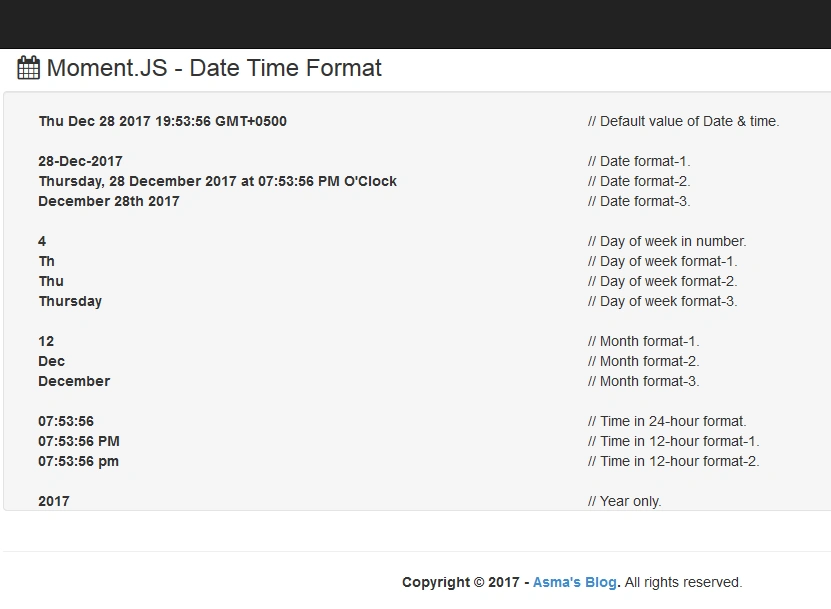
In the above code, I have used different formats of date & time in combination with Moment.JS library. Let's have a look into them i.e.
For the following default format by moment.js library i.e.

- var defaultFormatVal = moment();
For the following format i.e.
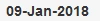
I have used the following line of code i.e.
- var dateFormatVal1 = moment().format('DD-MMM-YYYY');
For the following format i.e.

I have used the following code i.e.
- var dateFormatVal2 = moment().format('dddd, DD MMMM YYYY [at] hh:mm:ss A [O\'Clock]');
Notice in the above code that in order to use a sentence or word inside the format I can use that within square brackets ([]).
For different display variation in the day of the week i.e.

I have used the following piece of code i.e.
- var dayFormatVal1 = moment().format('d');
- var dayFormatVal2 = moment().format('dd');
- var dayFormatVal3 = moment().format('ddd');
- var dayFormatVal4 = moment().format('dddd');
For different display variations of the month i.e.

I have used the following code i.e.
- var monthFormatVal1 = moment().format('MM');
- var monthFormatVal2 = moment().format('MMM');
- var monthFormatVal3 = moment().format('MMMM');
For a time in 24-hour format i.e.

I have used the following piece of code i.e.
- var timeFormatVal1 = moment().format('hh:mm:ss');
For a time in 12-hour format i.e.

I have used the following code i.e.
- var timeFormatVal2 = moment().format('hh:mm:ss A');
- var timeFormatVal3 = moment().format('hh:mm:ss a');
To display only year format i.e.

I have used the following line of code i.e.
- var yearOnlyVal = moment().format('YYYY');
Step 3
Now create a new plain HTML file "datetime-manipulation.html" and replace following code in it i.e.
- <!DOCTYPE html>
- <html>
- <head>
- <meta charset="utf-8" />
- <meta name="viewport" content="width=device-width, initial-scale=1.0">
- <title>Moment.JS - Date Time Manipulation</title>
- <link rel="stylesheet" href="Style/bootstrap.css" />
- <link rel="stylesheet" href="Style/Site.css" />
- <script type="text/javascript" src="Scripts/modernizr-2.6.2.js"></script>
- <!-- Font Awesome -->
- <link rel="stylesheet" href="https://maxcdn.bootstrapcdn.com/font-awesome/4.4.0/css/font-awesome.min.css" />
- </head>
- <body>
- <div class="navbar navbar-inverse navbar-fixed-top">
- <div class="container">
- <div class="navbar-header">
- <button type="button" class="navbar-toggle" data-toggle="collapse" data-target=".navbar-collapse">
- <span class="icon-bar"></span>
- <span class="icon-bar"></span>
- <span class="icon-bar"></span>
- </button>
- </div>
- </div>
- </div>
- <div class="container body-content">
- <div class="row">
- <div class="panel-heading">
- <div class="col-md-8 custom-heading3">
- <h3>
- <i class="fa fa-calendar"></i>
- <span>Moment.JS - Date Time Manipulation</span>
- </h3>
- </div>
- </div>
- </div>
- <div class="row">
- <section class="col-md-12 col-md-push-0">
- <div class="row">
- <div class="col-xs-12 col-xs-push-2">
- <!-- Moment.JS -->
- <div class="well bs-component">
- <b><span id="manipulationId1" class="col-xs-6"></span></b> <span class="col-xs-4"> // Number of years from current year till 2015. </span><br /><br />
- <b><span id="manipulationId2" class="col-xs-6"></span></b> <span class="col-xs-4"> // Start of the month. </span><br />
- <b><span id="manipulationId3" class="col-xs-6"></span></b> <span class="col-xs-4"> // Start of the year. </span><br /><br />
- <b><span id="manipulationId4" class="col-xs-6"></span></b> <span class="col-xs-4"> // End of the month. </span><br />
- <b><span id="manipulationId5" class="col-xs-6"></span></b> <span class="col-xs-4"> // End of the year. </span><br /><br />
- <b><span id="manipulationId6" class="col-xs-6"></span></b> <span class="col-xs-4"> // Last 7 days. </span><br />
- <b><span id="manipulationId7" class="col-xs-6"></span></b> <span class="col-xs-4"> // Last 30 days. </span><br /><br />
- <b><span id="manipulationId8" class="col-xs-6"></span></b> <span class="col-xs-4"> // Start of this month. </span><br />
- <b><span id="manipulationId9" class="col-xs-6"></span></b> <span class="col-xs-4"> // End of this month. </span><br />
- <b><span id="manipulationId10" class="col-xs-6"></span></b> <span class="col-xs-4"> // Last month. </span><br /><br />
- <b><span id="manipulationId11" class="col-xs-6"></span></b> <span class="col-xs-4"> // Next 7 days. </span><br />
- <b><span id="manipulationId12" class="col-xs-6"></span></b> <span class="col-xs-4"> // Next 30 days. </span><br />
- </div>
- </div><!-- /.col -->
- </div>
- </section>
- </div>
- <hr />
- <footer>
- <center>
- <p><strong>Copyright © <span id="copyrightYearId"></span> - <a href="http://www.asmak9.com/">Asma's Blog</a>.</strong> All rights reserved.</p>
- </center>
- </footer>
- </div>
- <script type="text/javascript" src="Scripts/jquery-1.10.2.js"></script>
- <script type="text/javascript" src="Scripts/bootstrap.js"></script>
- <script type="text/javascript" src="Scripts/respond.js"></script>
- <!-- Moment.JS-->
- <script type="text/javascript" src="http://cdn.jsdelivr.net/momentjs/latest/moment.min.js"></script>
- <script type="text/javascript">
- // Initialization.
- var manipulationVal1 = moment('2015', 'YYYY').fromNow();
- var manipulationVal2 = moment('2017-06-01').startOf('month').format('dddd, DD-MMM-YYYY');
- var manipulationVal3 = moment('2018-03-15').startOf('year').format('dddd, DD-MMM-YYYY');
- var manipulationVal4 = moment('2017-06-01').endOf('month').format('dddd, DD-MMM-YYYY');
- var manipulationVal5 = moment('2018-03-15').endOf('year').format('dddd, DD-MMM-YYYY');
- var manipulationVal6 = moment().subtract(7, 'days').format('dddd, DD-MMM-YYYY');
- var manipulationVal7 = moment().subtract(30, 'days').format('dddd, DD-MMM-YYYY');
- var manipulationVal8 = moment().startOf('month').format('dddd, DD-MMM-YYYY');
- var manipulationVal9 = moment().endOf('month').format('dddd, DD-MMM-YYYY');
- var manipulationVal10 = moment().subtract(1, 'month').startOf('month').format('dddd, DD-MMM-YYYY');
- var manipulationVal11 = moment().add(7, 'days').format('dddd, DD-MMM-YYYY');
- var manipulationVal12 = moment().add(30, 'days').format('dddd, DD-MMM-YYYY');
- var yearOnlyVal = moment().format('YYYY');
- // Setting Copyright Year.
- document.getElementById('copyrightYearId').innerHTML = yearOnlyVal;
- // Date Time Format settings.
- document.getElementById('manipulationId1').innerHTML = manipulationVal1;
- document.getElementById('manipulationId2').innerHTML = manipulationVal2;
- document.getElementById('manipulationId3').innerHTML = manipulationVal3;
- document.getElementById('manipulationId4').innerHTML = manipulationVal4;
- document.getElementById('manipulationId5').innerHTML = manipulationVal5;
- document.getElementById('manipulationId6').innerHTML = manipulationVal6;
- document.getElementById('manipulationId7').innerHTML = manipulationVal7;
- document.getElementById('manipulationId8').innerHTML = manipulationVal8;
- document.getElementById('manipulationId9').innerHTML = manipulationVal9;
- document.getElementById('manipulationId10').innerHTML = manipulationVal10;
- document.getElementById('manipulationId11').innerHTML = manipulationVal11;
- document.getElementById('manipulationId12').innerHTML = manipulationVal12;
- </script>
- </body>
- </html>
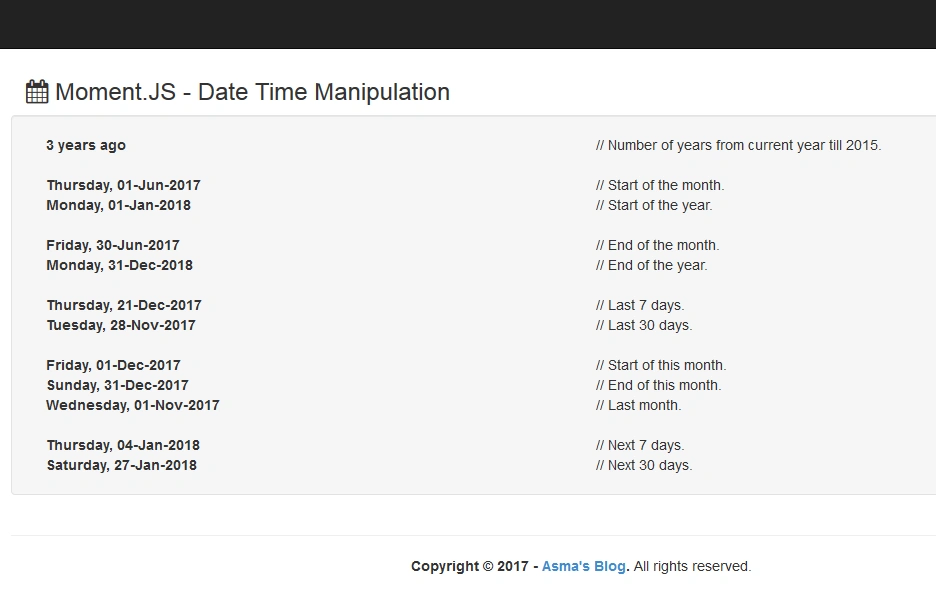
In the above code, I have simply utilized Moment.JS different methods for the manipulation of date & time. Let's view chunk by chunk different manipulation methods.
For the following display the number of years from the current year to 3 years back i.e.
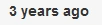
I have used the following line of code i.e.
- var manipulationVal1 = moment('2015', 'YYYY').fromNow();
For displaying the start of any month and start of any year i.e.
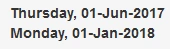
I have used the following code i.e.
- var manipulationVal2 = moment('2017-06-01').startOf('month').format('dddd, DD-MMM-YYYY');
- var manipulationVal3 = moment('2018-03-15').startOf('year').format('dddd, DD-MMM-YYYY');
For displaying the end of any month and end of any year i.e.
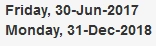
I have used the following piece of code i.e.
- var manipulationVal4 = moment('2017-06-01').endOf('month').format('dddd, DD-MMM-YYYY');
- var manipulationVal5 = moment('2018-03-15').endOf('year').format('dddd, DD-MMM-YYYY');
For displaying the number of X last days i.e.
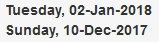
I have used the following code i.e.
- var manipulationVal6 = moment().subtract(7, 'days').format('dddd, DD-MMM-YYYY');
- var manipulationVal7 = moment().subtract(30, 'days').format('dddd, DD-MMM-YYYY');
For displaying the start of this month, the end of this month and last month i.e.
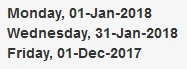
I have used the following code i.e.
- var manipulationVal8 = moment().startOf('month').format('dddd, DD-MMM-YYYY');
- var manipulationVal9 = moment().endOf('month').format('dddd, DD-MMM-YYYY');
- var manipulationVal10 = moment().subtract(1, 'month').startOf('month').format('dddd, DD-MMM-YYYY');
For displaying X number of next days i.e.
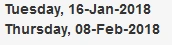
I have used the following chunk of code i.e.
- var manipulationVal11 = moment().add(7, 'days').format('dddd, DD-MMM-YYYY');
- var manipulationVal12 = moment().add(30, 'days').format('dddd, DD-MMM-YYYY');
Conclusion
In this article, you will learn to use Moment.JS library. You will learn to use different date formats. You will also learn to use different time formats. You will learn to use different display variations of the day of the week and month of the year. You will also learn to use different manipulation methods of the Moment.JS library in order to calculate X number of last day or X number of next day or start and end of month and year.
mrinal kumarPosted Jan 12, 2018, 10:57 AM
Nice article. really helpful.