

Background
I have read many forum posts regarding how to join two DataTables, so by considering those requirements I have decided to write this article. So let us learn step-by-step how to Join two DataTables using LINQ
LINQ
Language-Integrated Query (LINQ) is a set of features introduced in Visual Studio 2008 that extends powerful query capabilities to the language syntax of C# and Visual Basic. Using LINQ you can manipulate the data similar to what is done using SQL queries. Let us learn practically how to convert a LINQ query result into a DataTable by creating a sample application.
Now create the project as,
- "Start" - "All Programs" - "Microsoft Visual Studio 2010".
- "File" - "New Project" - "C#" - "Empty Project" (to avoid adding a master page).
- Provide the Project name such as "JoinDataTableUsingLINQ" or another as you wish and specify the location.
- Then right-click on Solution Explorer and select "Add New Item" then select Default.aspx page.
- Drag and drop three Grid views to bind the records after Joining the two data tables.
Now the Default.aspx source code will be as follows.
<%@ Page Language="C#" AutoEventWireup="true" CodeFile="Default.aspx.cs" Inherits="_Default" %>
<!DOCTYPE html PUBLIC "-//W3C//DTD XHTML 1.0 Transitional//EN" "http://www.w3.org/TR/xhtml1/DTD/xhtml1-transitional.dtd">
<html xmlns="http://www.w3.org/1999/xhtml">
<head runat="server">
    <title></title>
</head>
<body style="background-color: Blue">
    <h4 style="color: White">
        Article by Vithal Wadje
    </h4>
    <form id="form1" runat="server">
        <div>
            <h4 style="color: White">
                Product Table Records Before joining
            </h4>
            <asp:GridView ID="GridView1" runat="server" CellPadding="4" ForeColor="#333333" GridLines="None">
                <AlternatingRowStyle BackColor="White" />
                <EditRowStyle BackColor="#7C6F57" />
                <FooterStyle BackColor="#1C5E55" Font-Bold="True" ForeColor="White" />
                <HeaderStyle BackColor="#1C5E55" Font-Bold="True" ForeColor="White" />
                <PagerStyle BackColor="#666666" ForeColor="White" HorizontalAlign="Center" />
                <RowStyle BackColor="#E3EAEB" />
                <SelectedRowStyle BackColor="#C5BBAF" Font-Bold="True" ForeColor="#333333" />
                <SortedAscendingCellStyle BackColor="#F8FAFA" />
                <SortedAscendingHeaderStyle BackColor="#246B61" />
                <SortedDescendingCellStyle BackColor="#D4DFE1" />
                <SortedDescendingHeaderStyle BackColor="#15524A" />
            </asp:GridView>
            <br />
            <h4 style="color: White">
                Tax Master Table Records Before joining
            </h4>
            <asp:GridView ID="GridView2" runat="server" CellPadding="4" ForeColor="#333333" GridLines="None">
                <AlternatingRowStyle BackColor="White" />
                <EditRowStyle BackColor="#7C6F57" />
                <FooterStyle BackColor="#1C5E55" Font-Bold="True" ForeColor="White" />
                <HeaderStyle BackColor="#1C5E55" Font-Bold="True" ForeColor="White" />
                <PagerStyle BackColor="#666666" ForeColor="White" HorizontalAlign="Center" />
                <RowStyle BackColor="#E3EAEB" />
                <SelectedRowStyle BackColor="#C5BBAF" Font-Bold="True" ForeColor="#333333" />
                <SortedAscendingCellStyle BackColor="#F8FAFA" />
                <SortedAscendingHeaderStyle BackColor="#246B61" />
                <SortedDescendingCellStyle BackColor="#D4DFE1" />
                <SortedDescendingHeaderStyle BackColor="#15524A" />
            </asp:GridView>
            <br />
        </div>
        <h4 style="color: White">
            Tax and Product Table Records after joining
        </h4>
        <asp:GridView ID="GridView3" runat="server" CellPadding="4" ForeColor="#333333" GridLines="None">
            <AlternatingRowStyle BackColor="White" />
            <EditRowStyle BackColor="#7C6F57" />
            <FooterStyle BackColor="#1C5E55" Font-Bold="True" ForeColor="White" />
            <HeaderStyle BackColor="#1C5E55" Font-Bold="True" ForeColor="White" />
            <PagerStyle BackColor="#666666" ForeColor="White" HorizontalAlign="Center" />
            <RowStyle BackColor="#E3EAEB" />
            <SelectedRowStyle BackColor="#C5BBAF" Font-Bold="True" ForeColor="#333333" />
            <SortedAscendingCellStyle BackColor="#F8FAFA" />
            <SortedAscendingHeaderStyle BackColor="#246B61" />
            <SortedDescendingCellStyle BackColor="#D4DFE1" />
            <SortedDescendingHeaderStyle BackColor="#15524A" />
        </asp:GridView>
        <br />
    </form>
</body>
</html>
Now let's use the scenario that we have one Product table and one Tax Master Table and we want to join these tables depending on Tax Id, so let us create the tables instead of going to the DataBase.
Open the Default.aspx.cs Page and provide the following code to create the Product table as in the following.
// Creating Product DataTable
DataTable dt = new DataTable();
DataRow dr = null;

dt.TableName = "Product";

// Adding columns to the DataTable
dt.Columns.Add("Id", typeof(int));
dt.Columns[0].AutoIncrementSeed = 1;
dt.Columns[0].AutoIncrement = true;
dt.Columns.Add("Product Name");
dt.Columns.Add("Brand Name");
dt.Columns.Add("Tax Id", typeof(int));

// Adding rows to the DataTable
dr = dt.NewRow();
dr["Product Name"] = "Laptop";
dr["Brand Name"] = "Samsung";
dr["Tax Id"] = 1;
dt.Rows.Add(dr);

DataRow dr1 = dt.NewRow();
dr1["Product Name"] = "Mouse";
dr1["Brand Name"] = "Dell";
dr1["Tax Id"] = 1;
dt.Rows.Add(dr1);

DataRow dr2 = dt.NewRow();
dr2["Product Name"] = "Mobile";
dr2["Brand Name"] = "Apple";
dr2["Tax Id"] = 1;
dt.Rows.Add(dr2);

DataRow dr3 = dt.NewRow();
dr3["Product Name"] = "Book";
dr3["Brand Name"] = "C# Corner Press";
dr3["Tax Id"] = 2;
dt.Rows.Add(dr3);
The Product table records will be as follows.
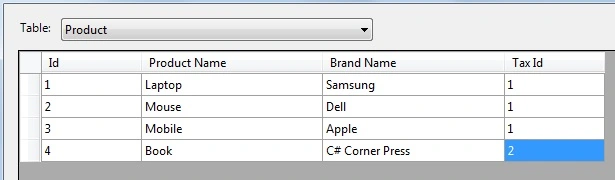
Now let us create the Tax Master table using the following code.
// Creating Tax DataTable
DataTable dtTax = new DataTable();
dtTax.TableName = "taxmaster";

// Adding columns to the DataTable
dtTax.Columns.Add("Tax Id", typeof(int));
dtTax.Columns[0].AutoIncrementSeed = 1;
dtTax.Columns[0].AutoIncrement = true;
dtTax.Columns.Add("Product Category");
dtTax.Columns.Add("Charge", typeof(int));

// Adding rows to the DataTable
DataRow drtax = dtTax.NewRow();
drtax["Product Category"] = "Electronics";
drtax["Charge"] = 10;
dtTax.Rows.Add(drtax);

DataRow drtax1 = dtTax.NewRow();
drtax1["Product Category"] = "Educational";
drtax1["Charge"] = 8;
dtTax.Rows.Add(drtax1);
Now the Tax Master table records will be as follows.
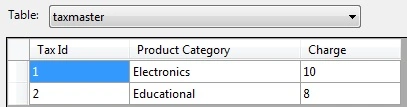
Now let us see the preceding two tables, one is Product and the other is Tax Master. From them we want to display the tax charge of each product and tax charges are in the Tax Master table, so to get it we need to join the preceding two tables using LINQ.
So let us write the code to join the Product and Tax Master tables as in the following.
// Joining Product and Tax DataTable
var JoinResult = (from p in dt.AsEnumerable()
                  join t in dtTax.AsEnumerable()
                  on p.Field<int>("Tax Id") equals t.Field<int>("Tax Id")
                  select new
                  {
                      ProductName = p.Field<string>("Product Name"),
                      BrandName = p.Field<string>("Brand Name"),
                      ProductCategory = t.Field<string>("Product Category"),
                      TaxCharge = t.Field<int>("Charge")
                  }).ToList();
Now create a function to name the LINQResultToDataTable that converts the LINQ result to a table as in the following.
public DataTable LINQResultToDataTable<T>(IEnumerable<T> Linqlist)
{
    DataTable dt = new DataTable();
    PropertyInfo[] columns = null;

    if (Linqlist == null)
        return dt;

    foreach (T Record in Linqlist)
    {
        if (columns == null)
        {
            columns = Record.GetType().GetProperties();

            foreach (PropertyInfo GetProperty in columns)
            {
                Type IcolType = GetProperty.PropertyType;

                if (IcolType.IsGenericType && IcolType.GetGenericTypeDefinition() == typeof(Nullable<>))
                {
                    IcolType = IcolType.GetGenericArguments()[0];
                }

                dt.Columns.Add(new DataColumn(GetProperty.Name, IcolType));
            }
        }

        DataRow dr = dt.NewRow();

        foreach (PropertyInfo p in columns)
        {
            dr[p.Name] = p.GetValue(Record, null) ?? DBNull.Value;
        }

        dt.Rows.Add(dr);
    }

    return dt;
}
The preceding function takes the LINQ query result and converts it into the Data Table. If you want to learn more about IEnumerable and the preceding function, refer to the following article of mine.
Now we have a common data table after joining the Product and Tax Master tables, so let us bind three grid views from the three Data Tables so we can understand the difference. The entire code of Default.aspx.cs will be such as follows.
Now run the application, and then the GirdView records will be such as follows before joining.

Now the third GiridView records will be as follows after joining.

From the preceding example, it's clear that we can join two data tables using LINQ.
Notes
- Download the Zip file from the attachment for the full source code of the application.
- You can also bind the DataTables from the database.
Summary
I hope this article is useful for all readers, if you have any suggestion then please contact me including beginners also.
Shehzad KhanPosted Jan 26, 2023, 9:42 AM
Hi Vithal Wadje Sir, How to optimize this query in C# only during high volume data...//joining Product and Tax DataTable var JoinResult = (from p in dt.AsEnumerable() join t in dtTax.AsEnumerable() on p.Field<int>("Tax Id") equals t.Field<int>("Tax Id") select new { ProductName = p.Field<string>("Product Name"), BrandName = p.Field<string>("Brand Name"), ProductCategory = t.Field<string>("Product Category"), TaxCharge = t.Field<int>("Charge") }).ToList();
Ranjitha NarayanPosted Aug 10, 2017, 5:38 AM
Nice article sir , thank you it helped me alot code is working fine :)
AmitPosted Nov 4, 2016, 4:51 AM
LINQResultToDataTable<T>(IEnumerable<T> Linqlist howto convert var to datatable. Downloaded project contains nothing
Vithal WadjePosted May 25, 2015, 3:09 PM
yes
Saber ShaikhPosted Dec 15, 2014, 7:36 AM
I want Reduce This Code so..
Vithal WadjePosted Dec 15, 2014, 7:22 AM
yes saber shaikh sir why not ,you can reduce it
Saber ShaikhPosted Dec 15, 2014, 6:04 AM
can we Reduce this code for Execute
Vithal WadjePosted Dec 14, 2014, 1:14 PM
thanks sir
Jitendra KumarPosted Dec 14, 2014, 12:11 PM
Nice article..