

The following is my Data Table in Design Mode from which I will show data in a jqGrid: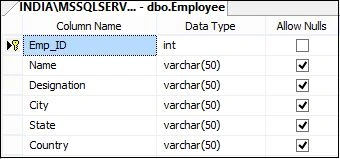
Image 1.
The following is the script of my Data Table:
- CREATE TABLE [dbo].[Employee](
- [Emp_ID] [int] IDENTITY(1,1) NOT NULL,
- [Name] [varchar](50) NULL,
- [Designation] [varchar](50) NULL,
- [City] [varchar](50) NULL,
- [State] [varchar](50) NULL,
- [Country] [varchar](50) NULL,
- CONSTRAINT [PK_Employee] PRIMARY KEY CLUSTERED
- (
- [Emp_ID] ASC
- )WITH (PAD_INDEX = OFF, STATISTICS_NORECOMPUTE = OFF, IGNORE_DUP_KEY = OFF, ALLOW_ROW_LOCKS = ON, ALLOW_PAGE_LOCKS = ON) ON [PRIMARY]
- ) ON [PRIMARY]
- GO
The data in My Table is: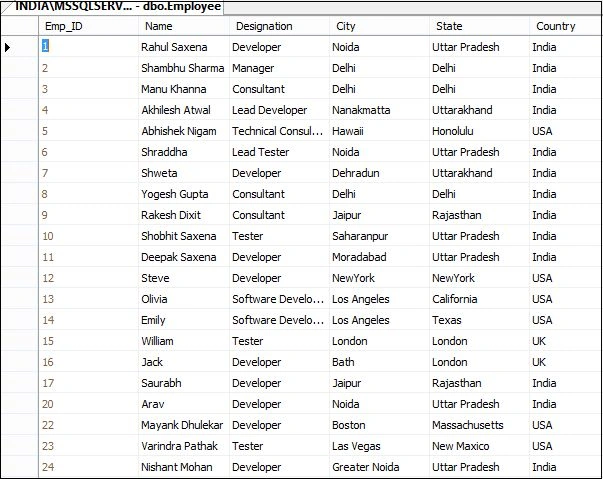
Image 2.
The following is my aspx code:
- <%@ Page Language="C#" AutoEventWireup="true" CodeBehind="Default.aspx.cs" Inherits="jQGridExample.Default" %>
- <!DOCTYPE html>
- <html xmlns="http://www.w3.org/1999/xhtml">
- <head runat="server">
- <title></title>
- <link type="text/css" href="http://jqueryrock.googlecode.com/svn/trunk/css/jquery-ui-1.9.2.custom.css" rel="stylesheet" />
- <link type="text/css" href="http://jqueryrock.googlecode.com/svn/trunk/jqgrid/css/ui.jqgrid.css" rel="stylesheet" />
- <script type="text/javascript" src="http://jqueryrock.googlecode.com/svn/trunk/js/jquery-1.8.3.js"></script>
- <script type="text/javascript" src="http://jqueryrock.googlecode.com/svn/trunk/js/jquery-ui-1.9.2.custom.js"></script>
- <script src="http://jqueryrock.googlecode.com/svn/trunk/jqgrid/js/grid.locale-en.js" type="text/javascript"></script>
- <script src="http://jqueryrock.googlecode.com/svn/trunk/jqgrid/js/jquery.jqGrid.min.js" type="text/javascript"></script>
- <script type="text/javascript">
- $(function () {
- $("#dataGrid").jqGrid({
- url: 'Default.aspx/GetDataFromDB',
- datatype: 'json',
- mtype: 'POST',
- serializeGridData: function (postData) {
- return JSON.stringify(postData);
- },
- ajaxGridOptions: { contentType: "application/json" },
- loadonce: true,
- colNames: ['Employee ID', 'Name', 'Designation', 'City', 'State', 'Country'],
- colModel: [
- { name: 'Emp_ID', index: 'Employee ID', width: 80 },
- { name: 'Name', index: 'Name', width: 140 },
- { name: 'Designation', index: 'Designation', width: 160 },
- { name: 'City', index: 'City', width: 180 },
- { name: 'State', index: 'State', width: 180 },
- { name: 'Country', index: 'Country', width: 180 }
- ],
- pager: '#pagingGrid',
- rowNum: 5,
- rowList: [10, 20, 30],
- viewrecords: true,
- gridview: true,
- jsonReader: {
- page: function (obj) { return 1; },
- total: function (obj) { return 1; },
- records: function (obj) { return obj.d.length; },
- root: function (obj) { return obj.d; },
- repeatitems: false,
- id: "0"
- },
- caption: 'jQ Grid Example'
- });
- }).pagingGrid("#pager", { edit: true, add: true, del: false });
- </script>
- </head>
- <body style="font-family: Arial; font-size: 10pt">
- <table style="border: solid 15px red; width: 100%; vertical-align: central;">
- <tr>
- <td style="padding-left: 20px; padding-top: 20px; padding-bottom: 20px; background-color: skyblue; font-family: 'Times New Roman'; font-weight: bold; font-size: 20pt; color: chocolate;">jQ Grid Example In ASP.NET C#
- </td>
- </tr>
- <tr>
- <td style="text-align: center; vertical-align: central; padding: 50px;">
- <table id="dataGrid" style="text-align: center;"></table>
- <div id="pagingGrid"></div>
- </td>
- </tr>
- </table>
- </body>
- </html>
The following is my aspx.cs code:
- using System;
- using System.Collections.Generic;
- using System.Linq;
- using System.Web;
- using System.Web.UI;
- using System.Web.UI.WebControls;
- using System.Data.SqlClient;
- using System.Configuration;
- using System.Data;
- using System.Web.Script.Serialization;
- using System.Web.Services;
- namespace jQGridExample
- {
- public partial class Default : System.Web.UI.Page
- {
- protected void Page_Load(object sender, EventArgs e)
- {
- }
- [WebMethod]
- public static List<Dictionary<string, object>> GetDataFromDB()
- {
- DataTable dt = new DataTable();
- using (SqlConnection con = new SqlConnection(@"Data Source=INDIA\MSSQLServer2k8; Initial Catalog=EmployeeManagement; Uid=sa; pwd=india;"))
- {
- using (SqlCommand cmd = new SqlCommand("SELECT Emp_ID, Name, Designation, City, State,Country FROM Employee ORDER BY Emp_ID,Country,State, City", con))
- {
- con.Open();
- SqlDataAdapter da = new SqlDataAdapter(cmd);
- da.Fill(dt);
- System.Web.Script.Serialization.JavaScriptSerializer serializer = new System.Web.Script.Serialization.JavaScriptSerializer();
- List<Dictionary<string, object>> rows = new List<Dictionary<string, object>>();
- Dictionary<string, object> row;
- foreach (DataRow dr in dt.Rows)
- {
- row = new Dictionary<string, object>();
- foreach (DataColumn col in dt.Columns)
- {
- row.Add(col.ColumnName, dr[col]);
- }
- rows.Add(row);
- }
- return rows;
- }
- }
- }
- }
- }
Now run the application.
All the records are in the jqGrid. Here I set the Page Size to 5.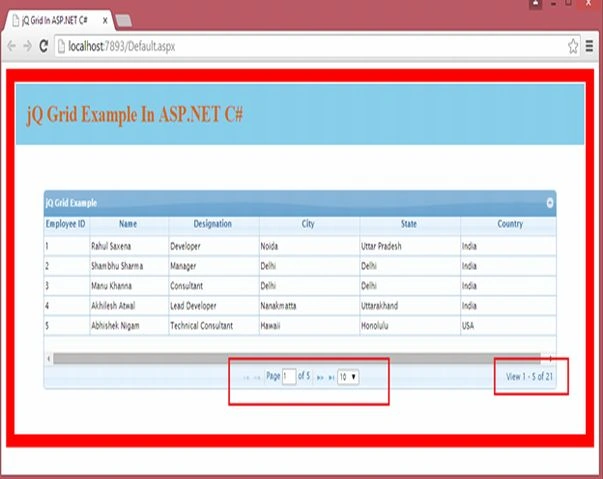
Image 3.
Now do paging as in the following: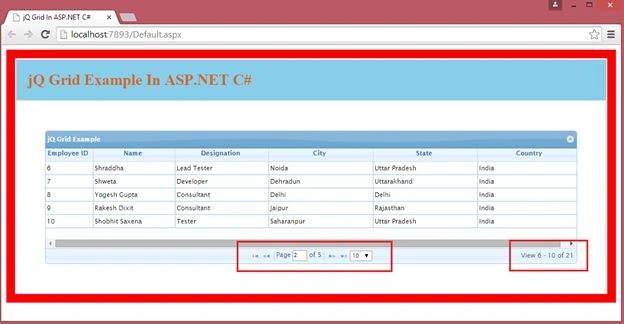
Image 4.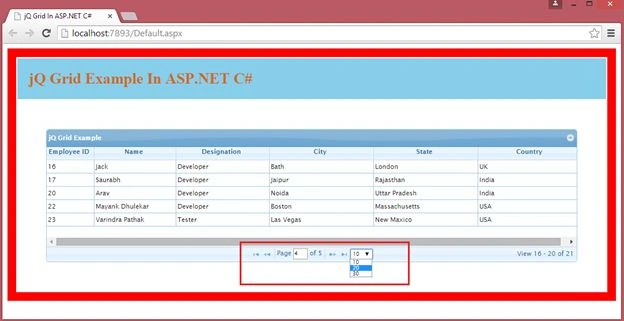
Image 5.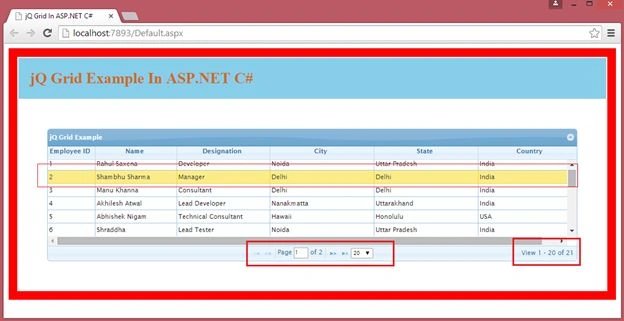
Image 6.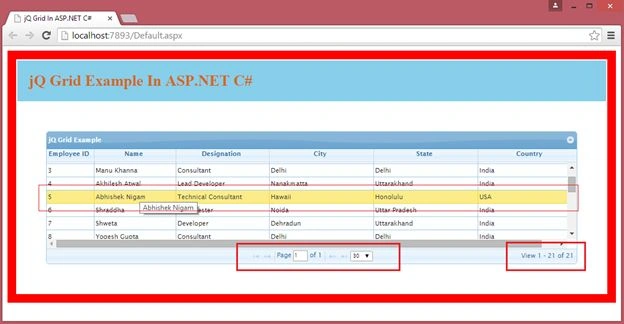
Image 7.
Pramendu ThakurPosted May 28, 2019, 1:10 AM
$ is undefine error occured how to solve it
Dupur ThakurpoPosted Nov 5, 2018, 3:14 AM
$ is undefine error occured
onais ahmerPosted Jul 2, 2018, 11:55 PM
Page Load but grid not shown
Dhanraj BendalePosted Jun 16, 2017, 9:23 AM
Demo is sucesses fullly run but two jqGrid is not work to one page in two types
Former memberPosted Jan 20, 2017, 1:39 AM
Pagingrid not supported and data not display if webnethod call
Sarath NilamburPosted Nov 4, 2016, 5:28 AM
I get error. http://jqueryrock.googlecode.com/svn/trunk/css/jquery-ui-1.9.2.custom.css Default.aspx:9 GET http://jqueryrock.googlecode.com/svn/trunk/js/jquery-1.8.3.js
Prasunjeet SoniPosted May 17, 2016, 3:43 AM
In my grid have less then 10 record so the next prev button will be displayed or not ...
Venkat SPosted Apr 20, 2016, 5:54 AM
[System.Web.Services.WebMethod] public static List<Char> GetMIS() { Chat objChat = new Chat(); List<Chat> objChatList = new List<Chat>(); ChatAppBL objChatBL = new ChatAppBL(); objChatList = objChatBL.BindMsgBL(objChat); var jsonSerialiser = new JavaScriptSerializer(); var json = jsonSerialiser.Serialize(objChatList); return json.ToList(); }
Venkat SPosted Apr 20, 2016, 5:54 AM
When I am using the above code they working good...but i m trying to change my project type ...but now working jqgrid kindly help....
Venkat SPosted Apr 20, 2016, 5:53 AM
afsd
Venkat SPosted Apr 20, 2016, 5:53 AM
When I am using the above code they working good...but i m trying to change my project type
MOHD ASIF GANAIEPosted Feb 15, 2016, 4:53 AM
Can you tell me how to show all selected rows in JQGrid without having scroll..thnks
suman NathPosted Dec 19, 2015, 6:24 AM
pls let me know to call jqGrid({ url: '') when its content page
Koundinya CVNPosted Dec 1, 2015, 1:18 PM
Good Example. But Getting error : PagingGrid is not a function. Can you please write an article for Sub Grid as an extension for this.
Aniket NarvankarPosted Oct 21, 2015, 2:58 AM
sir,it is giving me error paginggrid is not a function,i am not getting what it is actually pointing to.
Rahul Kumar SaxenaPosted Sep 2, 2015, 1:25 AM
Thanks Ramavtar Rajput
Rahul Kumar SaxenaPosted Sep 2, 2015, 1:25 AM
Thanks Azhar Hussain
Rahul Kumar SaxenaPosted Sep 2, 2015, 1:25 AM
Thanks Saineshwar Bageri
Rahul Kumar SaxenaPosted Sep 2, 2015, 1:25 AM
Yes Pc Patel I will try
Rahul Kumar SaxenaPosted Sep 2, 2015, 1:25 AM
Thanks Pc Patel
Saineshwar BageriPosted Aug 29, 2015, 1:27 AM
Nice one sir was hunting this
Phoolchand PatelPosted Aug 25, 2015, 10:37 AM
It will be a great help
Phoolchand PatelPosted Aug 25, 2015, 10:36 AM
Hi Rahul can you please write an article on jtable crud opertaion in web forms. http://www.jtable.org/
Rahul Kumar SaxenaPosted Mar 13, 2015, 3:11 AM
Thanks Vinoth...
vinoth vinothPosted Mar 13, 2015, 2:13 AM
THANKYOU FOR YOUR POST, IT IS VERY HELPFUL, AND I WAS CONVERTED THIS CODE INTO STORED-PROCEDURE MODE IN MY TASK,THEN THIS SAMPLE VERY HELPFUL FOR MY TASK tHANKYOU
Rahul Kumar SaxenaPosted Mar 10, 2015, 2:24 PM
Thanks Rajesh Gajra... In future Sure I will try to write same...
Rajesh BhanushaliPosted Mar 10, 2015, 4:36 AM
Nice article indeed.Sir can you please provide example of jqgrid with server side paging,sorting and filtering?
Rahul Kumar SaxenaPosted Feb 26, 2015, 5:21 AM
Thanks leger Djiba...
Rahul Kumar SaxenaPosted Feb 26, 2015, 5:20 AM
Thanks Vilas Shinde...
Rahul Kumar SaxenaPosted Feb 24, 2015, 7:54 AM
Sure I will write about Edit Delete & Search
Rahul Kumar SaxenaPosted Feb 24, 2015, 7:51 AM
Thanks Khargesh Rajput...
Khargesh RajputPosted Feb 13, 2015, 11:22 PM
nice sir ,please write about edit delete search in jqgrid in articles