

In this article, I am going to cover some really interesting material that is very useful today in web application development. You will learn how to make jQuery Ajax GET and POST calls to controller methods.
When we use jQuery Ajax to access a server (controller's method) without reloading the web page we have two choices for how to pass the information for the request to the server (controller's method). These two options are to use either GET or POST.
Note. Before beginning with the code, ensure you are using the jQuery library before the GET or POST script.
GET
GET is used to request data from a specified resource. With all the GET requests we pass the URL which is compulsory, however, it can take the following overloads.
.get( url [, data ] [, success(data, textStatus, jqXHR) ] [, dataType ] ).done/.fail
Now, let's try to use GET in the MVC application.
GET call to Controller's Method that will return string data
Let's imagine we have the following method in the controller:
public string TellMeDate()
{
    return DateTime.Today.ToString();
}
This method will return string data (date-time) when we call it, let's make an async call using jQuery Ajax.
<p id="rData">
</p>
<script type="text/jscript">
    var url = "/Home/TellMeDate";
    $.get(url, null, function (data) {
        $("#rData").html(data);
    });
</script>
When the page gets loaded, jQuery Ajax will generate an Ajax GET request/call. The first parameter is the URL the second is data (this is optional, even if we can avoid typing "null") and the third is the success function when the response is received. The success function takes one parameter "data" that holds the string content and we attach this content to a DOM element.
If you want to generate an Ajax GET request when the user clicks a button then can use the following instead:
<script type="text/jscript">
    $('#ButtonID').click(function () {
        var url = "/Home/TellMeDate";
        $.get(url, null, function (data) {
            $("#rData").html(data);
        });
    })
</script>
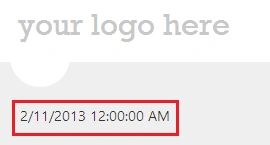
If you run the application, you will see the following output.
GET call with a parameter to Controller's Method that will return string data.
Let's imagine we have the following method in the controller:
public string WelcomeMsg(string input)
{
    if (!String.IsNullOrEmpty(input))
        return "Please welcome " + input + ".";
    else
        return "Please enter your name.";
}
This method will accept a parameter and will return string data (a welcome message or instruction message) when we call it. Now, let's make an async call to this method using jQuery Ajax.
<p>
    Enter you name @Html.TextBox("Name")
    <input type="submit" id="SubmitName" value="Submit"/>
</p>
<script type="text/jscript">
    $('#SubmitName').click(function () {
        var url = "/Home/WelcomeMsg";
        var name = $('#Name').val();
        $.get(url, { input: name }, function (data) {
            $("#rData").html(data);
        });
    })
</script>
As you can see, when we click the button after typing a name in the TextBox, jQuery Ajax will generate an Ajax GET request/call. Notice that the second parameter to the "get" function now contains a key { input: name } (parameter). This example supplies one parameter but can be extended to provide multiple parameters. The result of the preceding looks like the following.
GET call with a parameter to Controller's Method that will return JSON data
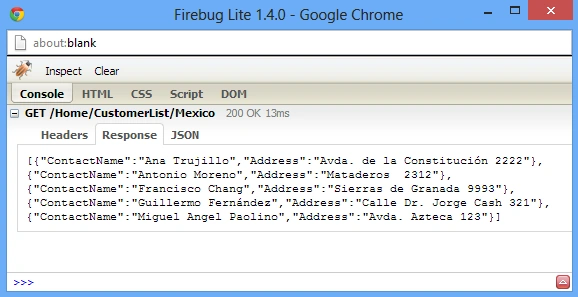
The Controller's method we used above returns simple strings. Now, to deal with complex data we need JSON. The following method will return a JsonResult having the customer's contact name and Address from NorthwindEntities. I am using the Northwind database and EF Database First approach in this sample.
public JsonResult CustomerList(string Id)
{
    NorthwindEntities db = new NorthwindEntities();
    var result = from r in db.Customers
                    where r.Country == Id
                    select new { r.ContactName, r.Address };
    return Json(result, JsonRequestBehavior.AllowGet);
}
The above method will accept Id as a parameter and return a "JsonResult". This action method can be called using the following jQuery Ajax GET call.
<p id="rData">
</p>
<p>
    Enter country name @Html.TextBox("Country")
    <input type="submit" id="GetCustomers" value="Submit"/>
</p>
<script type="text/jscript">
    $('#GetCustomers').click(function () {
        $.getJSON('/Home/CustomerList/' + $('#Country').val(), function (data) {
            var items = '<table><tr><th>Name</th><th>Address</th></tr>';
            $.each(data, function (i, country) {
                items += "<tr><td>" + country.ContactName + "</td><td>" + country.Address + "</td></tr>";
            });
            items += "</table>";
            $('#rData').html(items);
        });
    })
</script>
conqu ererPosted Mar 7, 2024, 10:26 PM
Perfect perfect
Samiullah BurkiPosted Mar 7, 2022, 10:40 AM
If our controller and method name was show in ajax call and also parameters numbers then how to save it from calling it from other source like postman
First LastPosted Mar 27, 2020, 8:21 PM
How do you send back a forms data? The data on the form is defined by a model. The form.serialize() strings it together and I can see the fields that I changed on the form (the model) but when I receive it in the controller method's argument it is null. The controller's argument is defined as the same type as the model in the form.
Ashwin KumarPosted Mar 21, 2019, 2:29 AM
How do we call from view to controller action method using jquery url, not string
Naresh SinghalPosted Feb 21, 2018, 6:22 AM
Very Nice Sir, Explained Plenty of ways to use Json ....Very Useful.....Thanks.
Festus MutuaPosted Nov 1, 2017, 3:31 PM
[HttpPost] public string JsonStringBody([FromBody] string content) { return content; }
Festus MutuaPosted Nov 1, 2017, 3:31 PM
Kindly help me with source codes for POST method on MVC API to receive string data. Just receive STRING DATA.. i have this but its not working.....
JAMSHEED RAHMANPosted Sep 30, 2017, 4:46 AM
Thank you so much. Its very useful for me. I am working in ASP.Net MVC Core. For me the AJAX POST method parameter was always null on controller. But now its working fine.
Sudarshan SinghPosted Jul 26, 2017, 8:26 AM
Pretty efficient and useful piece of work. Thanks
kalu singh raoPosted Jul 25, 2016, 7:53 AM
Nice share
shaik muzammelPosted Sep 4, 2015, 3:19 AM
Thanx sir very helpful for me..
Yagnesh PanchalPosted Jul 2, 2015, 3:22 AM
Hi, I am using MVC 5 and trying to run the second example of getting parameter to return to same form. I am unable to run that. What changes i need to do.
Shrish ShrivastavaPosted Apr 19, 2013, 4:29 AM
very nice sir !