

Introduction
In this post you are going to learn all about jQuery and CSS Selectors, if you are still not using jQuery in your web apps, this post will motivate you.Here I am going to talk on "Custom Selectors" and filter expression, let's first look at a problem that we will solve in this article.
Problem
Assume I have a blog/website and I want all external URLs to open on new browser tab. For example when you click on any external URL on Facebook, it opens URL on new tag. No meaning you have mentioned "target" attribute with URL or not, I always want external URLs to open on new tab.
In addition with this, I also want to add an external icon with all external URLs. How to do this?
Look at the image and demo given below that is fully functional solution.
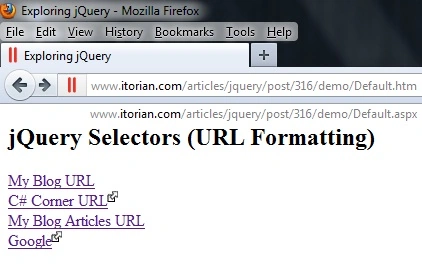
I guess you can understand my ideas now. In above image/demo you can see, my blog URLs has no icon and it always opens on same page (not on new tab), rest all URLs will open on new tab.
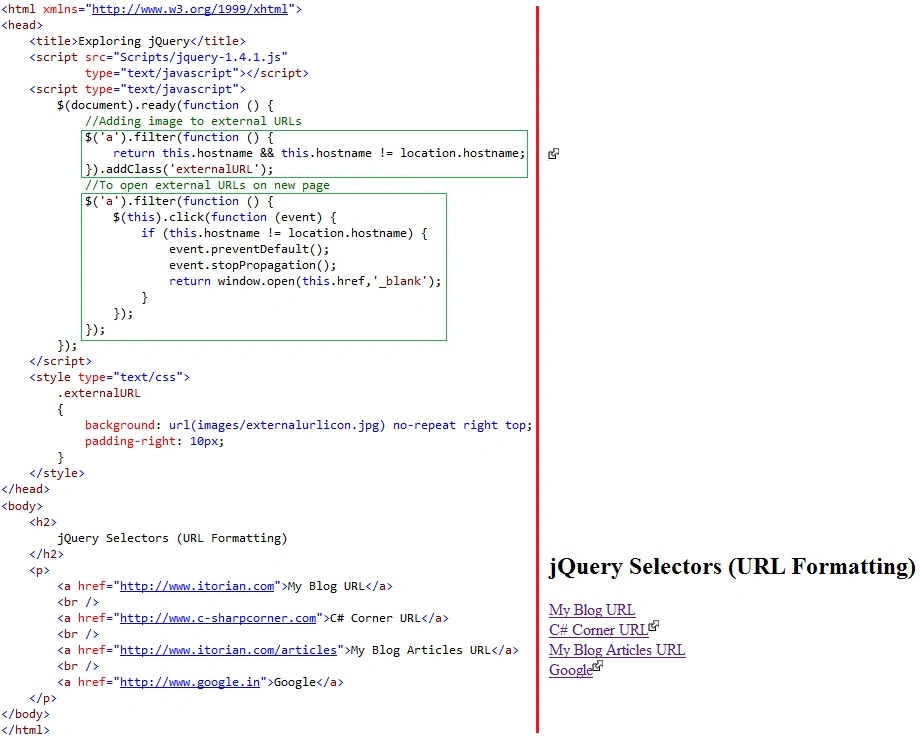
Now to develop such functionality we need to take the advantage of jQuery's "Custom Selectors" and filter method. So, let's learn both of them.
Filter Expression
It reduces the set of matched elements to those that match the selector or pass the function's test.
Remember filter is big topic and I am not going to discuss all here. If you want to learn more, visit here.
Join the conversation! Your thoughts help the community grow.