
Where and how to use it
JQuery is a JavaScript library which is lightweight, with the main purpose of "Write less. do more." Every developer uses JQuery normally for manipulation on Html, css, client side validation, Ajax, Rising event on controls, making the UI more attractive, etc. In the market there are so many libraries which allow you to use them, you just have to write a few lines of codes in your application which binds with your controls and needs implementation of those libraries.
As we know that JQuery is a JavaScript library, to use that you should first have basic knowledge about HTML and JavaScript. Whenever we use JavaScript we first include one CDN or we will download JQuery core library.
You can download it from here.
Or you can include one of the cdn:
Google cdn:
- <head>
- <script src="https://ajax.googleapis.com/ajax/libs/jquery/1.12.0/jquery.min.js"></script>
- </head>
- <head>
- <script src="http://ajax.aspnetcdn.com/ajax/jQuery/jquery-1.12.0.min.js"></script>
- </head>
- $(selector).action() //syntax.
- $ is a function which specifies that you want to access JQuery.
- (selector) is for finding html element //such as <Button id=”btnid” class=”btnclass”>ADD</Button>.
- We can access html elements using there id or class name{for class (“.btnid”) for id (“#btnclass”) } . If you want to access all button with class name “btnclass” just use (“btnclass”), this will allow you to access all button.
- action() is for performing any action on (selector) //action suppose hide()
E.g: $(“#btnid”).hide();
How we raise function or event in JavaScript
- Function changeBackground(color) {
- Document.body.style.background = color;
- }
- Onload=”changeBackground (‘red’);”
- $ (‘body’) .css (‘background’, ‘#ccc’);
Code:

Output:

Method chaining concept in Jquery
There is a technique called chaining that allows us to run multiple JQuery command, one after other on the same element.
Important point:
- It makes your code short and easy to manage.
- It gives better performance.
- The chain starts from left to right. So left most will be called first and so on.
Example:
- <script>
- $(document).ready(function(){
- $('#dvContent').addClass('dummy'); //without method chaining
- $('#dvContent').css('color', 'red');
- $('#dvContent').fadeIn('slow');
- });
- </script>
- <script>
- $(document).ready(function(){
- $('#dvContent').addClass('dummyclas').css('color','red') //with method chaining
- });
- </script>
- <script>
- $('#form1').find('input:text, input:password, input:file, select, textarea').val('');
- $('#form1').find('input:radio,input:checkbox').removeAttr('checked').removeAttr('selected')
- </script>
Simple example of Ajax with Web method in ASP.NET
Step 1: Open a new web empty project:
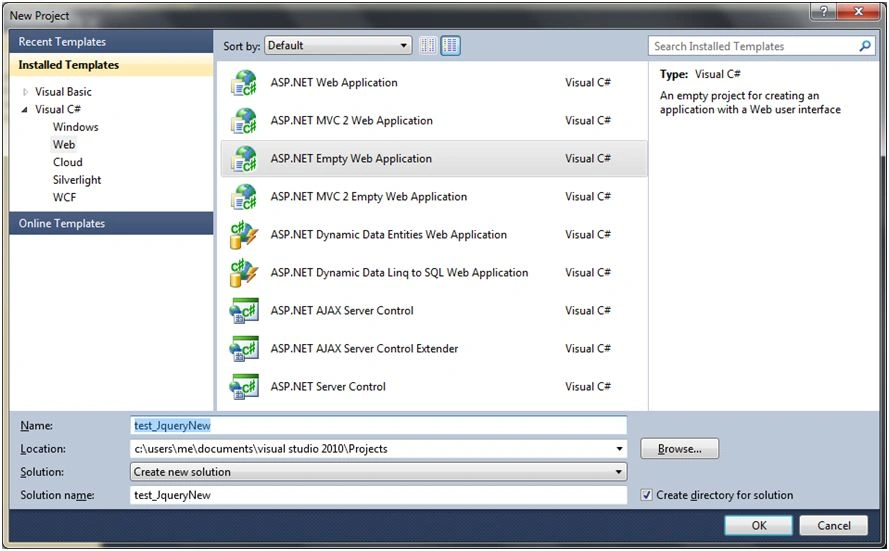
Step 2: Write basic html form for registration
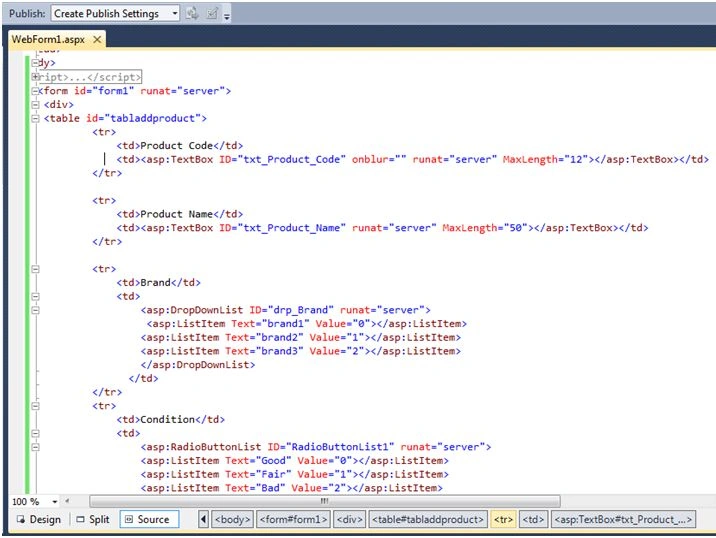
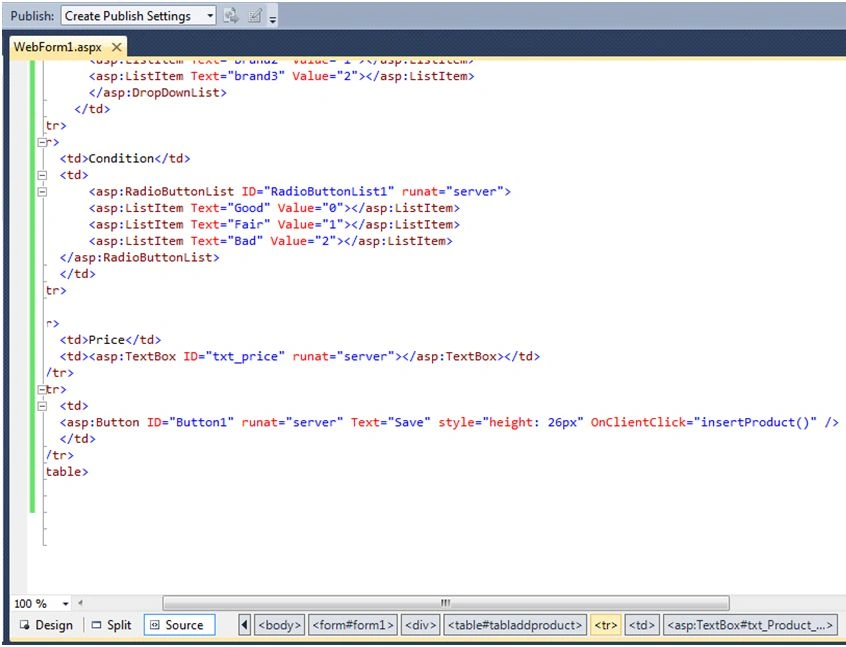
Step 3: Write script which has Ajax functionality in it.
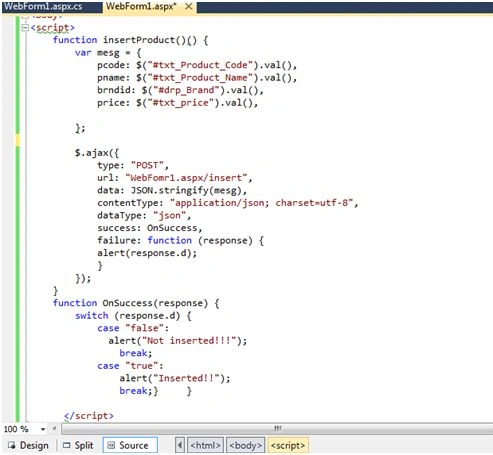
Working:
- In insertProduct() function, we have created one variable with name mesg.
- Mesg variable have key value pair of combination, for example, pcode is key and $(“txt_Product_Code”).val() have value.
- In $.Ajax
- For “post” means the request is of type POST.
- We have written “url” ,where Ajax will find its desired web method.
- “data” means what data we are passing ,actual content.
- Whenever two different technologies interaction are involved the data which are passed between them are only String. Its a standard set for interaction. Here we are using JavaScript and C#.
- Write web method from which JavaScript find its desired web method.
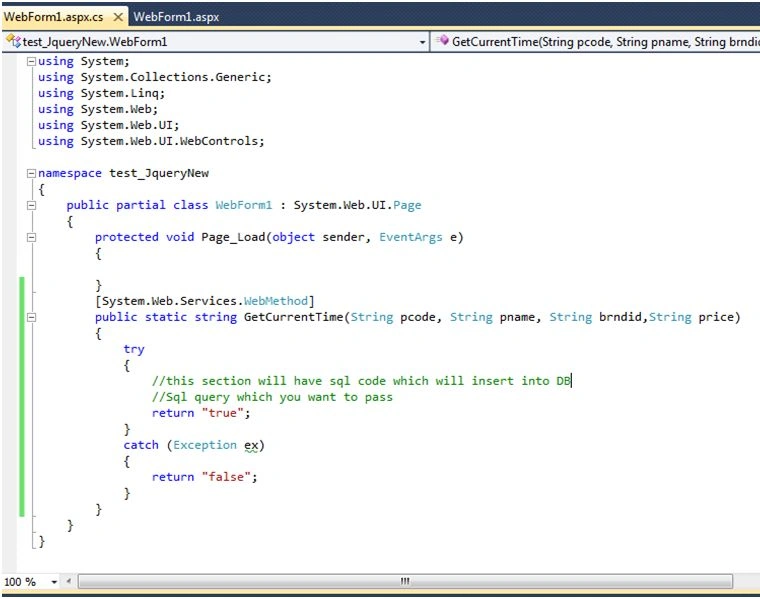
Working: If we get true from web method as return value, in JavaScript it will check the response.
Jitendra ShahPosted Aug 14, 2017, 5:41 AM
WOW! Extremely helpful!
Santhakumar MunuswamyPosted Jan 23, 2016, 1:36 AM
Thanks for nice share
Gowtham KPosted Jan 22, 2016, 9:11 PM
Good One, Thanks for sharing:)
Jaco ZwartsPosted Jan 22, 2016, 11:14 AM
Nice Article really good work!
Umarul FarookPosted Jan 22, 2016, 10:15 AM
nice
Debasis SahaPosted Jan 22, 2016, 9:55 AM
Good..Keep posting...
Muhammad Aqib ShehzadPosted Jan 22, 2016, 4:34 AM
good one
Sthitaprajnya Debasis NayakPosted Jan 22, 2016, 3:40 AM
Nice.
Manas MohapatraPosted Jan 22, 2016, 3:37 AM
Informative one..
Ankur MistryPosted Jan 22, 2016, 3:35 AM
very nice
Pankaj Kumar ChoudharyPosted Jan 22, 2016, 2:19 AM
Nice Explain............