

This article explains how to use jQuery fading methods. The fade methods define visibility of content in UI, in other words how the web page is hidden/shown. To use the fade methods of jQuery I need a jQuery library in my project so I directly use the Google AJAX Libraries content delivery network to serve jQuery from Google. Doing so has several advantages over hosting jQuery on our server, decreased latency, increased parallelism, and better caching. We add the script to our project.
<script type="text/javascript" src="//ajax.googleapis.com/ajax/libs/jquery/1.10.1/jquery.min.js"></script>
You can also use other versions of jQuery and can get a link for Google Hosted Libraries.
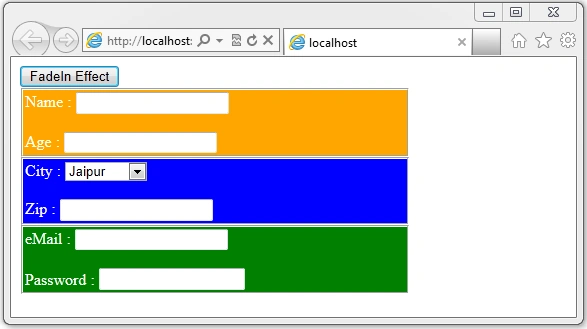
We create a web Form to implement jQuery fade methods for the web form with 3 panels (rendered in a div) so the web page design is such that it will be used for all methods.
<asp:Button ID="btnEffect" runat="server" Text="FadeIn Effect" /><br />
<asp:Panel ID="panelPersonalInfo" runat="server" >
<fieldset title ="Personal" style="width:380px;padding:2px;background-color:Orange;Color:White">
Name : <asp:TextBox ID="txtName" runat="server"></asp:TextBox><br /><br />
Age : <asp:TextBox ID="txtAge" runat="server"></asp:TextBox>
</fieldset>
</asp:Panel>
<asp:Panel ID="panelAddressInfo" runat="server">
<fieldset title ="Address" style="width:380px;padding:2px;background-color:Blue;Color:White">
City : <asp:DropDownList ID="ddlCity" runat="server">
<asp:ListItem Value="1" Text="Jaipur"></asp:ListItem>
<asp:ListItem Value="2" Text="Udaipur"></asp:ListItem>
<asp:ListItem Value="3" Text="Jaisalmer"></asp:ListItem>
</asp:DropDownList><br /><br />
Zip : <asp:TextBox ID="txtZip" runat="server"></asp:TextBox>
</fieldset>
</asp:Panel>
<asp:Panel ID="panelLoginInfo" runat="server" >
<fieldset title ="Login Information" style="width:380px;padding:2px;background-color:Green;Color:White">
eMail : <asp:TextBox ID="txtMail" runat="server"></asp:TextBox><br /><br />
Password : <asp:TextBox ID="txtPassword" runat="server" TextMode="Password"></asp:TextBox>
</fieldset>
</asp:Panel>
Join the conversation! Your thoughts help the community grow.