

In the example I am showing data from the following table: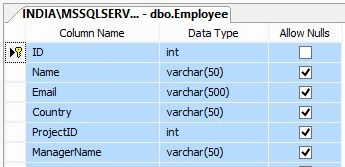
Figure 1
The following is the script of my Employee table:
- CREATE TABLE [dbo].[Employee](
- [ID] [int] IDENTITY(1,1) NOT NULL,
- [Name] [varchar](50) NULL,
- [Email] [varchar](500) NULL,
- [Country] [varchar](50) NULL,
- [ProjectID] [int] NULL,
- [ManagerName] [varchar](50) NULL,
- CONSTRAINT [PK_Employee] PRIMARY KEY CLUSTERED
- (
- [ID] ASC
- )WITH (PAD_INDEX = OFF, STATISTICS_NORECOMPUTE = OFF,
- IGNORE_DUP_KEY = OFF, ALLOW_ROW_LOCKS = ON,
- ALLOW_PAGE_LOCKS = ON) ON [PRIMARY]
- ) ON [PRIMARY]
- GO
Figure 2.
I am making a join with the Project table when showing records from this table.
The following is the Project table:
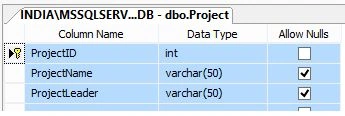
Figure 3
The following is the script of my Project table:
- CREATE TABLE [dbo].[Project](
- [ProjectID] [int] IDENTITY(1,1) NOT NULL,
- [ProjectName] [varchar](50) NULL,
- [ProjectLeader] [varchar](50) NULL,
- CONSTRAINT [PK_Project] PRIMARY KEY CLUSTERED
- (
- [ProjectID] ASC
- )WITH (PAD_INDEX = OFF, STATISTICS_NORECOMPUTE = OFF,
- IGNORE_DUP_KEY = OFF, ALLOW_ROW_LOCKS = ON,
- ALLOW_PAGE_LOCKS = ON) ON [PRIMARY]
- ) ON [PRIMARY]
- GO
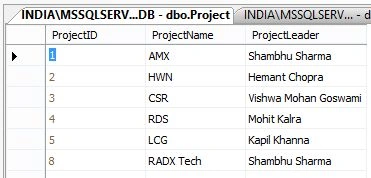
Figure 4
The following is the aspx code:
- <%@ Page Language="C#" AutoEventWireup="true" CodeBehind="Default3.aspx.cs" Inherits="Contains_In_jQuery.Default3" %>
- <!DOCTYPE html>
- <html xmlns="http://www.w3.org/1999/xhtml">
- <head runat="server">
- <title>jQuery: Change Row Back Color</title>
- <script src="Scripts/jquery-2.1.4.min.js"></script>
- <style type="text/css">
- body {
- font-family: Arial;
- font-size: 10pt;
- }
- td {
- cursor: pointer;
- }
- .hover_row {
- background-color: #A1DCF2;
- }
- </style>
- <script type="text/javascript">
- $(document).ready(function () {
- $('#gvData').empty();
- $.ajax({
- type: "POST",
- contentType: "application/json; charset=utf-8",
- url: "Default3.aspx/BindEmployees",
- data: "{}",
- dataType: "json",
- success: function (result) {
- $("#gvData").append("<tr style='background-color:red; color:white; font-weight:bold;'><td style='text-align:left;'>ID</td><td style='text-align:left;'>Name</td><td style='text-align:left;'>Email</td><td style='text-align:left;'>Country</td><td style='text-align:left;'>Project name</td><td style='text-align:left;'>Manager Name</td></tr>");
- for (var i = 0; i < result.d.length; i++) {
- var Country = result.d[i].Country;
- if (Country.indexOf('India') != -1) {
- $("#gvData").append("<tr style='background-color:#DC143C; font-family:Verdana; font-size:10pt;color:White;'><td style='text-align:left;'>" + result.d[i].ID + "</td><td style='text-align:left;'>" + result.d[i].Name + "</td><td style='text-align:left;'>" + result.d[i].Email + "</td><td style='text-align:left;'>" + result.d[i].Country + "</td><td style='text-align:left;'>" + result.d[i].ProjectID + "</td><td style='text-align:left;'>" + result.d[i].ManagerName + "</td></tr>");
- }
- else {
- $("#gvData").append("<tr style='background-color:skyblue; font-family:Verdana; font-size:10pt ;'><td style='text-align:left;'>" + result.d[i].ID + "</td><td style='text-align:left;'>" + result.d[i].Name + "</td><td style='text-align:left;'>" + result.d[i].Email + "</td><td style='text-align:left;'>" + result.d[i].Country + "</td><td style='text-align:left;'>" + result.d[i].ProjectID + "</td><td style='text-align:left;'>" + result.d[i].ManagerName + "</td></tr>");
- }
- }
- },
- error: function (result) {
- alert("Error");
- }
- });
- $(function () {
- $("[id*=gvData] td").hover(function () {
- $("td", $(this).closest("tr")).addClass("hover_row");
- }, function () {
- $("td", $(this).closest("tr")).removeClass("hover_row");
- });
- });
- });
- </script>
- </head>
- <body>
- <form id="form1" runat="server">
- <table style="width: 100%; text-align: center; border: solid 5px red; background-color: orange; vertical-align: top;">
- <tr>
- <td>
- <div>
- <fieldset style="width: 99%;">
- <legend style="font-size: 20pt; color: white; font-family: Verdana">jQuery Set Row Back Color By Checking Column Value</legend>
- <table style="width: 100%;">
- <tr>
- <td style="vertical-align: top; background-color: yellowgreen; text-align: center;">
- <asp:GridView ID="gvData" runat="server" CellPadding="4" ShowHeaderWhenEmpty="True"
- BackColor="White" GridLines="Both"
- BorderColor="#CC9966" BorderStyle="None" Width="90%" BorderWidth="1px" HorizontalAlign="Center">
- <FooterStyle BackColor="#FFFFCC" ForeColor="#330099" />
- <HeaderStyle BackColor="#990000" Font-Bold="True" ForeColor="#FFFFCC" />
- <PagerStyle BackColor="#FFFFCC" ForeColor="#330099" HorizontalAlign="Center" />
- <RowStyle BackColor="White" ForeColor="#330099" />
- <SelectedRowStyle BackColor="#FFCC66" Font-Bold="True" ForeColor="#663399" />
- <SortedAscendingCellStyle BackColor="#FEFCEB" />
- <SortedAscendingHeaderStyle BackColor="#AF0101" />
- <SortedDescendingCellStyle BackColor="#F6F0C0" />
- <SortedDescendingHeaderStyle BackColor="#7E0000" />
- </asp:GridView>
- </td>
- </tr>
- </table>
- </fieldset>
- </div>
- </td>
- </tr>
- </table>
- </form>
- </body>
- </html>
- using System;
- using System.Collections.Generic;
- using System.Data;
- using System.Data.SqlClient;
- using System.Linq;
- using System.Web;
- using System.Web.Services;
- using System.Web.UI;
- using System.Web.UI.WebControls;
- namespace Contains_In_jQuery
- {
- public partial class Default3 : System.Web.UI.Page
- {
- protected void Page_Load(object sender, EventArgs e)
- {
- if (!Page.IsPostBack)
- {
- BindGridWithDummyRow();
- }
- }
- public void BindGridWithDummyRow()
- {
- DataTable dt = new DataTable();
- dt.Columns.Add("ID");
- dt.Columns.Add("Name");
- dt.Columns.Add("Email");
- dt.Columns.Add("Country");
- dt.Columns.Add("ProjectID");
- dt.Columns.Add("ManagerName");
- gvData.DataSource = dt;
- gvData.DataBind();
- }
- [WebMethod]
- public static Employee[] BindEmployees()
- {
- string connectionString = @"Data Source=INDIA\MSSQLServer2k8; Initial Catalog= TestDB; Integrated Security=true;";
- DataTable dt = new DataTable();
- List<Employee> employeeList = new List<Employee>();
- using (SqlConnection con = new SqlConnection(connectionString))
- {
- using (SqlCommand command = new SqlCommand("select e.ID, e.Name,e.Email,e.Country,ProjectName,e.ManagerName from Employee as e Inner join project as p on e.ProjectID=p.ProjectID ORDER BY e.Name", con))
- {
- con.Open();
- SqlDataAdapter da = new SqlDataAdapter(command);
- da.Fill(dt);
- foreach (DataRow dtrow in dt.Rows)
- {
- Employee employee = new Employee();
- employee.ID = Convert.ToInt32(dtrow["ID"].ToString());
- employee.Name = dtrow["Name"].ToString();
- employee.Email = dtrow["Email"].ToString();
- employee.Country = dtrow["Country"].ToString();
- employee.ProjectID = dtrow["ProjectName"].ToString();
- employee.ManagerName = dtrow["ManagerName"].ToString();
- employeeList.Add(employee);
- }
- }
- }
- return employeeList.ToArray();
- }
- }
- }
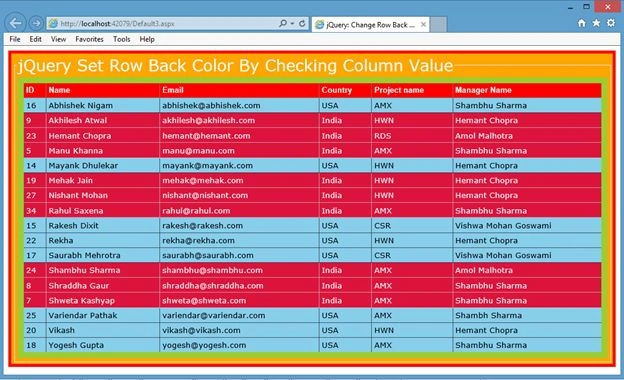
Figure 5
If you want to set Column background color then use the following changes:
- $(document).ready(function() {
- $('#gvData').empty();
- $.ajax({
- type: "POST",
- contentType: "application/json; charset=utf-8",
- url: "Default3.aspx/BindEmployees",
- data: "{}",
- dataType: "json",
- success: function(result) {
- $("#gvData").append("<tr style='background-color:red; color:white; font-weight:bold;'><td style='text-align:left;'>ID</td><td style='text-align:left;'>Name</td><td style='text-align:left;'>Email</td><td style='text-align:left;'>Country</td><td style='text-align:left;'>Project name</td><td style='text-align:left;'>Manager Name</td></tr>");
- for (var i = 0; i < result.d.length; i++) {
- var Country = result.d[i].Country;
- if (Country.indexOf('India') != -1) {
- $("#gvData").append("<tr style='background-color:#DC143C; font-family:Verdana; font-size:10pt;color:White;'><td style='text-align:left;'>" + result.d[i].ID + "</td><td style='text-align:left;'>" + result.d[i].Name + "</td><td style='text-align:left;'>" + result.d[i].Email + "</td><td style='text-align:left; background-color:green;'>" + result.d[i].Country + "</td><td style='text-align:left;'>" + result.d[i].ProjectID + "</td><td style='text-align:left;'>" + result.d[i].ManagerName + "</td></tr>");
- } else {
- $("#gvData").append("<tr style='background-color:skyblue; font-family:Verdana; font-size:10pt ;'><td style='text-align:left;'>" + result.d[i].ID + "</td><td style='text-align:left;'>" + result.d[i].Name + "</td><td style='text-align:left;'>" + result.d[i].Email + "</td><td style='text-align:left;'>" + result.d[i].Country + "</td><td style='text-align:left;'>" + result.d[i].ProjectID + "</td><td style='text-align:left;'>" + result.d[i].ManagerName + "</td></tr>");
- }
- }
- },
- error: function(result) {
- alert("Error");
- }
- });
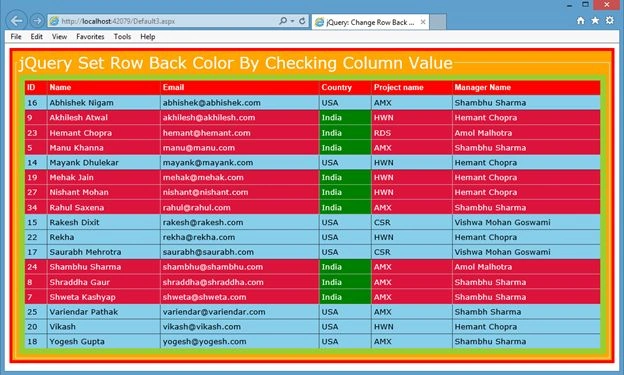
Figure 6
nethaji jayaveluPosted Mar 17, 2016, 1:09 AM
hi i want one word color change in a row example manager name shambu sharma sharma only color change
Rahul Kumar SaxenaPosted Jul 25, 2015, 3:06 AM
Thanks 2 All...
Rahul Kumar SaxenaPosted Jul 24, 2015, 8:56 AM
Thanks Rakesh Kalluri
Rakesh KalluriPosted Jul 24, 2015, 7:52 AM
Good one sir..
Rahul Kumar SaxenaPosted Jul 24, 2015, 7:37 AM
Thanks Debendra Dash
Rahul Kumar SaxenaPosted Jul 24, 2015, 7:37 AM
Thanks Sibeesh Venu
Rahul Kumar SaxenaPosted Jul 24, 2015, 7:37 AM
Thanks Debasis Saha
Rahul Kumar SaxenaPosted Jul 24, 2015, 7:37 AM
Thanks Santhakumar Munuswamy
Rahul Kumar SaxenaPosted Jul 24, 2015, 7:36 AM
Thanks Shridhar Sharma
Rahul Kumar SaxenaPosted Jul 24, 2015, 7:36 AM
Thanks Gopi Chand
Debendra DashPosted Jul 24, 2015, 6:30 AM
good one......
Sibeesh VenuPosted Jul 24, 2015, 4:13 AM
Nice Share. Thank you
Debasis SahaPosted Jul 24, 2015, 1:35 AM
Nice One..
Santhakumar MunuswamyPosted Jul 23, 2015, 2:44 PM
Thanks for nice article:)
Shridhar SharmaPosted Jul 23, 2015, 1:41 PM
nice one sir
Gopi ChandPosted Jul 23, 2015, 11:25 AM
Well done
Rahul Kumar SaxenaPosted Jul 23, 2015, 10:40 AM
Thanks Nipesh Janghel
Rahul Kumar SaxenaPosted Jul 23, 2015, 10:40 AM
Thanks Rakesh Chavda
Nipesh JanghelPosted Jul 23, 2015, 9:50 AM
Nice!!
RakeshPosted Jul 23, 2015, 9:45 AM
Nice sir
Rahul Kumar SaxenaPosted Jul 23, 2015, 6:20 AM
Thanks Sibeesh Venu bro...
Rahul Kumar SaxenaPosted Jul 23, 2015, 6:20 AM
Thanks Nilesh Jadav
Sibeesh VenuPosted Jul 23, 2015, 5:25 AM
Nice Share.
Nilesh JadavPosted Jul 23, 2015, 5:13 AM
Nice article sir
Rahul Kumar SaxenaPosted Jul 23, 2015, 3:40 AM
Thanks Rajeesh Menoth
Rahul Kumar SaxenaPosted Jul 23, 2015, 3:40 AM
Thanks Pankaj Kumar Choudhary
Rahul Kumar SaxenaPosted Jul 23, 2015, 3:40 AM
thanks Sharad
Rajeesh MenothPosted Jul 23, 2015, 3:27 AM
Good One sir..
Pankaj Kumar ChoudharyPosted Jul 23, 2015, 3:16 AM
Nice One Sir........
SharadPosted Jul 23, 2015, 3:14 AM
very nice...