

JQuery using selectors
In this article we will look how to use Jquery selectors available for accessing DOM.
So let's get started.I create an HTML file and add downloaded jquery-1.4.2.min.js file to below html file named as JQuerySelectors.html.
JQuerySelectors.html
<html>
<head>
<title>JQuery
Sample HTML Page</title>
<script
src="jquery-1.4.2.min.js"
type="text/javascript">
</script>
<script
language="javascript"
type="text/javascript">
$(document).ready(function() {
$('#div1').hide();
});
</script>
</head>
<body>
<div>
<div
id="div1">This
is a Section.</div>
<div>This
is next Section.</div>
<div>This
is Last Section.</div>
</div>
</body>
</html>
Here is a list of selectors, their syntax and brief description.
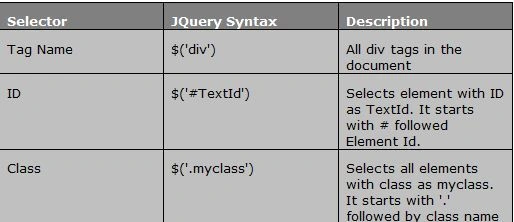
We can select elements based on attributes using below syntax:
$('div [attr-name^=test]') - Selects all div tags with attribute value equal to test.
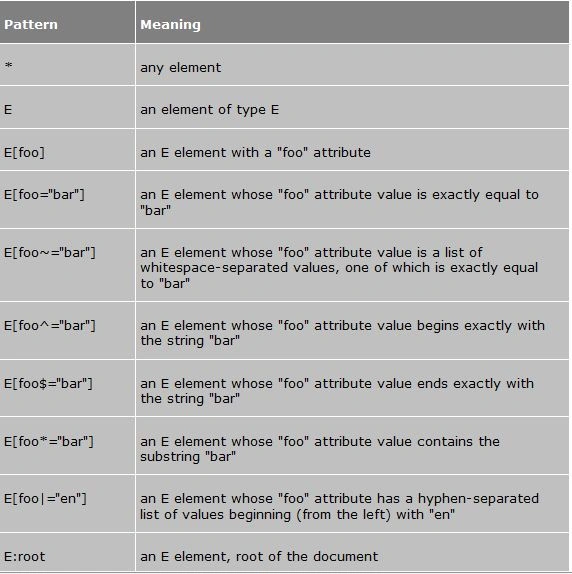
Now, we will look into custom selectors provided by JQuery. Custom selectors starts with :. Few of them are :even, :odd, :eq etc. We can use :even, :odd for styling alternate rows in a table using below syntax:
$('tr:odd').addClass('alternate');// Adds CSS class
Or
$('tr:nth-child(even)').addClass('alternate');
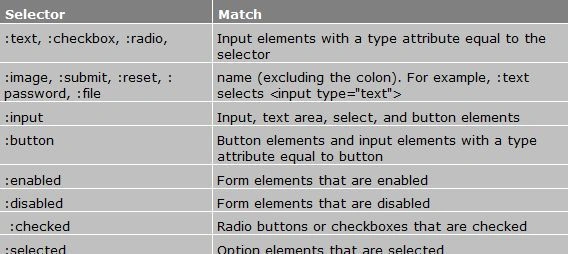
We can use custom selectors with form's elements like checkbox, textbox etc as shown below:
$(':button:disabled') - Select all disabled buttons
Summary
In this article you have seen how to using Jquery selectors available for accessing DOM.
I hope this article was helpful!
Resources
Here are some useful related resources:
- Basic Selectors in JQuery
- Scrolling an ASP.NET Multiline Textbox using jQuery
- Animate and Highlight gridview rows using jQuery
- Selecting and Modifying elements using JQuery
Alok PandeyPosted Dec 24, 2011, 12:36 AM
Nice article, Mr. Alten.
Nitin SinghPosted Dec 23, 2011, 11:49 PM
Thanks Mr. Chingumbra.
Alec StewartPosted Dec 23, 2011, 11:45 PM
Hey Mr.Chingumbra you have provided the good insight of the topic...Thanks
Manoj Singh PanwarPosted Dec 23, 2011, 11:40 PM
good Mr Alten