

Introduction
In this example we will explain the basics and widely used jQuery validation in ASP.Net Web Form. Using a library to do form validations can save much of your development time. The jQuery Form validation library is the most popular validation library and I think one of the easiest libraries to use in web forms.
For validating a web form using the jQuery validation library we need to include the following scripting file in our master page or webpage.
- <!--include jQuery -->
- <script src="http://ajax.googleapis.com/ajax/libs/jquery/1.11.1/jquery.min.js"
- type="text/javascript"></script>
- <!--include jQuery Validation Plugin-->
- <script src="http://ajax.aspnetcdn.com/ajax/jquery.validate/1.12.0/jquery.validate.min.js"
- type="text/javascript"></script>
- <script src="Scripts/jquery-1.10.2.min.js"></script>
- <script src="Scripts/jquery.validate.min.js"></script>
If you are using the Visual Studio 2013 default template then jquery-1.10.2.min.js is available for your Scripts folder. Just add the reference of that. For jquery.validate.min.js you can use the CDN link or add the reference using the NuGet package manager (search for jquery.validate.min and install it).
After adding the preceding reference to your page we need to use the following syntax to defend the rule for our webpage.
In simple form, the format is like this:
$('#formid').validate( { rules:{ }, messages:{ } } );
Using the preceding syntax we will validate our webpage. formid is the Id of our webpage for which we do the validation.
For writing our custom/validation rule we need to use the following syntax.
- rules:
- {
- Name_Of_Field1:
- {
- validation_1: param_1,
- validation_2: param_2
- }
- Name_Of_Field2:
- {
- validation_3: param_3,
- validation_4: param_4
- }
- }
Actually when the ASP.Net page is rendered in the browser the name of the control has been converted to its HTML equivalent so to access the name of the control in ASP.Net we need to use the following options.
- Use <%=ControlName.UniqueID %>.
- Use ClientIDMode="Static" inside the control and then use the id of the control.
By default jQuery displays an error message once the validation field is something so it's recommended to customize the default error message to minimize the confusion. We need to use the following syntax to display the custom validation message based on the control.
- messages:
- {
- Name_Of_Field1:
- {
- validation_1: "message for validation_1",
- validation_2: "message for validation_2"
- }
- Name_Of_Field2:
- {
- validation_3: "message for validation_3",
- validation_4: "message for validation_4"
- }
- }
This article will explain the following validation.
- Required Field validation.
- Regular Expression Validation.
- Range validation.
- Compression Validation.
- Custom Validation.
Required field validation is one of the most commonly used validations with web forms Now I will explain how we make an ASP.Net control required using jQuery.
TextBox: For making a TextBox required we must use the following code.
-
Add the reference of jQuery scripts file and validation file as in the following:
In this case the entire scripts file is in my Scripts folder. Just drag and drop the required file and it will automatically generate the required HTML code for you.- <script src="Scripts/jquery-1.10.2.min.js"></script>
- <script src="Scripts/jquery.validate.min.js"></script>
-
After adding the reference use the following syntax for validation.
- <script type ="text/javascript" >
- $(document).ready(function() {
- $("#form1").validate({
- rules: {
- //This section we need to place our custom rule for the control.
- },
- messages: {
- //This section we need to place our custom validation message for each control.
- },
- });
- });
- </script>
-
Now inside the rules section we need to add the control name with the required rules for validation. To do that we need to add the following code.
UniqueID will provide the name of the control. We can also use the Id of the control as a control name. For that we need to use ClientIDMode="Static" . Required will make the TextBox required. The complete code will be like:- //Name of the field.
- <%=IdOfTheTextBox.UniqueID %>:{
- required:true
- }
- <script src="Scripts/jquery-1.10.2.min.js"></script>
- <script src="Scripts/jquery.validate.min.js"></script>
- <script type ="text/javascript" >
- $(document).ready(function () {
- $("#form1").validate({
- rules: {
- //This section we need to place our custom rule
- //for the control.
- <%=txtName.UniqueID %>:{
- required:true
- },
- },
- messages: {
- //This section we need to place our custom
- //validation message for each control.
- <%=txtName.UniqueID %>:{
- required: "Name is required."
- },
- },
- });
- });
- </script>
- <br />
- Name <asp:TextBox ID="txtName" runat="server"></asp:TextBox>
- <br />
- <br />
- <asp:Button ID="btnSubmit" runat="server" Text="Submit" />
If we run the preceding code the output will be like.

If we did not add our custom message to the preceding control then it will display “This field is required.”. That creates confusion for the end user so it is always recommended that use your custom validation error message when validating a control.
In general the entire error message should display in the Red color. If we want to do the same we need to add some CSS for that.
- <style type ="text/css" >
- label.error {
- color: red;
- display:inline-flex ;
- }
- </style>
Now all the errors will display in Red. Just change the color to any other color depending on your requirement.

DropDownList: For making a dropdown list required we must create our custom validation rule and add that rule with the dropdown list like.
- //custom validation rule for Dropdown List
- $.validator.addMethod("CheckDropDownList", function (value, element, param) {
- if (value == '0')
- return false;
- else
- return true;
- },"Please select a Department.");
Here you can change the value ==’0’ to any other if your dropdown list's first value is not zero. The complete code will be like:
- <script src="Scripts/jquery-1.10.2.min.js"></script>
- <script src="Scripts/jquery.validate.min.js"></script>
- <script type ="text/javascript" >
- $(document).ready(function () {
- //custom validation rule for Dropdown List
- $.validator.addMethod("CheckDropDownList", function (value, element, param) {
- if (value == '0')
- return false;
- else
- return true;
- },"Please select a Department.");
- $("#form1").validate({
- rules: {
- <%=ddlDept.UniqueID %>:{
- CheckDropDownList:true
- },
- },
- messages: {
- //This section we need to place our custom validation message for each control.
- },
- });
- });
- </script>
- <style type ="text/css" >
- label.error {
- color: red;
- display:inline-flex ;
- }
- </style>
- <br />
- Department <asp:DropDownList ID="ddlDept" runat="server">
- </asp:DropDownList>
- <br />
- <asp:Button ID="btnSubmit" runat="server" Text="Submit" />

RadioButtonList: For making a Radio Button List required we do not need to put in any extra effort, just follow the same procedure as for the TextBox.
- <script src="Scripts/jquery-1.10.2.min.js"></script>
- <script src="Scripts/jquery.validate.min.js"></script>
- <script type ="text/javascript" >
- $(document).ready(function () {
- $("#form1").validate({
- rules: {
- <%=rbEmpLevel.UniqueID %>: {
- required: true
- },
- },
- messages: {
- //This section we need to place our custom
- //Validation message for each control.
- <%=rbEmpLevel.UniqueID %>: {
- required: "Skills is required."
- },
- },
- });
- });
- </script>
- <style type ="text/css" >
- label.error {
- color: red;
- display:inline-flex ;
- }
- </style>
- <br />
- Employee Level <asp:RadioButtonList ID="rbEmpLevel" CssClass="radioclass" runat="server" RepeatDirection="Horizontal">
- </asp:RadioButtonList>
- <br />
- <asp:Button ID="btnSubmit" runat="server" Text="Submit" />
Here also I am binding the radio button list at runtime. When we run the preceding code it will show:
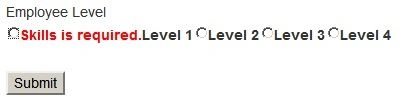
Here the error message is misplaced since we can see it clearly. For placing the error message after the radio button list we need to use the following code after the message body.
- //Error placement for radio buttons
- errorPlacement: function(error, element)
- {
- if ( element.is(":radio") )
- {
- error.appendTo( element.parents('.radioclass') );
- }
- else
- { // This is the default behavior
- error.insertAfter(element );
- }
- },
The preceding code will just adjust the error message and place it after the radio button list.
Regular Expression Validation
It is very simple to add a regular expression validator to jQuery validation. We just need to add one function for that like.
- //custom rule to check regular expression
- $.validator.addMethod("match", function(value, element)
- {
- return this.optional(element) || /^[a-zA-Z0-9._-]+@[a-zA-Z0-9-]+\.[a-zA-Z.]{2,5}$/i.test(value);
- }, "Please enter a valid email address.");
You can change the regular expression depending on your needs. The complete code will be like:
- <script src="Scripts/jquery-1.10.2.min.js"></script>
- <script src="Scripts/jquery.validate.min.js"></script>
- <script type ="text/javascript" >
- $(document).ready(function () {
- //custom rule to check regular expression
- $.validator.addMethod("match", function(value, element)
- {
- return this.optional(element) || /^[a-zA-Z0-9._-]+@[a-zA-Z0-9-]+\.[a-zA-Z.]{2,5}$/i.test(value);
- }, "Please enter a valid email address.");
- $("#form1").validate({
- rules: {
- <%=txtEmailId.UniqueID %>: {
- match: true
- },
- },
- messages: {
- //This section we need to place our custom validation message for each control.
- },
- });
- });
- </script>
- <style type ="text/css" >
- label.error {
- color: red;
- display:inline-flex ;
- }
- </style>
- <br />
- Email Id <asp:TextBox ID="txtEmailId" runat="server" CausesValidation="True" ></asp:TextBox>
- <br />
- <asp:Button ID="btnSubmit" runat="server" Text="Submit" />

Note: Actually for email id there is no need to add a regular expression validator. jQuery provides a default rule, we just need to enable that rule. For example I have used the preceding code.
email: true
It will also validate the email id without using a regular expression. A regular expression will be very useful when we want to apply our custom syntax on a TextBox.
In the same way we can also validate an URL using:
url: true // It will validate the valid URL
digits: true // It will only accept Number Input.
date: true // It will only accept valid date format Input.
Range validation
It's very simple to use range validation in jQuery. jQuery has some built-in range validation rules, we just need to use them. There are the following range validations in jQuery:
- range: [20, 25] // It will only accept Number between 20 to 25.
- minlength: 10, // Minimum length of the TextBox is 10.
- maxlength: 20// Maximum length of the TextBox is 20.
- rangelength: [10, 20] // TextBox only accepts a minimum of 10 and a max of 20 characters.
Note: rangelength will not validate the TextBox when the TextBox is null; the same for range also.
Complete sample code:
- <script src="Scripts/jquery-1.10.2.min.js"></script>
- <script src="Scripts/jquery.validate.min.js"></script>
- <script type ="text/javascript" >
- $(document).ready(function () {
- $("#form1").validate({
- rules: {
- <%=txtAge.UniqueID %>: {
- range: [10, 20],
- },
- },
- messages: {
- //This section we need to place our custom validation message for each control.
- <%=txtAge.UniqueID %>: {
- range: "Age should be between {0} and {1}"
- },
- },
- });
- });
- </script>
- <style type ="text/css" >
- label.error {
- color: red;
- display:inline-flex ;
- }
- </style>
- <br />
- Age <asp:TextBox ID="txtAge" runat="server" CausesValidation="True" ></asp:TextBox>
- <br />
- <asp:Button ID="btnSubmit" runat="server" Text="Submit" />

Using the following example we can achieve compression validation.
- <script src="Scripts/jquery-1.10.2.min.js"></script>
- <script src="Scripts/jquery.validate.min.js"></script>
- <script type ="text/javascript" >
- $(document).ready(function () {
- $("#form1").validate({
- rules: {
- <%=txtcid.UniqueID %>: {
- required: true,
- equalTo: "#<%=txtemailId.ClientID %>" // Id of the control to compare.
- },
- },
- messages: {
- //This section we need to place our custom validation message for each control.
- <%=txtcid.UniqueID %>: {
- equalTo: "Enter Same Email Id."
- },
- },
- });
- });
- </script>
- <style type ="text/css" >
- label.error {
- color: red;
- display:inline-flex ;
- }
- </style>
- <br />
- Email Id
- <asp:TextBox ID="txtemailId" runat="server" CausesValidation="True" ></asp:TextBox>
- <br />
- Comferm Email Id <asp:TextBox ID="txtcid" runat="server" CausesValidation="True" ></asp:TextBox>
- <br />
- <asp:Button ID="btnSubmit" runat="server" Text="Submit" />
When we run the page it will show like:
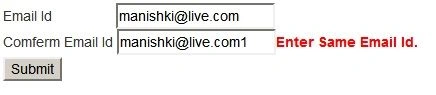
We can also check other comparison validation by creating our custom rule. I already showed how to add a custom rule with jQuery validation.
Custom Validation
We can also make an Ajax call and check some condition depending on our needs. In the following example I am checking whether the email id is available or not. If the email id is available then it should show an error message and restrict the form from posting to the server. For doing that we need to use the following procedure.
-
Step 1: Create a web services and check email availability in the database.
I have created a web service (EmployeeServices.asmx) and added the following method to that.The preceding method will check for email id availability in the database and if it is available then it will return false otherwise true. Here I am using Entity Framework. You can use any other. Just remember that if the record is available then the method should return false otherwise true.- [WebMethod]
- public bool IsEmailIdAvailable(string emailId)
- {
- bool ret = false;
- try
- {
- using (EmployeeDbContext db = new EmployeeDbContext())
- {
- ret = !db.EmployeeDetails.Any(x => x.EmailId.Equals(emailId));
- }
- return ret;
- }
- catch
- {
- return false;
- }
- }
-
Step 2: Call this web service method under remote attribute in jQuery validation like.
When we run the page it will check for email id availability in the database. If it is available then the following error message will show.- <script src="Scripts/jquery-1.10.2.min.js"></script>
- <script src="Scripts/jquery.validate.min.js"></script>
- <script type ="text/javascript" >
- $(document).ready(function() {
- $("#form1").validate({
- rules: {
- <%=txtemailId.UniqueID %>: {
- required: true,
- remote: function () {
- return {
- url: '<%= ResolveUrl("~/EmployeeServices.asmx/IsEmailIdAvailable") %>', //URL of asmx file.
- type: "POST",
- contentType: "application/json; charset=utf-8",
- dataType: "json",
- data: JSON.stringify({ emailId: $('#txtemailId').val() }),
- dataFilter: function (data) {
- var msg = JSON.parse(data);
- if (msg.hasOwnProperty('d'))
- return msg.d;
- else
- return msg;
- }
- }
- }
- },
- },
- messages: {
- <%=txtemailId.UniqueID %>: {
- required: "Email Id is Required",
- remote: "This Email Id is already in use",
- },
- },
- });
- });
- </script>
- <style type ="text/css" >
- label.error {
- color: red;
- display:inline-flex ;
- }
- </style>
- <br />
- Email Id <asp:TextBox ID="txtemailId" runat="server" CausesValidation="True" ClientIDMode="Static" ></asp:TextBox>
- <br />
- <br />
- <asp:Button ID="btnSubmit" runat="server" Text="Submit" />

Summary
In this illustration you came to understand the basics of jQuery validation with ASP. NET web forms.
Sujit SahooPosted Aug 2, 2019, 9:42 AM
Nice article sir, it helped me a lot.
Naseer AliPosted Apr 15, 2018, 8:13 AM
Its nice but i am using your way on pop up login which is placed in master page and also i did the valudation as ur article on content page for registering new user but the , the problem is when i am in sign up page i cant login through the pop up, the sign up page fields also get validated please give ,me a solution for this
Ramendra kumar vermaPosted Apr 4, 2018, 12:06 PM
How to find 3rd largset number in array without inbuild function
Daniel BojorgePosted May 9, 2017, 1:03 AM
Grait tutorial, but I have some problem, in my form I have a button when click run in code behind. How I can do for stop send form when it is invalid?
AnwarPosted Mar 14, 2017, 11:02 AM
<%=txtName.UniqueID%> : <----- here im getting an error that is expected identifier number or string . can any one help me.
Upendra Pratap ShahiPosted Oct 7, 2015, 1:55 AM
nice one
Manish Kumar ChoudharyPosted Apr 21, 2015, 4:03 AM
Thanks Gowtham Rajamanickam.
Manish Kumar ChoudharyPosted Apr 21, 2015, 4:03 AM
Thanks Rahul Saxena.
Rahul Kumar SaxenaPosted Apr 21, 2015, 2:34 AM
congrats article of the day bro...
Gowtham RajamanickamPosted Mar 13, 2015, 5:24 AM
Good article !
Manish Kumar ChoudharyPosted Feb 10, 2015, 1:56 AM
Thanks Sahil Sharma sir. Nice to know it's helping you.
Sahil SharmaPosted Feb 10, 2015, 1:54 AM
helpful. Thanks for sharing
Manish Kumar ChoudharyPosted Feb 9, 2015, 11:15 PM
Thanks Sibeesh Venu..
Sibeesh VenuPosted Feb 9, 2015, 11:14 PM
Good one .