

Introduction
JSON stands for JavaScript Object Notation. JSON is a light weight data interchange format in a text format so it can be easily parsed and read by machines and humans.
Parsing JSON data is important in Android. Create a new project on Android by using the following steps,
Step 1
 Step 2

Step 3

Step 4

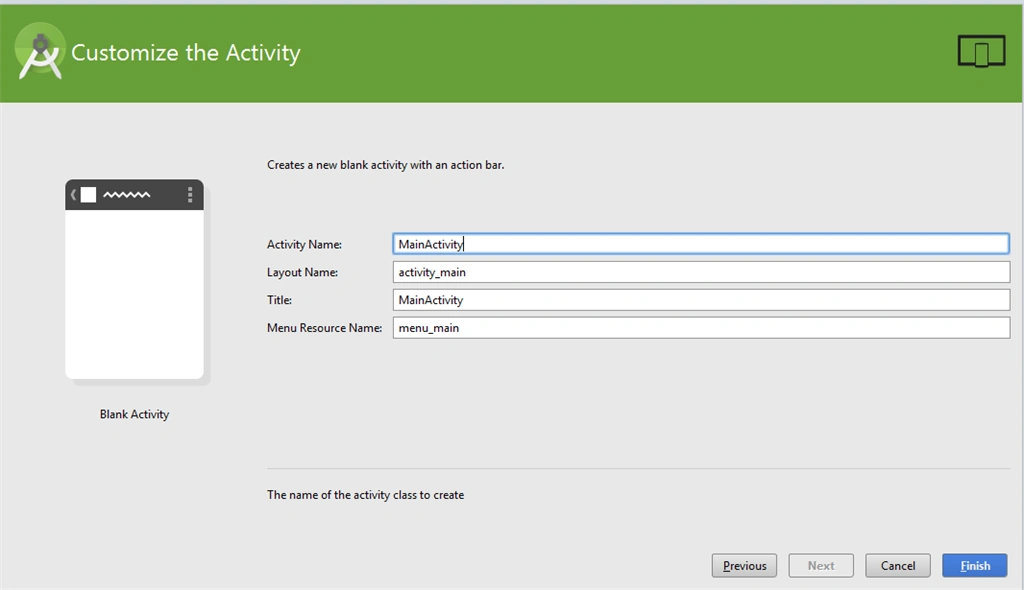
JSON uses the following two types of different structures,
- Collection of name/value pair
- Array
Example of collection of name/value pair: The { (curly brace) represents the JSON object.
- {"Employee" :{
- "id":"1",
- "name":"David",
- "address":"Delhi",
- "zip":"110002"}
- }
Example of collection of array: The [ (square bracket ) represents the JSON array.
- {
- "Employee": [
- {
- "id": "1",
- "name": "David",
- "address": "Delhi",
- "zip": "110002"
- },
- {
- "id": "2",
- "name": "John",
- "address": "Mumbai",
- "zip": "400001"
- },
- {
- "id": "3",
- "name": "Mathew",
- "address": "Delhi",
- "zip": "110003"
- },
- {
- "id": "4",
- "name": "Mary",
- "address": "Delhi",
- "zip": "110010"
- }]
- }
Complete Java class to parse JSON data.
- {
- "Employee": [
- {
- "id": "1",
- "name": "David",
- "address": "Delhi",
- "zip": "110002"
- },
- {
- "id": "2",
- "name": "John",
- "address": "Mumbai",
- "zip": "400001"
- },
- {
- "id": "3",
- "name": "Mathew",
- "address": "Delhi",
- "zip": "110003"
- },
- {
- "id": "4",
- "name": "Mary",
- "address": "Delhi",
- "zip": "110010"
- }]
- }
- package com.test.ppandey.jsonparse;
- import android.support.v7.app.ActionBarActivity;
- import android.os.Bundle;
- import android.view.Menu;
- import android.view.MenuItem;
- import android.widget.TextView;
- import org.json.JSONArray;
- import org.json.JSONException;
- import org.json.JSONObject;
- public class MainActivity extends ActionBarActivity
- {
- @Override
- protected void onCreate(Bundle savedInstanceState)
- {
- super.onCreate(savedInstanceState);
- setContentView(R.layout.activity_main);
- TextView output = (TextView) findViewById(R.id.textView1);
- String strJson = "{\"Employee\" :[ {" + " \"id\":\"1\",\n" + "\"name\":\"David\",\n" + "\"address\":\"Delhi\", \n" + "\"zip\":\"110002\"}, {\n" + "\"id\":\"2\",\n" + "\"name\":\"John\",\n" + "\"address\":\"Mumbai\",\n" + "\"zip\":\"400001\"}, {\n" + "\"id\":\"3\",\n" + "\"name\":\"Mathew\",\n" + "\"address\":\"Delhi\",\n" + "\"zip\":\"110003\"}, {\n" + "\"id\":\"4\",\n" + "\"name\":\"Mary\",\n" + "\"address\":\"Delhi\",\n" + "\"zip\":\"110010\"} \n" + "]}";
- String data = "";
- try
- {
- JSONObject jsonRootObject = new JSONObject(strJson);
- //Instance of JSONArray that contains JSONObjects
- JSONArray jsonArray = jsonRootObject.optJSONArray("Employee");
- //Iterate the jsonArray and print the information of the JSONObjects
- for (int i = 0; i < jsonArray.length(); i++)
- {
- JSONObject jsonObject = jsonArray.getJSONObject(i);
- int id = Integer.parseInt(jsonObject.optString("id").toString());
- String name = jsonObject.optString("name").toString();
- String address = jsonObject.optString("address").toString();
- String zip = jsonObject.optString("zip").toString();
- data += "Employee " + i + " : \n id= " + id + " \n Name= " + name + " \n Address= " + address + " \n zip=" + zip + "\n ";
- }
- output.setText(data);
- }
- catch (JSONException e)
- {
- e.printStackTrace();
- }
- }
- @Override
- public boolean onCreateOptionsMenu(Menu menu)
- {
- // Inflate the menu; this adds items to the action bar if it is present.
- getMenuInflater().inflate(R.menu.menu_main, menu);
- return true;
- }
- @Override
- public boolean onOptionsItemSelected(MenuItem item)
- {
- // Handle action bar item clicks here. The action bar will
- // automatically handle clicks on the Home/Up button, so long
- // as you specify a parent activity in AndroidManifest.xml.
- int id = item.getItemId();
- //noinspection SimplifiableIfStatement
- if (id == R.id.action_settings)
- {
- return true;
- }
- return super.onOptionsItemSelected(item);
- }
- }
In the above code, we created string containing JSON data and object of class JSONObject.
- JSONObject jsonRootObject = new JSONObject(strJson);
And pass string containing JSON data to it.
The second step is to parse the JSON.
- JSONArray jsonArray = jsonRootObject.optJSONArray("Employee");
- int id = Integer.parseInt(jsonObject.optString("id").toString());
- String name = jsonObject.optString("name").toString();
- String address = jsonObject.optString("address").toString();
- String zip = jsonObject.optString("zip").toString();
Run the application and we get the JSON data as in the following.

Asfend YarPosted Feb 20, 2016, 5:06 AM
good
Asfend YarPosted Feb 16, 2016, 4:51 AM
can you give the real time example of json parsing
Asfend YarPosted Feb 16, 2016, 4:51 AM
nice share
Iris PanabakerPosted Jan 22, 2016, 9:35 AM
love to share a json tool which help user to debug json data http://codebeautify.org/jsonviewer
Santhakumar MunuswamyPosted Jan 13, 2016, 10:10 AM
Thanks for nice article
Edu MunizPosted Jan 13, 2016, 7:22 AM
good job. Thanks for share
Humayun Kabir MamunPosted Jan 12, 2016, 10:13 AM
Nice...
Mohammed IbrahimPosted Jan 12, 2016, 7:29 AM
nice
Kumaresh RajalingamPosted Jan 12, 2016, 6:00 AM
Nice share
Ankur MistryPosted Jan 12, 2016, 3:12 AM
helpful, thanks for sharing
Nanddeep NachanPosted Jan 12, 2016, 2:55 AM
Nice share
Dinesh BeniwalPosted Jan 12, 2016, 1:18 AM
Good work Pandey G