

Introduction
This article discusses the JSON Web Token (JWT) and its authentication into your Angular 8 project with a secure backend API running on Node.JS. The security that will lie beneath the interfacing will be JWT as it is a secure and competent way to authenticate users using API endpoints.
What are JSON web tokens?
JSON Web Token is an open standard or RFC Standard (Request for Comments). It comprises a best-practice set of methodologies that describes a compact and autonomous way for securely transmitting information between parties as a JSON object. This information is digitally signed or encrypted and hence it can be simply verified and trusted. For this purpose, a secret key such as an HMAC algorithm is set or a public/private key pair is generated using RSA or ECDSA.
Why are JSON web tokens useful?
JWT offers the most secure way for authenticating the integrity of the exchange of information between the client and the server. It is adapted for verification so in the case of any violation or breach, the token will not verify or expire based on time.
Moreover, the benefits of JSON Web Tokens (JWT) outweigh more compared to Simple Web Tokens (SWT) or Security Assertion Markup Language Tokens (SAML) so JWT
can be preferred over the other two.
Let's take a glance at the theory in practice for JSON web authentication using Angular 8 and NodeJS.
Here, Angular 8 will be used on the frontend while the Node.JS server on the backend. First, an interceptor will be formed on the Angular side. An interceptor can break any HTTP request sent from Angular, replicate it, and insert a token to it before it is sent at last.
All the requests obtained will first be broken and replicated or cloned on the Node.JS side. Then, the token will be extracted and authenticated. If the verification is successful, the request will be forwarded to its handler for a specific response. If the authentication fails, all remaining requests will be invalid and a 401 unauthorized status will be sent to Angular.
All requests will be verified for a 401 status in the interceptor of the Angular App and for such a request, the token will be removed which is stored at Angular. The user will be logged out of all sessions and will land on the login screen.
Let’s get started.
The Angular App is created at the frontend followed by interceptor creation.
- ngnewangFrontend
Then, the Interceptor.
- nggenerateserviceAuthInterceptor
Now go to src/app/app.module.ts
Here, HTTP Module is imported for HTTP Calls to obtain global access.
import { BrowserModule } from '@angular/platform-browser';
import { NgModule } from '@angular/core';
import { AppRoutingModule } from './app-routing.module';
import { AppComponent } from './app.component';
import { HTTP_INTERCEPTORS, HttpClientModule } from '@angular/common/http';
import { AuthInterceptorService } from './auth-interceptor.service';
import { HomeComponent } from './home/home.component';
@NgModule({
  declarations: [
    AppComponent,
    HomeComponent
  ],
  imports: [
    BrowserModule,
    AppRoutingModule,
    HttpClientModule
  ],
  providers: [
    { provide: HTTP_INTERCEPTORS, useClass: AuthInterceptorService, multi: true }
  ],
  bootstrap: [AppComponent]
})
export class AppModule {}
Now, open the interceptor service class and then go to src/app/auth-interceptor.service.ts:
import { Injectable } from '@angular/core';
import { HttpEvent, HttpInterceptor, HttpHandler, HttpRequest, HttpErrorResponse } from '@angular/common/http';
import { catchError } from 'rxjs/operators';
import { Observable, throwError } from 'rxjs';
@Injectable({
  providedIn: 'root'
})
export class AuthInterceptorService implements HttpInterceptor {
  intercept(req: HttpRequest<any>, next: HttpHandler) {
    console.log("Interception In Progress"); // SECTION 1
    const token: string = localStorage.getItem('token');
    req = req.clone({ headers: req.headers.set('Authorization', 'Bearer ' + token) });
    req = req.clone({ headers: req.headers.set('Content-Type', 'application/json') });
    req = req.clone({ headers: req.headers.set('Accept', 'application/json') });
    return next.handle(req)
      .pipe(
        catchError((error: HttpErrorResponse) => {
          // 401 UNAUTHORIZED - SECTION 2
          if (error && error.status === 401) {
            console.log("ERROR 401 UNAUTHORIZED");
          }
          const err = error.error.message || error.statusText;
          return throwError(error);
        })
      );
  }
}
Section 1
First, the token from local storage is retrieved. Then the httpRequest req is cloned or replicated and the header is added to it which is “Authorization, Bearer: token”. Hence the token is formed which will be sent in the header of the httpRequest. This method can also be applied to standardize all the requests with the Content-Type and Accept header injection.
Section 2
If there is an error response such as 401 or 402, the pipe guides to catch the error and further logic to de-authenticate the user due to bad or unauthorized requests can be implemented. For other error requests, it simply gives back the error in the call to the frontend.
Next, move on to the creation of the Backend.
Form a Directory for the Server and type in npm init to initialize it as a node project.
mkdir node_server
cd node_server
npm init -y
To install the required libraries, use the command; npm i -S express cors body-parser express-jwt JSON web token
Now, let’s generate an app.js in the node_server folder and start coding the backend.
Following is app.js and the boilerplate code.
const express = require('express');
const bodyParser = require('body-parser');
const cors = require('cors');
const app = express();
const port = 3000;
app.use(cors());
app.options('*', cors());
app.use(bodyParser.json({ limit: '10mb', extended: true }));
app.use(bodyParser.urlencoded({ limit: '10mb', extended: true }));
app.get('/', (req, res) => {
  res.json("Hello World");
});
/* CODE IN BETWEEN */
/* CODE IN BETWEEN */
/* LISTEN */
app.listen(port, function () {
  console.log("Listening to " + port);
});
Generally, a token is generated in a production app, which is also the route for authenticating the user, the login route. Once successfully authenticated, you will send the token.
// SECRET FOR JSON WEB TOKEN
let secret = 'some_secret';
/* CREATE TOKEN FOR USE */
app.get('/token/sign', (req, res) => {
  var userData = {
    "name": "Muhammad Bilal",
    "id": "4321"
  };
  let token = jwt.sign(userData, secret, { expiresIn: '15s' });
  res.status(200).json({ "token": token });
});
We have a route now, a secret for encoding our data and remembering a data object i.e. userData. Therefore, once you decode it, you will get back to this object, so storing a password is not a good practice here, maybe just name and ID.
Let’s run the application and check the token generated.
nodeapp.js
Listening to 3000.
Being one of the great tools, you can use ‘postman’ to test the routes.
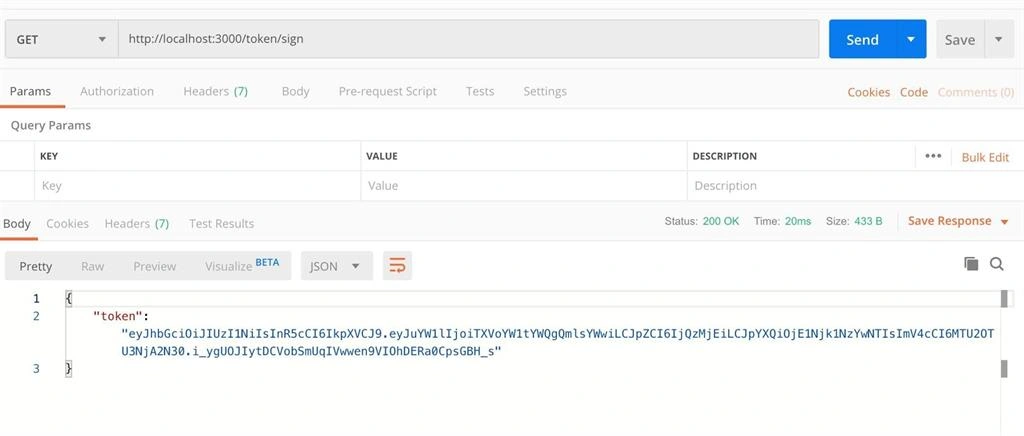
Hence, the first web token is generated successfully.
To illustrate a use case, path1 is created and the endpoint is secured using JSON Web Token. For this, use express-jet.
app.get('/path1', (req, res) => {
  res.status(200)
    .json({
      "success": true,
      "msg": "SecretAccessGranted"
    });
});
// Express-JWT in motion.
// ALLOW PATHS WITHOUT TOKEN AUTHENTICATION
app.use(expressJWT({ secret: secret })
  .unless(
    { path: ['/token/sign'] }
  ));
To further illustrate the code, it states that only these paths to access the endpoint without token authentication.
Now in the next step, let’s try to access the path without a token sent in the header.
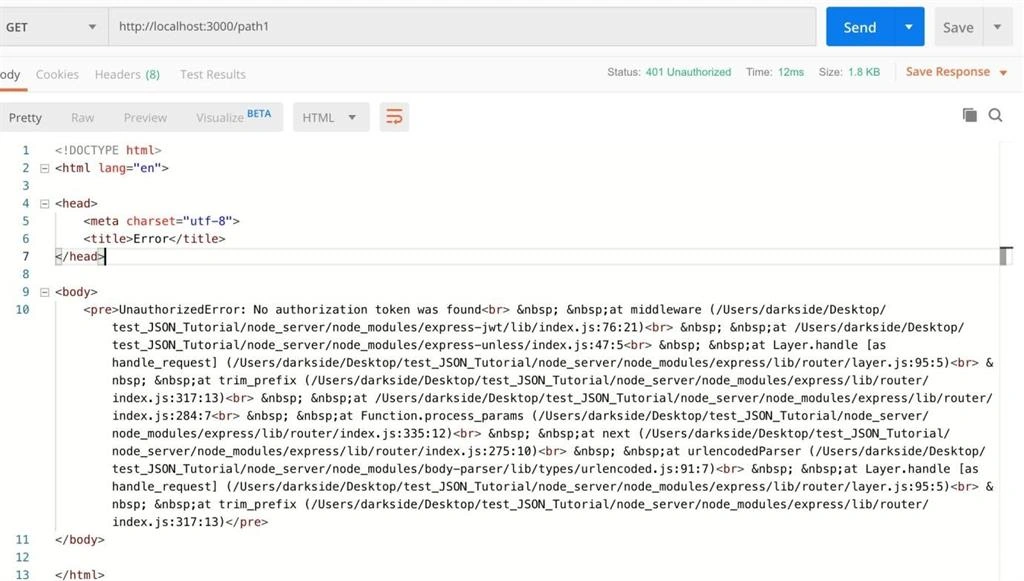
It can be seen that the path can’t be accessed. It also sent back a 401 Unauthorized, so that’s great. Now let’s test it with the token obtained from the token/sign route.
app.get('/path1', (req, res) => {
  res.status(200)
    .json({
      "success": true,
      "msg": "SecretAccessGranted"
    });
});
As you can see, when adding the Bearer Token, access is received successfully. Heading back to Angular, a new component home is created.
ng generate component home
Now this is the home.component.ts file.
signIn() {
  this.http.get(this.API_URL + '/token/sign')
    .subscribe(
      (res) => {
        console.log(res);
        if (res['token']) {
          localStorage.setItem('token', res['token']);
        }
      },
      (err) => {
        console.log(err);
      }
    );
}
getPath() {
  this.http.get(this.API_URL + '/path1')
    .subscribe(
      (res) => {
        console.log(res);
      },
      (err) => {
        console.log(err);
      }
    );
}
So, on the sign function, a token is requested and stored it in local storage. Then on the second function, the path is requested.
Join the conversation! Your thoughts help the community grow.