
Introduction
- JSON is faster than XML.
- It uses arrays.
- JSON is very easy to read and write.
- Create the instance of Http Client
- Tell HttpClient to execute the Method
- Read the Response
- Release the connection
- Deal with the response
- <RelativeLayout xmlns:android="http://schemas.android.com/apk/res/android"
- xmlns:tools="http://schemas.android.com/tools"
- android:layout_width="match_parent"
- android:layout_height="match_parent"
- android:paddingLeft="@dimen/activity_horizontal_margin"
- android:paddingRight="@dimen/activity_horizontal_margin"
- android:paddingTop="@dimen/activity_vertical_margin"
- android:paddingBottom="@dimen/activity_vertical_margin"
- tools:context=".MainActivity"
- android:background="#ddcc12">
- <TextView
- android:layout_width="wrap_content"
- android:layout_height="wrap_content"
- android:id="@+id/textView1"
- android:textStyle="bold"
- />
- <TextView
- android:layout_width="wrap_content"
- android:layout_height="wrap_content"
- android:id="@+id/textView2"
- android:textStyle="bold"
- android:layout_marginTop="100dp"
- />
- <TextView
- android:layout_width="wrap_content"
- android:layout_height="wrap_content"
- android:id="@+id/textView3"
- android:textStyle="bold"
- android:layout_marginTop="200dp"
- />
- </RelativeLayout>
Step 3
Create a Java file and write this:
- package com.jsonprsing4;
- import android.annotation.TargetApi;
- import android.os.Build;
- import android.os.Bundle;
- import android.app.Activity;
- import android.os.StrictMode;
- import android.util.Log;
- import android.view.Menu;
- import android.widget.ArrayAdapter;
- import android.widget.ListView;
- import android.widget.TextView;
- import org.json.JSONArray;
- import org.json.JSONException;
- import org.json.JSONObject;
- import java.io.IOException;
- import java.util.ArrayList;
- public class MainActivity extends Activity {
- TextView textView1,textView2,textView3;
- String str1,str2;
- String name1,name2,name3;
- String experiencePoints1,experiencePoints2,experiencePoints3;
- String vehicleColor,vehicleType,fuel;
- private static String url = "http://docs.blackberry.com/sampledata.json";
- @TargetApi(Build.VERSION_CODES.GINGERBREAD)
- @Override
- protected void onCreate(Bundle savedInstanceState) {
- super.onCreate(savedInstanceState);
- setContentView(R.layout.activity_main);
- textView1=(TextView)findViewById(R.id.textView1);
- textView2=(TextView)findViewById(R.id.textView2);
- textView3=(TextView)findViewById(R.id.textView3);
- if (android.os.Build.VERSION.SDK_INT > 9) {
- StrictMode.ThreadPolicy policy = new StrictMode.ThreadPolicy.Builder().permitAll().build();
- StrictMode.setThreadPolicy(policy);
- }
- try {
- JsonParser jsonParser=new JsonParser();
- JSONArray jsonArray=jsonParser.getJSONFromUrl(url);
- JSONObject jsonObject=jsonArray.getJSONObject(1);
- vehicleType=jsonObject.getString("vehicleType");
- vehicleColor=jsonObject.getString("vehicleColor");
- fuel=jsonObject.getString("fuel");
- JSONArray jsonArray1=jsonObject.getJSONArray("approvedOperators");
- JSONObject jsonObject1=jsonArray1.getJSONObject(0);
- name1 = jsonObject1.getString("name");
- experiencePoints1=jsonObject1.getString("experiencePoints");
- JSONObject jsonObject2=jsonArray1.getJSONObject(1);
- name2 = jsonObject2.getString("name");
- experiencePoints2=jsonObject2.getString("experiencePoints");
- JSONObject jsonObject3=jsonArray1.getJSONObject(2);
- name3 = jsonObject3.getString("name");
- experiencePoints3=jsonObject3.getString("experiencePoints");
- String str1="\nvehicleColor: "+vehicleColor+"\nvehicleType: "+vehicleColor+"\nfuel: "+fuel+"\nname: "+name1+"\nexperiencePoints: "+experiencePoints1;
- String str2="\nvehicleColor: "+vehicleColor+"\nvehicleType: "+vehicleColor+"\nfuel: "+fuel+"\nname: "+name2+"\nexperiencePoints: "+experiencePoints2;
- String str3="\nvehicleColor: "+vehicleColor+"\nvehicleType: "+vehicleColor+"\nfuel: "+fuel+"\nname: "+name3+"\nexperiencePoints: "+experiencePoints3;
- textView1.setText(str1);
- textView2.setText(str2);
- textView3.setText(str3);
- /* array[1]=vehicleColor;
- array[2]=vehicleType;
- array[3]=fuel;
- array[4]=name1;
- array[5]=experiencePoints1;
- array[6]=name2;
- array[7]=experiencePoints2;
- array[8]=name3;
- array[9]=experiencePoints3;*/
- /* arrayList1=new ArrayList();
- arrayList1.add(vehicleType);
- arrayList1.add(fuel);
- arrayList1.add(vehicleColor);
- arrayList1.add(name);
- arrayList1.add(experiencePoints);*/
- /* else if(i==1)
- {
- Log.i("","ADil");
- JSONObject jsonObject=jsonArray.getJSONObject(i);
- vehicleType= jsonObject.getString("vehicleType");
- vehicleColor= jsonObject.getString("vehicleColor");
- fuel=jsonObject.getString("fuel");
- JSONArray jsonArray1=jsonObject.getJSONArray("approvedOperator");
- for(int j=0;j<jsonArray.length();j++)
- {
- JSONObject jsonObject1=jsonArray1.getJSONObject(j);
- jsonObject1.getString("name");
- jsonObject1.getString("experienceoperator");
- }
- /*arrayList2=new ArrayList();
- arrayList2.add(vehicleType);
- arrayList2.add(fuel);
- arrayList2.add(vehicleColor);
- arrayList2.add(name);
- arrayList2.add(experiencePoints);*/
- /* else if(i==2)
- {
- Log.i("","Kashif");
- JSONObject jsonObject=jsonArray.getJSONObject(i);
- vehicleType=jsonObject.getString("vehicleType");
- vehicleColor=jsonObject.getString("vehicleColor");
- fuel=jsonObject.getString("fuel");
- JSONArray jsonArray1=jsonObject.getJSONArray("approvedOperator");
- for(int j=0;j<jsonArray1.length();j++)
- {
- JSONObject jsonObject1=jsonArray1.getJSONObject(j);
- jsonObject1.getString("name");
- jsonObject1.getString("experienceOperator");
- }
- /* arrayList3=new ArrayList();
- arrayList3.add(vehicleType);
- arrayList3.add(fuel);
- arrayList3.add(vehicleColor);
- arrayList3.add(name);
- arrayList3.add(experiencePoints);*/
- }
- /*arrayList.add(arrayList1);
- arrayList.add(arrayList2);
- arrayList.add(arrayList3);*/
- catch (JSONException e) {
- e.printStackTrace();
- }
- }
- @Override
- public boolean onCreateOptionsMenu(Menu menu) {
- // Inflate the menu; this adds items to the action bar if it is present.
- getMenuInflater().inflate(R.menu.main, menu);
- return true;
- }
- }
Step 4
In this step, you will first create an instance of HttpClient because HttpClient is used when you want to retrieve and send data over the internet. Now you will get all the data using the HttpGet class and by ing the URL to the constructor you will get all the data. Get the response by calling the execute() method of HttpClient.
When we want to send and receive data over the internet we use HttpClient. The following is the general procedure for using Httpclient.
- Create the instance of HttpClient
- Tell HttpClient to execute the method
- Read the Response
- Release the connection
- Deal with the response
- package com.jsonprsing4;
- import android.os.AsyncTask;
- import android.util.Log;
- import org.apache.http.HttpEntity;
- import org.apache.http.HttpResponse;
- import org.apache.http.StatusLine;
- import org.apache.http.client.ClientProtocolException;
- import org.apache.http.client.HttpClient;
- import org.apache.http.client.methods.HttpGet;
- import org.apache.http.impl.client.DefaultHttpClient;
- import org.json.JSONArray;
- import org.json.JSONException;
- import java.io.BufferedReader;
- import java.io.IOException;
- import java.io.InputStream;
- import java.io.InputStreamReader;
- public class JsonParser extends AsyncTask {
- static InputStream is = null;
- static JSONArray jarray = null;
- static String json = "";
- public JsonParser() {
- }
- @Override
- protected Object doInBackground(Object[] params) {
- return null;
- }
- public JSONArray getJSONFromUrl(String url) {
- StringBuilder builder = new StringBuilder();
- try {
- HttpClient client = new DefaultHttpClient();
- HttpGet httpGet = new HttpGet(url);
- HttpResponse response = client.execute(httpGet);
- StatusLine statusLine = response.getStatusLine();
- int statusCode = statusLine.getStatusCode();
- if (statusCode == 200) {
- HttpEntity entity = response.getEntity();
- InputStream content = entity.getContent();
- BufferedReader reader = new BufferedReader(new InputStreamReader(content));
- String line;
- while ((line = reader.readLine()) != null) {
- builder.append(line);
- }
- } else {
- Log.e("Error....", "Failed to download file");
- }
- } catch (ClientProtocolException e) {
- e.printStackTrace();
- } catch (IOException e) {
- e.printStackTrace();
- }
- try {
- jarray = new JSONArray( builder.toString());
- } catch (JSONException e) {
- Log.e("JSON Parser", "Error parsing data " + e.toString());
- }
- return jarray;
- }
- }
Step 5
Android Manifest.xml file
- <?xml version="1.0" encoding="utf-8"?>
- <manifest xmlns:android="http://schemas.android.com/apk/res/android"
- package="com.jsonprsing4"
- android:versionCode="1"
- android:versionName="1.0" >
- <uses-sdk
- android:minSdkVersion="7"
- android:targetSdkVersion="16" />
- <application
- android:allowBackup="true"
- android:icon="@drawable/ic_launcher"
- android:label="@string/app_name"
- android:theme="@style/AppTheme" >
- <activity
- android:name="com.jsonprsing4.MainActivity"
- android:label="@string/app_name" >
- <intent-filter>
- <action android:name="android.intent.action.MAIN" />
- <category android:name="android.intent.category.LAUNCHER" />
- </intent-filter>
- </activity>
- </application>
- <uses-permission android:name="android.permission.INTERNET"/>
- </manifest>
Step 6
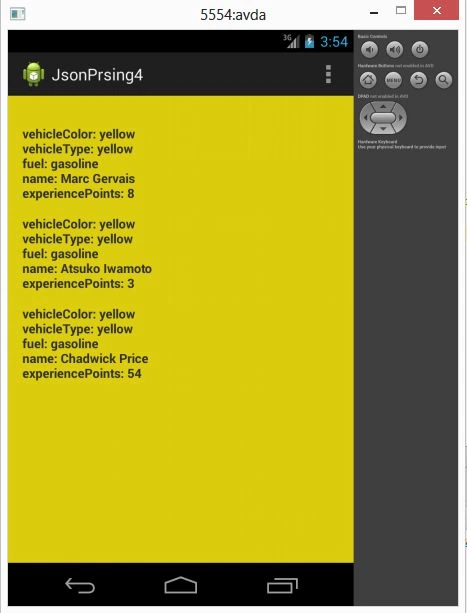
Retrieve data through the internet.
Sam HobbsPosted Nov 4, 2013, 12:50 PM
The article "JSON versus XML: Not as Simple as You Think" describes some advantages of XML: http://metajack.im/2010/02/01/json-versus-xml-not-as-simple-as-you-think/
Sam HobbsPosted Nov 4, 2013, 12:48 PM
XML also has advantages. Also, it is not as simple as "JSON is faster than XML". The following article "XML Can Give the Same Performance as JSON" explains that (note that I really like the piece of advice at the bottom): http://www.infoq.com/news/2013/08/xml-json-performance